Vscode: Can't resize Breakpoints section in Debug sidebar
Steps to reproduce:
- Open debug sidebar
- Try to resize the last section
Breakpointsusing the mouse.
If I swap the section with another, everyone works fine. It seems to be specific to Breakpoints when it's in the bottom.
I see the same behaviour in 1.21 and today's 1.22-insiders.
 gushuro
All 13 comments
That is by design of the breakpoints view since our first version.
It has fixed size and is docked to the bottom by default.
The downside of this is that currently breakpoints view is the only view that behaves like this
No other user complained about this so I am relucatant to change it. For now let's leave it as a feature request and only change if we get more feedback about this.
 isidorn
on 13 Apr 2018
isidorn
on 13 Apr 2018
This iteration we focus on issue grooming. This issue is being closed to keep the number of issues in our inbox on a manageable level, we are closing issues that are not going to be addressed in the foreseeable future: We look at the number of votes the issue has received and the number of duplicate issues filed. More details here. If you disagree and feel that this issue is crucial: We are happy to listen and to reconsider.
If you wonder what we are up to, please see our roadmap and issue reporting guidelines.
Thanks for your understanding and happy coding!
![vscodebot[bot] picture](https://avatars2.githubusercontent.com/in/2406?v=4&s=40) vscodebot[bot]
on 21 Sep 2018
vscodebot[bot]
on 21 Sep 2018
I still face this issue. It is not possible to resize breakpoints view. I have many breakpoints and it is frustrating to scroll and look for a breakpoint you want to deactivate. I interchanged the position of the breakpoints view but still no luck.
Any reason why it is the way it is? I feel the behaviour should be same for all the panes.
@isidorn Could you please have a look again and see if this can be planned.
 hitesh-parmar
on 10 Mar 2020
hitesh-parmar
on 10 Mar 2020
Sure we can reopen this. Though still not planned.
isidorn
on 10 Mar 2020
@isidorn
What exactly was the reason that the breakpoints view cannot be resized?
Is there any reason why removing the constraint would be a problem?
 weinand
on 7 Apr 2020
weinand
on 7 Apr 2020
@weinand it just feels better since it does not require manual size managment by the user.
Like the open editors view.
isidorn
on 7 Apr 2020
@isidorn Open editors section can be resized when the scroll bar is present. Breakpoints cannot be resized regardless of the number of breakpoints present.
 rushvora
on 7 Apr 2020
rushvora
on 7 Apr 2020
@rushvora good point
@isidorn could we make "Breakpoints" view and "Open editors" view behave the same?
weinand
on 7 Apr 2020
Makes sense. I have pushed a change that the Breakpoint behave like the Open Editors.
isidorn
on 7 Apr 2020
Since I see a lot of thumbs up and no complaints I am adding a verified label.
Users please let me know if this is not correct and this feature does not work for you.
isidorn
on 27 Apr 2020
@isidorn Tested in the latest insider build - Version: 1.45.0-insider. No extensions installed, fresh build I just downloaded to try this out. (I mistakenly thought the feature hadn't made it to stable since it's still not draggable)
It partly works. It's still not draggable, but the size does expand, only when all the other sections are collapsed. I have attached a screenshot to show the same, where the breakpoint section expands to occupy all the space.
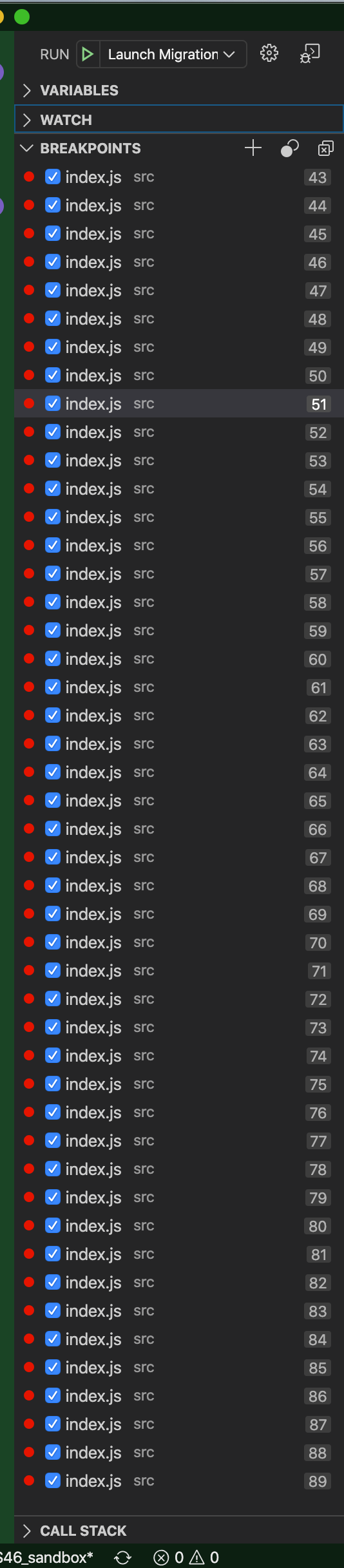
In the below screenshot, when any one or more section(s) are expanded, the size is still fixed. Dragging the breakpoints upward expands the call stack section, and I can't seem to increase the size of the breakpoint section in this scenario.
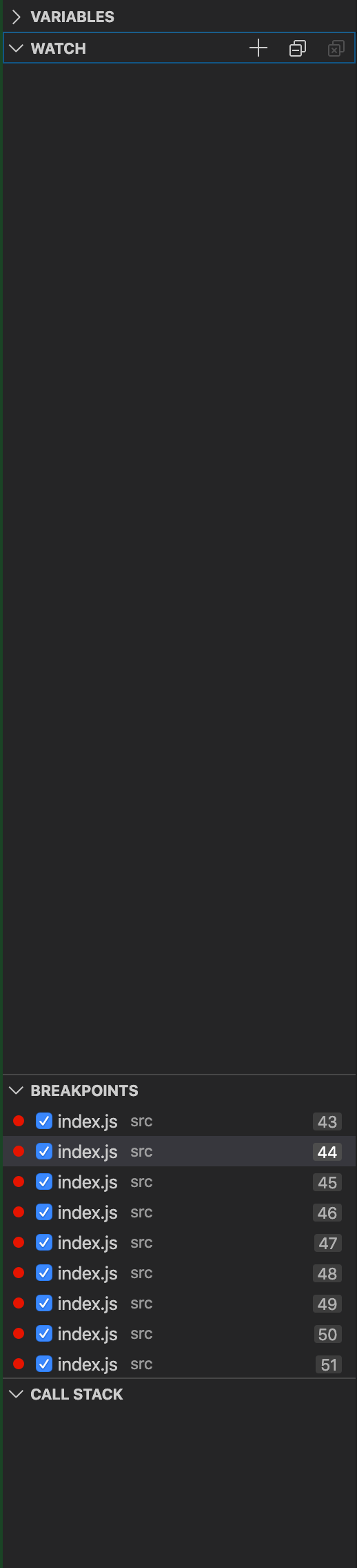
So as of now the only way to see an expanded breakpoints section is the collapse all the other sections (variables, watch, call stack).
Hope this feedback helps!
Edit - the behaviour is exactly the same in the stable build.
rushvora
on 28 Apr 2020
@isidorn Err… I don't believe this has been fixed completely. 😅
rushvora
on 6 May 2020
I can not repro what you are seeing. I can always expand the breakpoints if there are more breakpoints than what is visible.
So can you please file a new issue with reproducable steps. Thank you!
isidorn
on 6 May 2020
Related issues
 villiv
·
3Comments
villiv
·
3Comments
 curtw
·
3Comments
curtw
·
3Comments
 v-pavanp
·
3Comments
v-pavanp
·
3Comments
 borekb
·
3Comments
borekb
·
3Comments
 vsccarl
·
3Comments
vsccarl
·
3Comments
Most helpful comment
Makes sense. I have pushed a change that the Breakpoint behave like the Open Editors.