Vscode: Panel: overflow behavior for title bar actions
Issue Type: Bug
- Open an integrated terminal
- Move terminal to right
- Click restore panel size button
- The Maximize panel, Move to Bottom and Close buttons become hidden without any indicator. If I click at edge of window, I am able to perform the Maximize panel action.
VS Code version: Code 1.21.1 (79b44aa704ce542d8ca4a3cc44cfca566e7720f1, 2018-03-14T14:46:30.761Z)
OS version: Linux x64 4.13.0-37-generic
System Info
|Item|Value|
|---|---|
|CPUs|Intel(R) Core(TM) i7-6600U CPU @ 2.60GHz (4 x 2800)|
|Load (avg)|1, 1, 1|
|Memory (System)|15.49GB (9.82GB free)|
|Process Argv|/usr/share/code/code .|
|Screen Reader|no|
|VM|0%|
Extensions (6)
Extension|Author (truncated)|Version
---|---|---
language-x86-64-assembly|13x|2.2.11
vscode-eslint|dba|1.4.7
tslint|eg2|1.0.28
python|ms-|2018.2.1
cpptools|ms-|0.15.0
debugger-for-chrome|msj|4.2.1
Reproduces without extensions
 shivammittal99
All 8 comments
@shivammittal99 can you provide a screenshot of what you mean? I'm guessing it's about the lack of a proper overflow menu for panel actions.
 Tyriar
on 17 Mar 2018
Tyriar
on 17 Mar 2018
Yes this is due to the fact that terminal panel has lot of actions and we do not have nice action overflow behavior. Renaming and treating as a feature request. Since showing those actions with an overflow is the only solution
 isidorn
on 19 Mar 2018
isidorn
on 19 Mar 2018
Oh man; I even tried uninstalling and re-installing the terminal extension and I still can't get it to move back. How do we move it back in the meantime ?
 mengesb
on 30 Jul 2018
mengesb
on 30 Jul 2018
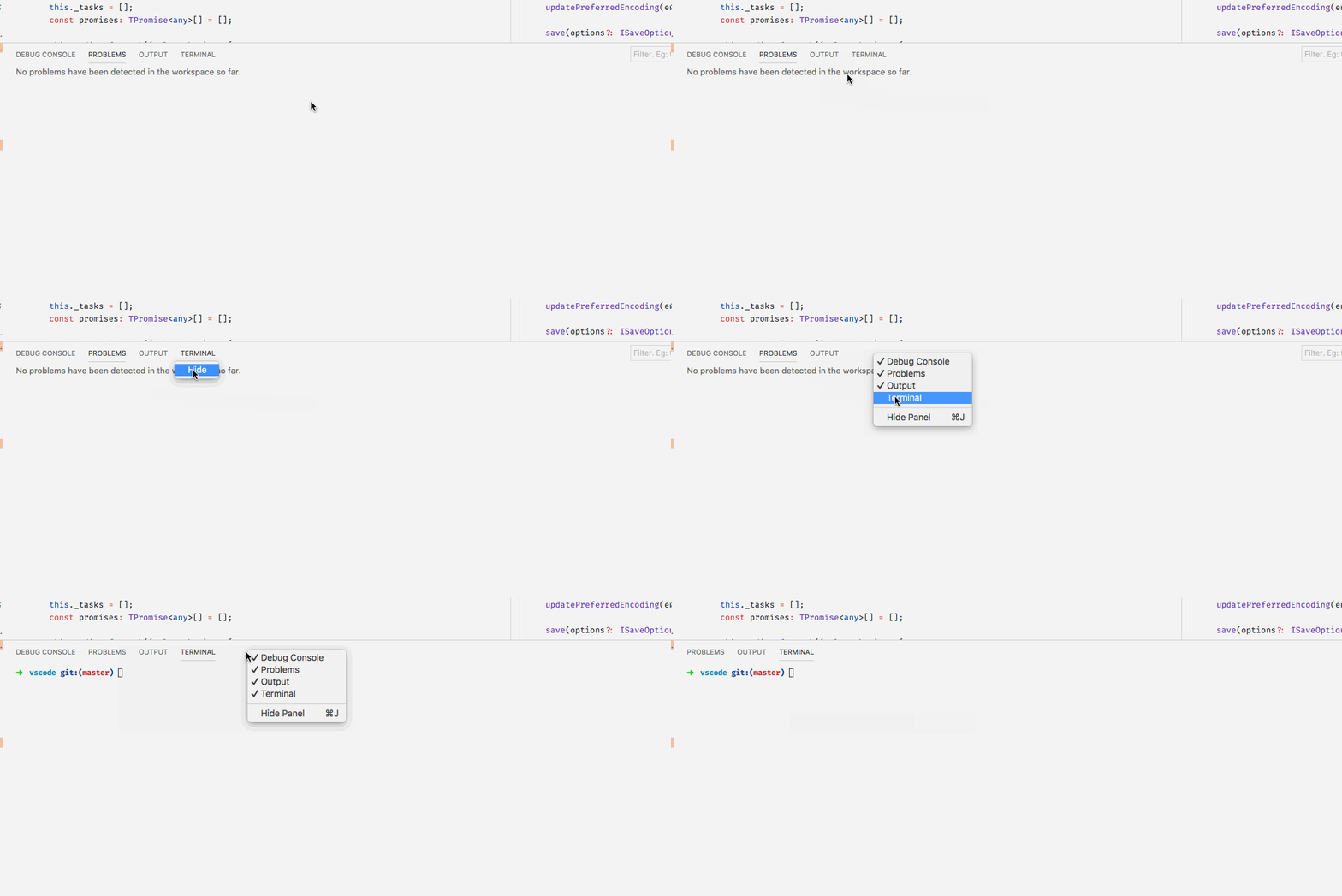
Right click in composite bar -> hide some panels you do not use -> should get space
isidorn
on 30 Jul 2018
heh, in other words I'm stuck unless I uninstall vscode? or will that even solve it?
mengesb
on 30 Jul 2018
isidorn
on 30 Jul 2018
OK found it; it wasn't re-drawing right.
mengesb
on 31 Jul 2018
This issue is being closed to keep the number of issues in our inbox on a manageable level, we are closing issues that are not going to be addressed in the foreseeable future: We look at the number of votes the issue has received and the number of duplicate issues filed. More details here. If you disagree and feel that this issue is crucial: We are happy to listen and to reconsider.
If you wonder what we are up to, please see our roadmap and issue reporting guidelines.
Thanks for your understanding and happy coding!
![vscodebot[bot] picture](https://avatars2.githubusercontent.com/in/2406?v=4&s=40) vscodebot[bot]
on 8 Oct 2019
vscodebot[bot]
on 8 Oct 2019
Related issues
 vsccarl
·
3Comments
vsccarl
·
3Comments
 villiv
·
3Comments
villiv
·
3Comments
 trstringer
·
3Comments
trstringer
·
3Comments
 ryan-wong
·
3Comments
ryan-wong
·
3Comments
 lukehoban
·
3Comments
lukehoban
·
3Comments
Most helpful comment