Vscode: Google Japanese Input (IME) on Mac - Suggestions Overlap w/ Text
- VSCode Version: 1.21.0
- OS Version: macOS 10.13.1
Steps to Reproduce:
- Install Google Japanese Input https://www.google.co.jp/intl/ja/ime/
- Activate it
- Open a new VSCode instance
- Type
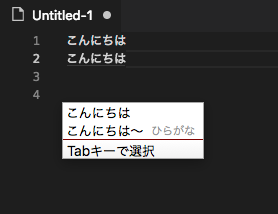
konnnichihaon keyboard, then hit enter, and do it again a few times - Expected: the suggestions should never overlap w/ text. Actual: the suggestions overlap w/ text.
See the GIF:

Does this issue occur when all extensions are disabled?: Yes
Notes:
This is not an issue with the default Japanese IME that comes w/ macOS.
Update (Sep 27, 2018): Workaround
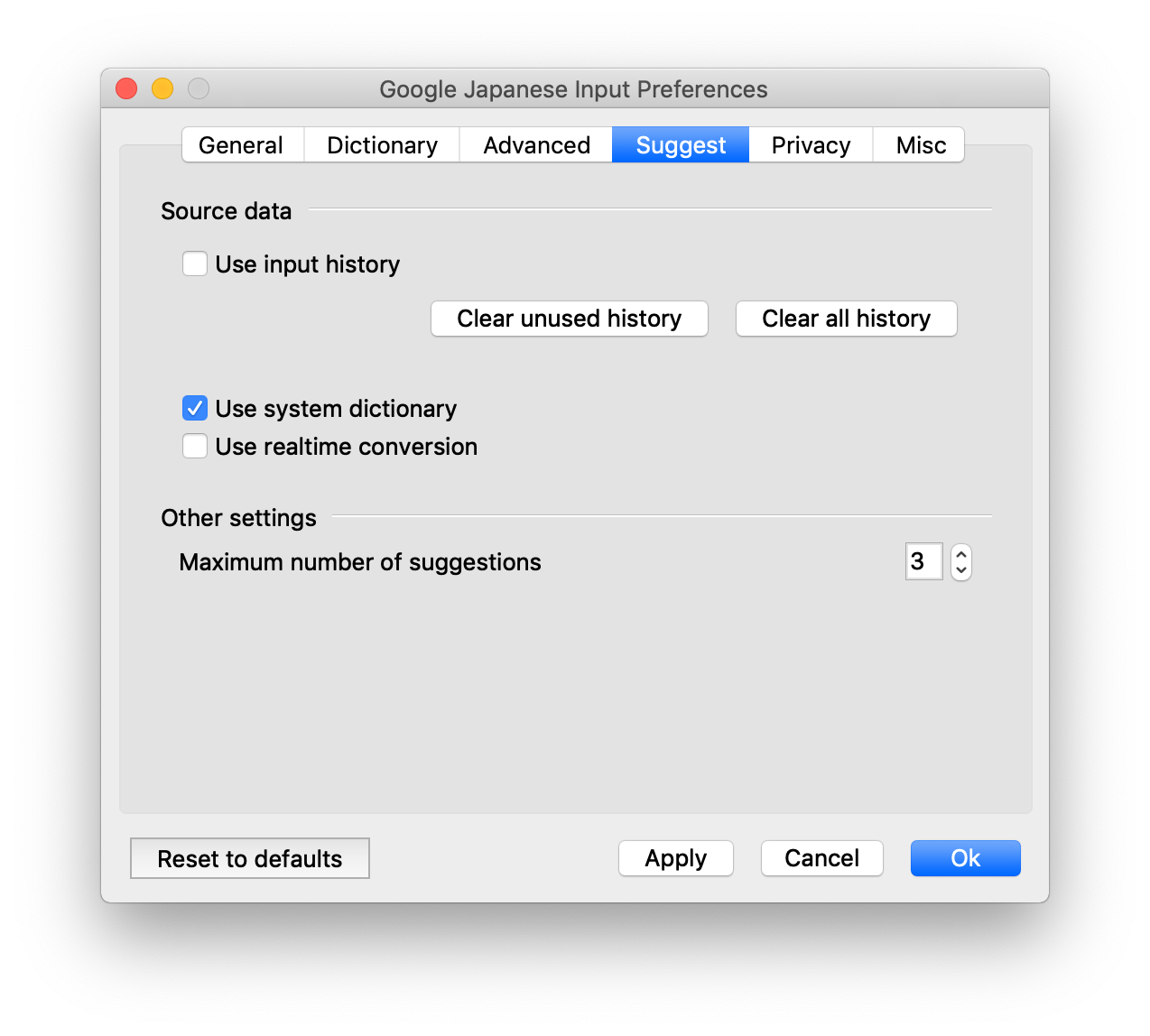
This setting seems to fix the issue. (You'll lose some functionalities)

 chibicode
All 19 comments
Same Here
 Yamotty
on 13 Mar 2018
Yamotty
on 13 Mar 2018
same here
 mashriq
on 13 Mar 2018
mashriq
on 13 Mar 2018
Same Here
 CM-Kajiwara
on 13 Mar 2018
CM-Kajiwara
on 13 Mar 2018
@jrieken The suggestion box that shows up in this case is not the one for suggestWidget. This seems like a native control which I dont believe VS Code controls
cc @rebornix @octref
@chibicode @Yamotty @mashriq @CM-Kajiwara Is this a regression? Did this work as expected in earlier versions of VS Code and stopped working recently?
 ramya-rao-a
on 13 Mar 2018
ramya-rao-a
on 13 Mar 2018
I think it is probably caused by the position adjustment of the textarea, Google IME tries to put the candidate list at the proper position, but I don't have a stable reproduce yet.
 rebornix
on 13 Mar 2018
rebornix
on 13 Mar 2018
Sorry, I am a new user to VSCode so not sure if this is a regression.
chibicode
on 13 Mar 2018
@rebornix I can repro it consistently.

 octref
on 13 Mar 2018
octref
on 13 Mar 2018
Not just VSCode but Adobe Brackets seems to have the same issue as well - and for that, apparently, the issue is on CodeMirror:
https://github.com/codemirror/CodeMirror/issues/4089
If it's an Electron issue not sure if upgrading Electron to 2.x or 3.x fixes it. https://github.com/Microsoft/vscode/issues/45542
This was not an issue on Atom (even when Atom was using Electron 1.x).
chibicode
on 23 Jul 2018
I also searched through Twitter, and people have been reporting this since April 2015. Definitely not a regression. @ramya-rao-a @rebornix
https://twitter.com/shohaga/status/593568407301193728
https://twitter.com/hiedar83/status/593676327665860608
https://twitter.com/tyamaz/status/593728561392984064
chibicode
on 23 Jul 2018
Same Here
@rebornix

 hiramatsu
on 24 Aug 2018
hiramatsu
on 24 Aug 2018
@rebornix @octref Is there anything I can do to help?
Also saw this reported on Teratail, a Japanese Stackoverflow clone, about a week ago.
https://teratail.com/questions/143100
chibicode
on 5 Sep 2018
※日本語で失礼します。
暫定的(temporary)な回避策(workaround)ですが、「Google 日本語入力 環境設定」の「サジェスト」タブの
・入力履歴からのサジェスト自動表示を有効にする
・リアルタイム変換を有効にする
のチェックを外せば被らなくなりました。(上記機能は失われますが…)
hiramatsu
on 26 Sep 2018
Translating what @hiramatsu said:
Temporary workaround: go to Google Japanese Input preferences,

go to サジェスト ("suggest") and uncheck
- 入力履歴からのサジェスト自動表示を有効にする (disable suggestion from input history)
- リアルタイム変換を有効にする (disable live conversion)
Then click 適用 button at the bottom.
Then it no longer overlaps.
chibicode
on 26 Sep 2018
@hiramatsu @chibicode thanks for your help. This issue was caused by how we implement our editor (virtualize everything but has a tiny textarea around the virtual cursor) and Google IME doesn't work the same as the OS builtin IME. I don't have a good idea how to hint Google IME about the position but your solution works perfectly for this issue.
For anyone who is using English as system language, the preference with the workaround will look like below:
rebornix
on 26 Sep 2018
@rebornix thanks for the follow-up!
Just for completeness: Google maintains "a subset of Google Japanese Input in the form of source code under OSS license without any warranty nor user support" at google/mozc (more explanation), though they're not accepting pull requests at the moment.
chibicode
on 27 Sep 2018
Same here
 yujikuroki
on 5 Oct 2018
yujikuroki
on 5 Oct 2018
same here
 jedipunkz
on 13 Mar 2019
jedipunkz
on 13 Mar 2019
same here
OS: windows 10
Language: Chinese
IME: Sogou Pinyin, Baidu Pinyin

 zkwhandan
on 21 Jul 2019
zkwhandan
on 21 Jul 2019
Please ask your question on StackOverflow. We have a great community over there. They have already answered thousands of questions and are happy to answer yours as well. See also our issue reporting guidelines.
Happy Coding!
 vscode-triage-bot
on 6 Nov 2020
vscode-triage-bot
on 6 Nov 2020
Related issues
 v-pavanp
·
3Comments
v-pavanp
·
3Comments
 NikosEfthias
·
3Comments
NikosEfthias
·
3Comments
 borekb
·
3Comments
borekb
·
3Comments
 vsccarl
·
3Comments
vsccarl
·
3Comments
 ryan-wong
·
3Comments
ryan-wong
·
3Comments
Most helpful comment
Same Here