Vscode: Single window prompt for closing multiple unsaved files in an editor group
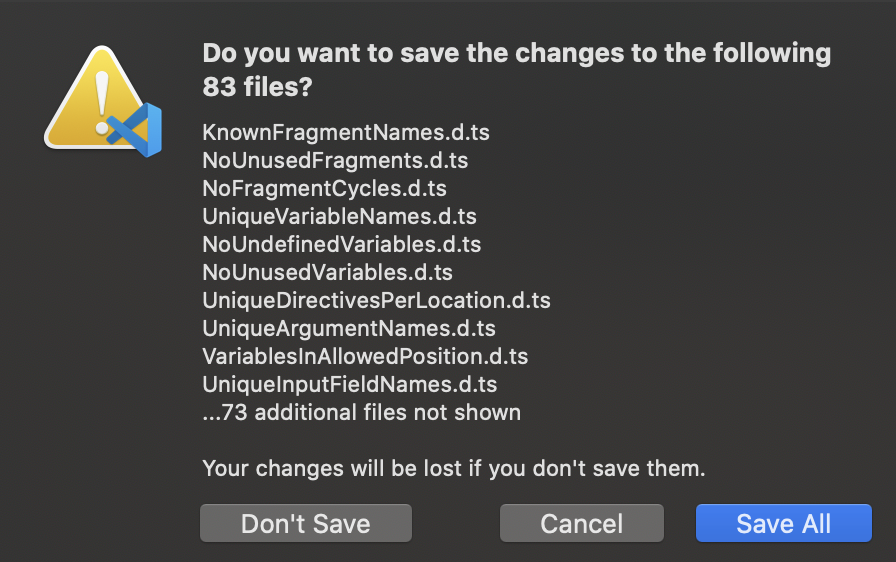
If you have multiple unsaved documents open and either use the "Close All" function (main use case) or close VS code without hot exit enabled (secondary use case), at present you get a single message box per file.
I think Visual Studio's approach is better, where you get a single dialog prompting you to "Save changes to the following items":

 richardlawley
All 12 comments
@richardlawley what are your exact steps to get the single message boxes? We show combined dialog in many cases already.
 bpasero
on 20 Feb 2018
bpasero
on 20 Feb 2018
@bpasero I can see the combined dialog when use File > Close Folder, but single message boxes are still received when right click an open tab, Close All (Ctrl+K, W), or Close to the Right.
richardlawley
on 20 Feb 2018
@richardlawley we also show a combined dialog if you pick "Close All", but its true that we are not doing that if you are within an editor group.
bpasero
on 20 Feb 2018
This issue is being closed to keep the number of issues in our inbox on a manageable level, we are closing issues that are not going to be addressed in the foreseeable future: We look at the number of votes the issue has received and the number of duplicate issues filed. More details here. If you disagree and feel that this issue is crucial: We are happy to listen and to reconsider.
If you wonder what we are up to, please see our roadmap and issue reporting guidelines.
Thanks for your understanding and happy coding!
![vscodebot[bot] picture](https://avatars2.githubusercontent.com/in/2406?v=4&s=40) vscodebot[bot]
on 14 Oct 2019
vscodebot[bot]
on 14 Oct 2019
this becomes a big issue when an F2 rename decides to go ahead and edit things inside node_modules that's not even referencing the thing you're trying to rename
 BenWildeman
on 19 Feb 2020
BenWildeman
on 19 Feb 2020
+1
 georginio
on 16 Jul 2020
georginio
on 16 Jul 2020
+1 mood killer
this becomes a big issue when an F2 rename decides to go ahead and edit things inside node_modules that's not even referencing the thing you're trying to rename
 nihiluis
on 18 Jul 2020
nihiluis
on 18 Jul 2020
+1
 pleek91
on 20 Jul 2020
pleek91
on 20 Jul 2020
this becomes a big issue when an F2 rename decides to go ahead and edit things inside node_modules that's not even referencing the thing you're trying to rename
I keep running into this as well and there's no way to just close them. So I need to sit through 100+ dialogs
 MrToph
on 23 Jul 2020
MrToph
on 23 Jul 2020
Had this today after moving an index file with automatic import updates. Looking forward to 15 minutes of clicking "don't save" about 800 times now,
Given that this scenario is likely much less common than needing to close 6 or 7 files and make a decision on each, it would be nice if there was a buried "Close All (Including Unsaved)" option somewhere to just burn all open windows indiscriminately.
 rpdobson123
on 29 Jul 2020
rpdobson123
on 29 Jul 2020
There sorta is...
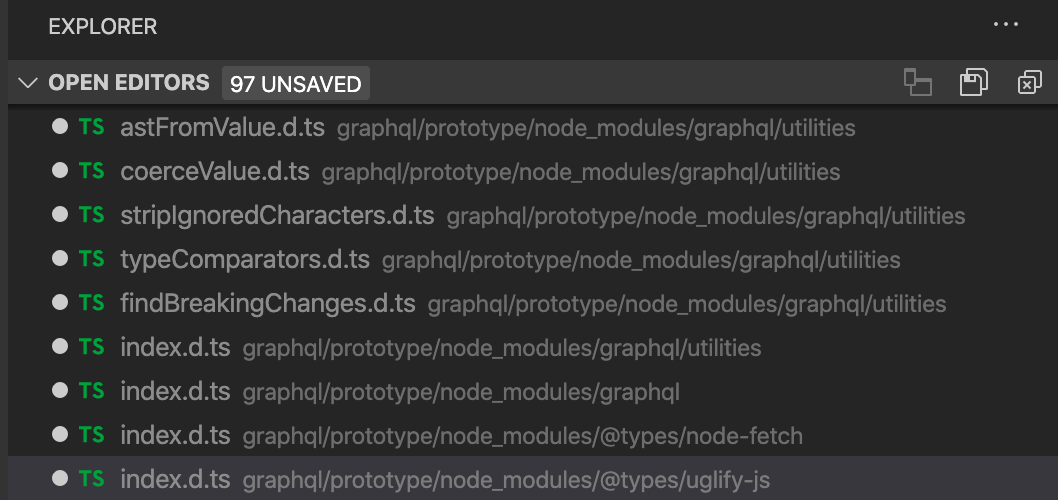
That little X in the top right hand corner.
 toddheslin
on 27 Aug 2020
toddheslin
on 27 Aug 2020
Thank you @toddheslin !! never spotted that before - that does the trick!
 ChrisD-Woodside
on 18 Sep 2020
ChrisD-Woodside
on 18 Sep 2020
Related issues
 trstringer
·
3Comments
trstringer
·
3Comments
 v-pavanp
·
3Comments
v-pavanp
·
3Comments
 biij5698
·
3Comments
biij5698
·
3Comments
 sirius1024
·
3Comments
sirius1024
·
3Comments
 shanalikhan
·
3Comments
shanalikhan
·
3Comments
Most helpful comment
this becomes a big issue when an F2 rename decides to go ahead and edit things inside node_modules that's not even referencing the thing you're trying to rename