Vscode: Extension incomplete after update
pls see this issue https://github.com/Microsoft/vscode-tslint/issues/324.
 egamma
All 52 comments
Another instance of a corrupt extension https://github.com/Microsoft/vscode-tslint/issues/323#issuecomment-366261023.
I´m starting to think that we should have a checksum for an installed extension so that we can detect a corruption and recover from it.
egamma
on 16 Feb 2018
@egamma wrote:
One more thing can you please attach the log for the shared process to Microsoft/vscode#43813?
Here you are: shared.log
 thorn0
on 16 Feb 2018
thorn0
on 16 Feb 2018
@thorn0 From the logs I am guessing following:
- You have deleted TS Lint extension from the disk
- You installed TS Lint extension again freshly
After this, I think you have TS Lint extension working.
I would be interested to know how the extension got corrupted before above happened. We preserve logs for last 10 VS Code sessions, hoping that the corrupted extension might occurred during those 10 sessions. Can you please share the logs of the shared process from last available sessions. To get that
- Open logs folder. Use command
Open Logs Folder. This will open the logs folder for current session. - Go to its parent folder where you can see all sessions and you can get the logs of shared process from there.
Also, any idea if you restarted (quit and restart) VS Code while the update of TS Lint extension is happening?
 sandy081
on 20 Feb 2018
sandy081
on 20 Feb 2018
That's what helped:
- I have uninstalled the extension
- But the corrupted folder still was there, so I deleted it myself
- I installed TS Lint extension again freshly
First I tried reinstalling the extension without the step 2, but it didn't help.
We preserve logs for last 10 VS Code sessions
Sorry, I open and close VS Code often enough, so there are only today's and yesterday's logs there.
any idea if you restarted (quit and restart) VS Code while the update of TS Lint extension is happening?
Probably. Extensions are updated automatically, so I don't pay much attention to their updating.
Also I had this issue: #43503
thorn0
on 20 Feb 2018
Logs at the point of the corruption would have been helpful to know what happened. My suspect is that code would have been restarted while extension update is in progress.
sandy081
on 20 Feb 2018
This issue has been closed automatically because it needs more information and has not had recent activity. See also our issue reporting guidelines.
Happy Coding!
![vscodebot[bot] picture](https://avatars2.githubusercontent.com/in/2406?v=4&s=40) vscodebot[bot]
on 27 Feb 2018
vscodebot[bot]
on 27 Feb 2018
This will be fixed in the perspective of code got restarted while extension update is in progress.
sandy081
on 27 Feb 2018
Will it be something like along the lines of:
have a checksum for an installed extension so that we can detect a corruption and recover from it
?
thorn0
on 27 Feb 2018
Hmm I suspect download was not an issue but extracting for which we do not have checksum. If there is an interruption or failure while extracting, I will not consider that as installed and remove it.
sandy081
on 28 Feb 2018
I pushed following fix in #44471
- Remove partially extracted extensions from the disk When there is a failure during extract or post extract
The other case that is left is when there is an abrupt shutdown of VS Code.
sandy081
on 28 Feb 2018
@sandy081 This has been happening multiple times in the Go extension as well. The extension fails to activate due to missing files. For some, uninstall -> install works. Others have to manually delete the extension from the extensions folder and then install.
Next time it happens, I'll direct them here and ask them to share the logs of the shared process
cc @octref who has seen this in the vetur extension as well
 ramya-rao-a
on 28 Feb 2018
ramya-rao-a
on 28 Feb 2018
@ramya-rao-a Yeah I opened #44709...
@sandy081
For some, uninstall -> install works. Others have to manually delete the extension from the extensions folder and then install.
That's the same case with Vetur. Do you have any theory as to why in some cases, uninstall -> install works, whereas for some people they had to remove the extension folders manually?
The other case that is left is when there is an abrupt shutdown of VS Code.
Maybe a fix for that could be making the shutdown or upgrade process start until all extension upgrades are done. It would be a common case where people are not using Code for a few days, got updates for both Code and extensions, and did the Code upgrade while extensions were installing.
I actually get this easily reproduced. Go to Vim's extension folder and in package.json, mark the version lower, reload VS Code so auto upgrade happens, Cmd + Q to shutdown while extension was installing.
Remove partially extracted extensions from the disk When there is a failure during extract or post extract
I think it does not cover the case where the extraction completed without error but some files become missing. Are we 100% sure we are not hitting any bugs in yauzl?
Another point was a majority of these reports coming in Vetur were from Windows users. One possibility is Windows Defender is doing something...
 octref
on 28 Feb 2018
octref
on 28 Feb 2018
@octref For Go there is a good mix of Windows, linux and Mac. So I don't think this is a Windows specific
ramya-rao-a
on 28 Feb 2018
That's the same case with Vetur. Do you have any theory as to why in some cases, uninstall -> install works, whereas for some people they had to remove the extension folders manually?
This is because, Internally, during uninstall we just tag the extension as uninstalled and remove this tag if user installs it immediately. If user wants to remove and install the extension completely I have introduced a new command Developer: Reinstall Extension. This will remove it completely from the disk and installs it freshly. See #44838
I think it does not cover the case
Yes, it does not cover shutdown case while update is happening. One suggestion from Alex is to extract it to some temp folder and move it when the extraction is complete. But this will also have a time frame where VS Code could quit while moving.
Are we 100% sure we are not hitting any bugs in yauzl?
I am not sure.
sandy081
on 1 Mar 2018
Developer: Reinstall Extension
Thanks for the addition. I'll point people to using it until a checksum becomes available.
octref
on 1 Mar 2018
Internally, during uninstall we just tag the extension as uninstalled and remove this tag if user installs it immediately.
Is the extension removed some time later if the user doesn't re-install it immediately? Sounds like a really questionable design decision any way.
thorn0
on 2 Mar 2018
Yes, extension is removed when VS Code is restarted. Removing the uninstalled tag happens only If the user is trying to install the same version as he/she uninstalled. If there is a new version available, new version is installed.
sandy081
on 2 Mar 2018
Hmm. Well I just had a theme fail to update and after manually deleting it, I can not reinstall it at all (from the extensions panel or manually).
Here is the log entry from the original failure to update:
[2018-03-08 07:16:22.092] [sharedprocess] [info] Installing extension: Material-theme
[2018-03-08 07:16:23.195] [sharedprocess] [info] Downloaded extension: Material-theme
[2018-03-08 07:16:23.246] [sharedprocess] [info] Extracted extension to C:\Users\Matt\.vscode-insiders\extensions\.zhuangtongfa.material-theme-2.13.0: zhuangtongfa.material-theme-2.13.0
[2018-03-08 07:16:23.247] [sharedprocess] [info] Deleting the extracted extension zhuangtongfa.material-theme-2.13.0
[2018-03-08 07:16:23.263] [sharedprocess] [info] Scanned user extensions: 7
[2018-03-08 07:16:23.264] [sharedprocess] [error] Failed to install extension: zhuangtongfa.material-theme EPERM: operation not permitted, rename 'C:\Users\Matt\.vscode-insiders\extensions\.zhuangtongfa.material-theme-2.13.0' -> 'C:\Users\Matt\.vscode-insiders\extensions\zhuangtongfa.material-theme-2.13.0'
Trying to install it again triggers the same error too, but as far as I can tell neither of those folders even exist (which makes sense if it was deleted before the rename could happen).
 mattacosta
on 8 Mar 2018
mattacosta
on 8 Mar 2018
We are seeing something similar as well with the VS Live Share extension (Windows, VS Code Insider 1.22.0):
extensionsActions.ts:134
Error: EPERM: operation not permitted, rename 'C:\Users\dakhours\.vscode-insiders\extensions\.ms-vsliveshare.vsliveshare-0.2.206' -> 'C:\Users\dakhours\.vscode-insiders\extensions\ms-vsliveshare.vsliveshare-0.2.206'
 davidkpiano
on 8 Mar 2018
davidkpiano
on 8 Mar 2018
@davidkpiano after the error do what folders do you see in C:\Users\dakhours\.vscode-insiders\extensions ?
 kieferrm
on 8 Mar 2018
kieferrm
on 8 Mar 2018
@kieferrm We tested on a fresh install and it showed empty and for me it had an old version... that said I did uninstall prior to testing a fresh download.
 avanderhoorn
on 8 Mar 2018
avanderhoorn
on 8 Mar 2018
After deleting the previous versions, the extension folder does show up but it's empty, with the exception of dotnet_modules.
davidkpiano
on 8 Mar 2018
Same happens here! On attempt on any extension.
[2018-03-08 17:36:36.759] [sharedprocess] [info] Installing extension: debugger-for-chrome
[2018-03-08 17:36:37.542] [sharedprocess] [info] Downloaded extension: debugger-for-chrome
[2018-03-08 17:36:37.918] [sharedprocess] [info] Extracted extension to C:\Users\Jule\.vscode-insiders\extensions\.msjsdiag.debugger-for-chrome-4.1.0: msjsdiag.debugger-for-chrome-4.1.0
[2018-03-08 17:36:37.919] [sharedprocess] [info] Deleting the extracted extension msjsdiag.debugger-for-chrome-4.1.0
[2018-03-08 17:36:37.976] [sharedprocess] [info] Scanned user extensions: 36
[2018-03-08 17:36:37.976] [sharedprocess] [error] Failed to install extension: msjsdiag.debugger-for-chrome EPERM: operation not permitted, rename 'C:\Users\Jule\.vscode-insiders\extensions\.msjsdiag.debugger-for-chrome-4.1.0' -> 'C:\Users\Jule\.vscode-insiders\extensions\msjsdiag.debugger-for-chrome-4.1.0'
 Jule-
on 8 Mar 2018
Jule-
on 8 Mar 2018
Not sure if this is relevant, if we manually download from the marketplace like the prompt suggests, and if you try and then manually load that, it comes up with the same error as if you tried to download from the store in VS Code currently... Interesting, looking at the properties, it has AES checked. If we then untick the AES option and then try and install manually again, it works.
avanderhoorn
on 8 Mar 2018
@avanderhoorn please, where do you find AES in the properties, VS Code properties?
Jule-
on 8 Mar 2018
@Jule- Its not in VS but in windows explorer... i.e. right click > properties.
avanderhoorn
on 8 Mar 2018
@avanderhoorn can you attach a screenshot. I don't see any AES property.
kieferrm
on 8 Mar 2018
The error is throw at https://github.com/Microsoft/vscode/blob/master/src/vs/platform/extensionManagement/node/extensionManagementService.ts#L438.
kieferrm
on 8 Mar 2018
Is it happening for a particular extension or all extensions and on windows only?
sandy081
on 8 Mar 2018
@sandy081 all extensions! And I can only test on Windows actually so someone can confirm on Linux, Mac?
Jule-
on 8 Mar 2018
We think we have a fix - seems that the rename fails right after the unzip, because the unzip was not actually waiting for all the written file handles to be closed.
 roblourens
on 8 Mar 2018
roblourens
on 8 Mar 2018
Of note, procmon reports this as the failure:
Code - Insiders.exe 4736 SetRenameInformationFile C:\Users\<user>\.vscode-insiders\extensions\.ms-vsliveshare.vsliveshare-0.2.206 ACCESS DENIED ReplaceIfExists: True, FileName: C:\Users\<user>\.vscode-insiders\extensions\ms-vsliveshare.vsliveshare-0.2.206
 grork
on 8 Mar 2018
grork
on 8 Mar 2018
https://github.com/Microsoft/vscode/issues/43813#issuecomment-371596507 describes the first problem. The second one we just found is that Defender can still be active on the directory. So, we need to retry if we receive a EPERM error.
kieferrm
on 8 Mar 2018
@roblourens Thanks for pitching in and doing the fix/workaround. It was working fine when I tested on my Windows VM and it is obvious that there is no Defender running on it.
Not sure if I am super happy with the current workaround to retry for 5 minutes as it is not clear till when the Defender holds on to the folder.
@joaomoreno @alexandrudima Any other suggestions to overcome this? In brief, I cannot rename the temporary folder (that starts with .) after extracting, because Windows Defender is interfering.
sandy081
on 13 Mar 2018
It's just 5s not minutes. But it isn't a satisfying solution.
roblourens
on 13 Mar 2018
@roblourens Sorry, Yes it is 5 seconds.
sandy081
on 14 Mar 2018
@sandy081 You can only retry while the problem is EPERM, up until a decent timeout period. Very sad.
 joaomoreno
on 14 Mar 2018
joaomoreno
on 14 Mar 2018
I assume the fix is only for Windows? For Vetur, Golang and Vim issues reporting incomplete installs on macOS/Linux are also merged into this issue so I think we should keep this issue open.
octref
on 14 Mar 2018
I think there are two related causes. The first https://github.com/Microsoft/vscode/issues/43813#issuecomment-371596507 was not windows-specific. The second (windows defender) is.
roblourens
on 15 Mar 2018
@octref Following is the main fix that went into this issue
Main Fix
- Extract .vsix into temp folder (name starting with
.) in extensions folder first and rename it once extraction is finished. This will avoid partially extracted extensions for eg., if code is restarted while the extension is being extracted. This is a fix for all platforms.
Side affects due to Main Fix
- Rename fails right after the unzip, because the unzip was not actually waiting for all the written file handles to be closed. This is a general fix.
- Defender blocks the rename - Windows fix.
I assume the fix is only for Windows? For Vetur, Golang and Vim issues reporting incomplete installs on macOS/Linux are also merged into this issue so I think we should keep this issue open.
Main fix done here is for all platforms. Hoping that this will fix most of the complaints. I think we can revisit this if there are still such cases which could speculate to last thing that is yauzl library is not extracting completely and not throwing any errors.
sandy081
on 15 Mar 2018
Great writeup. Thanks for the explanation.
octref
on 15 Mar 2018
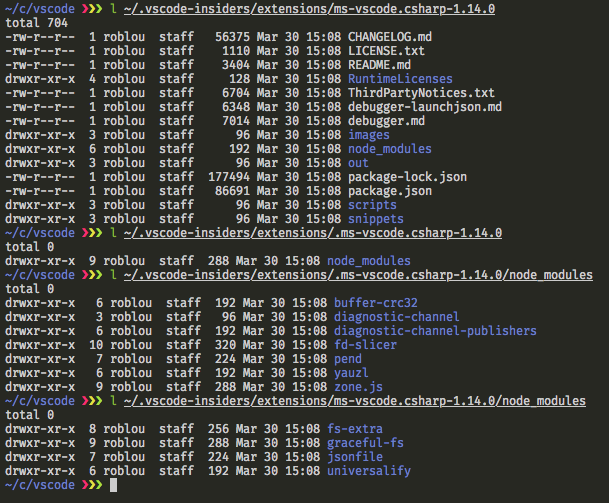
@sandy081 I think there's still an issue here. I don't know how this is happening, but it's quite easy to reproduce.
I click the install button on an extension, them immediately press cmd+q. Then I see some files in the . folder and some in the destination folder.
We should just be calling fs.rename, so something weird is up. I tried it from the command line, pressing ctrl+c while installing, but don't see an issue there.
The shared process logs don't show anything useful. I think they are missing the last log message or two.
$ l ~/.vscode-insiders/extensions/.ms-vscode.csharp-1.14.0
drwxr-xr-x  3 roblou  staff  96 Mar 30 14:59 node_modules

$ l ~/.vscode-insiders/extensions/ms-vscode.csharp-1.14.0
-rw-r--r--  1 roblou  staff  49152 Mar 30 14:59 CHANGELOG.md



roblourens
on 31 Mar 2018
@roblourens Yes you are right. I expected operation fs.rename (which is also used for updating VS Code) to be atomic which proved to be not. Thanks for your testing.
I reverted the rename approach which I think will make extension installation much more prone to partial/corrupted installation.
Better approach would be
Track the extensions installations in a file (like un-installations). Enter the extension being installed and remove it from the file when the extension is completely installed. Do not load extensions which are not installed completely. Also inform the user about this or auto clean up in the background?
Prompt user about extension installations in progress while restarting VS Code.
sandy081
on 2 Apr 2018
@bpasero Helped in investigating deeper into this to understand why fs.rename is not atomic. In fact fs.rename is atomic and the issue that @roblourens reproduced here is not due to rename. It is because of the fallback code that extracts to the real folder if extraction to temp folder fails. This fallback case is being called when VS Code is shutdown because extraction gets cancelled. Hence both folders (temp and real) exist.
Fallback was needed for the windows defender issue during rename. So fix is to run the fallback only if the error is EPERM error in Windows.
Thanks @bpasero
sandy081
on 3 Apr 2018
To verify:
- Try to install an extension which is bit big in size. For eg: Python, c#, Java or live share.
- Before the installation is finished, Quit VS Code
- Make sure that in the extensions folder you do not have both temporary and real folder. For eg., if it is python then you should not have both
.ms-python.python-*andms-python.python-*folders. - If the installation was completed before you quit VS Code, then only the real folder should exist. Eg:
ms-python.python-*and it should be extracted completely. You can verify the completeness by downloading the extension from Marketplace manually. - If the installation was not completed before you quit VS Code, then only the temp folder should exist and when you start VS Code extension should not be in installed list and you can be able to install it without issues.
Please try above steps during different timings during extension installation
sandy081
on 3 Apr 2018
Verified under Windows.
 dbaeumer
on 3 Apr 2018
dbaeumer
on 3 Apr 2018
Verified on Linux (Ubuntu 16.04)
 aeschli
on 3 Apr 2018
aeschli
on 3 Apr 2018
@roblourens Can you please verify on Mac
sandy081
on 3 Apr 2018
Verified on Mac.
Is the fallback for if it still fails after the 5s retry period? And in this case the promise was just being canceled when the renderer process goes down?
roblourens
on 3 Apr 2018
Yes fallback is for the case when the rename fails after trying for 5s.
sandy081
on 3 Apr 2018
Did you see a case where the rename still failed after trying for 5s, or is it a theoretical problem?
This solution still leaves a gap where the unzip to the final extension folder could be interrupted, which I think was basically the original problem.
You mentioned above that another sort of solution would be better and I agree with that. https://github.com/Microsoft/vscode/issues/43813#issuecomment-377995857
roblourens
on 3 Apr 2018
@roblourens Yes it is an hypothesis and it could cause user not able to install extensions at all.
Yes, there could be still some set of users (who has windows defenders holding onto files for more than 5s) can fall into this gap. But I think that will be very very minimal.
I have already pushed a fix to masters to remove the fallback and increase the retry time to 30s. I am also thinking to increase time to a minute. If there is a process that hangs onto extracted folder for such an amount of time, it is really an issue that the user should be known to. Because, it will be an issue while removing extensions too. So this will remove that very minimal set of users too.
I also agree other solution is bit consistent but was not trivial to implement in last minute. This can be thought about too in April.
sandy081
on 4 Apr 2018
Related issues
 NikosEfthias
·
3Comments
NikosEfthias
·
3Comments
 v-pavanp
·
3Comments
v-pavanp
·
3Comments
 trstringer
·
3Comments
trstringer
·
3Comments
 DovydasNavickas
·
3Comments
DovydasNavickas
·
3Comments
 philipgiuliani
·
3Comments
philipgiuliani
·
3Comments
Most helpful comment
We think we have a fix - seems that the rename fails right after the unzip, because the unzip was not actually waiting for all the written file handles to be closed.