Vscode: Ability to contribute views containers
- Ability to contribute views containers to the Activity bar like
azure,outlineetc., - Contribute views to these activity groups
 sandy081
All 52 comments
An UX discussion happened and the following solution was suggested in two steps
Step 1
- Provide an extension point to contribute activity bar group (viewlet) and allow extensions to group views.
- If there are multiple contributions with the same group id, last one wins
Advantages:
Extension can group the views they would like to have under single viewlet. This will work well with azure views.
Disadvantages:
Each Extension can create its own viewlet and there could be too many icons in the activity bar. This is mitigated by our activity bar that can scale.
User has no control to group or ungroup views. If two extensions contribute
gitrelated views under two different viewlets, then user cannot group them into one. If an extension contributeazureanddockerviews under single viewlet and then it is not possible for user to makedockeras a separate viewlet.
Step 2
Ability to move views across groups . This is a big discussion scopes to complete VS Code.
- Moving across groups / panels etc.
Follow up tasks:
- Start with Step 1: Create UI mock ups for contributing viewlets and get feedback from team and community
I would defer this to next milestone due to me being not available completely in this milestone.
sandy081
on 19 Mar 2018
@sandy081 how would the (default) order of views contributed into an activity be defined? Would it just be order of registration?
 eamodio
on 19 Mar 2018
eamodio
on 19 Mar 2018
I would love to see the possible future ability of putting a WebView into an activity as this UI/UX/API evolves as well.
eamodio
on 19 Mar 2018
how would the (default) order of views contributed into an activity be defined? Would it just be order of registration?
@eamodio Yes, it would be based on the order of registration.
sandy081
on 19 Mar 2018
I'd like to suggest the ability to modify the custom activity's icon through icon packs/themes!
 Veramone
on 20 Mar 2018
Veramone
on 20 Mar 2018
I'd like to see the ability to contribute views/allow users to "dock" views on the opposite side of the activity bar and in the bottom (terminal/problems/etc) bar.
I know the vs code team is reticent about allowing custom UIs so the editor can stay "light and simple" but with custom TreeView and now the new WebView coming as well, that is what will eventually happen.
Ascii Example
| A |           |                        |         |
| C |           |                        |         |
| T |           |                        |         |
| V |           |          Code          |  Code   |
| I | File Tree |         Editor         | Outline |
| T |           |                        |         |
| Y |           |                        |         |
|   |           |----------------------------------|
| B |           | Problems / Terminal / [Coverage] |
| A |           |                                  |
| R |           |     [ Custom Coverage View ]     |
|   |           |                                  |
----------------------------------------------------
in this example, I could have an extension that contributes some type of "code outline" TreeView on the right, and another extension that contributes a WebView with coverage reports in the bottom bar.
Now I know some core contributors are dead set against this type of thing, but this is where the UI is heading with the introduction of custom views, now you're talking about custom view positioning...
As far as I see it, the vscode team can follow one of two paths:
Custom Views ▶️ Custom View Group ▶️ Custom Activities ▶️ 🕥 API stabilizes ▶️ Extension Authors implement custom views ▶️ users love them but are frustrated because they have to jam all of their tools into one part of the screen ▶️ 📢 users complain, _alot_ ▶️ vscode team eventually relents ▶️ a bunch of code goes into the 🗑 and is rewritten ▶️ 🕥 API stabilizes ▶️ community is happy
OR
Custom Views ▶️ new view contribution/docking API ▶️ 🕥 API stabilizes ▶️ community is happy
 rozzzly
on 24 Mar 2018
rozzzly
on 24 Mar 2018
I'd love to see this - it feels wonky that we're putting some trees in the File Explorer pane. I'd also love for the user to be able to dock it to the other side too (this goes for existing panels too; a generic solution that lets my undock Git or search results for example).
 DanTup
on 26 Mar 2018
DanTup
on 26 Mar 2018
It would be great to have the ability for badges on the custom activities as well. Just like the change count on the SCM activity.
eamodio
on 3 Apr 2018
Following is the contribution point I am planning to expose
"contributes": {
    "viewsContainers": {
        "activitybar": [
                        {
                "id": "azure",
                "title": "Azure",
                 "icon": "resources/azure.png"
                }
                  ]
    },
        "views": {
        "azure": [
            {
                "id": "cosmosdb",
                "name": "Azure Cosmos DB"
            },
                         {
                "id": "docker",
                "name": "Docker"
            }
        ]
    }
}

- Register an activity group
- Contribute views to the registered activity group location
- An extension can also contribute to an activity group registered by a different extension by adding it as a dependency
- If the location is not found, view is added to
exploreras a fallback.
@jrieken for API discussion
- Want to have the new contribution behind the flag (like proposed).
@chrisdias FYI
sandy081
on 17 Apr 2018
@sandy081 From the sample I don't understand how the views and the group a glued together...
 jrieken
on 17 Apr 2018
jrieken
on 17 Apr 2018
@jrieken Oops!! There was a copy/paste error. Updated the sample.
sandy081
on 17 Apr 2018
Open to contribution point name. Called activityGroups because they are part of activityBar. Also thought about viewGroups.
sandy081
on 17 Apr 2018
Oops!! There was a copy/paste error. Updated the sample.
Ok, now it makes sense ;-)
Yeah, good question about the name. Not sure yet, we can brainstorm
jrieken
on 17 Apr 2018
Will there be a way to specify different light vs dark icons? Also the name activities makes sense to me, as that is the terminology I've seen used for things on the activity bar, and hopefully you will be able to contribute other things into an activity (webview, hint, hint 😄) -- so imo it would be nice to keep it flexible.
eamodio
on 17 Apr 2018
I could be totally wrong on this, but presumably the image is used as mask so that the background color is actually determined by the theme? If not, the default light and dark themes both use a black activity bar so I'm not sure how the editor would decide which to use.
 mattacosta
on 18 Apr 2018
mattacosta
on 18 Apr 2018
There will be only single icon and will be masked to be aligned with existing icons.
sandy081
on 18 Apr 2018
@sandy081 One thing to keep in mind is viewlet progress. Today we have withProgress and ProgressLocation which we now need to teach about 'new' viewlets
jrieken
on 18 Apr 2018
@jrieken Good point.
Currently there are no plans in exposing the custom viewlet in the API. It is just a composite of views. And the views progress is shown in the viewlet progress.
sandy081
on 18 Apr 2018
If there isn't any activity API will there still be some way to apply a badge (counter) to the activity icon?
eamodio
on 18 Apr 2018
@eamodio There is a thinking to expose badge in view API. Have to think how badges from multiple views escalate to the activity.
sandy081
on 18 Apr 2018
@sandy081 -
Have to think how badges from multiple views escalate to the activity.
Why not let the activity register a callback function to decide? If no callback function is registered, then fall back to some sensible default like addition (if view A reports 5 errors and view B reports 3 errors, the activity probably wants the number 8 in its badge). But since some activities might want semantics other than addition (say, the max or min of the numbers reported by subviews), allow an activity to register a callback function that takes a list of views and what they have in their badge (e.g., the number being displayed) and which will return what to display in the activity badge.
So for example, an activity that's part of a profiler tool might (if arbitrary strings are allowed in badges) have one view with "400 ms" in its badge, another view with "800 ms" in its badge, and it might want to report "1.2 s" in the overall activity's badge. VS Code won't be able to account for every scenario, but allowing a callback to be registered would give that control over to activity authors.
 rmunn
on 19 Apr 2018
rmunn
on 19 Apr 2018
Changed the extension point name to viewsContainer and here is the example.
"contributes": {
    "viewsContainers": {
        "activitybar": [
                        {
                "id": "azure",
                "title": "Azure",
                 "icon": "resources/azure.png"
                }
                  ]
    },
        "views": {
        "azure": [
            {
                "id": "cosmosdb",
                "name": "Azure Cosmos DB"
            },
                         {
                "id": "docker",
                "name": "Docker"
            }
        ]
    }
}
This feature is available in insiders under proposed api flag. It means, extension point is active only in Insiders and extension should set enableProposedApi property to true and user should start VS Code by passing extension id to --enable-proposed-api argument. Eg: code-insiders --enable-proposed-api pub.extname
sandy081
on 19 Apr 2018
@sandy081 I've been playing with this a bit over the last couple of day -- very cool. Though I noticed that the activity title is used in the form of container.title: view.name which feels strange when there is only 1 view contributed. Maybe the the view name can only be tacked on when there is more than 1?
Also if there are no views added into an activity, should it show in the sidebar? For example, let's say I have a conditional view (when clause) that associated with an activity. When that view is hidden, I kind of would expect that the activity in the sidebar would also be hidden -- especially since there is no when clause support on the activity itself.
eamodio
on 23 Apr 2018
Though I noticed that the activity title is used in the form of container.title: view.name which feels strange when there is only 1 view contributed. Maybe the the view name can only be tacked on when there is more than 1?
This is consistent with other view containers in the activity bar explorer, scm etc.,. But we can think of not forcing this by having a property?
Also if there are no views added into an activity, should it show in the sidebar? For example, let's say I have a conditional view (when clause) that associated with an activity. When that view is hidden, I kind of would expect that the activity in the sidebar would also be hidden -- especially since there is no when clause support on the activity itself.
I already hide the view container if there are no views are registered. Hiding it when there are no views shown in the container might be problematic especially when user hides the view manually. To be deterministic, view containers are hidden only when no views are registered. when context is not provided because view containers can be shared across extensions.
sandy081
on 24 Apr 2018
@sandy081 Any guidelines on making the icon? I tried putting in our existing Icon in (I hoped to just use the same SVG we use for icons in the tree, etc.) but it's got less padding also also looks a different colour:
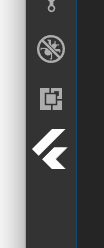
Also, related to above, I hide my view based on a when clause - does this mean it'll always appear to the user (since it's registered)?
DanTup
on 24 Apr 2018
@sandy081 Also, when I call reveal on my tree, the sidebar switches back to Explorer, rather than the where the tree is in its new place.
DanTup
on 24 Apr 2018
@DanTup Good question, I am working on drafting the icon specs. What I can tell for now is to take Search icon as reference

Yes, when clause does not have impact on it. User can hide it by right click and hide.
Regarding reveal issue, its a bug and I fixed it today.
sandy081
on 24 Apr 2018
@sandy081 I don't see the title behavior in either the explorer or scm -- I always see the explorer title as EXPLORER and scm as SOURCE CONTROL: GIT (even if there are other contributed views). But either way as long as there is a way to control it I will be happy 😁
As for hiding the activity if there are no visible views, here are 2 scenarios I'm looking at solving.
First, in GitLens, I would like to provide an option to the user to choose whether to show the GitLens explorers in the scm activity OR in its own gitlens activity. And as far as I can tell, this isn't possible, because the only way for me to have an activity is unconditional in the package.json. Is there a way that I can provide this option?
Second, in CodeStream, while I want CodeStream in its own activity, I don't really want it visible if you are not signed in. I would like to have the activity hide as I am currently hiding the view itself, to keep the UI cleaner (since I have a simple status bar icon for signing in).
Thank you for your consideration!
eamodio
on 24 Apr 2018
@sandy081 Will these contributed views automatically be listed in the command palette?
I don't use the activity bar at all. I navigate everything through the command palette.
Also, when I refer to the command palette, I want them in the normal command list. Just like view: show SCM etc. I don't want to have to type view ... to get to the view as that requires a separate action and does not get listed in the recent list of commands I've used.
 dakaraphi
on 24 Apr 2018
dakaraphi
on 24 Apr 2018
@sandy081
What I can tell for now is to take Search icon as reference
Will do! I think the colour difference I noted was because it was selected - doh!
Yes,
whenclause does not have impact on it. User can hide it by right click and hide.
Can I unregister/re-register it to hide it? It might not be a big deal (since it's probably unlikely a user will transition from Flutter -> non-Flutter without the extension reloading, which will probably take care of this anyway).
Regarding reveal issue, its a bug and I fixed it today.
Super!
Btw, regarding the title issue mentioned above, I echo the comments - the title for the custom view looks nothing like the others. Explorer just says EXPLORER and then has OPEN EDITORS as a heading underneath; but my custom view ended up with FLUTTER OUTLINE: FLUTTER OUTLINE in one single bar at the top.
My preference could be for the same as the others, but ideally a dynamic heading (eg. where "Open Editors" normally is, so I could show the filename of the file we're rendering the outline for.
DanTup
on 24 Apr 2018
@chrisdias @egamma I do not see major issues while testing. Planning to remove the proposed api flag and make it available for stable. Any concerns?
sandy081
on 25 Apr 2018
@eamodio I think you have to hide all views in the explorer to get this
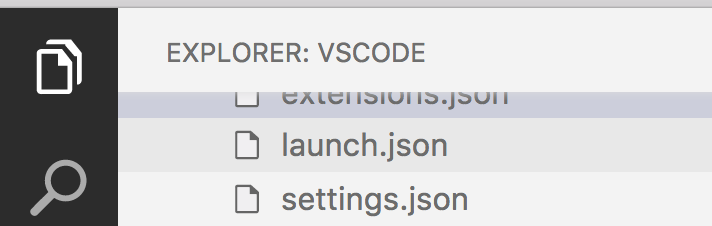
Regarding showing/hiding view containers by default when empty, I will give more thought about this and come up with a solution.
@dakaraphi Yes, you will have a command to open the contributed view containers in the activity bar. You can also access them in the View: Open View command.
Finally, It is not recommended to use one view per container. Try to group views related together into one view container. Like Azure, Test, Cloud, etc., @DanTup In your case, Why do not you define a Flutter view container and all Flutter related views go there. You can also consider removing Flutter from your view name as you are putting your view into Flutter container. Then it looks like Flutter: Outline which is pretty good.
sandy081
on 25 Apr 2018
@sandy081
You can also access them in the View: Open View command
Actually this is not what I want or rather it is at least sub-optimal.
- I have to use 2 steps to get to the view. Type this command, then type the view name
- I can't use the normal command palette history to quickly jump back to a view I was previously using.
- It is inconsistent with the availability of the built-in views being in the command list
What would be ideal is to have these views contributed to the normal command list just like the other built-in views.
dakaraphi
on 25 Apr 2018
@dakaraphi Not sure if you have read my complete statement
Yes, you will have a command to open the contributed view containers in the activity bar. You can also access them in the View: Open View command.
First part is for supporting normal commands to open contributed view containers. For eg: View: Open Azure
sandy081
on 25 Apr 2018
@sandy081 it seems that today's insiders has broken this -- The activity shows up, but the view never renders. Its getTreeItem and getChildren never get called.
eamodio
on 25 Apr 2018
@sandy081 Ahh ok awesome! sorry, I didn't quite get what meant initially.
dakaraphi
on 25 Apr 2018
@eamodio Yeah, I fixed it today. Sorry for that.
sandy081
on 25 Apr 2018
Pushed a change to provide out of the box Test view container. All extensions contributing test views can contribute to this container using the id test.


sandy081
on 25 Apr 2018
@sandy081 ah, great that its fixed -- thanks! (I'm assuming there won't be a new release issued until tomorrow right?)
eamodio
on 25 Apr 2018
@eamodio Unfortunately yes. Please let me know if you are blocked, I can request a new build for you.
sandy081
on 25 Apr 2018
If it isn't too much trouble that would be very helpful and greatly appreciated.
eamodio
on 25 Apr 2018
How about sharing a latest build to you instead of releasing it? Does it works?
sandy081
on 25 Apr 2018
Sure, works for me, thanks!
eamodio
on 25 Apr 2018
Pushed a change to provide out of the box Test view container. All extensions contributing test views can contribute to this container using the id test.
Neat! :)
@sandy081
You can also consider removing Flutter from your view name as you are putting your view into Flutter container. Then it looks like
Flutter: Outlinewhich is pretty good.
Good idea! I think ultimately this might just become an "outline", since we'll have a standard non-flutter outline, but for now I think this works fine 👍
DanTup
on 26 Apr 2018
Removed the proposed api flag and this will be available in next stable release.
sandy081
on 26 Apr 2018
@sandy081 Two minor things I noticed while working on my outline:
If I call reveal, the sidebar switches to my view. This could be annoying to the user - I want to keep the item in the tree that corresponds to where the cursor is selected, but I don't want to force the tree to be visible it it's not already. Is there a way I can set the selection (so that if they switch to this bar, it's selected) without forcing the view to become visible?
(This is kinda tree-reveal-related rather than this one, but...) if I call reveal(null) it doesn't remove the current selection. So if the user moves the cursor to a position that is not represented by a node (eg. the space between two classes) the previous node remains selected. Any way to remove a selection?
DanTup
on 26 Apr 2018
Here is the request for 1) - https://github.com/Microsoft/vscode/issues/48198
Please file a separate request for 2).
Thanks.
sandy081
on 26 Apr 2018
Thanks; opened #48754 :)
DanTup
on 26 Apr 2018
@DanTup Are you also working on a code outline extension? Maybe we could get a standard view container for our extensions like there is one for tests? (I am the author of Code Outline.)
 patrys
on 26 Apr 2018
patrys
on 26 Apr 2018
@patrys I'm not working on an Outline extension, I author the Dart/Flutter extensions. I'm currently working on a special type of outline for Flutter (which will need to be rendered by us, it's very specific), though we do have a standard outline in our backlog.
For the Flutter one, I think a Flutter icon on the side bar makes sense (there are other tools we may add to it in future), but the standard outline may make sense to share a view. However, it raises some questions:
If two extensions contribute view containers with the same ID and different titles, which gets displayed?
If an extension provides its own outline and an "Outline extension" also provides an outline, is there user going to end up with two outlines?
DanTup
on 26 Apr 2018
If two extensions contribute view containers with the same ID and different titles, which gets displayed?
Edit: The first one wins
If an extension provides its own outline and an "Outline extension" also provides an outline, is there user going to end up with two outlines?
Yes
sandy081
on 26 Apr 2018
Closing this issue.. Please file separate issues for new feature requests or bugs
sandy081
on 27 Apr 2018
Related issues
 sirius1024
·
3Comments
sirius1024
·
3Comments
 borekb
·
3Comments
borekb
·
3Comments
 villiv
·
3Comments
villiv
·
3Comments
 trstringer
·
3Comments
trstringer
·
3Comments
 v-pavanp
·
3Comments
v-pavanp
·
3Comments
Most helpful comment
It would be great to have the ability for badges on the custom activities as well. Just like the change count on the SCM activity.