Vscode: Home/End keys can't be used to navigate intellisense suggestions
Issue Type
Bug
Description
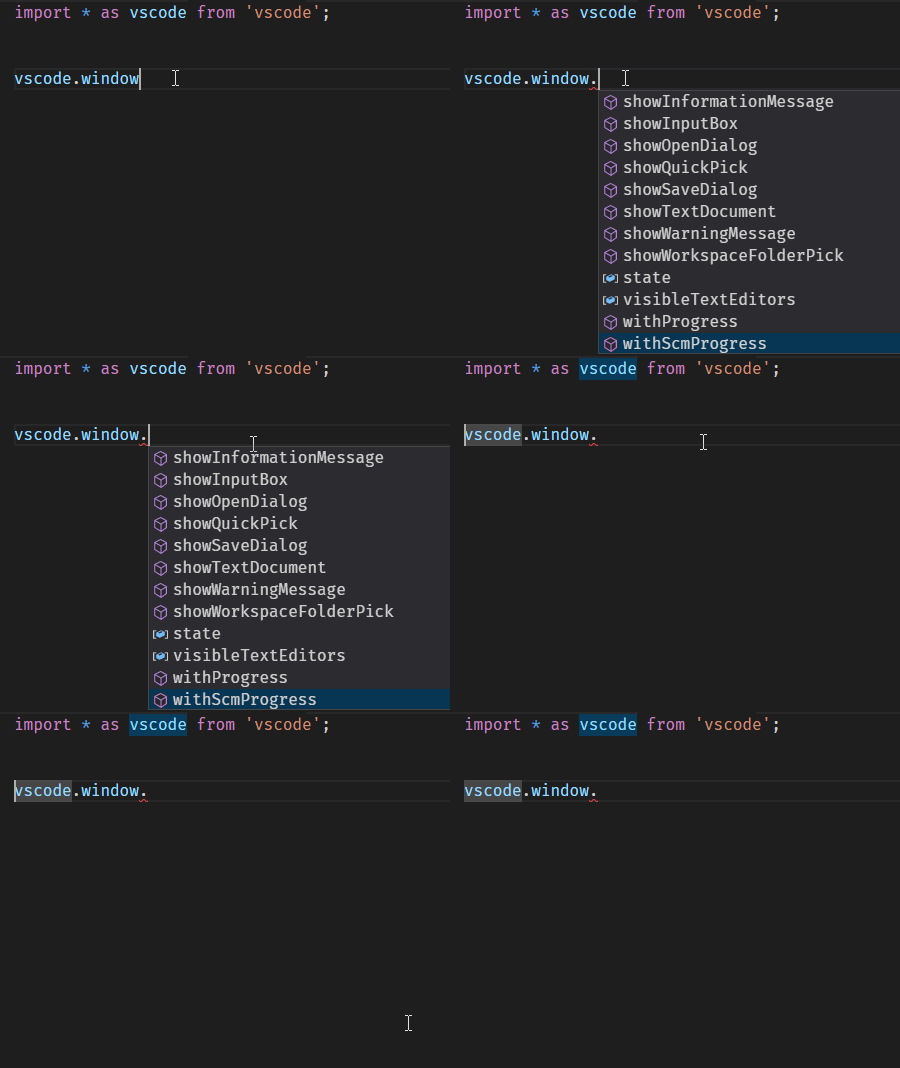
- Trigger intellisense suggestion
- Try to scroll to top/bottom of list with Home/End keys.
VS Code Info
VS Code version: Code - Insiders 1.21.0-insider (ef42990520a856451ba5ad6fa1d299b0e0c185a2, 2018-02-12T05:14:21.574Z)
OS version: Windows_NT x64 10.0.16299
|Item|Value|
|---|---|
|CPUs|Intel(R) Core(TM) i7-4600U CPU @ 2.10GHz (4 x 2694)|
|Memory (System)|7.88GB (2.58GB free)|
|Process Argv|C:\Program Files\Microsoft VS Code Insiders\Code - Insiders.exe|
|Screen Reader|no|
|VM|0%|
Reproduces without extensions
 tsalinger
All 13 comments
Hello @jrieken I would like to work on this. Any code pointer would be great.
 pradeepmurugesan
on 15 Mar 2018
pradeepmurugesan
on 15 Mar 2018
Checkout https://github.com/Microsoft/vscode/blob/0b718942408b39182b77310c4e1796c54f59b843/src/vs/editor/contrib/suggest/suggestController.ts#L407 and https://github.com/Microsoft/vscode/blob/0b718942408b39182b77310c4e1796c54f59b843/src/vs/editor/contrib/suggest/suggestController.ts#L438 which define a command to go the last/first suggestion. What's missing is the definition of a keybinding, like it's done here: https://github.com/Microsoft/vscode/blob/0b718942408b39182b77310c4e1796c54f59b843/src/vs/editor/contrib/suggest/suggestController.ts#L447
 jrieken
on 15 Mar 2018
jrieken
on 15 Mar 2018
Great.. This will definitely help.. Thank you..
pradeepmurugesan
on 15 Mar 2018
@jrieken the changes were straight forward. I am unable to find any tests for the suggestions. Can you please help me there. Just to point the test files if there are any.
I manually checked and things are fine.
pradeepmurugesan
on 15 Mar 2018
Wicked - automatic testing is hard because we cannot generate key events. I think we can live without them this time
jrieken
on 15 Mar 2018
As @jrieken proposed to have the discussion here, instead of in a duplicate issue for the "Con"-perspective, I will add my objections here as well (taken from #46182) :)
My problem with the change is that it is a new behavior that does not match the previous user experience as well as the default behavior of Visual Studio. Therefore, the current behavior goes against the muscle memory and expectations of years working with Visual Studio.

Aside the muscle memory, it seems also a little bit unintuitive as the new key binding offers an additional entrypoint for IntelliSense even if not interaction occurred with IntelliSense beforehand. In the example above, I just write a normal command and in my opinion, jumping to the end of the line to write curly brackets is much more common that jumping to the end of the IntelliSense list. If IntelliSense has been invoked using the up and down keys on the keyboard, I would expect to jump to the end as the mental focus (and the real focus in the application) is on the IntelliSense dialog. But as I did not interacted with IntelliSense, my mental focus is still in the editor.
For me, this issue is currently very frustrating and the opposite of the "Happy Coding" goal that is stated on the Roadmap page, as VS Code interrupts the normal coding experience with an unintuitive and uncommon behavior. In my opinion, the best approach would be to make this setting configurable through the keybindings, so that users can configure IntelliSense as they like.
@jrieken answered in the other issue:
In my opinion, the best approach would be to make this setting configurable through the keybindings, so that users can configure IntelliSense as they like.
Yes, you can unbind the keybinding.
[...] Leaving the default untouched as long as not too many people complain.
But what would be the default? In my opinion, it should be the previous behavior.
For those that have the same issue: This keybinding deactivates the new setting:
    {
        "key": "end",
        "command": "-selectLastSuggestion",
        "when": "suggestWidgetMultipleSuggestions && suggestWidgetVisible && textInputFocus"
    }
 lafe
on 26 Mar 2018
lafe
on 26 Mar 2018
@lafe Thank you! That was driving me crazy. I made some changes though, cause I do want the annoying command sometimes (I have that right!! 😅)
{
"key": "home",
"command": "-selectFirstSuggestion",
"when": "suggestWidgetMultipleSuggestions && suggestWidgetVisible && textInputFocus"
},
    {
        "key": "end",
        "command": "-selectLastSuggestion",
        "when": "suggestWidgetMultipleSuggestions && suggestWidgetVisible && textInputFocus"
},
{
"key": "ctrl+home",
"command": "selectFirstSuggestion",
"when": "suggestWidgetMultipleSuggestions && suggestWidgetVisible && textInputFocus"
},
{
"key": "ctrl+end",
"command": "selectLastSuggestion",
"when": "suggestWidgetMultipleSuggestions && suggestWidgetVisible && textInputFocus"
}
With this home/end behave like before and ctrl+home/ctrl+end have the new default behavior.
 kleber-swf
on 7 Apr 2018
kleber-swf
on 7 Apr 2018
I agree with @lafe 's perspective. This feature seems to be optimized for longer words, but induces a penalty when Intellisense is not required, as in the case of single letter variable names.
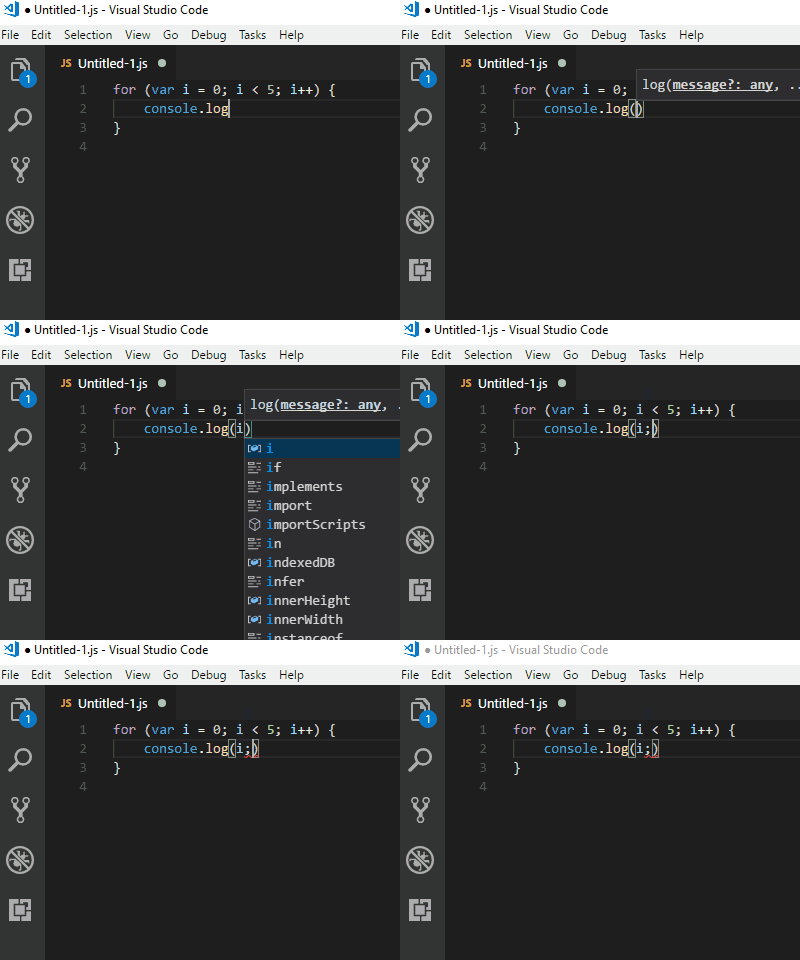
In the gif, you can see that the previous workflow was to press (i End ;, which now places the semicolon in an unwanted place.
 danmarshall
on 14 Apr 2018
danmarshall
on 14 Apr 2018
Quoting from #46182
Leaving the default untouched as long as not too many people complain.
I don't think the default behavior should be changed to navigate IntelliSense. I just ran into the frustration of seeing the End key not move the cursor and navigate the IntelliSense instead 10 times in a row, and then stop coding and found this issue.
 afq984
on 14 Apr 2018
afq984
on 14 Apr 2018
But what would be the default? In my opinion, it should be the previous behavior.
👍 for this. Why was this made the default in the first place?
 inosik
on 23 Apr 2018
inosik
on 23 Apr 2018
it makes sense bring pro-people and con-people onto the same issue. Leaving the default untouched as long as not too many people complain
@jrieken Given that quite a few folks have complained now and that the original ask has 0 upvotes, looks like there are a lot more con-people than pro-people for this feature.
Folks who want this feature can always customize their keybindings. I propose to revert this feature
 ramya-rao-a
on 24 Apr 2018
ramya-rao-a
on 24 Apr 2018
This feature has been reverted with https://github.com/Microsoft/vscode/commit/38f1eddf382e508e8be605ba6ef39c8a97e03a61
You will see the changes in tomorrow's Insiders
Folks who want this feature can customize their keybindings as below
{
    "key": "home",
    "command": "selectFirstSuggestion",
    "when": "suggestWidgetMultipleSuggestions && suggestWidgetVisible && textInputFocus"
},
{
    "key": "end",
    "command": "selectLastSuggestion",
    "when": "suggestWidgetMultipleSuggestions && suggestWidgetVisible && textInputFocus"
}
LOL. History repeats itself: #24673
 alexdima
on 25 Apr 2018
alexdima
on 25 Apr 2018
Related issues
 philipgiuliani
·
3Comments
philipgiuliani
·
3Comments
 vsccarl
·
3Comments
vsccarl
·
3Comments
 lukehoban
·
3Comments
lukehoban
·
3Comments
 biij5698
·
3Comments
biij5698
·
3Comments
 NikosEfthias
·
3Comments
NikosEfthias
·
3Comments
Most helpful comment
As @jrieken proposed to have the discussion here, instead of in a duplicate issue for the "Con"-perspective, I will add my objections here as well (taken from #46182) :)
My problem with the change is that it is a new behavior that does not match the previous user experience as well as the default behavior of Visual Studio. Therefore, the current behavior goes against the muscle memory and expectations of years working with Visual Studio.

Aside the muscle memory, it seems also a little bit unintuitive as the new key binding offers an additional entrypoint for IntelliSense even if not interaction occurred with IntelliSense beforehand. In the example above, I just write a normal command and in my opinion, jumping to the end of the line to write curly brackets is much more common that jumping to the end of the IntelliSense list. If IntelliSense has been invoked using the up and down keys on the keyboard, I would expect to jump to the end as the mental focus (and the real focus in the application) is on the IntelliSense dialog. But as I did not interacted with IntelliSense, my mental focus is still in the editor.
For me, this issue is currently very frustrating and the opposite of the "Happy Coding" goal that is stated on the Roadmap page, as VS Code interrupts the normal coding experience with an unintuitive and uncommon behavior. In my opinion, the best approach would be to make this setting configurable through the keybindings, so that users can configure IntelliSense as they like.
@jrieken answered in the other issue:
But what would be the default? In my opinion, it should be the previous behavior.
For those that have the same issue: This keybinding deactivates the new setting: