Issue Type
Bug
Description
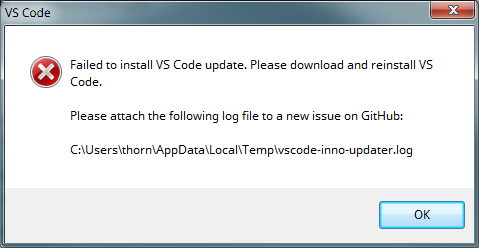
vscode-inno-updater.log:
Feb 12 13:59:10.913 INFO Starting: C:\Program Files (x86)\Microsoft VS Code Insiders\Code - Insiders.exe, false
Feb 12 13:59:10.916 INFO Checking for running Code - Insiders.exe processes... (attempt 1)
Feb 12 13:59:10.918 INFO Code - Insiders.exe is running, wait a bit
Feb 12 13:59:11.418 INFO Checking for running Code - Insiders.exe processes... (attempt 2)
Feb 12 13:59:11.423 INFO Code - Insiders.exe is running, wait a bit
Feb 12 13:59:11.923 INFO Checking for running Code - Insiders.exe processes... (attempt 3)
Feb 12 13:59:11.927 INFO Code - Insiders.exe is not running
Feb 12 13:59:11.931 INFO Starting update, silent = false
Feb 12 13:59:11.963 INFO do_update: "C:\\Program Files (x86)\\Microsoft VS Code Insiders\\Code - Insiders.exe", _
Feb 12 13:59:13.546 INFO header: Header, id: Inno Setup Uninstall Log (b), app id: {C26E74D1-022E-4238-8B9D-1E7564A36CC9}, app name: Visual Studio Code - Insiders, version: 1048, num recs: 1029904, end offset: 268555159, flags: 0x35, crc: 0xaad480ca
Feb 12 13:59:13.546 INFO num_recs: 1029904
Feb 12 13:59:13.546 INFO move_update: "C:\\Program Files (x86)\\Microsoft VS Code Insiders\\unins000.dat", _
Feb 12 13:59:13.546 INFO Delete: "api-ms-win-core-console-l1-1-0.dll" (attempt 1)
Feb 12 13:59:13.547 INFO Delete: "api-ms-win-core-datetime-l1-1-0.dll" (attempt 1)
Feb 12 13:59:13.547 INFO Delete: "api-ms-win-core-debug-l1-1-0.dll" (attempt 1)
Feb 12 13:59:13.547 INFO Delete: "api-ms-win-core-errorhandling-l1-1-0.dll" (attempt 1)
Feb 12 13:59:13.548 INFO Delete: "api-ms-win-core-file-l1-1-0.dll" (attempt 1)
Feb 12 13:59:13.548 INFO Delete: "api-ms-win-core-file-l1-2-0.dll" (attempt 1)
Feb 12 13:59:13.598 INFO Delete: "api-ms-win-core-file-l1-2-0.dll" (attempt 2)
Feb 12 13:59:13.798 INFO Delete: "api-ms-win-core-file-l1-2-0.dll" (attempt 3)
Feb 12 13:59:14.248 INFO Delete: "api-ms-win-core-file-l1-2-0.dll" (attempt 4)
Feb 12 13:59:15.048 INFO Delete: "api-ms-win-core-file-l1-2-0.dll" (attempt 5)
Feb 12 13:59:16.298 INFO Delete: "api-ms-win-core-file-l1-2-0.dll" (attempt 6)
Feb 12 13:59:18.098 INFO Delete: "api-ms-win-core-file-l1-2-0.dll" (attempt 7)
Feb 12 13:59:20.549 INFO Delete: "api-ms-win-core-file-l1-2-0.dll" (attempt 8)
Feb 12 13:59:23.749 INFO Delete: "api-ms-win-core-file-l1-2-0.dll" (attempt 9)
Feb 12 13:59:27.799 INFO Delete: "api-ms-win-core-file-l1-2-0.dll" (attempt 10)
Feb 12 13:59:32.799 INFO Delete: "api-ms-win-core-file-l1-2-0.dll" (attempt 11)
Feb 12 13:59:32.958 ERRO Отказано в доступе. (os error 5)
VS Code Info
VS Code version: Code - Insiders 1.21.0-insider (d28f096018e2673a8437c788e3eed781ddb505ce, 2018-02-09T06:14:31.856Z)
OS version: Windows_NT ia32 6.1.7601
System Info
|Item|Value|
|---|---|
|CPUs|Intel(R) Core(TM) i5 CPU M 480 @ 2.67GHz (4 x 2660)|
|Memory (System)|7.86GB (2.30GB free)|
|Process Argv|C:\Program Files (x86)\Microsoft VS Code InsidersCode - Insiders.exe|
|Screen Reader|no|
|VM|50%|
Extensions: none
Reproduces without extensions
 thorn0
All 23 comments
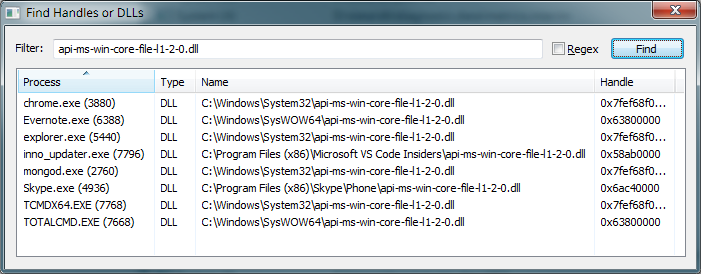
Thanks! Very interesting. Can you somehow check which process has an open handle on api-ms-win-core-file-l1-2-0.dll? I usually use Process Hacker for this.
 joaomoreno
on 12 Feb 2018
joaomoreno
on 12 Feb 2018
I have the same problem.
Using Process Hacker, I got this result:
 .
.
Even after closing MEGAsync, I still get this problem.
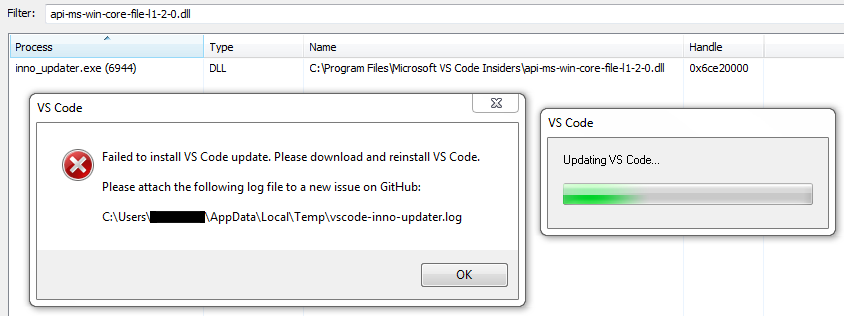
Here's the content of the log file:
Feb 12 15:17:18.100 INFO Starting: C:\Program Files\Microsoft VS Code Insiders\Code - Insiders.exe, false
Feb 12 15:17:18.101 INFO Checking for running Code - Insiders.exe processes... (attempt 1)
Feb 12 15:17:18.101 INFO Code - Insiders.exe is running, wait a bit
Feb 12 15:17:18.600 INFO Checking for running Code - Insiders.exe processes... (attempt 2)
Feb 12 15:17:18.602 INFO Code - Insiders.exe is running, wait a bit
Feb 12 15:17:19.103 INFO Checking for running Code - Insiders.exe processes... (attempt 3)
Feb 12 15:17:19.120 INFO Code - Insiders.exe is not running
Feb 12 15:17:19.120 INFO Starting update, silent = false
Feb 12 15:17:19.135 INFO do_update: "C:\\Program Files\\Microsoft VS Code Insiders\\Code - Insiders.exe", _
Feb 12 15:17:30.369 INFO header: Header, id: Inno Setup Uninstall Log (b), app id: {C26E74D1-022E-4238-8B9D-1E7564A36CC9}, app name: Visual Studio Code - Insiders, version: 1048, num recs: 378986, end offset: 98570101, flags: 0x15, crc: 0xa347c2a
Feb 12 15:17:30.370 INFO num_recs: 378986
Feb 12 15:17:30.370 INFO move_update: "C:\\Program Files\\Microsoft VS Code Insiders\\unins000.dat", _
Feb 12 15:17:30.370 INFO Delete: "api-ms-win-core-file-l1-2-0.dll" (attempt 1)
Feb 12 15:17:30.420 INFO Delete: "api-ms-win-core-file-l1-2-0.dll" (attempt 2)
Feb 12 15:17:30.620 INFO Delete: "api-ms-win-core-file-l1-2-0.dll" (attempt 3)
Feb 12 15:17:31.070 INFO Delete: "api-ms-win-core-file-l1-2-0.dll" (attempt 4)
Feb 12 15:17:31.870 INFO Delete: "api-ms-win-core-file-l1-2-0.dll" (attempt 5)
Feb 12 15:17:33.120 INFO Delete: "api-ms-win-core-file-l1-2-0.dll" (attempt 6)
Feb 12 15:17:34.920 INFO Delete: "api-ms-win-core-file-l1-2-0.dll" (attempt 7)
Feb 12 15:17:37.370 INFO Delete: "api-ms-win-core-file-l1-2-0.dll" (attempt 8)
Feb 12 15:17:40.570 INFO Delete: "api-ms-win-core-file-l1-2-0.dll" (attempt 9)
Feb 12 15:17:44.620 INFO Delete: "api-ms-win-core-file-l1-2-0.dll" (attempt 10)
Feb 12 15:17:49.620 INFO Delete: "api-ms-win-core-file-l1-2-0.dll" (attempt 11)
Feb 12 15:17:49.672 ERRO Accès refusé. (os error 5)
The last line means Access denied.
 Beafantles
on 12 Feb 2018
Beafantles
on 12 Feb 2018
thorn0
on 12 Feb 2018
When VS Code isn't running, I can move/rename this file without problems.
thorn0
on 12 Feb 2018
BTW, my OS is Windows 7 Pro x64, not "Windows_NT ia32 6.1.7601" as reported by VS Code.
@Beafantles What's your OS?
thorn0
on 12 Feb 2018
I'm on Windows 7 Pro x86 (6.1.7601 Service Pack 1 version 7601).
I haven't tested on other architectures yet.
Beafantles
on 12 Feb 2018
@thorn0 @Beafantles Love it that you guys are already collecting stuff for me. I'm getting a Windows 7 image and trying it out.
Can you also give me the list of extensions you currently have installed?
joaomoreno
on 12 Feb 2018
It works for me: Windows 10 Home(Build 15063.rs2_release.170317-1834)
I'm paying attention to the next updates, perhaps I can give you the needle of information.
 jens1o
on 12 Feb 2018
jens1o
on 12 Feb 2018
@thorn0 has no extensions it seems (according to his first post).
For my part, I have plenty ones:
Extensions
- Bracket Pair Colorizer
- C/C++
- C#
- Clang-Format
- CMake
- Code Runner
- cpplint
- Debugger for Chrome
- Doxygen
- Doxygen Documentation Generator
- Git History
- Git Project Manager
- gitignore
- GitLens - Git supercharged
- HTML CSS Support
- HTML Snippets
- IntelliSense for CSS class names
- JavaScript (ES6) code snippets
- jshint
- LaTeX Compile
- LaTeX Preview
- LaTeX Workshop
- latex-formatter
- Markdown All In One
- Markdown PDF
- Markdown Preview Enhanced
- markdownlint
- mssql
- npm
- One Dark Pro
- PHP Debug
- PHP IntelliSense
- PowerShell
- Python
- Unicode Latex
- VS Live Share
- vscode-icons
- vscode-pdf
Beafantles
on 12 Feb 2018
I could easily reproduce in Windows 7!
joaomoreno
on 12 Feb 2018
Perfect :)
jens1o
on 12 Feb 2018
I am having an issue updating Visual Studio Code - Insider's Build, The log output from the installer is shown below:
Feb 12 13:40:40.605 INFO Starting: C:\Program Files\Microsoft VS Code InsidersCode - Insiders.exe, true
Feb 12 13:40:40.668 INFO Checking for running Code - Insiders.exe processes... (attempt 1)
Feb 12 13:40:40.681 INFO Code - Insiders.exe is running, wait a bit
Feb 12 13:40:41.182 INFO Checking for running Code - Insiders.exe processes... (attempt 2)
Feb 12 13:40:41.193 INFO Code - Insiders.exe is running, wait a bit
Feb 12 13:40:41.694 INFO Checking for running Code - Insiders.exe processes... (attempt 3)
Feb 12 13:40:41.706 INFO Code - Insiders.exe is running, wait a bit
Feb 12 13:40:42.206 INFO Checking for running Code - Insiders.exe processes... (attempt 4)
Feb 12 13:40:42.218 INFO Code - Insiders.exe is running, wait a bit
Feb 12 13:40:42.719 INFO Checking for running Code - Insiders.exe processes... (attempt 5)
Feb 12 13:40:42.729 INFO Code - Insiders.exe is running, wait a bit
Feb 12 13:40:43.230 INFO Checking for running Code - Insiders.exe processes... (attempt 6)
Feb 12 13:40:43.240 INFO Code - Insiders.exe is running, wait a bit
Feb 12 13:40:43.741 INFO Checking for running Code - Insiders.exe processes... (attempt 7)
Feb 12 13:40:43.749 INFO Code - Insiders.exe is running, wait a bit
Feb 12 13:40:44.250 INFO Checking for running Code - Insiders.exe processes... (attempt 8)
Feb 12 13:40:44.258 INFO Code - Insiders.exe is not running
Feb 12 13:40:44.267 INFO Starting update, silent = true
Feb 12 13:40:44.267 INFO do_update: "C:\Program Files\Microsoft VS Code Insiders\Code - Insiders.exe", _
Feb 12 13:40:44.373 INFO header: Header, id: Inno Setup Uninstall Log (b) 64-bit, app id: {1287CAD5-7C8D-410D-88B9-0D1EE4A83FF2}, app name: Visual Studio Code - Insiders, version: 1048, num recs: 102371, end offset: 26529072, flags: 0x35, crc: 0x545ea7d9
Feb 12 13:40:44.374 INFO num_recs: 102371
Feb 12 13:40:44.374 INFO move_update: "C:\Program Files\Microsoft VS Code Insiders\unins000.dat", _
Feb 12 13:40:44.374 INFO Delete: "bin" (attempt 1)
Feb 12 13:40:44.374 INFO Delete: "Code - Insiders.exe" (attempt 1)
Feb 12 13:40:44.425 INFO Delete: "Code - Insiders.exe" (attempt 2)
Feb 12 13:40:44.626 INFO Delete: "Code - Insiders.exe" (attempt 3)
Feb 12 13:40:45.077 INFO Delete: "Code - Insiders.exe" (attempt 4)
Feb 12 13:40:45.877 INFO Delete: "Code - Insiders.exe" (attempt 5)
Feb 12 13:40:47.128 INFO Delete: "Code - Insiders.exe" (attempt 6)
Feb 12 13:40:48.929 INFO Delete: "Code - Insiders.exe" (attempt 7)
Feb 12 13:40:51.379 INFO Delete: "Code - Insiders.exe" (attempt 8)
Feb 12 13:40:54.585 INFO Delete: "Code - Insiders.exe" (attempt 9)
Feb 12 13:40:58.636 INFO Delete: "Code - Insiders.exe" (attempt 10)
Feb 12 13:41:03.636 INFO Delete: "Code - Insiders.exe" (attempt 11)
Feb 12 13:41:03.650 ERRO Access is denied. (os error 5)
I suspect that this has quite a bit to do with how this laptop is configured by our IT dept. I am connected to a local domain with standard user privileges. In order to install any software on the laptop I am required to enter my local administrator account privileges. VSCode installs and runs just fine, the issue occurs when VSCode is self-updating. Once VSCode is loaded, it reports that it has an update and I click "Install Update..." when I click on the gear icon. VSCode then downloads the update. When it completes the download, it requests that I restart VSCode and that's when this error is generated. I've tried running VSCode as the local administrator and follow the same steps above, but the issue still persists, any help that you can provide will be much appreciated!
 pbriggeman
on 12 Feb 2018
pbriggeman
on 12 Feb 2018
@pbriggeman What is your Windows version?
joaomoreno
on 12 Feb 2018
Oh, it looks like inno_updater.exe is loading up that DLL! Gotta figure out how to prevent it from doing so.
joaomoreno
on 12 Feb 2018
I saw your commit https://github.com/Microsoft/vscode/commit/1e6039f5a1cc021bd195e1cb9a7e4baaa5b2425b. I tried to update my VSCode application after that but it doesn't seems to works. Though, I don't have the same errors.
When I hit "Restart", I got this message error:
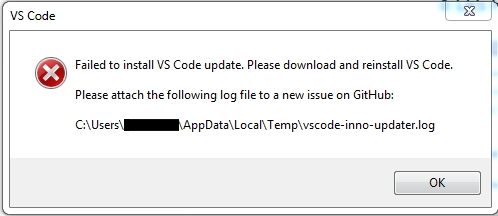
The differences between the old problem:
There is no more the little window telling that VSCode is updating (see below)
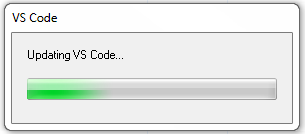
The log file is different:
Feb 13 13:58:59.711 INFO Starting: C:\Program Files\Microsoft VS Code Insiders\Code - Insiders.exe, true
Feb 13 13:58:59.712 INFO Checking for running Code - Insiders.exe processes... (attempt 1)
Feb 13 13:58:59.712 INFO Code - Insiders.exe is running, wait a bit
Feb 13 13:59:00.210 INFO Checking for running Code - Insiders.exe processes... (attempt 2)
Feb 13 13:59:00.212 INFO Code - Insiders.exe is running, wait a bit
Feb 13 13:59:00.721 INFO Checking for running Code - Insiders.exe processes... (attempt 3)
Feb 13 13:59:00.721 INFO Code - Insiders.exe is running, wait a bit
Feb 13 13:59:01.248 INFO Checking for running Code - Insiders.exe processes... (attempt 4)
Feb 13 13:59:01.248 INFO Code - Insiders.exe is running, wait a bit
Feb 13 13:59:01.746 INFO Checking for running Code - Insiders.exe processes... (attempt 5)
Feb 13 13:59:01.749 INFO Code - Insiders.exe is running, wait a bit
Feb 13 13:59:02.292 INFO Checking for running Code - Insiders.exe processes... (attempt 6)
Feb 13 13:59:02.292 INFO Code - Insiders.exe is running, wait a bit
Feb 13 13:59:02.807 INFO Checking for running Code - Insiders.exe processes... (attempt 7)
Feb 13 13:59:02.807 INFO Code - Insiders.exe is running, wait a bit
Feb 13 13:59:03.326 INFO Checking for running Code - Insiders.exe processes... (attempt 8)
Feb 13 13:59:03.326 INFO Code - Insiders.exe is running, wait a bit
Feb 13 13:59:03.840 INFO Checking for running Code - Insiders.exe processes... (attempt 9)
Feb 13 13:59:03.840 INFO Code - Insiders.exe is running, wait a bit
Feb 13 13:59:04.341 INFO Checking for running Code - Insiders.exe processes... (attempt 10)
Feb 13 13:59:04.341 INFO Code - Insiders.exe is running, wait a bit
Feb 13 13:59:04.855 INFO Checking for running Code - Insiders.exe processes... (attempt 11)
Feb 13 13:59:04.855 INFO Code - Insiders.exe is running, wait a bit
Feb 13 13:59:05.370 INFO Checking for running Code - Insiders.exe processes... (attempt 12)
Feb 13 13:59:05.370 INFO Code - Insiders.exe is running, wait a bit
Feb 13 13:59:05.885 INFO Checking for running Code - Insiders.exe processes... (attempt 13)
Feb 13 13:59:05.885 INFO Code - Insiders.exe is running, wait a bit
Feb 13 13:59:06.400 INFO Checking for running Code - Insiders.exe processes... (attempt 14)
Feb 13 13:59:06.400 INFO Code - Insiders.exe is running, wait a bit
Feb 13 13:59:06.906 INFO Checking for running Code - Insiders.exe processes... (attempt 15)
Feb 13 13:59:06.906 INFO Code - Insiders.exe is running, wait a bit
Feb 13 13:59:07.407 INFO Checking for running Code - Insiders.exe processes... (attempt 16)
Feb 13 13:59:07.407 INFO Code - Insiders.exe is running, wait a bit
Feb 13 13:59:07.908 INFO Checking for running Code - Insiders.exe processes... (attempt 17)
Feb 13 13:59:07.908 INFO Code - Insiders.exe is running, wait a bit
Feb 13 13:59:08.422 INFO Checking for running Code - Insiders.exe processes... (attempt 18)
Feb 13 13:59:08.422 INFO Code - Insiders.exe is running, wait a bit
Feb 13 13:59:08.924 INFO Checking for running Code - Insiders.exe processes... (attempt 19)
Feb 13 13:59:08.924 INFO Code - Insiders.exe is running, wait a bit
Feb 13 13:59:09.438 INFO Checking for running Code - Insiders.exe processes... (attempt 20)
Feb 13 13:59:09.438 INFO Gave up waiting for Code - Insiders.exe to exit
Feb 13 13:59:28.752 ERRO Failed to get process file name
EDIT: I'm still on the same architcture.
Windows 7 Pro x86 (6.1.7601 Service Pack 1 version 7601)
Beafantles
on 13 Feb 2018
@joaomoreno - Windows 10 / Version 1703 / OS Build 15063.850
pbriggeman
on 13 Feb 2018
@Beafantles Easy, I still haven't pushed the fix.
joaomoreno
on 13 Feb 2018
Oh... Indeed! 👀 Sorry about this, I thought changes were effective since I didn't get the same errors. I wanted to provide a little more information not putting any pressure on this. Thanks for your involvment in this issue, I'll be more careful next time! :)
Beafantles
on 13 Feb 2018
OK pushed a fix to master.
Guys, tomorrow there'll be a new version. The background update step to get that version, from the current one, will still fail. But background updates should work successfully from that build onwards. So, make sure you get that build from tomorrow and try to get a background update Thursday or Friday. Let me know how that goes.
joaomoreno
on 13 Feb 2018
@pbriggeman Your issue is separate. Let's move our discussion over here: #43612
joaomoreno
on 13 Feb 2018
@joaomoreno Nothing failed, it has simply successfully updated. :+1:
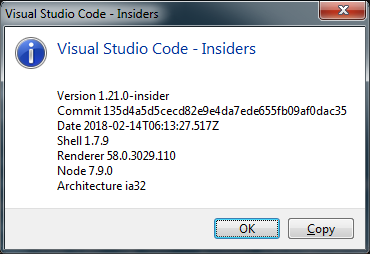
thorn0
on 14 Feb 2018
@joaomoreno Alright, I uninstalled VScode yesterday, reinstalled it and today, the background update worked, just as you said.
Thanks once again! \o/
Beafantles
on 15 Feb 2018
Marking as verified. I use background update on Windows and it doesn't fail for me.
 dbaeumer
on 2 Mar 2018
dbaeumer
on 2 Mar 2018
Related issues
 sijad
·
3Comments
sijad
·
3Comments
 v-pavanp
·
3Comments
v-pavanp
·
3Comments
 VitorLuizC
·
3Comments
VitorLuizC
·
3Comments
 philipgiuliani
·
3Comments
philipgiuliani
·
3Comments
 NikosEfthias
·
3Comments
NikosEfthias
·
3Comments