Vscode: Right-click not showing "open with VS Code"
- VSCode Version: Code 1.19.3 (7c4205b5c6e52a53b81c69d2b2dc8a627abaa0ba, 2018-01-25T10:36:43.673Z)
- OS Version: Windows_NT ia32 10.0.16299
- Extensions: none
Steps to Reproduce:
- Install VSCode (64-bit or 32-bit, both have same issue)
- Ensure the relevant items are checked in the install dialogue
- Right-click
Expected result:
- Context menu should show "Open with Code"
Actual result:
- The item isn't there
I've also tried suggested registry settings without luck (tried both "Program Files" and "Program Files (x86)":
Windows Registry Editor Version 5.00
; Open files
[HKEY_LOCAL_MACHINE\*\shell\Open with VS Code]
@="Edit with VS Code"
"Icon"="C:\\Program Files (x86)\\Microsoft VS Code\\Code.exe,0"
[HKEY_LOCAL_MACHINE\*\shell\Open with VS Code\command]
@="\"C:\\Program Files (x86)\\Microsoft VS Code\\Code.exe\" \"%1\""
; This will make it appear when you right click ON a folder
; The "Icon" line can be removed if you don't want the icon to appear
[HKEY_LOCAL_MACHINE\Directory\shell\vscode]
@="Open Folder as VS Code Project"
"Icon"="\"C:\\Program Files (x86)\\Microsoft VS Code\\Code.exe\",0"
[HKEY_LOCAL_MACHINE\Directory\shell\vscode\command]
@="\"C:\\Program Files (x86)\\Microsoft VS Code\\Code.exe\" \"%1\""
; This will make it appear when you right click INSIDE a folder
; The "Icon" line can be removed if you don't want the icon to appear
[HKEY_LOCAL_MACHINE\Directory\Background\shell\vscode]
@="Open Folder as VS Code Project"
"Icon"="\"C:\\Program Files (x86)\\Microsoft VS Code\\Code.exe\",0"
[HKEY_LOCAL_MACHINE\Directory\Background\shell\vscode\command]
@="\"C:\\Program Files (x86)\\Microsoft VS Code\\Code.exe\" \"%V\""
 simonl65
All 20 comments
I know it sounds funny... but did you restart your machine?
 joaomoreno
on 5 Feb 2018
joaomoreno
on 5 Feb 2018
Several times! Wierdly the "Open with Code" does appear on my work machine. Could this happen if I didn't check the appropriate boxes on the original install (I don't remember if I did or not)?
BTW: I even tried un-install/re-install of both 64-bit and 32-bit versions.
simonl65
on 5 Feb 2018
These are the registry keys we use:
HKCU\SOFTWARE\Classes\*\shell\VSCodeHKCU\SOFTWARE\Classes\directory\shell\VSCodeHKCU\SOFTWARE\Classes\directory\background\shell\VSCodeHKCU\SOFTWARE\Classes\Drive\shell\VSCode
Do you have them?
joaomoreno
on 7 Feb 2018
Ah, I tried both HKCR and HKLM but not HKCU - I'll give that a try when I get home tonight and let you know if it works.
Thanks for your input.
simonl65
on 8 Feb 2018
The setup has a checkbox to set the Open with VS Code menu item. Didn't you check that?
joaomoreno
on 8 Feb 2018
I did. It works if you're logged-in as an admin, but not otherwise.
simonl65
on 8 Feb 2018
Oh I see. Yeah that's pretty rough. We need to clean this up.
joaomoreno
on 8 Feb 2018
Thanks. I'll wait for the fix to land 👍
simonl65
on 8 Feb 2018
Hmmm, I looked at the registry at home (after uninstalling and re-installing v1.20.0) and I do have all the keys you mentioned above, but still no right-mouse-click options!
simonl65
on 9 Feb 2018
Any update on this? I just did a clean install of 1.22.1 (uninstall 1.21, restart, install 1.22.1) and I still don't have the menu items :-(
simonl65
on 9 Apr 2018
Not sure if this will help but I've just realised that even after: complete uninstall, remove anything that has "VS Code" or "Code.exe" from registry, reboot, fresh install, when I start VSCode I still see all my settings / extensions / open files - is that expected?
simonl65
on 9 Apr 2018
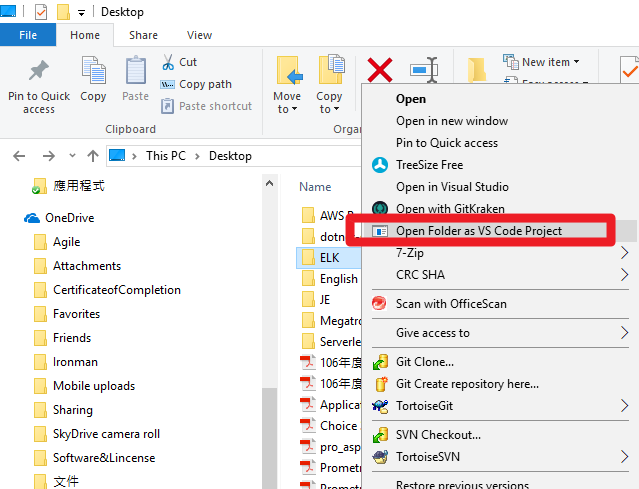
Hi this script is works for me. But I saw the icon of VSCode is missing.
Does anyone know how to fix the issue for missing icon on menu context for VSCode? Thanks for your help!
 blackie1019
on 11 May 2018
blackie1019
on 11 May 2018
Okay, I got the point why my icon is missing. The root cause is the incorrect file path for VSCode that I register into Windows Registry. It's my mistake only. This script is correct and works.
blackie1019
on 11 May 2018
Can't vscode add a button to do this ? it would be good for portable version.
 eromoe
on 16 Jul 2018
eromoe
on 16 Jul 2018
This is still not working. I am running version 1.26.1
 jmino
on 17 Aug 2018
jmino
on 17 Aug 2018
During the latest update (to 1.26.1), I followed the recommendation to remove the system wide install, and run with the User install. I did not have the windows explorer context menu items anymore, and also did not have the registry settings mentioned above.
Today, I re-ran the user installer, and everything looks good again - without needing to reboot.
I'm running Windows 10 1703 (OS Build 15063.1266) if that helps.
 testworksau
on 23 Aug 2018
testworksau
on 23 Aug 2018
Did the same thing as @testworksau and got the same result. Context item gone for files and folders.

 damadei
on 23 Aug 2018
damadei
on 23 Aug 2018
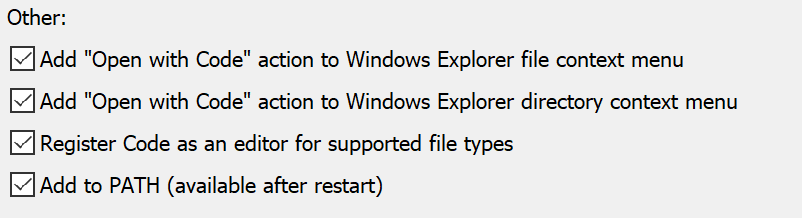
Just reinstalled it and saw it was my mistake for not seeing the options that are now present in the installer:
damadei
on 23 Aug 2018
Reinstalling did the trick! I don't recall the options as shown in @damadei screenshot when I initially installed via the VSCodeUserSetup. Reinstalling did it though. Thank you all!
jmino
on 23 Aug 2018
Thanks guys - this works for me 🥇
simonl65
on 27 Aug 2018
Related issues
 chrisdias
·
3Comments
chrisdias
·
3Comments
 VitorLuizC
·
3Comments
VitorLuizC
·
3Comments
 ryan-wong
·
3Comments
ryan-wong
·
3Comments
 biij5698
·
3Comments
biij5698
·
3Comments
 sijad
·
3Comments
sijad
·
3Comments
Most helpful comment
During the latest update (to
1.26.1), I followed the recommendation to remove the system wide install, and run with the User install. I did not have the windows explorer context menu items anymore, and also did not have the registry settings mentioned above.Today, I re-ran the user installer, and everything looks good again - without needing to reboot.
I'm running Windows 10 1703 (OS Build 15063.1266) if that helps.