Vscode: Simplify --goto to open file at specific line and column without --goto
At the moment files can be opened at a specific line and column like this:
code --goto src/app/pages/main.tsx:24:9
Why not omit --goto like Atom does it:
atom src/app/pages/main.tsx:24:9
See: https://code.visualstudio.com/docs/getstarted/tips-and-tricks#_command-line
Related tickets:
Simplify --goto's usage
Opening a file from command line with line number (--goto) is broken
 googol7
All 15 comments
@googol7 simple, ":" is a valid character in file names, so how would you suggest to then open a file like "foo.txt:3:3"?
 bpasero
on 19 Jan 2018
bpasero
on 19 Jan 2018
Lets say we run this command: code foo.txt:4:3:2
The algorithm could be like this:
Analyze the filename from the right side and look for colons :
- If
foo.txt:4:3:2exists open it - no line and column were provided. - If
foo.txt:4:3:2doesn’t exist butfoo.txt:4:3does exist then open it and jump to line 2. - If
foo.txt:4:3:2doesn’t exist butfoo.txt:4does exist then open it and jump to line 3 and character 2. - If
foo.txt:4:3:2doesn’t exist butfoo.txtdoes exist then open it and jump to line 4 and character 3. Ignore the:2 - If
foo.txtdoesn’t exist then create the filefoo.txt:4:3:2
Further testcase:
foo:4:3:2.txt:10:9 ... only consider :10:9 as a line : column as no other : or integer follows.
googol7
on 19 Jan 2018
@googol7 you can run Code with a path that does NOT exist on disk to actually create it. Keep that in mind.
bpasero
on 19 Jan 2018
@bpasero Let’s say the file foo.txt:4 exists and the user runs
code foo.txt:4:3:2
I'd prefer VS Code to open the existing file foo.txt:4 and jump to line 3, character 2 rather then creating a new file 'foo.txt:4:3:2`
googol7
on 19 Jan 2018
Hello,
I am not sure about opening a new issue, but it is possible create a link to a line? for example:
_file:///home/perry/harbour-src/contrib/hbunix/chdir.c:48_ try to open chdir.c:48, instead of open chdir.c and go to line 48... Is it possible do the second case?
 APerricone
on 17 Mar 2018
APerricone
on 17 Mar 2018
Quick workaround: create a shell alias, code -g also works fine without a line number. So I have:
alias code="code -g"
so, something like code ./home/josh/file.c opens fine and code ./home/josh/file.c:30 opens the file and highlights line 30
 josh-ua
on 15 Jan 2019
josh-ua
on 15 Jan 2019
Would be great if the vscode: protocol could support line numbers as well. This would make it easy for frameworks to link out to the exact line in VS code which triggered an error.
 iloveitaly
on 8 Aug 2019
iloveitaly
on 8 Aug 2019
Supporting the VIM syntax would be good, as VIM and Gedit already have this:
[+LINE[:COLUMN]]
e.g. code blah.py +2
 stuaxo
on 28 Aug 2019
stuaxo
on 28 Aug 2019
This feature request is now a candidate for our backlog. The community has 60 days to upvote the issue. If it receives 20 upvotes we will move it to our backlog. If not, we will close it. To learn more about how we handle feature requests, please see our documentation.
Happy Coding!
![vscodebot[bot] picture](https://avatars2.githubusercontent.com/in/2406?v=4&s=40) vscodebot[bot]
on 22 Jan 2020
vscodebot[bot]
on 22 Jan 2020
This feature request has not yet received the 20 community upvotes it takes to make to our backlog. 10 days to go. To learn more about how we handle feature requests, please see our documentation.
Happy Coding
vscodebot[bot]
on 12 Mar 2020
Hello,
I am not sure about opening a new issue, but it is possible create a link to a line? for example:
_file:///home/perry/harbour-src/contrib/hbunix/chdir.c:48_ try to open chdir.c:48, instead of open chdir.c and go to line 48... Is it possible do the second case?
YES!!! this would be really helpfull. We generate some .ts files from java and it would be nice to have links to original fields in ts.
 minomikula
on 18 Mar 2020
minomikula
on 18 Mar 2020
@minomikula encourage anyone that would find this useful to vote for this, we are only short 3 votes.
stuaxo
on 18 Mar 2020
:slightly_smiling_face: This feature request received a sufficient number of community upvotes and we moved it to our backlog. To learn more about how we handle feature requests, please see our documentation.
Happy Coding!
vscodebot[bot]
on 18 Mar 2020
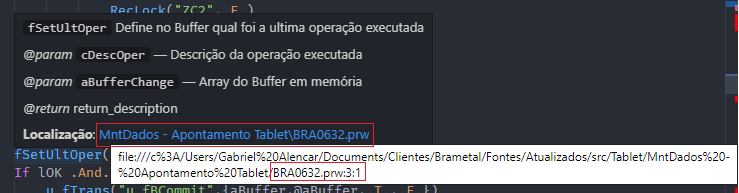
Hello, I have an extension that provides a hover documentation with a link to the file. And many users request that the link go at the documentation in question.
As the link uses Markdown notation, simply calling the file via URI "file://" recognizing the lines and columns with ":", would already meet this need.
Example:
 AlencarGabriel
on 7 May 2020
AlencarGabriel
on 7 May 2020
We closed this issue because we don't plan to address it in the foreseeable future. You can find more detailed information about our decision-making process here. If you disagree and feel that this issue is crucial: We are happy to listen and to reconsider.
If you wonder what we are up to, please see our roadmap and issue reporting guidelines.
Thanks for your understanding and happy coding!
 vscode-triage-bot
on 8 Nov 2020
vscode-triage-bot
on 8 Nov 2020
Related issues
 stoffeastrom
·
380Comments
stoffeastrom
·
380Comments
 niagr
·
246Comments
niagr
·
246Comments
 ghost
·
234Comments
ghost
·
234Comments
 TurkeyMan
·
411Comments
TurkeyMan
·
411Comments
 Tyriar
·
187Comments
Tyriar
·
187Comments
Most helpful comment
@bpasero Let’s say the file
foo.txt:4exists and the user runscode foo.txt:4:3:2I'd prefer VS Code to open the existing file
foo.txt:4and jump to line 3, character 2 rather then creating a new file 'foo.txt:4:3:2`