Vscode: editor.autoClosingBrackets does not affect python f"", r"", b"" strings autocompletion
Version 1.19.1
Commit 0759f77bb8d86658bc935a10a64f6182c5a1eeba
Date 2017-12-19T09:41:01.414Z
Shell 1.7.9
Renderer 58.0.3029.110
Node 7.9.0
Architecture x64
When editor.autoClosingBrackets set to false only simple " and ' stop autocompletes, but f", b", r" and combinations are still autocompletes. Maybe #35636 is the reason, I'm not familiar with codebase.
 pohmelie
All 2 comments
Since https://github.com/Microsoft/vscode-python/issues/508 redirected here, I'd like to rephrase what the problem is in that issue, which is related to this but not the same:
Problem:
When editor.autoClosingBrackets leaves as true, VS Code will close quotes for things like var = f'abc' but not when it is a argument of a function, such as foo(f'bac').
Now, I want to report yet another related bug: there is also a problem when you end your f string with }.
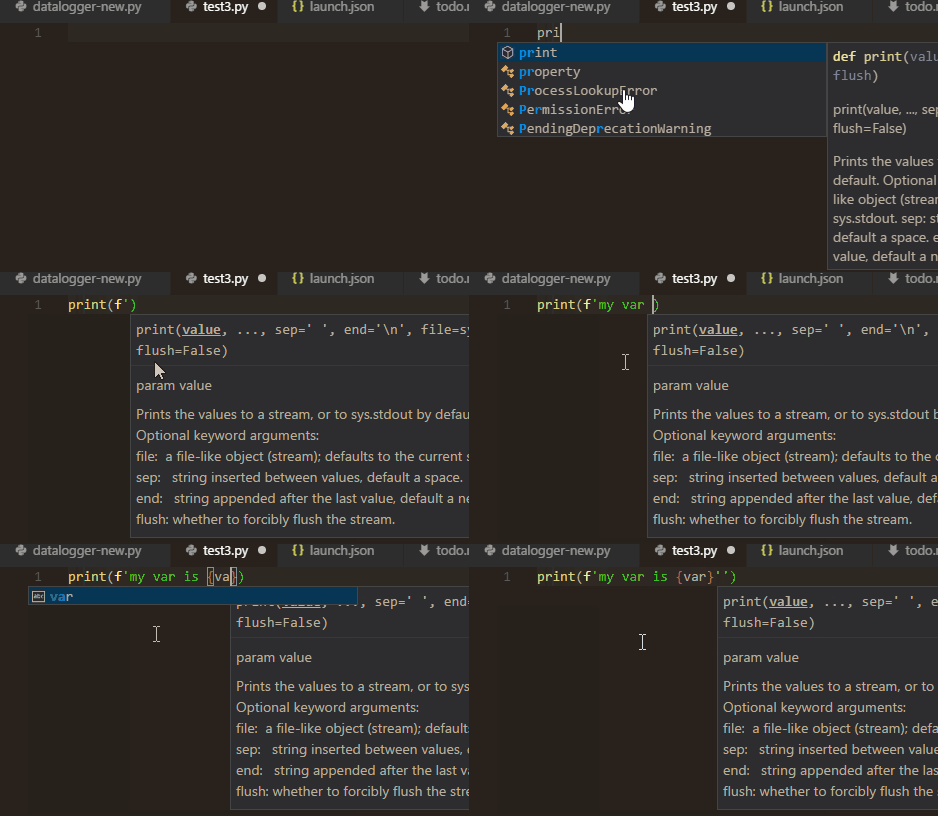
For example, try to type
print(f'my var is {var}')
It will not only not auto close the quote when you typing f' in the parentheses (mentioned above), it also will place two quotes when you type ' between } and ), which IMO is more annoying.
See the animation below.
 fireattack
on 9 May 2018
fireattack
on 9 May 2018
 rebornix
on 6 Sep 2018
rebornix
on 6 Sep 2018
Related issues
 curtw
·
3Comments
curtw
·
3Comments
 NikosEfthias
·
3Comments
NikosEfthias
·
3Comments
 mrkiley
·
3Comments
mrkiley
·
3Comments
 trstringer
·
3Comments
trstringer
·
3Comments
 chrisdias
·
3Comments
chrisdias
·
3Comments
Most helpful comment
Since https://github.com/Microsoft/vscode-python/issues/508 redirected here, I'd like to rephrase what the problem is in that issue, which is related to this but not the same:
Problem:
When
editor.autoClosingBracketsleaves astrue, VS Code will close quotes for things likevar = f'abc'but not when it is a argument of a function, such asfoo(f'bac').Now, I want to report yet another related bug: there is also a problem when you end your f string with
}.For example, try to type
It will not only not auto close the quote when you typing
f'in the parentheses (mentioned above), it also will place two quotes when you type'between}and), which IMO is more annoying.See the animation below.