Vscode: VSCode causes my screen flicker when running on 4k external monitor
- VSCode Version: 1.19.1
- OS Version: macOS 10.13.2
Steps to Reproduce:
- Start VS Code, keep the window on focus
- Copy and paste a large number of texts
- The whole screen will flicker (not only VS Code)
Does this issue occur when all extensions are disabled?: Yes
Etc:
- Occurs when all plugins are disabled
- Does not occur when window is not in focus
- Occurs on external 4k display at 3360x1890
"editor.disableTranslate3d": truenot work
 blastmann
All 23 comments
https://www.youtube.com/watch?v=GkjwA79ebW4
FYI, the video above shows the details about this issue.
blastmann
on 8 Jan 2018
Does it reproduce if you run "code --disable-gpu"?
 bpasero
on 8 Jan 2018
bpasero
on 8 Jan 2018
No. It's working now. Thanks. @bpasero
blastmann
on 8 Jan 2018
I have a similar problem that happens only on a particular Azure VM (no high-res, only 2 HD monitors). The problem happens also in the latest Insider build. I have tried code --disable-gpu but no luck. For some reason, I do not have the setting editor.disableTranslate3d...
 bergmeister
on 15 Feb 2018
bergmeister
on 15 Feb 2018
Also have this problem :|
 drewlustro
on 27 Mar 2018
drewlustro
on 27 Mar 2018
The problem could be solved at the end and it turned out to be a bug in the latest Citrix Virtual host software (I am using a thin client to connect to my dev VM in Azure)
bergmeister
on 27 Mar 2018
I've been getting this as well for as long as I've had my 4k monitor (about 1 year) and have just dealt with it. The whole screen flickers to a strange black screen with green lines whenever i switch tabs inside vscode, which is pretty frequent so it's definitely annoying.
Starting with the --disable-gpu flag resolves the screen flickering, but the app itself still flickers black momentarily. Still an upgrade, I guess...
I'm on macOS 10.13.4 and VSCode 1.22.2.
It seems fine on my 1080p monitor (no scaling) and on Windows (any monitor/scaling).
 dylantf
on 18 Apr 2018
dylantf
on 18 Apr 2018
I have a similar issue, but the flickering is much more severe. I run on
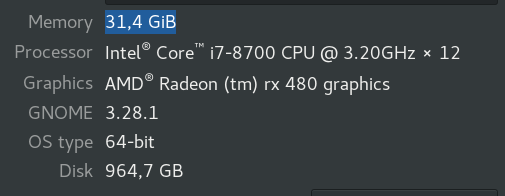
and I my flickering is recorded here, sorry about my phone camera being out of focus so much:
https://www.youtube.com/watch?v=peHqRBlXUM4
atom doesn't have any issues whatsoever even when in 4k. When I make the window smaller, flickering goes away, but that's not a solution. I tried running with code --disable-gpu but that only makes flickering faster-it does help a bit-I don't get whole blocks of content disappearing. I still get the flickering with it.
EDIT: code --ignore-gpu-blacklist fixed it! Finally! I was beginning to think I need to go back to Atom.
 capaj
on 2 May 2018
capaj
on 2 May 2018
Version 1.23.0 (1.23.0)
OS Version: macOS 10.12.6
HI,
I am little bit of a noob.
I am in VS Code, where/how do I enter code --ignore-gpu-blacklist ?
Sorry to sound out of touch.
 unapieer
on 9 May 2018
unapieer
on 9 May 2018
@unapieer On the command line, the command code opens VSCode because the binary is called code, therefore it is an argument on how to open/start VSCode in the first place.
bergmeister
on 9 May 2018
it would be really nice if that flag was enabled by default so that we wouldn't have to pass it every time.
capaj
on 9 May 2018
Without being a VSCode expert, I would say, it does not make sense to disadvantage most of the users with not using the GPU only to account for a few people. A user setting would make more sense IMHO.
bergmeister
on 10 May 2018
I'm running into the same issue. I'm not sure what changed, but it just started happening randomly on 10.13.4 and 5 with VSCode 1.23.1 on the 3008x1692 scaled setting on Dell P2715q (4k) monitor driven by my 2015 Macbook Pro (with AMD GPU).
 kavehv
on 22 May 2018
kavehv
on 22 May 2018
--ignore-gpu-blacklist fixes it here. It doesn't show in the CLI help text, but it works. The flashing was intolerable, very happy to have it solved.
( --disable-gpu didn't help (it _does_ appear in the help text) ).
I'm on macOS 10.13.2
 johnelm
on 22 May 2018
johnelm
on 22 May 2018
😭 Still happens w/ code --ignore-gpu-blacklist
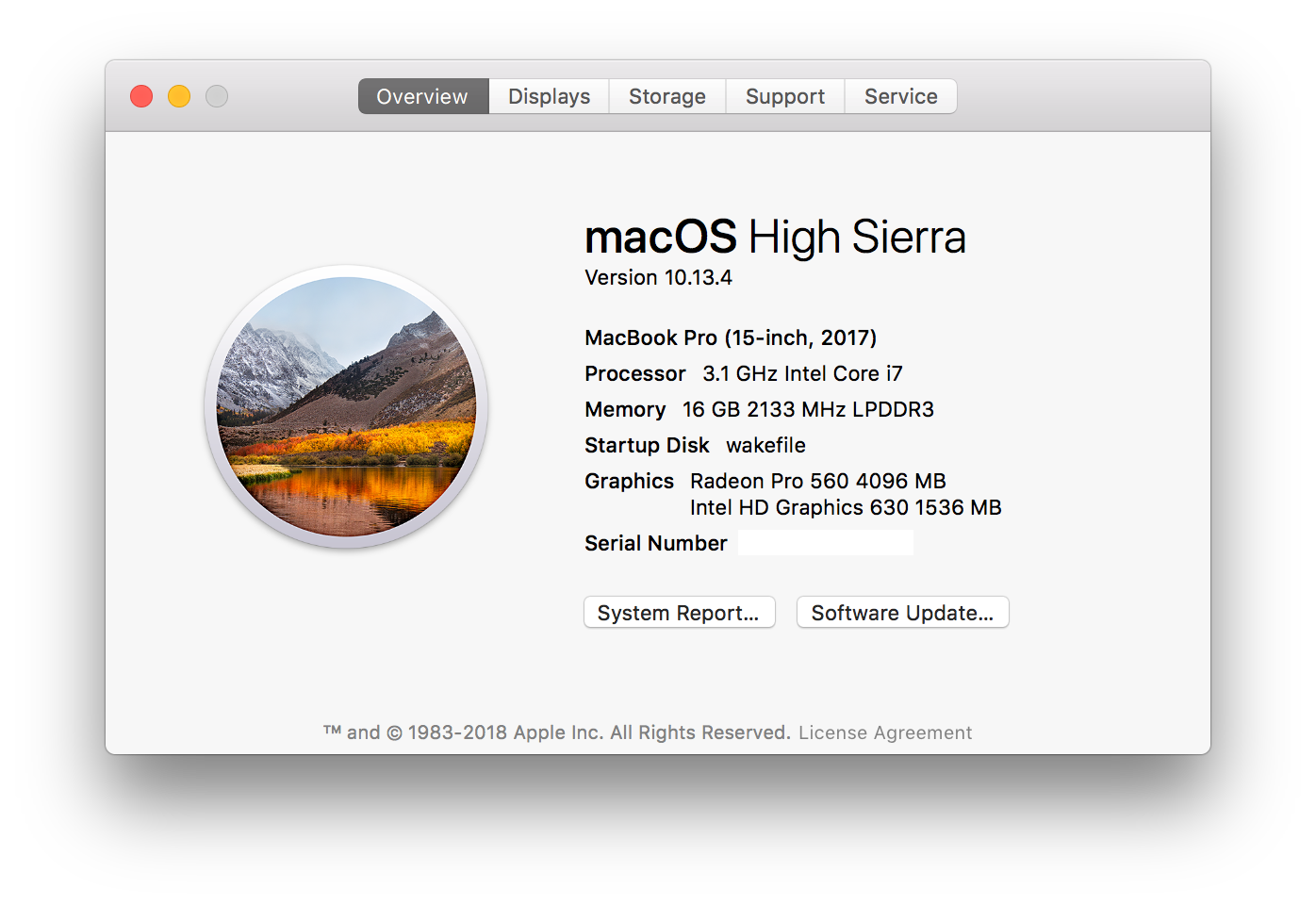
drewlustro
on 22 May 2018
Mine just started doing it too... Mac 10.13.3 and 1.23.1 VSC
EDIT: Only way to solve is to set scaling on my external monitor to none. Scaled it flickers.
 JaredSartin
on 22 May 2018
JaredSartin
on 22 May 2018
oops, I should have been specific about my OS level - I'm at 10.13.2 ( and --ignore-gpu-blacklist is solving the issue for me ). I've updated my earlier post to include this.
johnelm
on 22 May 2018
Running code . --high-dpi-support=1 seems to fix it as per #45492
JaredSartin
on 23 May 2018
Just took the time to download VSCode Insiders Version 1.24.0-insider and tried the following:
| Action | CLI | Result |
| --- | --- | --- |
| Launch normally | code-insiders | ❌ flickers |
| DPI flag | code-insiders --hi-dpi-support=1 | ❌ flickers |
| GPU blacklist flag | code-insiders --disable-gpu-blacklist | ❌ flickers |
| Open laptop clamshell
in frustration; only use 4K monitor | code-insiders | ✅ FUCKING WORKS |
macOS 10.13.4 - Radeon Pro 560 4GB
drewlustro
on 23 May 2018
code-insiders works here as well
macOS 10.12.6 - Intel HD 530
 tryangul
on 24 May 2018
tryangul
on 24 May 2018
FYI There are also bleeding edge "exploration" builds available - these use Electron 2.0 and a newer Chrome: #45542
I'm now using the exploration build together with --disable-gpu-blacklist for a flicker and artifact free experience.
 vgeddes
on 31 May 2018
vgeddes
on 31 May 2018
@blastmann (or anyone) do you still see this in our insiders release? You can give our preview releases a try from: https://code.visualstudio.com/insiders/
bpasero
on 17 Aug 2018
@bpasero The newest insider release seems working good now. I can't reproduce this issue.
blastmann
on 19 Aug 2018
Related issues
 sijad
·
3Comments
sijad
·
3Comments
 villiv
·
3Comments
villiv
·
3Comments
 curtw
·
3Comments
curtw
·
3Comments
 v-pavanp
·
3Comments
v-pavanp
·
3Comments
 NikosEfthias
·
3Comments
NikosEfthias
·
3Comments
Most helpful comment
Just took the time to download VSCode Insiders
Version 1.24.0-insiderand tried the following:| Action | CLI | Result |
| --- | --- | --- |
| Launch normally |
code-insiders| ❌ flickers || DPI flag |
code-insiders --hi-dpi-support=1| ❌ flickers || GPU blacklist flag |
code-insiders --disable-gpu-blacklist| ❌ flickers || Open laptop clamshell
in frustration; only use 4K monitor |
code-insiders| ✅ FUCKING WORKS |macOS 10.13.4 - Radeon Pro 560 4GB