Vscode: SCM: Restore commit message on reload/reopen
Sometimes I'm half-way done typing a commit message and I end up doing something else, then for some reason or other reload/reopen the editor, and what I typed is gone. Obviously not the end of the world, but even the search keeps its state when reloading/reopening. I think the extension search is the only other thing doesn't.
 AlansCodeLog
All 20 comments
Hello!
I'd like to work on this issue. Has anyone already started work on this?
 ryanolsonx
on 8 Jan 2018
ryanolsonx
on 8 Jan 2018
Opened a pull request. Saving/restoring message using storage service.
 niklabh
on 9 Jan 2018
niklabh
on 9 Jan 2018
@niklabh So fast! ⚡️
 joaomoreno
on 9 Jan 2018
joaomoreno
on 9 Jan 2018
Hey,
I would like to point out that for me the commit message is lost after just switching to a different view (e.g. to Files and back to Source Control), and this seems to happen only if there are multiple source control providers (or folders open?).
 ambrop72
on 30 Jan 2018
ambrop72
on 30 Jan 2018
Any update on this? I'm frustrated by this. Data loss is NEVER acceptable. I see there is already a crude PR for this. Hope someone can refine it so that it can be merged. (Sorry, I can't do TS yet.)
I think the extension search is the only other thing doesn't.
So apparently the Extension search keeps the state, so the above quoted statement is no longer true. If that was recently fixed, I think this should be too.
PS: I have multiple Git repos open in the Source Control view too.
 ADTC
on 22 Feb 2018
ADTC
on 22 Feb 2018
Unfortunately, commit is lost even when staying in the editor, but switching to another pane (like to quickly do find-in-files before committing). This is quite frustrating.
 RReverser
on 9 Jul 2018
RReverser
on 9 Jul 2018
So apparently the Extension search keeps the state, so the above quoted statement is no longer true. If that was recently fixed, I think this should be too.
You sure? Because it doesn't for me.
@RReverser I'm on the latest stable version and everything is working fine for me. That sounds like a separate bug/regression.
Extensions and Source Control always lose what I wrote on reload and only on reload as I think was normal behavior, hence why this was a feature request (@joaomoreno not sure why that was changed?). I also have multiple git repos open sometimes and at least with this release, they keep their state just fine when switching between them or tabs.
AlansCodeLog
on 9 Jul 2018
@AlansCodeLog maybe a regression as I've started noticing this relatively recently but reproduces quite consistently for me.
RReverser
on 10 Jul 2018
Hey guys, I'm looking at this again. I can't really reproduce what you guys are seeing.
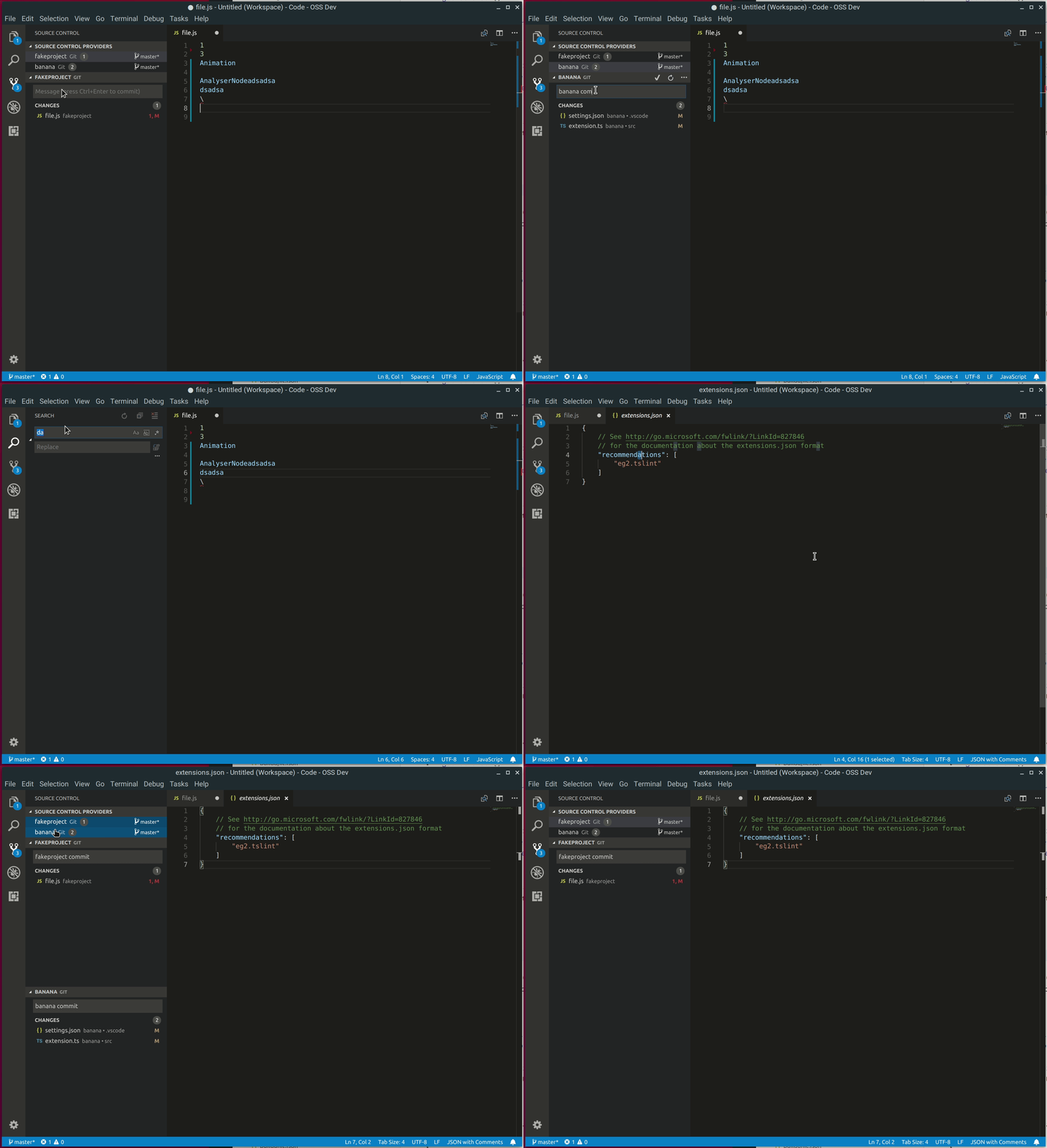
The only issue I see here is the original one: the commit message doesn't get restored on window reload.
Can you confirm?
joaomoreno
on 10 Jul 2018
Can you confirm?
Ok, looks like I can reproduce the commit message being lost on one repo but not the other. The only important difference between them I can think of is that the one where commit message is lost has this warning at the start:
The '...' repository has 39 submodules which won't be opened automatically. You can still open each one individually by opening a file within.
Not sure if it can be related, but maybe?
RReverser
on 10 Jul 2018
I created an empty project to reproduce, and it's even simpler: apparently even if I have a single submodule, the commit message keeps getting lost when switching panes, if I don't, then it's preserved fine.
RReverser
on 10 Jul 2018
@RReverser Nop, still works for me. Do you have any commit template message defined?
joaomoreno
on 10 Jul 2018
@joaomoreno Nope. This is getting weird...
RReverser
on 11 Jul 2018
Can you reproduce with --disable-extensions?
joaomoreno
on 11 Jul 2018
@joaomoreno Ummm... I couldn't reproduce without extensions, then restarted Code with extensions, and now for the first time in a while can't reproduce it even with extensions on either repo. Either Code has updated in the meanwhile or it was some weird state issue, but seems to work now.
RReverser
on 11 Jul 2018
Anybody else can confirm?
joaomoreno
on 12 Jul 2018
Can I ask why this was closed?
AlansCodeLog
on 14 Sep 2018
Anybody else can confirm?
@AlansCodeLog I received no reply since July 12. Since I can't reproduce and it works for me, I closed it. Can you still reproduce this? Can you reproduce with --disable-extensions?
joaomoreno
on 17 Sep 2018
Maybe I misunderstood, but I thought that your "can confirm" was regarding RReverser's issue, which was not the original issue. As I commented above (Jul 9), I could not replicate that. My issue I can still replicate (without extensions as well).
To be clear, to replicate: Type something in source control -> Reload Window -> Doesn't remember what you typed.
AlansCodeLog
on 17 Sep 2018
You're absolutely right. Somehow along the way I mistake the issue for switching viewlets.
joaomoreno
on 18 Sep 2018
Related issues
 sirius1024
·
3Comments
sirius1024
·
3Comments
 sijad
·
3Comments
sijad
·
3Comments
 NikosEfthias
·
3Comments
NikosEfthias
·
3Comments
 vsccarl
·
3Comments
vsccarl
·
3Comments
 VitorLuizC
·
3Comments
VitorLuizC
·
3Comments
Most helpful comment
Opened a pull request. Saving/restoring message using storage service.
https://github.com/Microsoft/vscode/pull/41341