Vscode: files.watcherExclude setting is not working in multi-root workspace
Initial problem is that npm install takes twice as long to install dependencies when vscode is running. I've figured out that this is because of file watching for node_modules folder so I added it to files.watcherExclude. I uses following combinations (but non of them seems to be working):
"files.watcherExclude": {
        "**/node_modules": true,
        "**/node_modules/**": true,
        "**/node_modules/*/**": true
    }
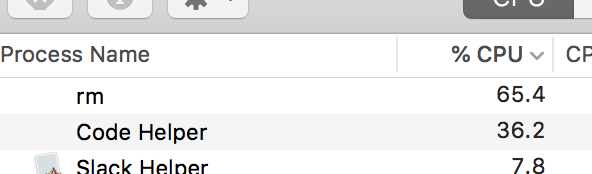
During rm -rf node_modules I notice that watcherService is having some load:

- VSCode Version: 1.19
- OS Version: Windows 10
Steps to Reproduce:
- Add any folder to
watcherExcludelist - Perform any operation on said folder (i.e. delete it)
Reproduces without extensions: Yes
 dmnrmr
All 56 comments
@dmnrmr are you inside a multi-folder workspace or single folder?
 bpasero
on 28 Dec 2017
bpasero
on 28 Dec 2017
A multi-folder workspace.
dmnrmr
on 28 Dec 2017
I'm running into #3998. It suggests manually excluding large folders as a workaround.
The only "large folder" in my project is node_modules/. It should be excluded by default, but I try to manually exclude it anyway -- and it won't work.
The only exclusion pattern that works around #3998 for me is "**". How do I properly exclude a folder in a project? :scream:
PS Single-folder workspace.
 lolmaus
on 26 Feb 2018
lolmaus
on 26 Feb 2018
Sorry, I've realized I have a huge tmp/ folder in my project. This helped:
    "files.watcherExclude": {
        "**/.git/objects/**": true,
        "**/node_modules/**": true,
        "**/tmp/**": true
    }
Facing the same issue with a .tox folder for a python project. No way to make the exclude pattern work.
 languitar
on 8 Jun 2018
languitar
on 8 Jun 2018
I'm observing this in both a single and double folder workspace and can reproduce it by trashing my node_modules or dist or tmp folders (all containing an enormous number of files)
My attempted settings are as follows:
"files.watcherExclude": {
    "**/.git/objects/**": true,
    "**/.git/subtree-cache/**": true,
    "**/node_modules/**": true,
    "**/tmp/**": true,
    "**/dist/**": true
  }
 jmonster
on 26 Jun 2018
jmonster
on 26 Jun 2018
@bpasero Facing the same issue. How to successfully exclude node_modules from watch list?
 anishmittal2020
on 25 Aug 2018
anishmittal2020
on 25 Aug 2018
If anyone is up for fixing this, here is a good overview of which files that needs to be debugged: https://github.com/Microsoft/vscode/search?q=%22files.watcherExclude%22&unscoped_q=%22files.watcherExclude%22
The glob patterns seems to be the culprit - e.i. they do not match the correct paths.
 dotnetCarpenter
on 26 Aug 2018
dotnetCarpenter
on 26 Aug 2018
Is this still happening?
bpasero
on 22 Sep 2018
Looks like this is no longer a problem.
dmnrmr
on 23 Sep 2018
This is still happening for me, was there a fix, what version?
 woytowg
on 6 Oct 2018
woytowg
on 6 Oct 2018
Still happening for me as well.
 nickisaacs
on 7 Oct 2018
nickisaacs
on 7 Oct 2018
I ran into a similar issue when working on a React Native project on Linux. It turned out that React Native process was overloading the file limits. I increased the file limits in Linux and the problem went away.
This is the command I used (on Ubuntu 18.04) in case it might help anyone:
echo fs.inotify.max_user_instances=524288 | sudo tee -a /etc/sysctl.conf && sudo sysctl -p
echo fs.inotify.max_user_watches=524288 | sudo tee -a /etc/sysctl.conf && sudo sysctl -p
echo fs.inotify.max_queued_events=524288 | sudo tee -a /etc/sysctl.conf && sudo sysctl -p
 plhosk
on 7 Oct 2018
plhosk
on 7 Oct 2018
@bpasero I have just checked in vscode 1.28.1 and it is still happening.
Please verify that an issue is fixed before closing it.
MAX file watches allowed on system: 8192
Current files in project - excluding node_modules: 213
Current files in project - including node_modules: 26472
Using the following from #45295
echo "MAX file watches allowed on system"
cat /proc/sys/fs/inotify/max_user_watches

echo "Current files in project - excluding node_modules"
find . -type f -not -path '**/node_modules/**' | wc -l

echo "Current files in project - including node_modules"
find . -type f | wc -l
I'm on Linux Mint 19 Tara.
dotnetCarpenter
on 13 Oct 2018
Hi all,
I am also facing the same issue on the latest version.
Tweaked the sysctl.conf and also modified settings.json file too as said above.
Fingers crossed.
PS: Zenwalk linux
 ZenwalkerD
on 15 Oct 2018
ZenwalkerD
on 15 Oct 2018
@Tyriar What info do you need?
dotnetCarpenter
on 16 Oct 2018
I tried the sysctl settings from plhosk, no luck.
PS: Ubuntu 18.04 linux
woytowg
on 16 Oct 2018
Hi all,
I am also facing the same issue on the latest version.
Tweaked the sysctl.conf and also modified settings.json file too as said above.
Fingers crossed.PS: Zenwalk linux
Update from my side:
After a while, things start to work better. I am not getting this pop notification anymore. The VS Code is also scanning all the required file watches.
However, i am noticing a bit of spike in CPU and memory usage of VSCode itself on my Linux box.
I shall investigate more and make some screenshot available if it keeps spiking up.
ZenwalkerD
on 22 Oct 2018
I am experiencing the same problem with watcherExclude configuration. It simply does not work at all on Linux platform (Archlinux in my case). I've tried a dozens of patterns, even "**/**" does not seems to work.
In my case project building causing frequent updates of shaded .jar file while third-party dependencies being included into that .jar. Watching of that single .jar file (with final size of 65MB) increasing Memory consumption by Watcher Service to 700 MB. The whole build process with multiple similar modules making Watcher Service to consume 5Gb of RAM just because of watching shaded JARs. Adding "**/.jar" or "**/target/**" rule to watcherExclude should solve the problem, but since it doesn't work I had to close the VS Code while building using external tools (instead of Maven for Java extension) every time to prevent huge memory leak.
Can someone from the developers finally take a look into Watcher Service and confirm that watcherExclude configuration works correctly or not in Linux or other unix-like environment and fix it if necessary?
 ayuzvyak
on 23 Oct 2018
ayuzvyak
on 23 Oct 2018
On my Linux box, i made few observations.
I was working on a angular6 project and i had to leave the box unattended for like an hour with webserver running (npm start).
When i returned, i found that the VSCode is consuming too much of HDD transactions and also CPU usage is high. This happened 3 times on my Linux box.
This almost hanged the OS wherein after waiting for 20 min, i had to hard reboot.
ZenwalkerD
on 25 Oct 2018
I am also having issues with watcherExclude on VSCode v1.28.2 in Ubuntu Linux. It doesn't work at all. Currently the virtual memory (VIRT column in htop) for the watcherService is 62 GB (I've seen it go to 254 GB) and the RSS is 165 MB and growing. I've also tried different pattern combinations but it doesn't make a difference. I've added patterns at both the workspace and folder levels and it still doesn't work.
You can use the following to look at the inotify handles that VS code uses to implement the watcherService:
$ ps aux | grep watcherService
(in my case the PID is 86221)
$ cd /proc/86221/fdinfo
$ ls -al ../fd | grep inotify
(I get back file descriptors 43 45 46 47 48 and 51)
$ cat 43 45 46 47 48 51 | wc -l
( this returns a total count of 27,200 on my system)
$ cat 43 45 46 47 48 51
(lists all of them with more details)
inotify wd:a38 ino:163e2a sdev:800001 mask:7c6 ignored_mask:0 fhandle-bytes:8 fhandle-type:1 f_handle:2a3e1600365b5934
inotify wd:a37 ino:163e29 sdev:800001 mask:7c6 ignored_mask:0 fhandle-bytes:8 fhandle-type:1 f_handle:293e1600355b5934
inotify wd:a36 ino:163e23 sdev:800001 mask:7c6 ignored_mask:0 fhandle-bytes:8 fhandle-type:1 f_handle:233e16002f5b5934
...
$ find / -inum $((16#163e2a))
/path/to/some/folder
(shows which folder the particular inotify handle refers to - on my system it shows thousands of folders that are supposed to be excluded)
I hope someone is working on a fix for this.
EDITED to fix formatting and to indicate that I am using Linux.
 PD-Extron
on 25 Oct 2018
PD-Extron
on 25 Oct 2018
@bpasero It too bad but this renders vscode useless on linux. I've been trying out Atom for some days now and haven't had an issue. So I will move to Atom.
If you are seeing a drop in linux users, I would contribute it to mainly these two issues, #40898 and #45295. Make sure you get around to look at these two issues, soon, if you care about linux users.
dotnetCarpenter
on 30 Oct 2018
I have updated the summary, the issue only exists if you are inside a multi-root workspace or when "files.useExperimentalFileWatcher": true is configured.
Revisiting our file watcher is something we have to plan for and can never be just a simple fix. I already talked to @egamma to put this on our 6 month roadmap.
bpasero
on 30 Oct 2018
Thanks for the info @bpasero. I will try to set "files.useExperimentalFileWatcher": false and see if that helps. I'm not using a multi-root workspace.
dotnetCarpenter
on 31 Oct 2018
I'm using multi-root with "files.useExperimentalFileWatcher": false on linux.
6 months is a long time, is there any workaround?
Has this always been broken in linux?
Can I revert to an older version where the file watcher works in linux?
woytowg
on 31 Oct 2018
@dotnetCarpenter @woytowg sorry for not being clear, this setting is ignored in a multi-root workspace. In there we have one file watching solution and that one unfortunately does not respect our exclude setting.
bpasero
on 31 Oct 2018
Just here to confirm I am also facing the same issue on VS Code 1.28.2 and Ubuntu 18.04.1 with "files.watcherExclude": {
"**/.git/objects/**": true,
"**/.git/subtree-cache/**": true,
"**/node_modules/**": true
}
and "files.useExperimentalFileWatcher": false

 theagilecoder
on 31 Oct 2018
theagilecoder
on 31 Oct 2018
@theagilecoder I tried that scenario (opened a single folder with large node_modules folder) and was not able to reproduce that behaviour. I saw the notification popup as soon as I included the node_modules folder and go away once I excluded it again.
bpasero
on 31 Oct 2018
@woytowg, no it hasn't always been broken, but it has been broken for a very long time. From the top of my head, I would say 1 year.
dotnetCarpenter
on 1 Nov 2018
The same here. Workspace e multi folders, f*ck node_modules
Manjaro 18
 felipebraga
on 28 Nov 2018
felipebraga
on 28 Nov 2018
@bpasero It too bad but this renders vscode useless on linux. I've been trying out Atom for some days now and haven't had an issue. So I will move to Atom.
If you are seeing a drop in linux users, I would contribute it to mainly these two issues, #40898 and #45295. Make sure you get around to look at these two issues, soon, if you care about linux users.
Same here too. I as well moved to Atom. However, to my disappointment, its intellisense for Typescript isnt as good as VSCode.
Mean while, i have downloaded the insider version 1.30. Lemme check the same behavior on that.
ZenwalkerD
on 29 Nov 2018
A very sub-optimal workaround is to not use multi-root (ie. separate window for each folder) and set "files.useExperimentalFileWatcher": false, then problem does not occur.
woytowg
on 29 Nov 2018
@bpasero Sorry, but why would you think that it's related with multi-root workspace? I have single root folder in my workspace and still experiencing this problem. And there are another two people above commented that it's reproducible in a single-root workspace.
In my settings "files.useExperimentalFileWatcher" is disabled, but I've also tried to enable it without any difference.
ayuzvyak
on 30 Nov 2018
@ayuzvyak because I cannot reproduce the issue in single folder workspace. Can you give me details about:
- your OS
- the folder you have opened (e.g. give me the github URL to clone)
- your settings
- the version of VSCode you are using
- under which condition you see a file event happening when you do not expect it
bpasero
on 30 Nov 2018
Any progress on this issue?
PD-Extron
on 12 Dec 2018
I am getting the same issue on a Mac. I have a workspace with a folder in it. I add the folder to the files.watcherExclude list and "touching" the folder causes a File Watcher event:

 steve28
on 13 Jan 2019
steve28
on 13 Jan 2019
I have never used multi-root workspace and I have this issue. Turning off experimental watcher worked for me but I didn't add any custom folder as @steve28 did. So this will apparently not work for everyone.
dotnetCarpenter
on 15 Jan 2019
I should point out that I do not use multi-home workspace either - I simply have a folder with some files in it, which are being written to while I'm editing in VSCode. I'm trying to get VS code to ignore them and not trigger constant git activity
steve28
on 16 Jan 2019
@dotnetCarpenter which plataform are you using?
felipebraga
on 16 Jan 2019
@felipebraga https://github.com/Microsoft/vscode/issues/40898#issuecomment-429573101
I'm on Linux Mint 19 Tara.
dotnetCarpenter
on 16 Jan 2019
files.watcherExclude is not working for me in a multi-root workspace in VS Code 1.36 on Centos 7. Any progress on this issue?
 DavidA2014
on 5 Jul 2019
DavidA2014
on 5 Jul 2019
I'm having a similar issue about it.
1.36 :sleeping:
felipebraga
on 5 Jul 2019
Seems to still not work these years. I tried to fix by myself, but i don't have any PHP executable on my Windows machine. As a clever workaround I meanwhile stopped working on larger projects with more than 20 files included.
 kakenbok
on 17 Sep 2019
kakenbok
on 17 Sep 2019
I have been working around this problem by creating a top level directory, like "myProject" and putting multiple git repos directly under this directory. Then I just open the folder "myProject". It not as good a native multi-root but it gets the job done without the watcherExclude bug.
 woytowgme2
on 17 Sep 2019
woytowgme2
on 17 Sep 2019
@kakenbok 😄 What does PHP now have to do with vscode?
dotnetCarpenter
on 15 Oct 2019
A workaround to prevent vscode from exhausting inotify watches when multi-root workspaces are used (it does not add any watch)
startcode.sh:
#!/bin/bash
#skipping inotify_add_watch syscall, without caller noticing (return 0)
(strace -f -e inject=inotify_add_watch:retval=0 -etrace=inotify_add_watch /path/to/code 2>&1) > /dev/null
 ghuser
on 5 Dec 2019
ghuser
on 5 Dec 2019
We are running VSCode on a Windows machine but are working through SSH on a Linux machine. It seems we've got the same issue here. vscode runs it own server process on the machine and it seems that it also tries to watch for file changes everywhere so the max inotify watches maxes out on the whole machine.
I have to dig a bit deeper in this but it looks like a similar issue to me.
 NicolasGoeddel
on 16 Dec 2019
NicolasGoeddel
on 16 Dec 2019
I find it very strange that this issue has not been addressed in over 3 years.
 zyron1x
on 18 Jan 2020
zyron1x
on 18 Jan 2020
Please stop at least watching .git node_modules vendor :D
kakenbok
on 25 Feb 2020
Some light on the issue:
If the workspace has one root directory the following watcher service is used:
FileWatcher( watcherService.ts ) which uses nodefs.watchand (the way it is called) seems to respect watch exclusions.
If the workspace has more that one root directories, the following service is used:
NsfwWatcherService( nsfwWatcherService.ts ) which uses nsfw and does not respect watch exclusions (at least in aninotify-friendly way). It just filters-out (does not deliver) the events produced by watching all workspace root directories, based on the watch exclusion list.
The decision of which watch service to use is taken here: diskFileSystemProvider.ts
Note: If you try to test/reproduce this issue have in mind that:
- Going from two workspace root directories to one (by
remove folder from workspace option), will not switch watcher until you restart the ide. - The opposite switches watcher without restart.
ghuser
on 9 Mar 2020
I've seen a number of comments in https://github.com/microsoft/vscode/issues/59679 from people experiencing this issue with only one root directory in the workspace.
On my Linux machine my project was in ~/projects/foo and my .workspace file was ~/projects/foo/foo.workspace. I.e. the workspace file was within my project. I did this so I could easily add the .workspace file to my repo.
Thus cat ~/projects/foo/foo.workspace yielded:
{
        "folders": [
                {
                        "path": "."
                }
        ],
        "settings": {}
}
Despite only haivng one root directory, VSCode was NOT honoring the Exclusion Patterns setting.
By moving the .workspace file outside (above) the project folder, to ~/projects/foo.workspace the contents changed to:
{
        "folders": [
                {
                        "path": "foo"
                }
        ],
        "settings": {}
}
VSCode now seems to be honoring the Exclusion Patterns setting.
 jsonsystems
on 31 Mar 2020
jsonsystems
on 31 Mar 2020
This problem is also affecting my work.
I have multi-root workspace.
OS - Windows 10 Pro KB4550945
VSCode: 1.44.2
Nothing is working for me:
using regex global user/workspace settings:
**/node_modules/*/**
**/node_modules/**
or full paths
The biggest problem is when I run npm install and all node_modules are installed; VSCode just hangs and eventually runs out of memory.
 kapalkat
on 4 May 2020
kapalkat
on 4 May 2020
I have not been able to reduce the number of files in my multi-root workspace either...
A quick question:
In my settings, for files.watcherExclude:
- Does the
trueorfalsehave any priority? If I exclude everything with atruesetting, can I re-enable a subset with afalsesetting:
"**/{*.pl,*.pm}" = true,
"**/ENABLE/{*.pl,*.pm}" = false
I haven't found any documentation at all on the impact of true or false on these settings...
- I have been trying the same objective (only enable files in a directory that has
ENABLEas a path segment) as follows:
"**/!ENABLE/**": true
In reality that should filter my workspace down to just a few files... But I'm still getting:

 beltaurus
on 14 May 2020
beltaurus
on 14 May 2020
In my solution, the Watcher Exclude settings are respected. Use absolute paths to the workspace folders in the *.code-workspace file.
I Remote-SSH into Linux from Windows. Opened my main folder, and added a secondary one to the workspace. Saved the workspace under main/.vscode.
So my folder structure is:
.
/main
    /.vscode/workspace.code-workspace
/secondary
And the workspace.code-workspace:
{
    "folders": [
        {
            "path": ".."
        },
        {
            "path": "../../secondary"
        }
    ],
    "settings": {}
}
Notice the relative paths.
And this is the amount of watches (info redacted to fit, I am using this utility):
   INOTIFY
   WATCHER
    COUNT     PID     CMD
----------------------------------------
   17892    12441  /home/vagrant/.vscode-server/bin/...
    9203    12441  /home/vagrant/.vscode-server/bin/...
       5     5560  /home/vagrant/.vscode-server/bin/...
       4    12327  /home/vagrant/.vscode-server/bin/...
Then changing the workspace folder paths to:
{
    "folders": [
        {
            "path": "/main"
        },
        {
            "path": "/secondary"
        }
    ],
    "settings": {}
}
fixes the issue:
   INOTIFY
   WATCHER
    COUNT     PID     CMD
----------------------------------------
    9203    12894  /home/vagrant/.vscode-server/bin/...
       84     5560  /home/vagrant/.vscode-server/bin/...
       49    12883  /home/vagrant/.vscode-server/bin/...
       0    12894  /home/vagrant/.vscode-server/bin/...
Note that 9k is roughly the number of watches in my secondary folder.
 okomarov
on 4 Jun 2020
okomarov
on 4 Jun 2020
I tried to reproduce it with minimal setup. Here's the example.
electron-quick-start.zip
After downloading it, run these scripts
unzip electron-quick-start.zip
cd electron-quick-start/hello-world/
npx yarn install
cd ..
npm i
npx electron-rebuild
npm start
After the electron hello world appears, run the command in another terminal
curl -s https://raw.githubusercontent.com/fatso83/dotfiles/master/utils/scripts/inotify-consumers | sh
The output be like
   INOTIFY
   WATCHER
    COUNT     PID     CMD
----------------------------------------
    5144  2159854  /tmp/electron-quick-start/node_modules/electron/dist/electron .
       4  2159854  /tmp/electron-quick-start/node_modules/electron/dist/electron .
You can see electron uses over 5000 inotify, like vscode.
According to the code, to my understanding, vscode use nsfw to watch the given path in multi-root workspace mode, and files in exclude paths are watched.
When the system reports file change, vscode checks whether the file is in exclude paths, if it is then do nothing.
So I think it's a wrong implement in vscode? It should not watch the whole directory.
 doraeric
on 19 Jul 2020
doraeric
on 19 Jul 2020
@doraeric
...vscode use nsfw to watch the given path in multi-root workspace mode, and files in exclude paths are watched.
When the system reports file change, vscode checks whether the file is in exclude paths, if it is then do nothing.So I think it's a wrong implement in vscode? It should not watch the whole directory.
I agree, this is because they try to support windows/linux/mac file-watching into one single piece of code, which is tricky.
I've also analyzed it above,
and added a feature request to nsfw, because I doubt nsfw will be replaced soon. ( By looking the file-watcher label history it seems like the team doesn't want to mess too much with file-watcher code (I can understand, it may be too risky). Most of the issues are closed without any fix. )
ghuser
on 20 Jul 2020
Related issues
 villiv
·
3Comments
villiv
·
3Comments
 ryan-wong
·
3Comments
ryan-wong
·
3Comments
 sirius1024
·
3Comments
sirius1024
·
3Comments
 vsccarl
·
3Comments
vsccarl
·
3Comments
 trstringer
·
3Comments
trstringer
·
3Comments
Most helpful comment
I find it very strange that this issue has not been addressed in over 3 years.