I find the git panel showing modified files a bit of a mess: files don't seem to be sorted in any way (maybe by full path?):
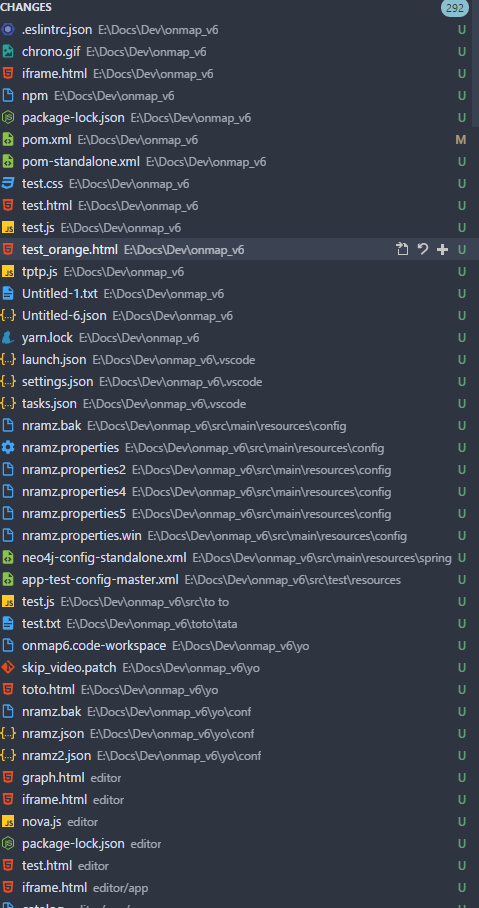
I find it really difficult to find:
- which files have been modified
- which files are untracked
- a particular file by its name
As a comparison, here is the result of running git status in the same workspace:
On branch bpmn_shapes_17016
Your branch is ahead of 'origin/bpmn_shapes_17016' by 1 commit.
  (use "git push" to publish your local commits)
Changes not staged for commit:
  (use "git add <file>..." to update what will be committed)
  (use "git checkout -- <file>..." to discard changes in working directory)

        modified:   ../../pom.xml
        modified:   app/scripts/app.js
        modified:   app/styles/onmap.rappid.css
        modified:   app/views/ui-components-module/generic-form.html

Untracked files:
  (use "git add <file>..." to include in what will be committed)

        ../../.eslintrc.json
        ../../.vscode/
        ../../Untitled-1.txt
        ../../Untitled-6.json
        ../../chrono.gif
        ../../iframe.html
        ../../npm
        ../../package-lock.json
        ../../pom-standalone.xml
...
In a quick look I can see that only four files have been modified.
Suggestions:
- add an option to group by status (ie: untracked, modified, added)
- add an option to sort files by name
Sort could work like this:
- if option is set: sort by status
- sort by name
Having a way to filter this list will be a good addition too: in case you want to see the status of a particular file using its name. Like you can do in the settings panel for example, when you look for a specific option.
 warpdesign
All 18 comments
also please add ability to sort them by folders.
this will be very helpful <3
 adel-bassiony
on 22 Dec 2017
adel-bassiony
on 22 Dec 2017
I second this. It would be really useful to have this functionality.
 repl-albert-chu
on 4 Jan 2018
repl-albert-chu
on 4 Jan 2018
especially in multi-root workspaces at least a grouping by root folder would help a lot
 marcelh-gh
on 15 Mar 2018
marcelh-gh
on 15 Mar 2018
This is a huge feature if added 👍
 0reo27
on 15 Sep 2018
0reo27
on 15 Sep 2018
👍
 ooHmartY
on 7 Nov 2018
ooHmartY
on 7 Nov 2018
I second this too!
 avlaguta
on 8 Nov 2018
avlaguta
on 8 Nov 2018
👍🏻
 ghost
on 13 Mar 2019
ghost
on 13 Mar 2019
still waiting for this
 ngocmanh1712
on 18 Apr 2019
ngocmanh1712
on 18 Apr 2019
When handling a large amount of changes this would be very helpful indeed! +1
Also, the ability to show all changes in a tree view would be super nice. The Explorer sidebar view almost does this by default, just showing all files instead of only those that have been added/changed.
 sniarn
on 18 Jun 2019
sniarn
on 18 Jun 2019
I'd welcome this too.
 fsesterh
on 19 Aug 2019
fsesterh
on 19 Aug 2019
Just can't believe this still hasn't been implemented...
 ngirard
on 25 Aug 2019
ngirard
on 25 Aug 2019
Wanted to switch from PhpStorm to VSC (because cheapskate), then this happened..
 progonkpa
on 17 Sep 2019
progonkpa
on 17 Sep 2019
Grouping is #14582
 joaomoreno
on 20 Sep 2019
joaomoreno
on 20 Sep 2019
@joaomoreno, great, thanks !
ngirard
on 20 Sep 2019
@joaomoreno awesome!
progonkpa
on 26 Sep 2019
It would be really nice if the SCM API exposed a way to sort files (such as a sort key). This would let us provide our own sorting options. For the original issue, the git extension could provide status / filename / file type. Other extensions could also detect e.g. auto-generated files and sort those lower.
 evangrayk
on 21 Oct 2019
evangrayk
on 21 Oct 2019
this is badly needed for usability with multi-file projects.
Should be able to sort both by git status (modified files first), and alphabetical.
Right now, there is no logical sort order. (1.40.2)
 wesinator
on 28 Nov 2019
wesinator
on 28 Nov 2019
I find it useful to sort by modified date/hour.
So if I did a small change and want to commit right away, I easily see where it is, on top. Or, if there is some modification that is still pending (and dont want to stash) it will be on the bottom.
 bernardoadc
on 4 Mar 2020
bernardoadc
on 4 Mar 2020
Related issues
 chrisdias
·
3Comments
chrisdias
·
3Comments
 borekb
·
3Comments
borekb
·
3Comments
 sirius1024
·
3Comments
sirius1024
·
3Comments
 biij5698
·
3Comments
biij5698
·
3Comments
 v-pavanp
·
3Comments
v-pavanp
·
3Comments
Most helpful comment
also please add ability to sort them by folders.
this will be very helpful <3