Vscode: Stage change jumps right to top after clicking add
- VSCode Version: 1.18.1
- OS Version: Ubuntu 17.04
Steps to Reproduce:
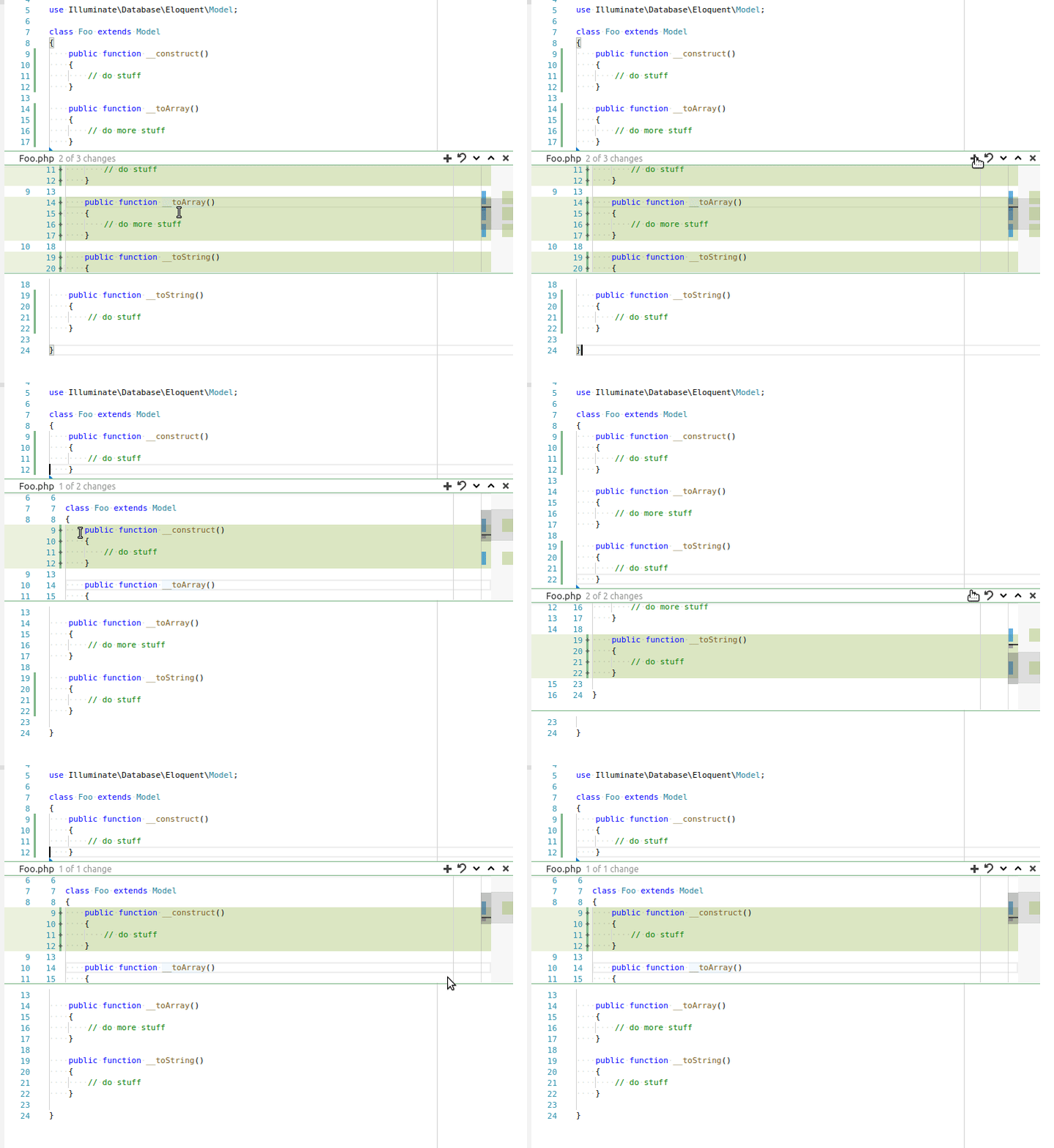
- Click green edge next to line number so the stage change popup appears.
- Click add button on one of the changes in the middle of document.
- Watch the popup jump straight back up to the first one after the add button is pressed.
Quite annoying if you want to add two changes in the middle of the document and click the add button and need to scroll a few hundred lines of code down again. It is easier to use git add -p right now.
Reproduces without extensions: Yes
 carestad
All 9 comments
To be fair, I would actually prefer it if I could just add the diff patches without any jumping around, and that it just closes after each add. So maybe a setting to control its behavior?
carestad
on 29 Nov 2017
Yeah... maybe closing after each add would be preferable.
 joaomoreno
on 4 Dec 2017
joaomoreno
on 4 Dec 2017
@joaomoreno Is this still for January or can we move it to Feb?
 ramya-rao-a
on 1 Feb 2018
ramya-rao-a
on 1 Feb 2018
When this gonna release
 mifas
on 13 Feb 2018
mifas
on 13 Feb 2018
@ramya-rao-a Can you please tell us when this gonna be release?
mifas
on 13 Mar 2018
@mifas As you can see, there is no fix done at the moment for this issue.
You are most welcome to give it a try. Am sure @joaomoreno can provide pointers as to where to get started.
ramya-rao-a
on 13 Mar 2018
It would probably be around this area: https://github.com/Microsoft/vscode/blob/master/src/vs/workbench/parts/scm/electron-browser/dirtydiffDecorator.ts#L677
joaomoreno
on 14 Mar 2018
Would you guys accept a PR that introduced a setting, eg jumpOnRevertChange = true that, when set to false, would prevent any jumping from happening?
 tomholub
on 22 Jul 2018
tomholub
on 22 Jul 2018
No setting, just close the widget.
joaomoreno
on 2 Aug 2018
Related issues
 villiv
·
3Comments
villiv
·
3Comments
 chrisdias
·
3Comments
chrisdias
·
3Comments
 trstringer
·
3Comments
trstringer
·
3Comments
 vsccarl
·
3Comments
vsccarl
·
3Comments
 v-pavanp
·
3Comments
v-pavanp
·
3Comments
Most helpful comment
Yeah... maybe closing after each add would be preferable.