Vscode: Allow Ctrl+S to save a dirty file of a peek editor when it has focus
- VSCode Version: 1.18.0 / 1.19.0-insider
- OS Version: Windows 10
Steps to Reproduce:
- Open a Project with Workspace (Typescript)
- Find one external method inside other method in whatever class.
- Press Alt+F12 to open "Peek Definition"
- Modify the method opened in peek definition
- Shiplá.. bug reproduced..
- The file opened in peek definition now be opened in workspace.
Even after save the file on peek definition, the file opened on workspace continue without save.
Reproduces without extensions: No
 cwberick
All 17 comments
Can you please clairify what the problem is. Here's what I see:
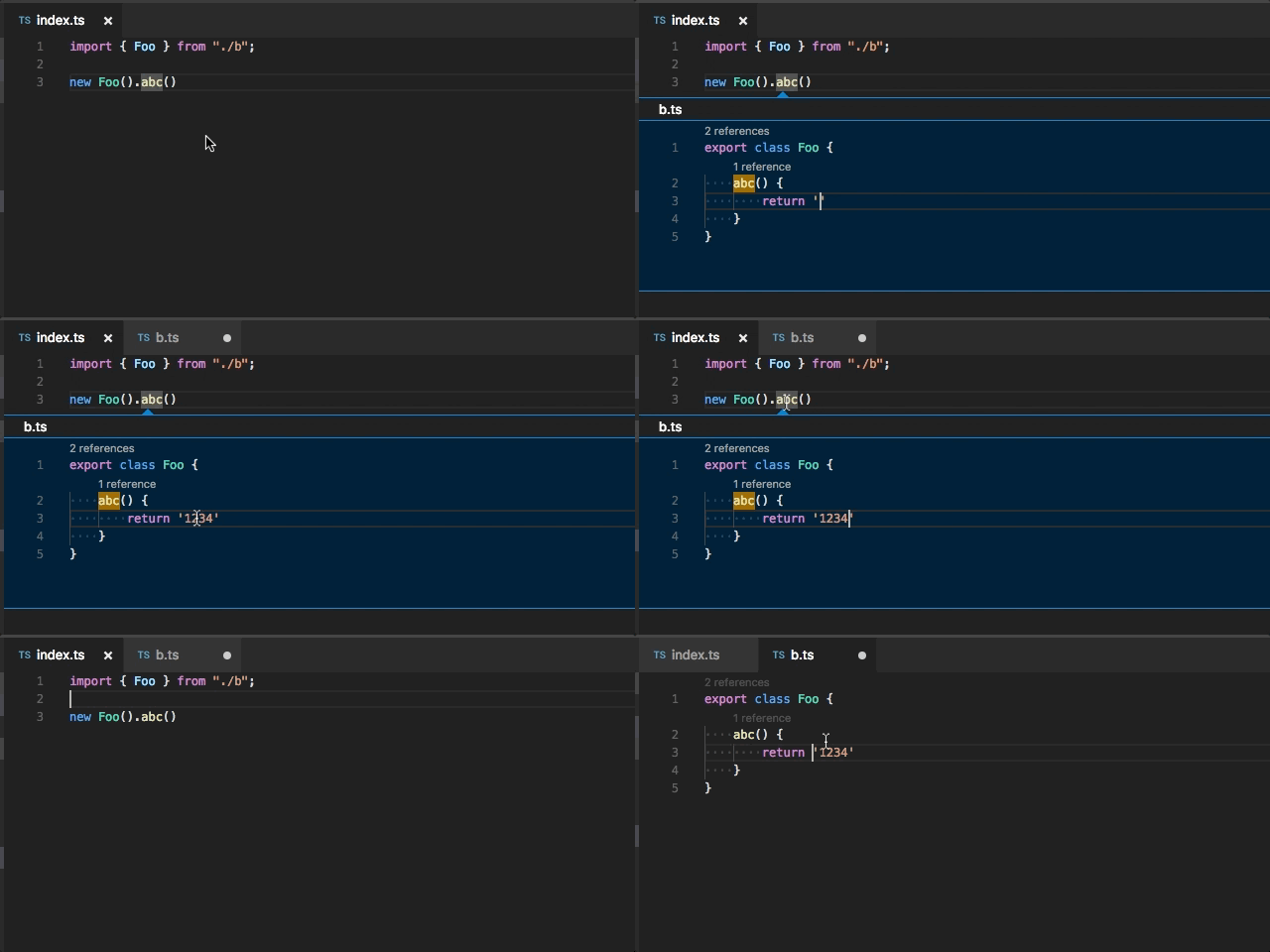
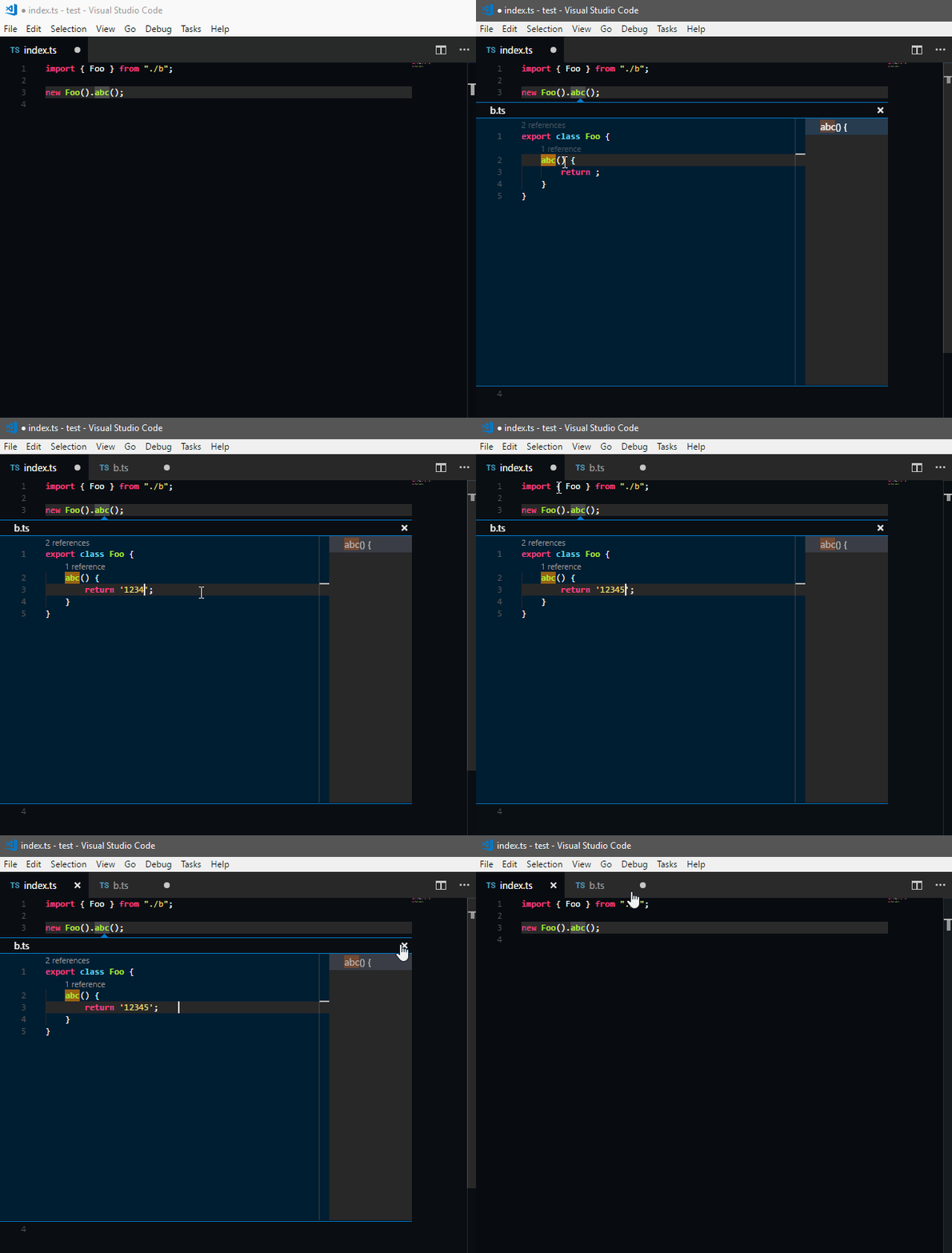
Is the error that file from the peek definition (b.ts in my gif) still has the unsaved indicator in the workspace, even after you save it?
 mjbvz
on 15 Nov 2017
mjbvz
on 15 Nov 2017
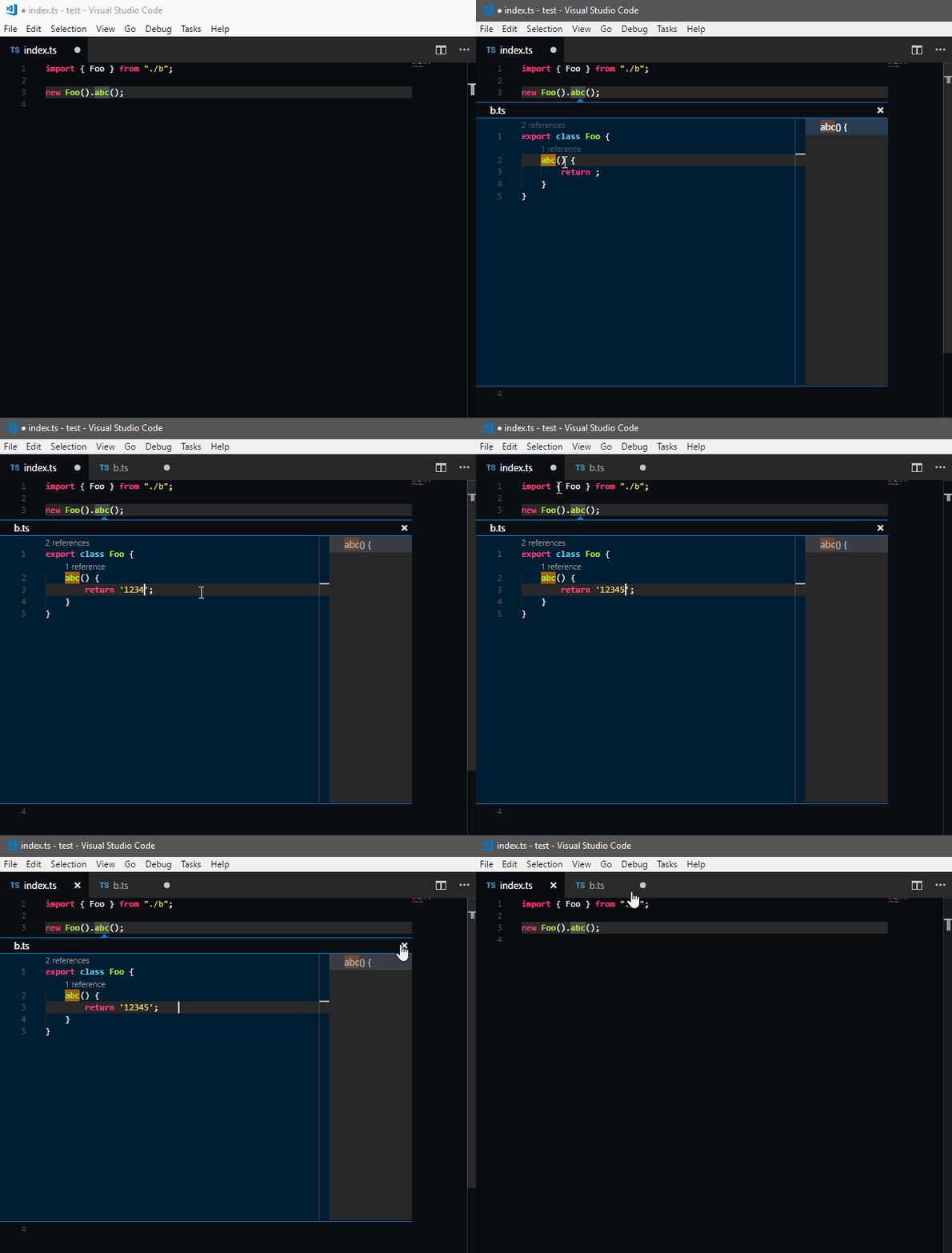
Yes, even after I save the file (b.ts). Pointer with focus inside peek definition, and I press Ctrl+S and after ESC to save and close peek definition the file b.ts continue with unsaved indicator. This behavior did not happen, even after I change file inside peek definition the file changed would not open.
cwberick
on 16 Nov 2017
See my gif. Note that the focus is on the peek definition and when I press Ctrl+S the saved file is not b.ts, but index.ts. I believe this behavior is wrong.
cwberick
on 16 Nov 2017
As designed, we open editors that are dirty to prevent data loss.
 bpasero
on 17 Nov 2017
bpasero
on 17 Nov 2017
But this is nothing intuitive @bpasero.
See my image, not would be interesting working like this?
When change file, show the little ball in peek definition.
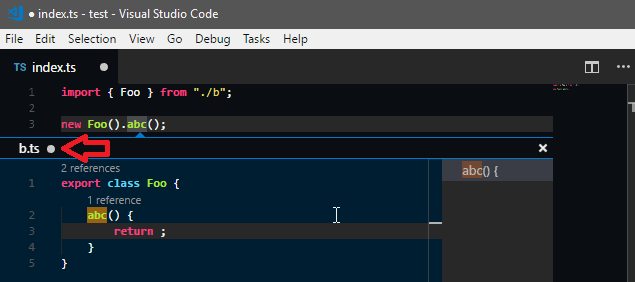
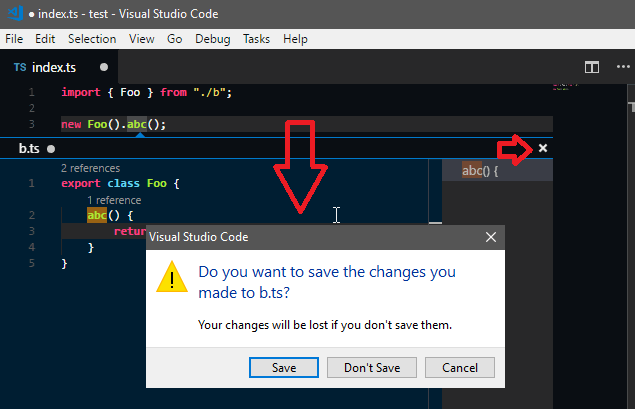
When click to Close (x) or ESC, then show the confirmation:
cwberick
on 17 Nov 2017
@cwberick and what should happen when you close the index.ts tab?
bpasero
on 17 Nov 2017
In this case if close the index.ts would could execute one stack of confirmation of files changed starting by b.ts
cwberick
on 17 Nov 2017
And if close vscode, then would be open the file b.ts on tab with changes before close. Like this no data is lost.
cwberick
on 17 Nov 2017
I do not like that behaviour, I prefer that one modified editor maps to one opened tab, anything else makes it very hard for the user to track dirty files.
bpasero
on 17 Nov 2017
ok.
cwberick
on 17 Nov 2017
@bpasero I've been in Visual Studio to see how it behaves and actually vscode is behaving the same way it does. However, in visual studio when we save Ctrl+S the file in focus inside peek definition the file opened in the tab is saved. I think vscode should behave the same way. In this case, I reiterate that saving the index.ts and not b.ts file when I am with the cursor in peek definition when pressing Ctrl+S is a bug.
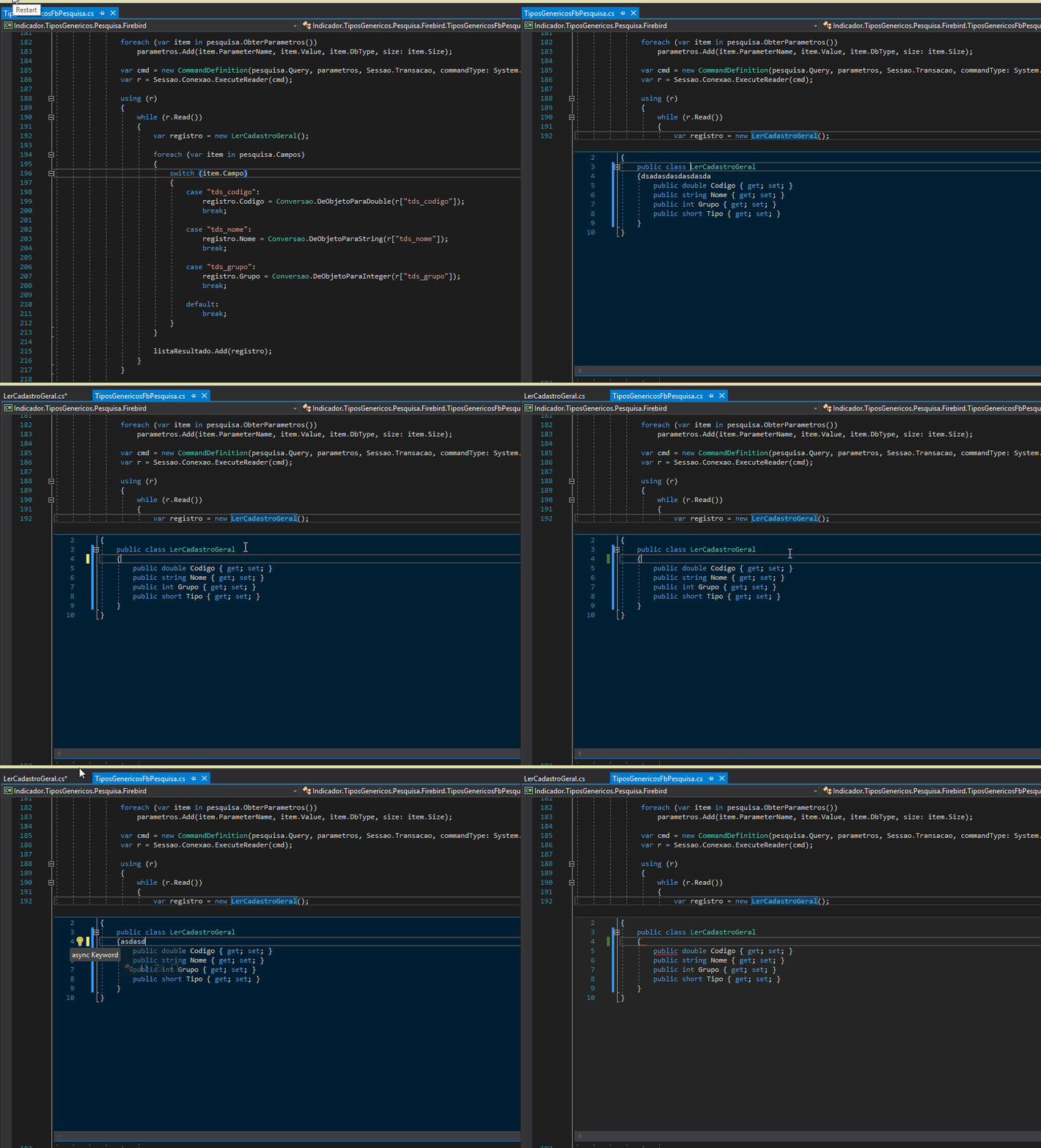
Now, see this behavior on vscode on press Ctrl+S
cwberick
on 17 Nov 2017
@bpasero ?
cwberick
on 20 Nov 2017
Yeah thats a good one, lets take this issue to reflect that.
bpasero
on 21 Nov 2017
@bpasero has there been any updates on this issue? I think this behaviour is rather reasonable and intuitive, though I'm kinda surprised this issue hasn't seen more activity (I'd expect more people to want this). I had someone ask about this very thing on my extension: CSS Peek and this could really help us:
If it was possible to save the file that you edit when you peak that would be amazing!! Then you wouldn't have to open that file at all to save it ...
 pranaygp
on 11 Jan 2018
pranaygp
on 11 Jan 2018
I've found that adding the following to keybindings.json accomplishes nearly the same thing:
{
    "key": "ctrl+s",
    "command": "workbench.action.files.saveAll",
    "when": "inReferenceSearchEditor"
}
Works for me since I don't tend to keep unsaved files open often.
@pranaygp Might be useful for CSS Peek.
 regoje
on 11 Nov 2018
regoje
on 11 Nov 2018
Hi
I agree with guys, that is really annoying, I'm wondering why they still didn't fix this problem ... !!!
why Ctrl+S work in peek preview ?!? its fine in Visual Studio
 Hamzeh75
on 8 Jan 2019
Hamzeh75
on 8 Jan 2019
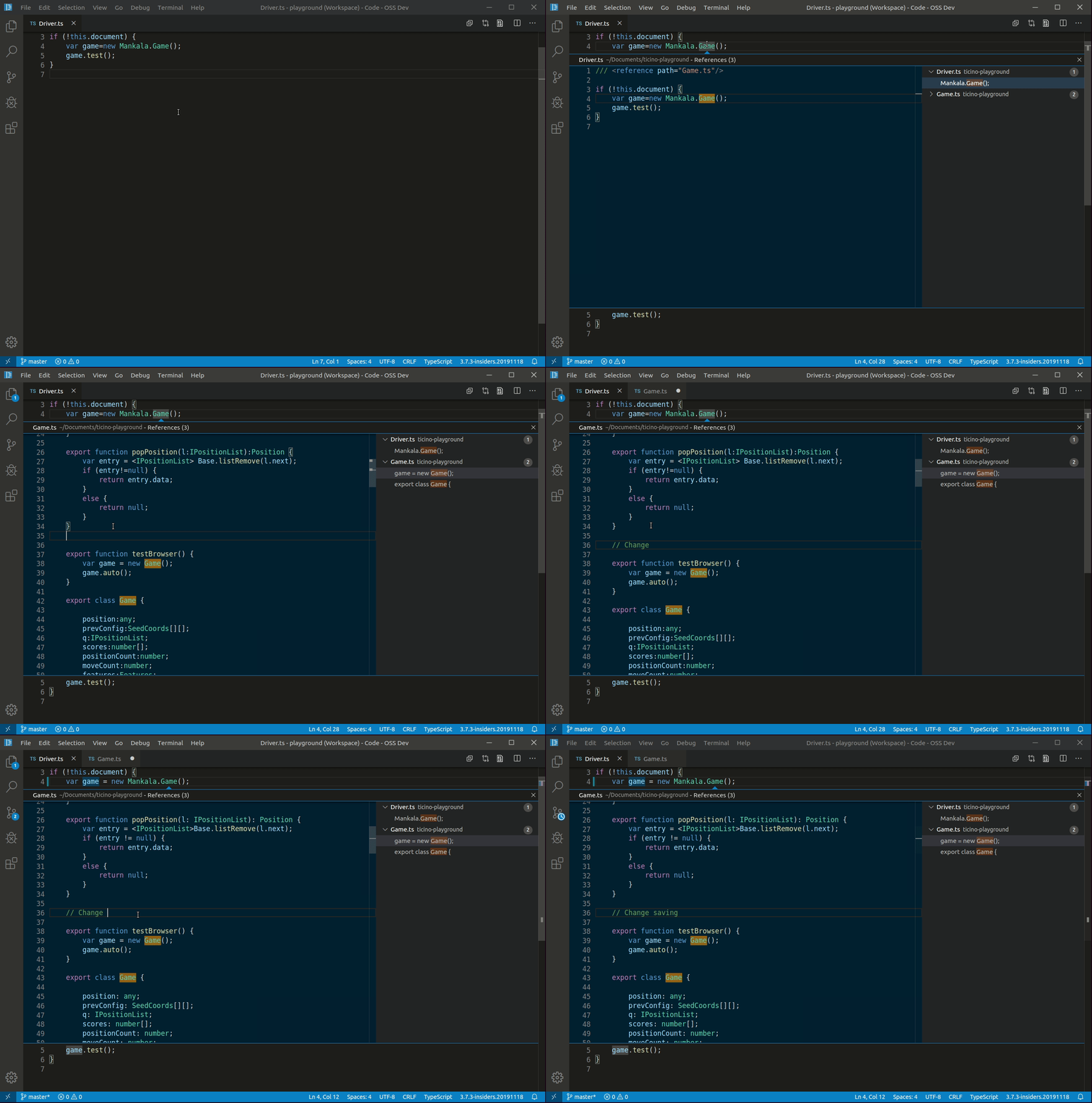
I pushed a change to enable this by default if the embedded editor is focused. Pressing CtrlCmd+S or File > Save will now save both the main editor and the embedded editor.
Feedback welcome, it will be in tomorrows insider build: https://code.visualstudio.com/insiders/
bpasero
on 19 Nov 2019
Related issues
 mrkiley
·
3Comments
mrkiley
·
3Comments
 lukehoban
·
3Comments
lukehoban
·
3Comments
 sijad
·
3Comments
sijad
·
3Comments
 NikosEfthias
·
3Comments
NikosEfthias
·
3Comments
 DovydasNavickas
·
3Comments
DovydasNavickas
·
3Comments
Most helpful comment
@bpasero has there been any updates on this issue? I think this behaviour is rather reasonable and intuitive, though I'm kinda surprised this issue hasn't seen more activity (I'd expect more people to want this). I had someone ask about this very thing on my extension: CSS Peek and this could really help us: