Vscode: Support for top-level await operators
Will VS Code ever support the ability to execute top-level await operators in the debug console? Currently if you try to execute await
My hope is someday the new chrome dev tools functionality may be added to WebStorm. https://developers.google.com/web/updates/2017/08/devtools-release-notes#await
- VSCode Version: 1.18.0
- OS Version: Windows 10
Steps to Reproduce:
- Open the attached code in VSCode. Set a debug break point at line 7.
- Click Debug then Start Debbuging. In the debug console type "await testFunction(); " then press enter. SyntaxError: Unexpected identifier appears in the Debug Console.
- In the debug console, type "(async () => { await testFunction();} )();" then press enter. Promise { pending } appears.
async function testFunction() {
    return new Promise((resolve) => {
        resolve('test');
    });
}

testFunction().then((res) => {
    console.log(res);
});
 jdavis61
All 18 comments
Node-debug doesn't preprocess the user input in any way before sending it to node.js for evaluation.
So, what you are seeing is expected but I understand it would be nice if VS Code could wrap the expression automagically into a closure.
On the other hand this "magic" could result in strange bugs that are difficult to diagnose.
@roblourens ?
 weinand
on 14 Nov 2017
weinand
on 14 Nov 2017
I believe this will come automatically with newer Chrome and Node versions. Will leave this open on myself to test and verify.
 roblourens
on 14 Nov 2017
roblourens
on 14 Nov 2017
Chrome sends "(async () => {return (await Promise.resolve('hi'))})()", but the adapter needs to know that it's attached to an appropriate version of Node/Chrome.
roblourens
on 4 Dec 2017
So the Chrome DevTools front-end sends a special formatted expression for top-level operators @roblourens?
 auchenberg
on 4 Dec 2017
auchenberg
on 4 Dec 2017
Right
roblourens
on 4 Dec 2017
Does the recently introduced experimental-repl-await in node v10 help with this?
 laggingreflex
on 9 May 2018
laggingreflex
on 9 May 2018
Probably but it's not necessarily any easier than what I said before.
roblourens
on 10 May 2018
This issue is being closed to keep the number of issues in our inbox on a manageable level, we are closing issues that are not going to be addressed in the foreseeable future: We look at the number of votes the issue has received and the number of duplicate issues filed. If you disagree and feel that this issue is crucial: We are happy to listen and to reconsider.
If you wonder what we are up to, please see our roadmap and issue reporting guidelines.
Thanks for your understanding and happy coding!
![vscodebot[bot] picture](https://avatars2.githubusercontent.com/in/2406?v=4&s=40) vscodebot[bot]
on 11 Sep 2018
vscodebot[bot]
on 11 Sep 2018
This is actually a fairly easy vscode-chrome-debug-core feature request. I filed https://github.com/Microsoft/vscode-chrome-debug-core/issues/353
roblourens
on 11 Sep 2018
I would take a PR for this. The change will be entirely inside the debug adapter, see https://github.com/Microsoft/vscode-chrome-debug-core/issues/353 and https://github.com/Microsoft/vscode-node-debug2/blob/master/CONTRIBUTING.md
roblourens
on 6 Oct 2018
This appears to happen in the latest stable Chrome (77) and Node.js (12.11) versions.
await Promise.resolve('foo')
SyntaxError: await is only valid in async function
It appears that the Chrome console preprocesses expressions that contain await (if the results here have anything returned from this function), so unfortunately this does not look super trivial to do. I think it'd be appropriate for us to preprocess console input in the same way, as I imagine that most users will expect the debug console in VS Code to behave identically to the one in Chrome.
 connor4312
on 7 Oct 2019
connor4312
on 7 Oct 2019
...waits patiently...
 merqrial
on 26 Nov 2019
merqrial
on 26 Nov 2019
I noticed the below over at https://github.com/microsoft/vscode-js-debug
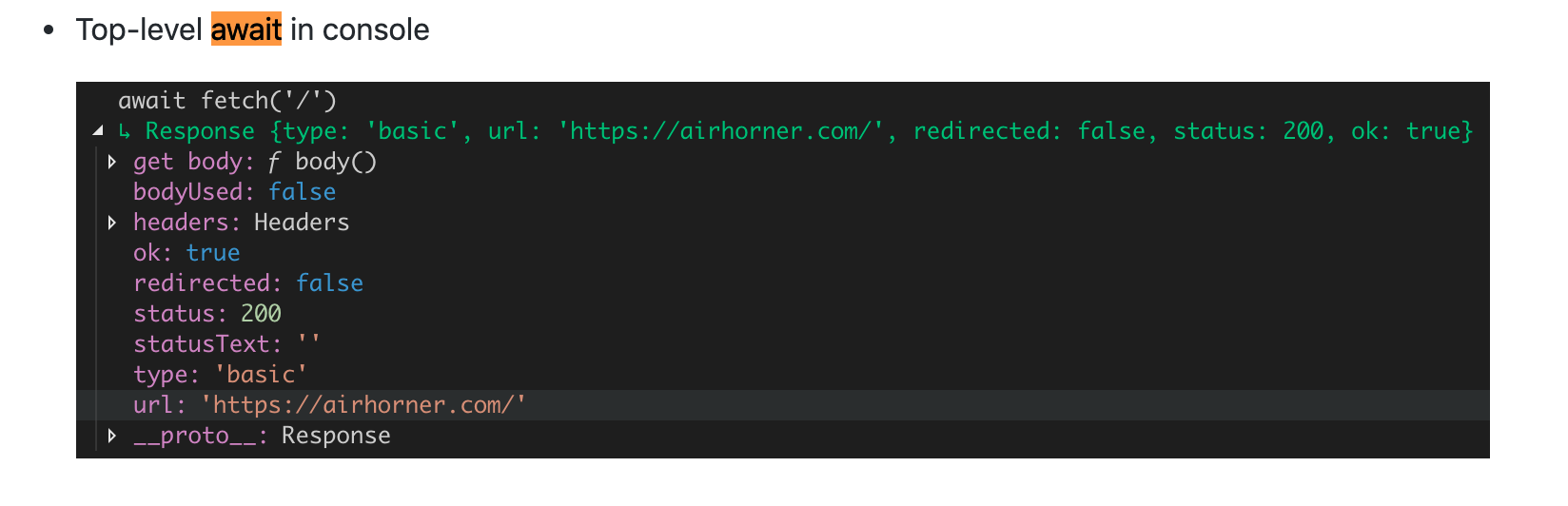
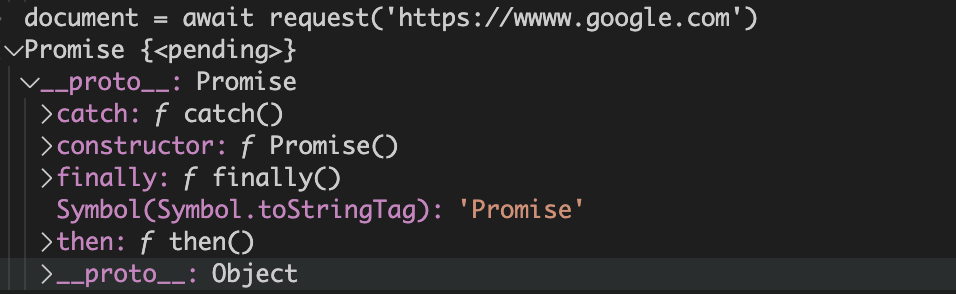
I tried it with https://github.com/request/request-promise-native but not sure how to resolve the promise:
 jcrben
on 3 Jan 2020
jcrben
on 3 Jan 2020
@jcrben this happens because Chrome/V8 does not let us await if you're paused on a breakpoint. If you're not on a breakpoint and running normally, we can evaluate the given statement(s) and get the promise result back.
connor4312
on 6 Jan 2020
This is becoming more and more relevant. Deno (a TypeScript runtime) now supports top-level await.
 galkowskit
on 16 Feb 2020
galkowskit
on 16 Feb 2020
I'll call this closed based on the fact that it's supported in https://github.com/microsoft/vscode-js-debug (as good as the runtime lets us) and that is the future of JS debugging
roblourens
on 5 Mar 2020
@roblourens @connor4312 is the plan to at some point be able to use this when paused at a breakpoint? That's where I see this as being the most useful.
jcrben
on 5 Mar 2020
You can follow this Chromium issue for that, Ben: https://bugs.chromium.org/p/chromium/issues/detail?id=833928
connor4312
on 5 Mar 2020
Related issues
 filfat
·
246Comments
filfat
·
246Comments
 Tyriar
·
314Comments
Tyriar
·
314Comments
 Brakkar
·
364Comments
Brakkar
·
364Comments
 hsdk123
·
263Comments
Tyriar
·
200Comments
hsdk123
·
263Comments
Tyriar
·
200Comments
Most helpful comment
This appears to happen in the latest stable Chrome (77) and Node.js (12.11) versions.
It appears that the Chrome console preprocesses expressions that contain await (if the results here have anything returned from this function), so unfortunately this does not look super trivial to do. I think it'd be appropriate for us to preprocess console input in the same way, as I imagine that most users will expect the debug console in VS Code to behave identically to the one in Chrome.