Vscode: Add an editor picker that allows to navigate editors in MRU order across groups
- VSCode Version: 1.17.2
- OS Version: Windows 10 x64
Of workbench.action.open{Previous,Next}RecentlyUsedEditor, #16463 says "These actions should behave the same as their similar actions "Open Next Recently Used Editor In Group" and "Open Previous Recently Used Editor in Group" but they work across groups."
However the actual behavior seems different than explained.
When I hit ctrl-tab (invoking workbench.action.openNextRecentlyUsedEditorInGroup), this allows me to toggle between two editors within a group with each invocation of the command. The promise of workbench.action.openNextRecentlyUsedEditor was to similarly be able to toggle between editors across any group. In practice, activating openNextRecentlyUsedEditor doesn't seem to modify the recent editor list, so once you reach the end of the of the list, the action becomes a no-op.
So, unlike openNextRecentlyUsedEditorInGroup which provides a simple toggle between editors within a group, we still don't seem to have a way to accomplish the same thing between groups.
 jtackaberry
All 18 comments
@jtackaberry agreed, it does behave different as you say that you cannot toggle. The truth is that this command is simply navigating in the editor history stack (the same you get when you do Go > Forward or Go > Backward). And that stack will not update itself when you navigate (as such you cannot toggle between two editors).
 bpasero
on 1 Nov 2017
bpasero
on 1 Nov 2017
Same here. I've ended up here when looking for proper solution for this issue: https://github.com/Microsoft/vscode/issues/20295. That issue is now closed, though proposed solution there is not really accurate as with workbench.action.nextEditor and workbench.action.previousEditor you navigate to the right and to the left tab, and not through the history.
So it'd be great if workbench.action.openNextRecentlyUsedEditor and workbench.action.openPreviousRecentlyUsedEditor could work right the same as InGroup variants but switching tabs right away, without picker popup.
 evenfrost
on 13 Dec 2017
evenfrost
on 13 Dec 2017
@bpasero I have created issue for that which looks like feature request and created stackoverflow question:
https://github.com/Microsoft/vscode/issues/40278
https://stackoverflow.com/questions/47844224/switch-between-tabs-from-different-tab-groups-in-vscode/47844522?noredirect=1#comment82654548_47844522
It would be nice to have option to switch between tabs from different groups.
 kkorus
on 16 Dec 2017
kkorus
on 16 Dec 2017
I'd also love to see openNextRecentlyUsedEditor behave exactly the same as openNextRecentlyUsedEditorInGroup except without minding groups at all.
Since that's exactly what the name suggests and what I was looking for, I initially thought that the new command is not working at all (see #50051)...
 CombeeMike
on 18 May 2018
CombeeMike
on 18 May 2018
I don't know what groups are, but in 1.23.1 on Windows 7, openNextRecentlyUsedEditor just never does anything at all. I want the same thing as everyone else here, an equivalent of VS NextDocumentWindow
 zeromus
on 6 Jun 2018
zeromus
on 6 Jun 2018
I've just tried the above settings in 1.31.1 on windows 7 and it does nothing. No tab switching at all. Hoping for a fix.
 biddster
on 7 Mar 2019
biddster
on 7 Mar 2019
Same here, 1.32.3 on Linux (Arch), no tab switching happening.
 ti-mo
on 25 Mar 2019
ti-mo
on 25 Mar 2019
Just wanting to bump this as openNextRecentlyUsedEditor is still broken.
I really just want the simplest use-case of a single shortcut to toggle between two active files regardless of group. Maybe there's some other way of accomplishing that.
jtackaberry
on 8 May 2019
Hey all, you can work around this issue by binding ctrl+tab to workbench.action.openPreviousEditorFromHistory. It will open the Ctrl-P quick open menu, but it will have the most recent editor highlighted, so you can type ctrl+tab enter and get the same functionality. You're welcome! 😄
 parkerault
on 3 Jul 2019
parkerault
on 3 Jul 2019
With https://github.com/microsoft/vscode/commit/1a7cec1cdb2fe8d89ce6ad6a00e96516efcde41a there is now a history of most recently used editors across all editor groups that is persisted and restored.
Commands workbench.action.openNextRecentlyUsedEditor and workbench.action.openPreviousRecentlyUsedEditor now leverage this new history (which is independent from the history used for "Go Forward" and "Go Back") and will navigate without any picker. The commands will work after startup and not require any initial navigation. Additionally there is workbench.action.openNextRecentlyUsedEditorInGroup and workbench.action.openPreviousRecentlyUsedEditorInGroup to perform this same kind of navigation in the active editor group only.
Additionally there is now a new picker (via workbench.action.showAllEditorsByMostRecentlyUsed) to show all editors by most recent usage:
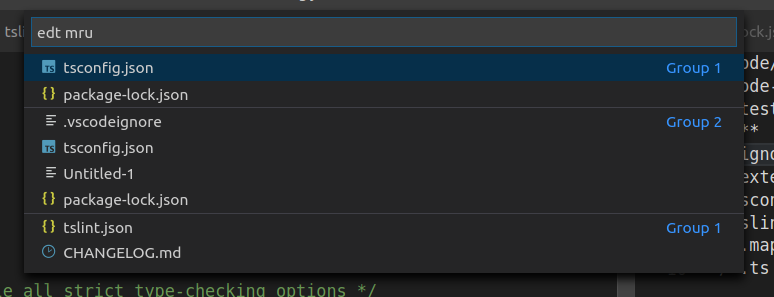
There are new commands to use with quick pick:
workbench.action.quickOpenPreviousRecentlyUsedEditorworkbench.action.quickOpenNextRecentlyUsedEditorworkbench.action.quickOpenPreviousRecentlyUsedEditorInGroupworkbench.action.quickOpenNextRecentlyUsedEditorInGroup
For example to use the new picker for most recently used editors across all groups, configure these keybindings:
{
    "key": "ctrl+tab",
    "command": "workbench.action.quickOpenPreviousRecentlyUsedEditor",
    "when": "!inEditorsPicker"
}
This is now available in our insiders build (https://code.visualstudio.com/insiders/) and I would be happy for feedback how it works.
bpasero
on 17 Dec 2019
@bpasero It seems that after the 1.42.0 update this key binding configuration for navigating between editors in a group doesn't work anymore: https://stackoverflow.com/a/51086822/4029784
 k4113h
on 21 Jan 2020
k4113h
on 21 Jan 2020
On the other hand configuring
{
    "key": "alt+tab",
    "command": "workbench.action.quickOpenNextRecentlyUsedEditor"
},
{
    "key": "alt+tab",
    "command": "workbench.action.quickOpenNavigateNextInEditorPicker",
    "when": "inEditorsPicker"
}
works now nicely.
k4113h
on 21 Jan 2020
Yeah, I was planning to document this in the release notes and our docs. I want to distinguish between using quick open for navigation and not.
Can you clarify what is not working with those keybindings in the SO thread:
{ "key": "ctrl+tab",       "command": "workbench.action.openNextRecentlyUsedEditorInGroup" },
{ "key": "ctrl+shift+tab", "command": "workbench.action.openPreviousRecentlyUsedEditorInGroup" }
They do work for me. However, initially pressing Ctrl+Tab will not work because you have not navigated history yet, so I think the better keybinding is to flip it:
{ "key": "ctrl+tab",       "command": "workbench.action.openPreviousRecentlyUsedEditorInGroup" },
{ "key": "ctrl+shift+tab", "command": "workbench.action.openNextRecentlyUsedEditorInGroup" }
In 1.41.1 workbench.action.openNextRecentlyUsedEditorInGroup brought up quick open
k4113h
on 21 Jan 2020
@k4113h yes, thanks for making this clear, I will make sure to have this in the release notes. As I said, I wanted to have commands for navigating the history with quick open and without. So I decided to have the name of the command reflect that.
bpasero
on 21 Jan 2020
Ok. And thanks for working on this; I prefer the new behavior of cycling through all editors regardless of the group. I just wanted to bring up the point that this change might break some users' shortcuts.
k4113h
on 21 Jan 2020
I'm trying to do something pretty similar to this, but am not quite able to figure out a solution. I'm trying to implement vim's <ctrl-^>, which goes back to the last used buffer. Regardless of how many files you've edited, hitting that repeatedly will only swap between two files.
Using workbench.action.openPreviousRecentlyUsedEditor is close, but in order to go back to the file I was just on I'd need to use workbench.action.openNextRecentlyUsedEditor. I'd like to be able to use a single shortcut to go back and forth between the two most recently used editors indefinitely.
The next best thing I've found is workbench.action.openPreviousEditorFromHistory, which has the behavior I want except that I need to select the first item. If there were a way to automatically select the first one (maybe with an argument) instead of opening a dropdown, that would be ideal.
Does anybody have any ideas for an existing solution or would this require a new pull request?
 redbmk
on 24 Jan 2020
redbmk
on 24 Jan 2020
Related issues
 biij5698
·
3Comments
biij5698
·
3Comments
 villiv
·
3Comments
villiv
·
3Comments
 trstringer
·
3Comments
trstringer
·
3Comments
 lukehoban
·
3Comments
lukehoban
·
3Comments
 curtw
·
3Comments
curtw
·
3Comments
Most helpful comment
I'd also love to see
openNextRecentlyUsedEditorbehave exactly the same asopenNextRecentlyUsedEditorInGroupexcept without minding groups at all.Since that's exactly what the name suggests and what I was looking for, I initially thought that the new command is not working at all (see #50051)...