Vscode: Wrong Icon for Executable. Electron Icon shown instead of VSCode's.
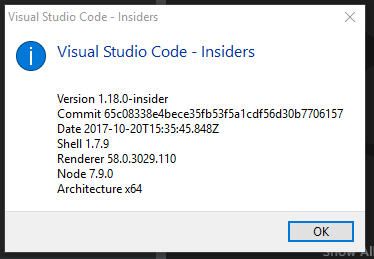
- VSCode Version: Code - Insiders 1.18.0-insider (65c08338e4bece35fb53f5a1cdf56d30b7706157, 2017-10-20T15:35:45.848Z)
- OS Version: Windows_NT x64 10.0.15063
Steps to Reproduce:
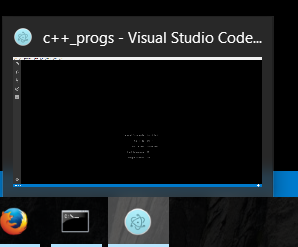
- After update to latest Insiders version, this icon changed to electron icon.

Reproduces without extensions: Yes
 Suraj-Yadav
All 17 comments
Here the same problem.

 ghost
on 21 Oct 2017
ghost
on 21 Oct 2017
Same here.
 ciel
on 21 Oct 2017
ciel
on 21 Oct 2017
Just updated mine an hour ago, and now i'm having the same issue.
 changavila
on 21 Oct 2017
changavila
on 21 Oct 2017
Is it because someone got tired of that whole icon drama? #35783
 kborowinski
on 21 Oct 2017
kborowinski
on 21 Oct 2017
What's sad is that I actually prefer this to the orange icon...
 dlong500
on 21 Oct 2017
dlong500
on 21 Oct 2017
I am having this problem too; at first I thought it was some icon cached by Windows for a generic Electron binary, so I cleared all the caches and that didn't help. Then I thought to open up freshly downloaded zip files instead of using the MSI installer packages. The Portable ZIP install for VS Code is fine as you can see (it even includes the proper branding information content)...
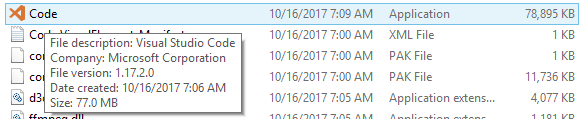
But the one for VS Code Insiders is obviously quite different...
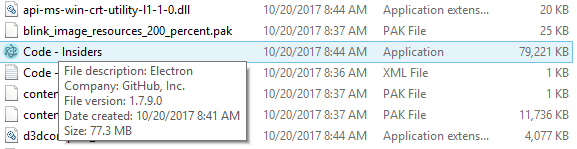
That means they are baked in that way from the beginning; I take it that means that the icon files and the branding information were not entered correctly in the workflow to package the Electron app for the latest build of VS Code Insiders.
 christopherwolf1
on 21 Oct 2017
christopherwolf1
on 21 Oct 2017
Same Here
 cotts
on 22 Oct 2017
cotts
on 22 Oct 2017
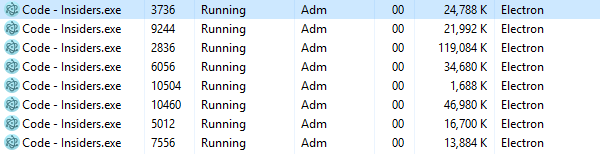
The Process name in Task Manager is also Electron
In Processes tab

In Details tab
 huyvd7
on 22 Oct 2017
huyvd7
on 22 Oct 2017
@joaomoreno did something change in gulp-atom-electron?
 bpasero
on 23 Oct 2017
bpasero
on 23 Oct 2017
Same here.
 RDeluxe
on 23 Oct 2017
RDeluxe
on 23 Oct 2017
@joaomoreno is taking care of it and starting new builds.
bpasero
on 24 Oct 2017
Latest insiders still shows Electron icon.
 jtsom
on 24 Oct 2017
jtsom
on 24 Oct 2017
The icon is now Ok, but in the task bar its still the electron.

- VSCode Version: Code - Insiders 1.18.0-insider (c1e079b6ccfad9ead105c44a84e862ffc5250222, 2017-10-25T04:18:36.616Z)
- OS Version: Windows_NT x64 10.0.15063
changavila
on 25 Oct 2017
It appears to have (mostly) fixed it for me, see below;
Taskbar:

Titlebar:

File Explorer Details:
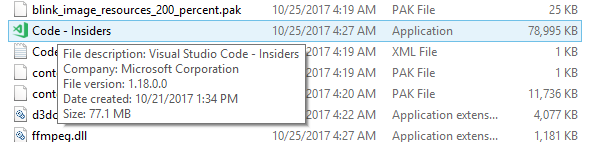
Task Manager Processes:

(Now that is a little bit unusual, I will admit)
I will experiment with flushing the icon cache and rebooting, although most of the places the icon shows up should be correct now.....Don't know exactly what is going on with the Task Manager example, though.
EDIT: _Resolved._ Uninstalled, rebooted, then reinstalled; that fixed the remaining Electron icons hanging around...

Everything seems to be OK now; if anybody is having further problems, the above sequence should fix them.
PS: Still moderately curious how the parent process could hold onto a cached icon resource file while the child process picked up the new one in the previous task manager shot; I would have thought that the latest update would have blown everything away at the same time, unless there was a hosting process that never got touched.
christopherwolf1
on 25 Oct 2017
This is now fixed for me (after a couple of updates) on Windows 10 64-bit 1703 (15063.674).
 TynesideGroup
on 25 Oct 2017
TynesideGroup
on 25 Oct 2017
Fixed for me today!
cotts
on 25 Oct 2017
Its now fixed.
changavila
on 26 Oct 2017
Related issues
 NikosEfthias
·
3Comments
NikosEfthias
·
3Comments
 lukehoban
·
3Comments
lukehoban
·
3Comments
 philipgiuliani
·
3Comments
philipgiuliani
·
3Comments
 mrkiley
·
3Comments
mrkiley
·
3Comments
 chrisdias
·
3Comments
chrisdias
·
3Comments
Most helpful comment
Is it because someone got tired of that whole icon drama? #35783