Vscode: Git: "Stage selected ranges" command changes encoding to UTF-8
- VSCode Version: 1.17.1
- OS Version: Windows 10
Steps to Reproduce:
- Create file with non UTF-8 (UTF-8 with BOM for example) encoding
- Commit it
- Make some changes
- Open VScode's diff view
- Select some range and run command "Git: Stage Selected Ranges"
- Check encoding of the staged file
Expected result: initial encoding preserved
Actual result: encoding is set to UTF-8
Reproduces without extensions: Yes
Note: "files.encoding" and "files.autoGuessEncoding" settings of VScode doesn't affect anyhow on the result.
 kav137
All 12 comments
I have the same problem on VSCode Version: 1.18.0 - Insider, OS Version: Windows 10 and this problem also reproduces without extentions. As the my project requires only one file encoding, that's very uncomfortable for me to stage and commit file ranges using external programs like source tree.
Please take a look on this problem
 harimambura
on 8 Nov 2017
harimambura
on 8 Nov 2017
if this bug is up for grabs, can I take this up?
 amitdey1987
on 8 Feb 2018
amitdey1987
on 8 Feb 2018
As @kav137 describes, how can I"Check encoding of the staged file"?
These are the steps I performed
1) created a file with encoding "UTF8 With Bom", within my repo.
2) committed this file
3) using vs code, edited this file
4) under the "Source Control" tab, I selected this file
5) ran the command "Git: Stage Selected Ranges"
6) under the "Source Control" tab, Under the "Staged Changes" section, I select my file.
After this, I am unsure where to look for encoding of the file.
At the bottom-right of the vs code window, I see "Line 1, Col 1 Spaces: 4 Plain Text". But no mention of encoding.
amitdey1987
on 9 Feb 2018
@amitdey1987
I recorded the video which shows how you can reproduce this issue
harimambura
on 9 Feb 2018
Are there any news about this? I am working on a Windows-1252 file and using "Stage Selected Ranges" tries to read it UTF-8 (using git add --patch works correctly)
 lorenzo-arena
on 17 May 2018
lorenzo-arena
on 17 May 2018
1.27.2 it looks like it's still broken.
 userFromHades
on 18 Sep 2018
userFromHades
on 18 Sep 2018
I'm looking at this right now, it seems that is because it creates a new document to receive the changes, and the new document doen't refer to any encoding.
I'll need to find how to find the encoding from the current opened document to use the same to the newly created document.
As soon as I find something, I'll let you know
 felipecaputo
on 29 Oct 2018
felipecaputo
on 29 Oct 2018
Unfortunately Stage Selected Ranges is unusable because of this problem. Our files are in UTF-8-BOM format and Stage Selected Ranges command strips BOM.
Are we waiting for #55110?
 rysavyjan
on 24 Apr 2019
rysavyjan
on 24 Apr 2019
So I installed OSS Dev version of VSCode and fired debugger. The problem is in vscode\extensions\git\src\git.ts
async stage(path: string, data: string): Promise<void> {
        const child = this.stream(['hash-object', '--stdin', '-w', '--path', path], { stdio: [null, null, null] });
        child.stdin.end(data, 'utf8');
child.stdin.end() is always called with 'utf8', regardless of original file encoding.
Object is staged using git.exe hash-object --stdin -w --path test.cpp
@joaomoreno can you please give me some hint how to continue? Is original file encoding (including BOM/non-BOM information) available here? Thank you. I would really like to fix this problem, so we can use VSCode for interactive staging.
rysavyjan
on 16 May 2019
Problem is still occurring in 1.36.1.
@rysavyjan: can we just omit the encoding in this call?
 KUGA2
on 30 Jul 2019
KUGA2
on 30 Jul 2019
This is an annoying issue, because when you go to view the changes on GitHub, it appears as if the entire file was modified, so you can't see what exactly changed. I'll have to keep using git add -p until this is fixed.
 rafaelgomesxyz
on 30 Sep 2019
rafaelgomesxyz
on 30 Sep 2019
This has been fixed thanks to https://github.com/microsoft/vscode/issues/55110
Verification:
- Create a UTF16 file, add some text and commit it
- Make another change in the same file and open diff view
Current stable (broken):
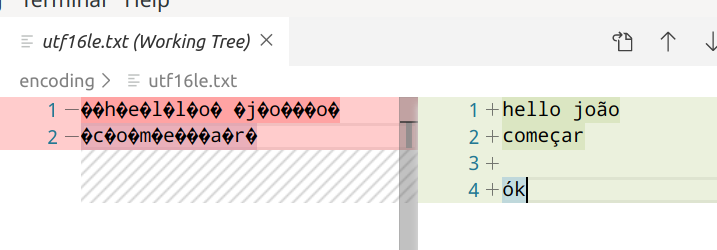
Fixed:

 joaomoreno
on 20 Nov 2019
joaomoreno
on 20 Nov 2019
Related issues
 jsftw86
·
361Comments
jsftw86
·
361Comments
 stoffeastrom
·
380Comments
stoffeastrom
·
380Comments
 lw-schick
·
229Comments
lw-schick
·
229Comments
 Tekbr
·
191Comments
Tekbr
·
191Comments
 hsdk123
·
263Comments
hsdk123
·
263Comments
Most helpful comment
So I installed OSS Dev version of VSCode and fired debugger. The problem is in vscode\extensions\git\src\git.ts
child.stdin.end() is always called with 'utf8', regardless of original file encoding.
Object is staged using
git.exe hash-object --stdin -w --path test.cpp@joaomoreno can you please give me some hint how to continue? Is original file encoding (including BOM/non-BOM information) available here? Thank you. I would really like to fix this problem, so we can use VSCode for interactive staging.