Vscode: Unicode symbols inside integrated terminal
Integrated terminal fails to display \u2387 symbol if used as part of command prompt (PS1)
In 1.16 it was working.
- VSCode Version: 1.17.0
- OS Version: Xubuntu 16.04.3
Steps to Reproduce:
- modify your PS1 to display \u2387 symbol
- open integrated terminal to see that only first part of this symbol is displayed, the second part is just a black space
- if I try
prinft "\u2387"from integrated terminal - it works
Reproduces without extensions: Yes
 zaharcelac
👍1
All 8 comments
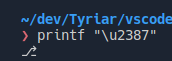
@zaharcan can you provide a screenshot? This is what I see:
 Tyriar
on 5 Oct 2017
Tyriar
on 5 Oct 2017

zaharcelac
on 5 Oct 2017
Found the issue, the character is drawn but the background isn't:

Tyriar
on 5 Oct 2017
Thanks for getting this figured out already... ran in to this with powerline for bash.
 vcsjones
on 5 Oct 2017
vcsjones
on 5 Oct 2017
👍1
Pushed to release/1.17 & master (https://github.com/Microsoft/vscode/commit/c7d4aed6a45c1498520b58463601cb82925cceb0)
Tyriar
on 6 Oct 2017
@Tyriar When would this be released?
 pradyunsg
on 7 Oct 2017
pradyunsg
on 7 Oct 2017
Probably early next week, not 100% sure though.
Tyriar
on 7 Oct 2017
🎉2
Yayie!
I've patched my downloaded VS Code to have the newer xterm until then! Thanks _a lot_ for some awesome work on the terminal! ^>^
pradyunsg
on 7 Oct 2017
👍3
Was this page helpful?
0 / 5 - 0 ratings
Related issues
 chrisdias
·
3Comments
chrisdias
·
3Comments
 biij5698
·
3Comments
biij5698
·
3Comments
 philipgiuliani
·
3Comments
philipgiuliani
·
3Comments
 vsccarl
·
3Comments
vsccarl
·
3Comments
 curtw
·
3Comments
curtw
·
3Comments
Most helpful comment
Yayie!
I've patched my downloaded VS Code to have the newer xterm until then! Thanks _a lot_ for some awesome work on the terminal! ^>^