Vscode: Git Index update is slow in current SCM
It takes too much time for the SCM view to update the index compared to the old Git-only SCM implementation.
- VSCode Version: Code 1.16.1 (27492b6bf3acb0775d82d2f87b25a93490673c6d, 2017-09-14T16:38:23.027Z)
- OS Version: Windows_NT x64 10.0.15063
- Extensions:
Extension|Author (truncated)|Version
---|---|---
html-snippets|abu|0.1.0
html-class-suggestions|And|1.0.7
vscode-eslint|dba|1.3.2
vscode-coffeescript-snippets|din|0.0.2
python|don|0.7.0
vscode-html-css|ecm|0.1.8
ts-tslint|eg2|0.0.4
tslint|eg2|1.0.9
code-runner|for|0.7.1
vue-snippets|hol|0.1.5
easy-icons|jam|0.3.1
git-indicators|lam|1.2.2
uncrustify|Lau|2.7.0
vscode-simple-icons|Lau|1.6.1
Kotlin|mat|1.3.0
cpptools|ms-|0.12.4
csharp|ms-|1.12.1
vetur|oct|0.9.10
vscode-docker|Pet|0.0.18
vscode-versionlens|pfl|0.19.1
vscode-coffeelint|slb|0.0.2
vscode-iced-coffeescript-preview|sta|1.0.6
vala|thi|0.3.0
html-preview-vscode|tht|0.1.1
html-css-class-completion|Zig|1.10.0
(2 theme extensions excluded)
Reproduces without extensions: Yes
 sr229
sr229
All 52 comments
How _slow_ is slow?
Any further information?
 joaomoreno
on 25 Sep 2017
joaomoreno
on 25 Sep 2017
@joaomoreno recorded time of 10-20 seconds to update changescompared to old SCM which is almost half a second or a second to update changes
sr229
on 25 Sep 2017
What does git status -u return?
joaomoreno
on 26 Sep 2017
@joaomoreno nothing on my side.
sr229
on 26 Sep 2017
And that operation returns immediately?
And when you say it takes time to "update changes"... what do you mean by that? To list the changes in the view? To render the diff editor? When it takes those 10-20 seconds... is there a progress bar during the whole time or it's mostly nothingness for pretty much all the time and then boom, the status is shown?
joaomoreno
on 27 Sep 2017
@joaomoreno there's a progress bar during the operation, it just takes way too much time to update changes, sometimes there's a situation it doesn't even detect changes automatically.
sr229
on 27 Sep 2017
That progress bar in the SCM viewlet shows during those 10-20 seconds?
joaomoreno
on 27 Sep 2017
@joaomoreno yes
sr229
on 28 Sep 2017
Can you somehow record a screencast?
joaomoreno
on 28 Sep 2017
@joaomoreno due to the limitations of my bandwidth, I cannot upload a screencast
however if a kind being would like to reproduce the issue, they'll provide a screencast
sr229
on 28 Sep 2017
It doesn't reproduce over here, unfortunately.
Can you try other repositories, are they as slow?
joaomoreno
on 28 Sep 2017
@joaomoreno I've tried the following on a large repository, a sample is one of my projects which is pretty large and it takes too much time updating the index automatically or doesn't update at all
sr229
on 30 Sep 2017
Not sure if this is the same issue, but git suddenly seems to be painfully slow in VS Code (1.16.1) on Win 7. It takes around about a minute to even acknowledge that there is a git repo in the working folder:

And then another 30 seconds plus to display status (even on small repos). Other actions like sync/displaying diffs of modified files are also painfully slow. But from command prompt git seems normal speed.

I've tried updating to latest Git for windows, but doesn't seem to have helped.
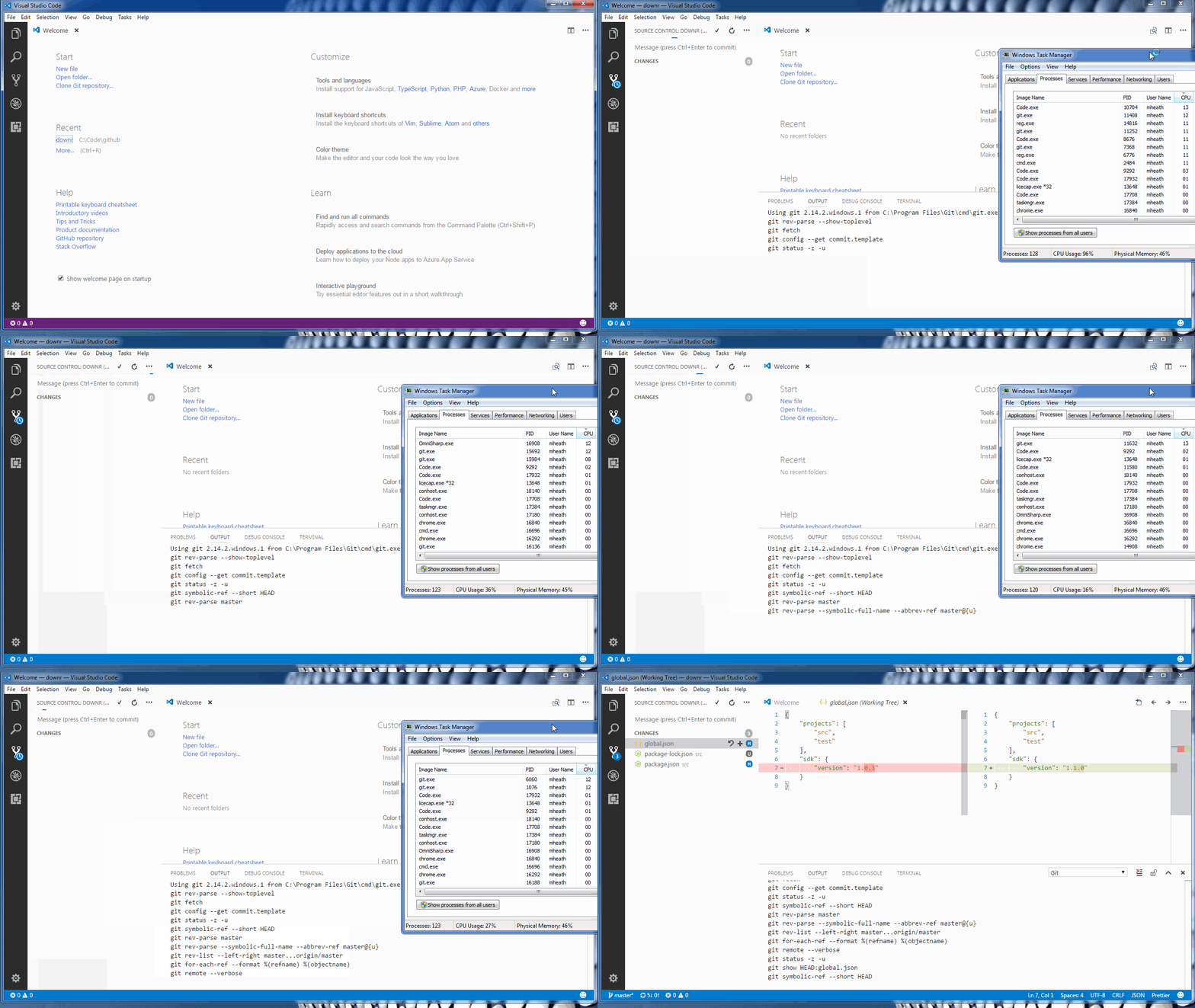
While VS code is waiting I see processes like
git.exe, cygwin-console-helper.exe, git-credential-manager.exe, sh.exe, git using up 12-13% CPU each on my quad core i7
Happy to provide any other diagnostic info if it helps.
 markheath
on 2 Oct 2017
markheath
on 2 Oct 2017
@markheath actually this is related so thank you for supporting more details.
sr229
on 3 Oct 2017
@markheath @sr229 Let's confirm that the issue is really within VS Code: can you try 1.15.1 and see whether git is fast there?
joaomoreno
on 3 Oct 2017
@joaomoreno also slow with 1.15.1
markheath
on 3 Oct 2017
Can confirm the same too
sr229
on 3 Oct 2017
OK interesting. What about 1.14.2?
joaomoreno
on 3 Oct 2017
@joaomoreno also slow with 1.14.2 - around 2 minutes from folder open to show changes in source control view.
markheath
on 3 Oct 2017
A (rather boring) screen capture - open a folder containing a basic git repo, view the diffs for a file. Takes about 3 minutes in total
markheath
on 3 Oct 2017
@markheath You mentioned:
Not sure if this is the same issue, but git suddenly seems to be painfully slow in VS Code (1.16.1) on Win 7.
So, we've now come to the conclusion that it wasn't Code 1.16.1 that caused the issue. There must've been something that changed in your system meanwhile to cause this difference. Can you recall what that was?
joaomoreno
on 4 Oct 2017
Yes, apologies if this is nothing to do with VS Code. Git doesn't seem to be slow from the command line, or in VS2017, GitHub for Windows or SourceTree, so not sure why this issue is just appearing in VS Code. I struggle to think of anything particularly relevant that might have changed my system. Thanks for your assistance though, and I will report back here if I discover what the root cause.
markheath
on 4 Oct 2017
One other thing I've noticed.
If I run a git command such as git status in the VS Code terminal it takes 20 seconds to complete, but if I run the same command from a regular windows command prompt it takes less than a second. The git --version and git --exec-path commands return the same results in both environments.
markheath
on 5 Oct 2017
@markheath Great finding! That tells me there is something different about the env between the two. You can use the set command to print the env on both sides and then we can compare.
joaomoreno
on 6 Oct 2017
OK, the output of set from a regular cmd.exe prompt to the VS code integrated terminal is identical (including path), except the VS code one has some extra environment variables set:
GOOGLE_API_KEY=XXXXXXredactedXXXXXXX
LANG=en_US.UTF-8
TERM_PROGRAM=vscode
TERM_PROGRAM_VERSION=1.17.0
VSCODE_CWD=C:\Program Files\Microsoft VS Code
VSCODE_IPC_HOOK=\\.\pipe\6d227eb99aafbb809552cb7357b23eeb-1.17.0-main-sock
VSCODE_NLS_CONFIG={"locale":"en-us","availableLanguages":{}}
VSCODE_NODE_CACHED_DATA_DIR_40088=C:\Users\mheath\AppData\Roaming\Code\CachedData\be377c0faf7574a59f84940f593a6849f12e4de7
VSCODE_PID=40088
Could it be LANG=en_US.UTF-8? Can you set that variable in a Command Prompt and check whether it makes it slower?
joaomoreno
on 9 Oct 2017
Thanks for the ongoing help. Unfortunately setting that environment variable makes no difference. I also tried setting some other environment variables from the environment for the git process launched by VSCode (viewed with Sysinternals process explorer) - settings like ELECTRON_RUN_AS_NODE, GIT_ASKPASS, PIPE_LOGGING, but they also don't replicate the slow behaviour seen running from within VS Code.
I've also tried using the git.path setting to point VS code at different portable versions of Git, but same slow performance with those too.
markheath
on 9 Oct 2017
@Tyriar Have you seen this before? Notice how running git status inside the integrated terminal is also pretty slow.
joaomoreno
on 11 Oct 2017
@joaomoreno about a year ago there was a report that certain interactions with either PHP or Python (can't remember which) were way slower in VS Code's terminal, I haven't heard much other than that. The Windows terminal in particular is a bit slower than native terminals but that scales with the amount of output to be processed, git status doesn't output much so I'm not sure what's happening.
Am I understanding correctly that it's not just inside the terminal but also when we launch git processes for the scm viewlet?
 Tyriar
on 12 Oct 2017
Tyriar
on 12 Oct 2017
Yes the issue is originally about git being slow in the UI but not outside of Code. But @markheath mentioned it is also slow in the integrated terminal.
joaomoreno
on 12 Oct 2017
Yes, slow for SCM, and slow in integrated terminal for both cmd.exe and Powershell integrated terminal.
If I run (Measure-Command {start-process git status -Wait}).TotalSeconds from a powershell prompt in VS Code in a folder that isn't even a Git repo, it takes an average of 12 seconds. From a regular powershell prompt in same folder - 1 second. Same version of Git in both instances.
Seems there might be a slowdown for other commands too, just not as dramatic. E.g. hg status is 6 seconds in Code vs 1 second in regular terminal. And node --version is 7.5 seconds in Code vs 2.5 seconds in regular terminal.
markheath
on 12 Oct 2017
@daviwil have you seen any reports that say the integrated terminal is significantly slower running certain commands like git?
Tyriar
on 12 Oct 2017
@Tyriar Nah, haven't heard any reports of that yet, but I'll let you know if I do!
 daviwil
on 12 Oct 2017
daviwil
on 12 Oct 2017
@markheath do you by any chance have Symantec Endpoint Protection or any other antivirus installed?
I had exactly the same issue. After uninstalling SEP everything is fast again.
 yurik256
on 13 Oct 2017
yurik256
on 13 Oct 2017
@yurik256 it has nothing to do with Antiviruses, I use only Windows Security Center and it is slow
sr229
on 13 Oct 2017
@yurik256 Yes, I do, and I was suspicious that this might be the cause so I've added git.exe and code.exe to the user-defined application exceptions list as well as the Program Files\Microsoft VS Code\ folder and Program Files\Git\ folders. Unfortunately corporate policy does not allow me to disable SEP completely.
markheath
on 13 Oct 2017
@markheath Did adding those exceptions to SEP make a difference for you? I am seeing exactly the same issue, with an average of 13s for (Measure-Command {start-process git status -Wait}).TotalSeconds from inside Code but 1s from a command line. I added the exceptions to SEP but it made no difference for me
 schweben
on 2 Nov 2017
schweben
on 2 Nov 2017
@markheath Can you at least disable it temporarily in order to check?
joaomoreno
on 2 Nov 2017
@joaomoreno If @markheath has a SEP corporate policy that is like mine then it is not possible to disable it
schweben
on 2 Nov 2017
It would be interesting to find out why it makes a difference inside and outside of Code then.
joaomoreno
on 2 Nov 2017
@joaomoreno sorry have no easy way to turn it off on this machine. If I can somehow disable it I'll test again and report back.
markheath
on 2 Nov 2017
another colleague at work is reporting the exact same issue, so does seem likely that it might be related to some kind of corporate IT policy, most probably SEP
markheath
on 3 Nov 2017
My whole team has the same issue. And it's not only about git. We were not able to start a debugger. Always got TIMEOUT error.
We also verified that uninstalling Symantec fixed all of these issues.
But the interesting thing is, that a few months ago VS Code was not that slow with SEP installed.
I can only assume that something was changed in SEP policy which is causing this slowness.
yurik256
on 3 Nov 2017
I have just found that although most of the settings in SEP are disabled and cannot be changed due to the corporate policy, I could uncheck the "Enable Application and Device Control" checkbox under Client Management Settings. Deselecting this took the 'git status' timing test from previous posts down to under a second and the Git functions in the VS Code UI are now performing as expected
schweben
on 3 Nov 2017
Yeah! @schweben you are a genius! It's just about the only bit of the SEP settings I didn't go into, but I was able to turn off "Enable Application and Device control" and everything is super fast again!
markheath
on 3 Nov 2017
Excellent! I'd love to take the credit for that but I found the clue at https://www.symantec.com/connect/forums/sep-slows-down-compiling-armcc :-)
schweben
on 3 Nov 2017
might be other reasons too as I have a Windows 10 Enterprise copy and SEP is disabled.
sr229
on 8 Nov 2017
If you temporarily disable Windows Security Center, does it get better?
joaomoreno
on 8 Nov 2017
no luck. I don't know what's actually making the SCM slow, might need investigation at this point
sr229
on 9 Nov 2017
I want to close this issue since pretty much everyone else was able to see improvements by looking into SEP. At this point I reason that it must be something else in your machine slowing down git inside VS Code.
You actually didn't confirm this: is git fast outside of Code?
joaomoreno
on 9 Nov 2017
@joaomoreno yes, Git is fast in CLI but slow in Code
sr229
on 11 Nov 2017
Sorry @sr229 but I'm out of ideas. It seems to be an issue with your system somehow. I'll close this for now. I'd be totally interested in knowing if you managed to figure out the root cause though, so keep us posted!
joaomoreno
on 13 Nov 2017
Related issues
 VitorLuizC
·
3Comments
VitorLuizC
·
3Comments
 v-pavanp
·
3Comments
v-pavanp
·
3Comments
 NikosEfthias
·
3Comments
NikosEfthias
·
3Comments
 vsccarl
·
3Comments
vsccarl
·
3Comments
 omidgolparvar
·
3Comments
omidgolparvar
·
3Comments
Most helpful comment
I have just found that although most of the settings in SEP are disabled and cannot be changed due to the corporate policy, I could uncheck the "Enable Application and Device Control" checkbox under Client Management Settings. Deselecting this took the 'git status' timing test from previous posts down to under a second and the Git functions in the VS Code UI are now performing as expected