Vscode: Installing Python extension: error end of central directory record signature not found
I'm upated VS Code 1.16.1 clean install & try to install extension Python error apear "end of central directory record signature not found" https://marketplace.visualstudio.com/items?itemName=donjayamanne.python, & i'm not using proxy too
 IB4N3Z
All 21 comments
Does it reproduce with any other extensions?
I believe you are behind a proxy, are you sure you're not?
Do you have any internet security software you could disable temporarily and try again?
 joaomoreno
on 21 Sep 2017
joaomoreno
on 21 Sep 2017
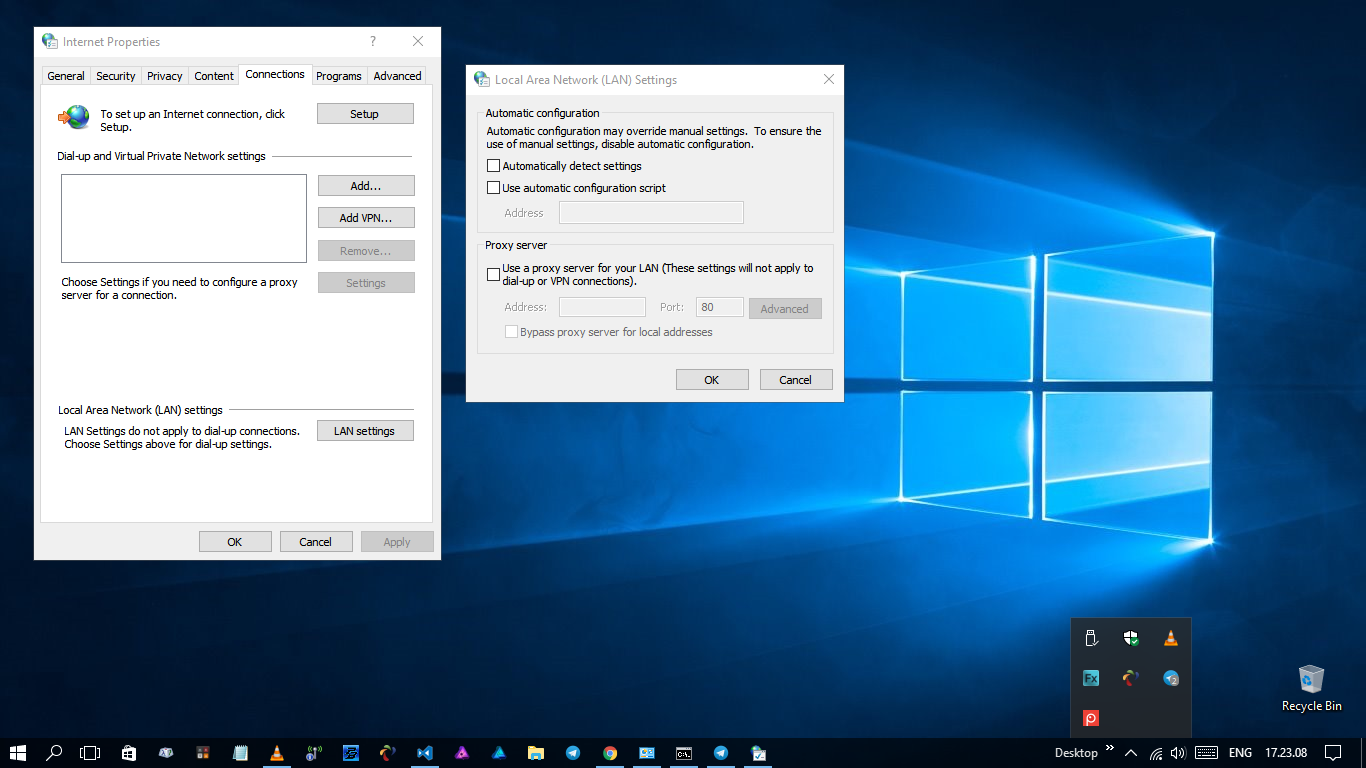
ass long i try to install another extension has no problem at all, but only for python extension get a problem, & proxy that you mean is on control panel as internet option, at tab Connections inside LAN Setting ?! no i don't have a proxy connection
IB4N3Z
on 23 Sep 2017
confirm on the mac version to.
Python 0.7.0 extension (from the initial Welcome page)

another extension

 aphe
on 25 Sep 2017
aphe
on 25 Sep 2017
@joaomoreno ,
Mine too. Confirmed for my linux machine, got the same error Error end of central directory record signature not found
is it the problem for the only python extension or any other issue related to this? Because the other extension is success to install.
Thx
 maestrofx
on 27 Sep 2017
maestrofx
on 27 Sep 2017
Hey guys what do you get when running nslookup www.gallerycdn.vsassets.io?
joaomoreno
on 27 Sep 2017
I was having the same problem, but then I tried to use another internet connection.
Firstly, I was still unable to install it directly in the VS Code. But I tried to install the extension using cmd and somehow it worked.
Failed:
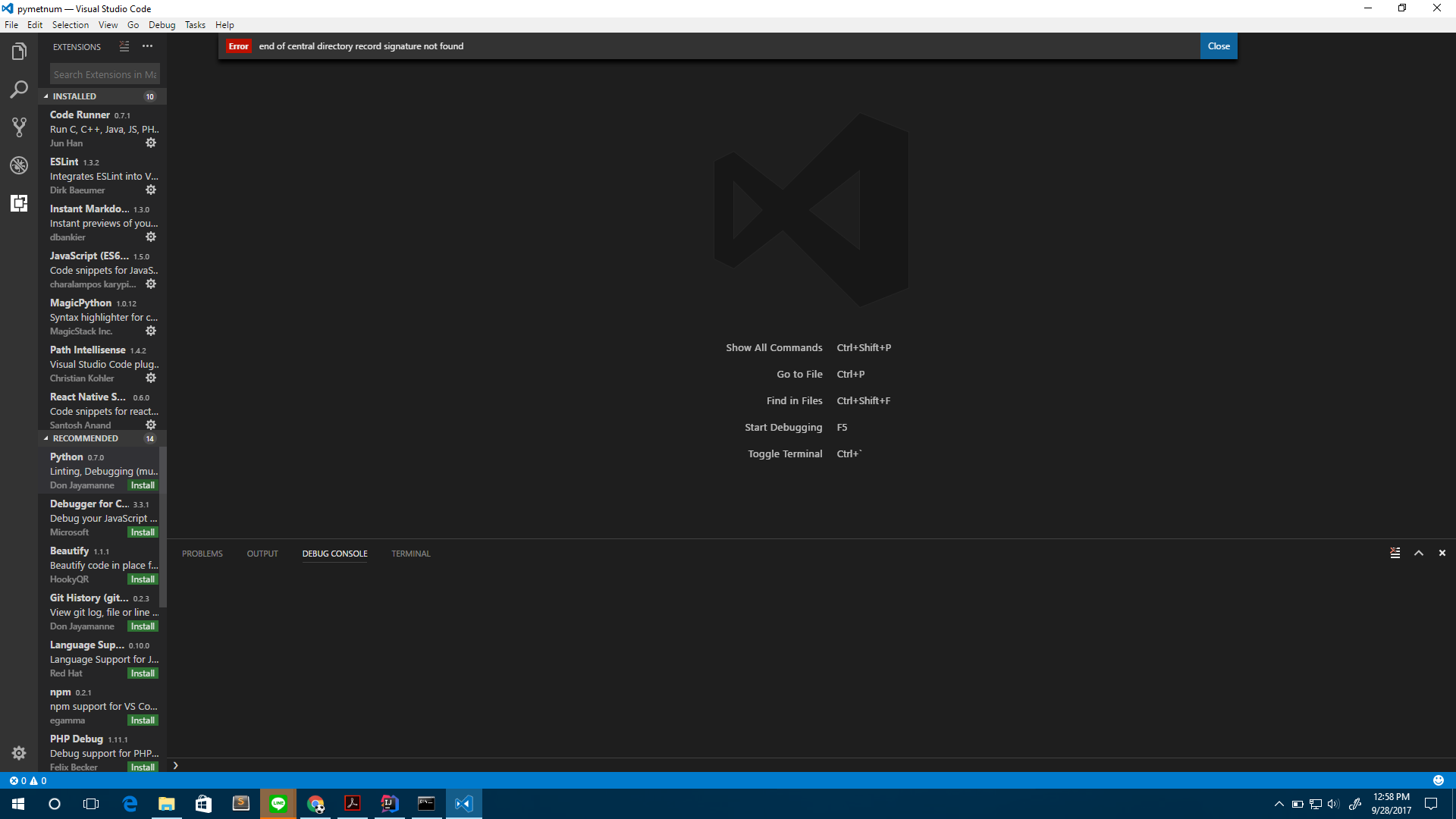
Worked:

 gifff
on 28 Sep 2017
gifff
on 28 Sep 2017
@gifff Great finding!
@jrieken There appears to be a difference between XHR and node requests in terms of the contents of the request which comes back. end of central directory record signature not found means that the unzipping library could not unzip the file because it was corrupt.
joaomoreno
on 28 Sep 2017
Yes, it is a connection issue.
try first i got this error message
Found 'donjayamanne.python' in the marketplace.
Installing...
Error: end of central directory record signature not found
    at /Applications/Visual Studio Code.app/Contents/Resources/app/node_modules/yauzl/index.js:183:14
    at /Applications/Visual Studio Code.app/Contents/Resources/app/node_modules/yauzl/index.js:618:5
    at /Applications/Visual Studio Code.app/Contents/Resources/app/node_modules/fd-slicer/index.js:32:7
    at FSReqWrap.wrapper [as oncomplete] (fs.js:629:17)
change the connection and successfully install
aphe
on 28 Sep 2017
@aphe What do you mean by "change the connection"? Like connect to another wifi? And does the change also fix the in-product installation?
joaomoreno
on 28 Sep 2017
i am using my vpn.
yes it works on terminal but not in-product installation.

aphe
on 28 Sep 2017
34709 seems to be the same.
joaomoreno
on 28 Sep 2017
how is this going? I'm experiencing the same, strangely only for python extension. I've installed Go, Scala, and Wakatime extension perfectly.
Update:
Install via vsix still works:
- Download this file https://donjayamanne.gallery.vsassets.io/_apis/public/gallery/publisher/donjayamanne/extension/python/0.7.0/assetbyname/Microsoft.VisualStudio.Services.VSIXPackage?install=true
- Rename the downloaded file extension to Microsoft.VisualStudio.Services.vsix.
- Install via Command Pallete

Note: the link is for version 0.7.0
 aslamhadi
on 2 Oct 2017
aslamhadi
on 2 Oct 2017
Thanks man ! It worked @aslamhadi
 ridanlukita
on 2 Oct 2017
ridanlukita
on 2 Oct 2017
thanks @aslamhadi it works perfectly for me.
@aphe BTW, can you tell me how to make the terminal path look like this -> https://user-images.githubusercontent.com/8718403/30974151-206a23bc-a499-11e7-8463-e90364253cf3.png
 takin
on 5 Oct 2017
takin
on 5 Oct 2017
It works for me @aslamhadi, Thanks!.
 winndo
on 8 Oct 2017
winndo
on 8 Oct 2017
but we won't have the ability of auto updating if we install the extension from VSIX, right?
 luftywiranda13
on 8 Oct 2017
luftywiranda13
on 8 Oct 2017
Install with GUI Failed, With Command Line Failed too.
C:\Users\Akagami>code --install-extension donjayamanne.python
Found 'donjayamanne.python' in the marketplace.
Installing...
ApplicationInsights:Sender [ { Error: connect ECONNREFUSED 127.0.0.1:443
at Object.exports._errnoException (util.js:1050:11)
at exports._exceptionWithHostPort (util.js:1073:20)
at TCPConnectWrap.afterConnect [as oncomplete] (net.js:1097:14)
code: 'ECONNREFUSED',
errno: 'ECONNREFUSED',
syscall: 'connect',
address: '127.0.0.1',
port: 443 } ]
Error: end of central directory record signature not found
at C:\Program Files\Microsoft VS Code\resources\app\node_modules\yauzl\index
.js:183:14
at C:\Program Files\Microsoft VS Code\resources\app\node_modules\yauzl\index
.js:618:5
at C:\Program Files\Microsoft VS Code\resources\app\node_modules\fd-slicer\i
ndex.js:32:7
at FSReqWrap.wrapper [as oncomplete] (fs.js:629:17)
 jamil912
on 9 Oct 2017
jamil912
on 9 Oct 2017
@aslamhadi Thank You very strongly much :smile:
That's Work for me

jamil912
on 9 Oct 2017
If you suffer from this, read @aslamhadi's suggestion as a workaround.
joaomoreno
on 23 Nov 2017
Any updates on this issue? I'm experiencing the same as:
- @aphe if trying to install via GUI
- @jamil912 if trying to install via command line
The suggested workaround is not working either, as the extension is no longer hosted on the provided URL..
I'm on a mac with OSX 10.11.5 and VsCode Version 1.16.1 (1.16.1)
Thanks in advance!
 miccferr
on 23 Dec 2017
miccferr
on 23 Dec 2017
Hi @miccferr, you can download vsix file here at the Resources section on the right.
aphe
on 27 Dec 2017
Related issues
 biij5698
·
3Comments
biij5698
·
3Comments
 lukehoban
·
3Comments
lukehoban
·
3Comments
 chrisdias
·
3Comments
chrisdias
·
3Comments
 mrkiley
·
3Comments
mrkiley
·
3Comments
 shanalikhan
·
3Comments
shanalikhan
·
3Comments
Most helpful comment
how is this going? I'm experiencing the same, strangely only for python extension. I've installed Go, Scala, and Wakatime extension perfectly.
Update:
Install via vsix still works:
Note: the link is for version 0.7.0