Vscode: Preserve unknown unicode characters when saving
EDITED: I've updated this top comment to contain the most relevant information. This is still present in the most recent VSCode version 1.22.2.
I didn't see an existing one like this so here we are.
- VSCode Version: 1.22.2
- OS Version: Win10 Enterprise
Steps to Reproduce:
- Have a UTF-8 file with unicode U+0091 in it.
- Open file in VS code to have it displayed as �
- Make change somewhere in file other than the hex 91 character and save file
- Open in notepad++ to see the character is now different as the hex in the file for U+0091 has been rewritten as � (0xEFBFBD) from the 0x91 it was previously.
Reproduces without extensions: Yes
Weird_Character.zip
Here is an example that I've encountered with most of the file cut out.
This is what it looks like in both editors prior to making the change:

Here is what it looks like after adding the 4th line of text from VS Code:
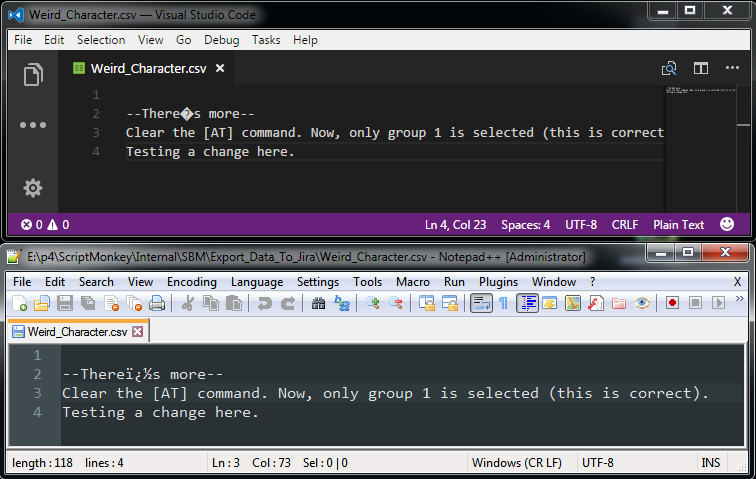
As I was guessing, it looks like VS Code is normalizing the encoding of the file to UTF-8 and modifying the underlying hex in the file to the '?' character in "there's". Is this expected behavior to implicitly normalize the underlying file whenever it's saved like this?
I tried the same edit but from notepad++ first and it doesn't seem to normalize the file.
 Captainohair
All 21 comments
Further investigation and asking around seems to indicate that the quote character is a 1252 encoded character that's being displayed weirdly and then normalized to utf-8 and saved back.
Captainohair
on 19 Sep 2017
Is it expected that VS Code will normalize your file to whatever encoding it detects the file as? If so, what I'm describing might be expected behavior. I'm coming from notepad++ though which doesn't normalize files by default so it seemed wrong.
Captainohair
on 19 Sep 2017
@Captainohair I could not reproduce.
Here is what I have tried:
A program that generates such a file:
var fs = require('fs');
fs.writeFileSync('file.txt', 'world <<' + '\u0091' + '>>');
The generated file in a hex viewer:

I then proceed to open the file in VS Code and type "Hello" before "world". I hit save. Here is the file on disk:

Perhaps there is something else specific about your file, that makes VS Code open it with a different encoding than utf8?
@bpasero can help with our settings around encodings
 alexdima
on 20 Sep 2017
alexdima
on 20 Sep 2017
@bpasero can help with our settings around encodings
files.encoding: <the encoding>
 bpasero
on 20 Sep 2017
bpasero
on 20 Sep 2017
Weird_Character.zip
Here is an example that I've encountered with most of the file cut out.
This is what it looks like in both editors prior to making the change:
Here is what it looks like after adding the 4th line of text from VS Code:
As I was guessing, it looks like VS Code is normalizing the encoding of the file to UTF-8 and modifying the underlying hex in the file to the '?' character in "there's". Is this expected behavior to implicitly normalize the underlying file whenever it's saved like this?
I tried the same edit but from notepad++ first and it doesn't seem to normalize the file.
Captainohair
on 20 Sep 2017
Please fix this critical bug. It can't stay that VS Code is silently changing data. Working with ANSI files is unnecessarily stupid with VS Code.
 WorldofBay
on 26 Apr 2018
WorldofBay
on 26 Apr 2018
I haven't seen a response yet. Is this normalization that occurs expected behavior?
Captainohair
on 26 Apr 2018
I've edited the first comment with the better summary of the issue and that this is still occurring in the most recent version.
Captainohair
on 26 Apr 2018
@bpasero Any update on this? Is this apparent normalization to the detected encoding expected behavior?
Captainohair
on 20 Jul 2018
If a file contains a character that is not valid UTF-8, it will end up garbled as described in this issue. The underlying reason for this is that the encoding is set to UTF-8 and we encode the entire file as UTF-8 upon saving. If someone has a better idea what to do here, please comment.
bpasero
on 11 Sep 2018
well it is pretty easy imho:
if the file is opened as unicode AND saved as unicode, keep unchanged chunks as-is.
the problem of the current behaviour is that i change something in line 2 and vscode changes the hex somewhere down in line 4327 which i can't recognize.
if a file is opened in non-unicode and saved in unicode, encode it all in unicode as you do now.
another possibility:
open and save the file like now but warn if there are unknown characters that aren't the unicode unknown character, such as the ANSI codes for 'ä', 'ö', 'ü', 'ß'.
WorldofBay
on 11 Sep 2018
Ideally, normalizing behaviors like this would be an option I can opt out of. Maybe I want it to normalize files for something, but then I need to work with files where I need them to remain unchanged except for the exact bits I've directly modified. This is currently the default behavior of Notepad++, it saves only what I've changed in the file.
So, if it would be possible to have two modes, or a mode I could disable. Have it normalize by default to be consistent with existing behavior, but then have an option to turn off the normalization and have VS Code save only the changes to the file that I've made.
I just don't like knowing that my text editor might up and modify other parts of the file on me as @WorldofBay mentions. Whether or not my file is consistent with itself is a problem for me to decide, not my editor. I would like for my editor to have the tools available to make the file consistent with itself if I deem it necessary however.
Captainohair
on 11 Sep 2018
There is literally nothing I can do from the file service, this needs support from the editor. I am asking the snapshot to return me a value for the contents of the editor (here) and this value will be UTF encoded and already converted. So at that point in time it is too late to fix the conversion.
It seems to me that there should be a way to give the contents of a editor model as Buffer and not as string as it happens today. I think this is a challenging change and not sure worth the efford.
@rebornix feel free to decide how to proceed.
bpasero
on 13 Sep 2018
I think this is a challenging change and not sure worth the efford.
This issue has cut down on my use of VS Code for editing random files, because I can't trust it. As pointed out other editors handle this in a much nicer way. It's even worse if you use autosave by default, as simply opening a file to inspect it can lead to changes in the file without your knowledge.
The display of invalid characters can look however it needs to. Please don't change bytes in the file that I didn't type anything into.
 billwert
on 13 Sep 2018
billwert
on 13 Sep 2018
@bpasero Thank you for routing this to the appropriate party. @rebornix, please consider implementing a fix as we have described here. It would make VS Code much more robust and it would feel much more reliable. I agree with @billwert that I just can't trust the editor. As I've mentioned, it probably shouldn't matter most of the time whether your files are normalized or not, but sometimes I absolutely can't have a file get normalized based on what the editor thought it determined the file encoding to be. I do a lot of data transformation tasks and I need to know that what I'm seeing in my editor is exactly what is in the file.
Captainohair
on 13 Sep 2018
Technically we read the buffer from nodejs and then convert it into js string for later manipulation, in which it's being decoded (by guessing and we think it's UTF8 in this case) and then encoded as UTF16. That's why we see � when it's shown in the editor. When we attempt to save, we are decoding the string with � and then try to encode it with proper encoding for saving the disk. If I understand correctly, it went wrong when we do the encoding conversion from the buffer at the very beginning.
I labelled it as Help wanted as my knowledge of encoding/decoding doesn't give me any hint of how to properly fix this issue and if I can get any help, it would be highly appreciated.
 rebornix
on 13 Sep 2018
rebornix
on 13 Sep 2018
I unfortunately don't have nodejs experience but I will see if I can get more eyes on this who do.
Captainohair
on 13 Sep 2018
still running into the problem
from what i read here (correct me if wrong) it happens as following:
- data is read from the disk and decoded for display/modification in the editor (turning unknown characters into the unicode unknown character if UTF8 is assumed)
- some changes by the user
- all the data is encoded and saved back to the disk
while the error is done in 1 imo a fix in 3 would be equally valid. if you have any easier possibility to split the data into chunks and only reencode and write dirty chunks the worst part of this issue would be fixed (changing characters far out of scope).
also:
you labeled this as help wanted, can you give possible contributors some pointers where to look at? spots where normalization might happen?
WorldofBay
on 9 Jan 2019
I would say that if the editor fails to decode the file in the chosen encoding, you should a warning about the encoding being wrong. At least if you try to edit it.
 LinAGKar
on 15 Apr 2019
LinAGKar
on 15 Apr 2019
In my case, vim finds the right encoding for the file and doesn't garble the characters.
Definitely a bug that should be addressed, no editor should change characters in a file without notifying the user. VSCode should at the very least warn the user.
 xavierrobitaille
on 11 Jun 2020
xavierrobitaille
on 11 Jun 2020
This is a huge pain. VScode needs to have a dialog warning before saving a file that contains any "�".
 planetwarevince
on 15 Jul 2020
planetwarevince
on 15 Jul 2020
Related issues
 ozsay
·
247Comments
ozsay
·
247Comments
 misolori
·
282Comments
misolori
·
282Comments
 hsdk123
·
263Comments
hsdk123
·
263Comments
 Tyriar
·
314Comments
Tyriar
·
314Comments
 fabiopicchi
·
192Comments
fabiopicchi
·
192Comments
Most helpful comment
I would say that if the editor fails to decode the file in the chosen encoding, you should a warning about the encoding being wrong. At least if you try to edit it.