Vscode: [html] don't show closing tag proposal with "html.autoClosingTags": "false"
- VSCode Version: 1.16.1
- OS Version: W10 Home
In previous versions you could write <div>, press enter and get a newline. Pressing enter in 1.16.1 now closes the tag.
Please bring back the old behaviour when autoClosingTags is set to false.
Steps to Reproduce:
- Set html.autoClosingTags to false
- Write
<div> - Press enter
- Enter should give a newline, not close the tag
 thohe973
All 7 comments
It's actually the > that closes the tag. It's a new feature in 1.16 and we want, for now, keep it enabled by default. Please set "html.autoClosingTags": "false" in your user settings.
 aeschli
on 18 Sep 2017
aeschli
on 18 Sep 2017
Yeah, but setting "html.autoClosingTags": "false" in the user settings doesnt revert back to the old behaviour.
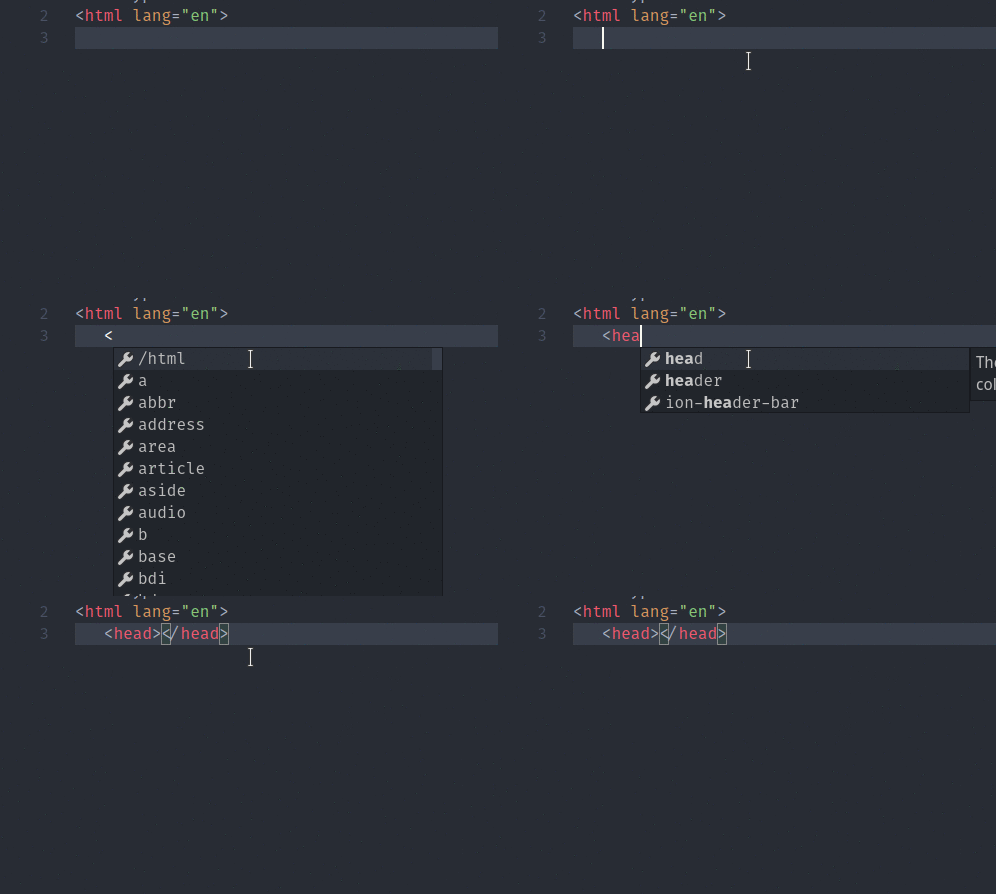
When its off, you now get a intellisense suggestion of </tag> when you write <tag>.
So if I want a newline after my tag I now haft to press Esc to close the suggestion and then press enter.
In previous versions you didnt get a suggestion and could press enter directly.
I think when autoClosingTags is false you shouldnt get a suggestion of </tag> just like in the older versions of vscode.
thohe973
on 18 Sep 2017
autoClosingTags should be on by default. It should respect if the user sets it's preferences to false, but should be true by default.
 str
on 27 Sep 2017
str
on 27 Sep 2017
- OS: ManjaroLinux 17.0.5
- VS Code: 1.16.1
- Additional Extension: Auto Close Tag with
"auto-close-tag.SublimeText3Mode"set totrue
I can confirm this, even though I set"html.autoClosingTags": falsein user settings, when I type<div>and hit Enter it returns a closed tag like<div></div>. but this time as an autocomplete option (I guess).
 amid11
on 2 Oct 2017
amid11
on 2 Oct 2017
Yeah, I think whoever implemented this tested the in-line case, but not the multi-line case. To be exceedingly clear (which is the only way to communicate that is actually communication):
STEPS TO REPRODUCE:
Set:
"html.autoClosingTags": false
In an HTML editor tab, create the following text on exactly one line, verbatim, with no leading and no trailing spaces:
~~~
stuffthings
~
Position the cursor on that line, in the first column.
Press only these keys in exactly this order:
'<', 'b', 'u', 't', 't', 'o', 'n', '>', [RETURN]
for a total of exactly precisely nine (9) keystrokes with a tolerance of zero (0).
EXPECTED EXACT RESULT:
~~~
_(assuming 3-space auto-indentation)_
OBSERVED FAILURE:
~~~
stuffthings
~
 hpg-mheck
on 30 Nov 2017
hpg-mheck
on 30 Nov 2017
IMHO, options to disable features should NEVER be tested by people who like those features. They always miss something. So, since I thoroughly detest anything that treats unmodified keystrokes (ASCII values between 32 and 127 with or without SHIFT but not including CTRL or ALT) as anything other than input that should be recorded verbatim and without extension, I'll be happy to test any repairs.
hpg-mheck
on 30 Nov 2017
Fixed by no longer triggering code completion on >. The proposal is still there but is only seen when actively pressing ctrl + space after >
aeschli
on 30 Nov 2017
Related issues
 lukehoban
·
3Comments
lukehoban
·
3Comments
 sijad
·
3Comments
sijad
·
3Comments
 trstringer
·
3Comments
trstringer
·
3Comments
 chrisdias
·
3Comments
chrisdias
·
3Comments
 NikosEfthias
·
3Comments
NikosEfthias
·
3Comments
Most helpful comment
Yeah, but setting
"html.autoClosingTags": "false"in the user settings doesnt revert back to the old behaviour.When its off, you now get a intellisense suggestion of
</tag>when you write<tag>.So if I want a newline after my tag I now haft to press Esc to close the suggestion and then press enter.
In previous versions you didnt get a suggestion and could press enter directly.
I think when autoClosingTags is false you shouldnt get a suggestion of
</tag>just like in the older versions of vscode.