Vscode: 1 CPU: Visual Studio Code 100% CPU and System freeze on startup win 7 64 bit
I have a windows 7 64bit PC running on an AMD processor with on board NVIDIA graphics chipset and 8 gb of RAM. I have tried various versions of vs code but the result is the same. It freezes the system for about 2 minutes until it opens it with a 100% CPU usage.
I have also tried different options like disable GPU and running without extentions etc. but all in vain.
I have an older laptop with 1gig RAM and windows 7 32 bit where vs code 1.1 runs without any of the above issues smoothly.
Can you please help ?
- VSCode Version: 1.1 tot 1.16
- OS Version: Windows 7 Ultimate 64bit
Steps to Reproduce:
- Open visual studio code
- System freeze and 100% CPU
Reproduces without extensions: Yes
 ParikshitBhagawati
All 50 comments
@ParikshitBhagawati VS Code uses multiple processes. Maybe it could help us figure out what's going on if we could find out which process is using 100% CPU. You can use a tool like process explorer and hover over the process that is at 100% CPU so we can find out the arguments it is launched with (i.e. identify which of our processes it is)
 alexdima
on 15 Sep 2017
alexdima
on 15 Sep 2017
@alexandrudima thanks for your response. attached is the screenshot from process explorer. please let me know if this help you with the info you were looking for.
p.s - using the insiders build now.

ParikshitBhagawati
on 15 Sep 2017
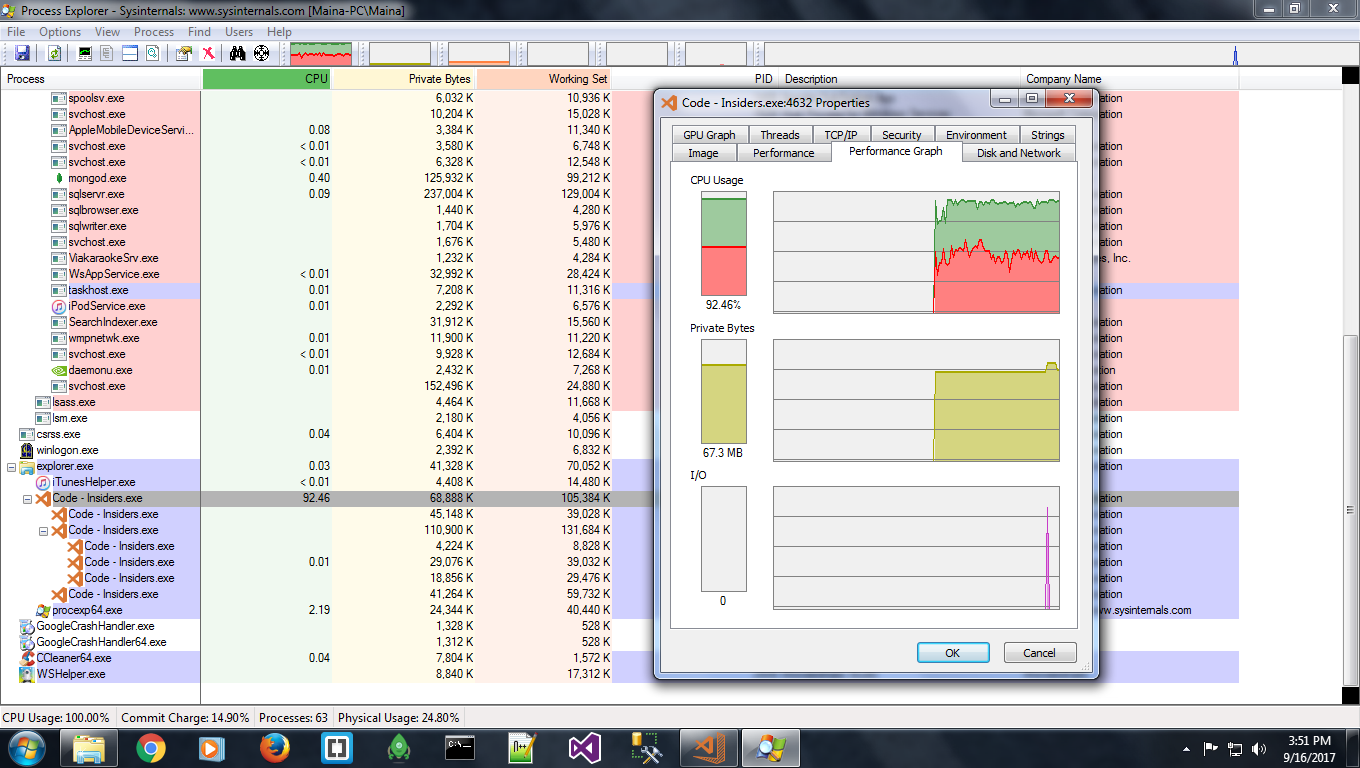
Here's more from today!
ParikshitBhagawati
on 16 Sep 2017
I haven't seen so far our main process going crazy like this.
alexdima
on 18 Sep 2017
Can you try to reproduce with our nightly insider builds? You can give our preview releases a try from: http://code.visualstudio.com/Download#insiders
 bpasero
on 18 Sep 2017
bpasero
on 18 Sep 2017
Well, the profile sent before was with the insiders build (Version 1.17.0). The link you provided however takes me to the download page for the latest stable build I guess, which is 1.16.1. But I downloaded it anyway with no change in results (100% CPU, unresponsive system etc.) and took 10 minutes to open.
Attached is the profile snapshot with the latest build.

Thanks!
ParikshitBhagawati
on 18 Sep 2017
@ParikshitBhagawati is this a single CPU VM?
bpasero
on 18 Sep 2017
Its not a VM.. It's a native single core processor.
ParikshitBhagawati
on 18 Sep 2017
Yeah. VS Code does not run well on 1-CPU systems. This is a known issue that was reported before.
bpasero
on 19 Sep 2017
So is there a fix /work around for this yet or planned in the future ? Or it just wont work ?
ParikshitBhagawati
on 19 Sep 2017
I also facing same issue. After launching visual studio, RAM become 100% and my desktop freezes
OS: Arch Linux
Kernel: 4.13.4-1-ARCH
 vaibhavsingh97
on 10 Oct 2017
vaibhavsingh97
on 10 Oct 2017
In Windows you can launch VS Code with low or below normal CPU priority and it won't freeze your machine. If you're already affected you can open task manager and set the priority for the processes using 100% CPU to either low or below normal priority. After a while the high CPU usage will stop.
 ahumeniy
on 14 Dec 2017
ahumeniy
on 14 Dec 2017
I changed my win7 VM to use multiple processors, and vscode is running fine again.
 royBrocken
on 25 Dec 2017
royBrocken
on 25 Dec 2017
My system is not freezing, but it almost did.
- VS code version 1.9.1 Architecture x64
- OS version: Windows 10 Home
- Processor: Intel(R) Core(TM) i7-3630QM CPU @ 2.40GHz 2.40 GHz
- Installed memory(RAM): 4.00 GB (3.89 GB usable)
- System type: 64-bit Operating System, x64-base processor
- memtest 86+ no errors found.

 lbertolotti
on 29 Dec 2017
lbertolotti
on 29 Dec 2017
As mentioned by @bpasero VS code doesn’t work well with single core CPUs. I had an option to enable multiple cores for my processor and when I did, Code started to work fine without the system freeze / 100% CPU issue.
ParikshitBhagawati
on 30 Dec 2017
Meet the same issue on Windows Server 2012 (VM, 1 core cpu).
Kill the high CPU usage process solves the problem.
Update:
There is the details via the --status command.
Version: Code 1.21.0 (9a199d77c82fcb82f39c68bb33c614af01c111ba, 2018-03
-07T11:04:09.969Z)
OS Version: Windows_NT x64 6.3.9600
CPUs: Intel(R) Xeon(R) CPU E5-26xx v4 (1 x 2394)
Memory (System): 2.00GB (0.55GB free)
VM: 0%
Screen Reader: no
Process Argv: C:\Program Files\Microsoft VS Code\Code.exe
CPU % Mem MB PID Process
0 123 3352 code main
0 82 3248 window (undefined)
97 46 3624 shared-process
0 204 4168 window
0 9 3696 electron-crash-reporter
0 60 3980 extensionHost
0 32 1460 electron_node jsonServerMain.js
0 60 2780 electron_node electronForkStart.js tsserver.js
0 30 3496 electron_node typingsInstaller.js tsserver.js t
ypesMap.js
0 49 4304 electron_node htmlServerMain.js
0 9 5056 watcherService
0 4 3752 console-window-host (Windows internal process)
 9chu
on 10 Mar 2018
9chu
on 10 Mar 2018
I no longer have this issue with version 1.21.
 jcontradiction
on 13 Mar 2018
jcontradiction
on 13 Mar 2018
I'm still having this issue with 1.21 on an AWS t2.micro. Upsizing to t2.medium.
 eselje
on 18 Mar 2018
eselje
on 18 Mar 2018
Same problem.
VS code: 1.20.1
OS: Win server 2012 R2

 johnsonz
on 29 Mar 2018
johnsonz
on 29 Mar 2018
Downloading an update in the background pegs the (a) CPU at 100%+ for me. Always has, still does.
 ssteinerx
on 19 Apr 2018
ssteinerx
on 19 Apr 2018
Same problem here, ArchLinux 4 core, latest vscode version
 Nhoya
on 10 May 2018
Nhoya
on 10 May 2018
Same here, i7 quad core with Ubuntu 18.04
 philpalmieri
on 10 May 2018
philpalmieri
on 10 May 2018
Same problem here, Windows10 12 core, latest vscode version
 samwei12
on 18 May 2018
samwei12
on 18 May 2018
I experience the same problem
OS Name:                   Microsoft Windows Server 2012 R2 Standard
OS Version:                6.3.9600 N/A Build 9600
OS Manufacturer:           Microsoft Corporation
OS Configuration:          Member Server
OS Build Type:             Multiprocessor Free
Registered Owner:          Windows User
Registered Organization:
Product ID:                00252-60272-42486-AA665
Original Install Date:     24-10-2017, 09:35:44
System Boot Time:          02-05-2018, 14:30:53
System Manufacturer:       VMware, Inc.
System Model:              VMware Virtual Platform
System Type:               x64-based PC
Processor(s):              1 Processor(s) Installed.
 mortenseifert
on 18 May 2018
mortenseifert
on 18 May 2018
same
 viniciusgati
on 23 May 2018
viniciusgati
on 23 May 2018
I experience the same problem
 thanhdevapp
on 29 May 2018
thanhdevapp
on 29 May 2018
same here, linux mint 18.1
when I close VSCode its process still remains in processes list (100%). Have to kill it manually
 scasic
on 4 Jun 2018
scasic
on 4 Jun 2018
Same problem here. Workaround for now appears to be to reduce Code.exe process priority to Below Normal, otherwise it's a good 10 mins to open and various actions cause it to freeze again after that.
Same issue on multiple Windows Server 2008 R2 SP1 VMs, all with dual vCPUs and various versions of VS code, currently 1.23.1.
 DFineNormal
on 5 Jun 2018
DFineNormal
on 5 Jun 2018
Problem also happens on VS 1.24.1 @ OSX 10.12.6
 pavelloz
on 21 Jun 2018
pavelloz
on 21 Jun 2018
Same, switching to Sublime... took my cpu to 85C, not even gaming does that...
 santi95
on 23 Jun 2018
santi95
on 23 Jun 2018
I had the same issue on my garbage single core CPU laptop, but changing the priority of the process to "Below Normal" makes it work fine. Now it's at 0% usage most of the time and goes up to ~10% when the window re-renders. Thanks y'all!
(In my case, setting the priority to "Low" made it a little bit more responsive than "Normal" but it still used 100% CPU)
 TBubba
on 26 Jun 2018
TBubba
on 26 Jun 2018
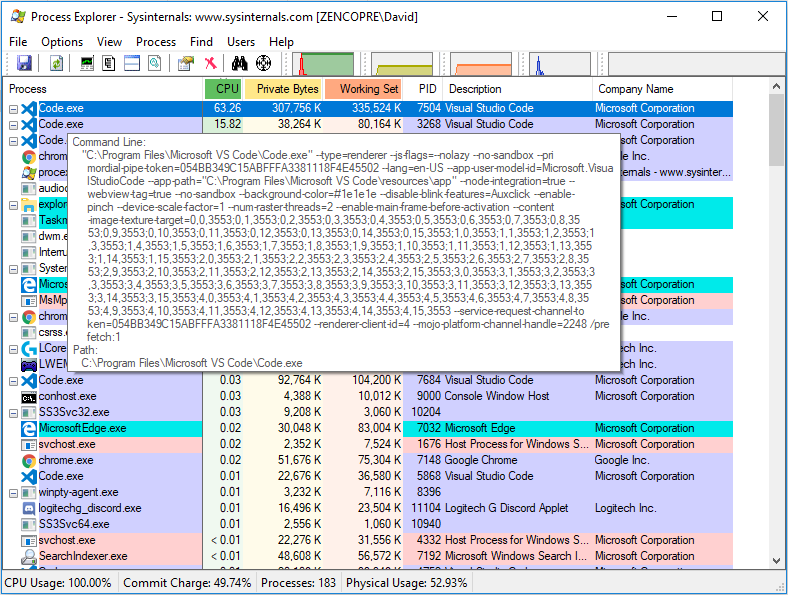
@bpasero I am having the same issue on an AMD Ryzen 1300x (four physical cores) so I don't think it is a single core issue.
 3dfoster
on 7 Jul 2018
3dfoster
on 7 Jul 2018
same here
 hiwjcn
on 7 Sep 2018
hiwjcn
on 7 Sep 2018
same here
 JohnProg
on 22 Oct 2018
JohnProg
on 22 Oct 2018
same issue on Win 10, with code and code-exploration. Also code doesn't open without internet connection
 jmbuhr
on 24 Oct 2018
jmbuhr
on 24 Oct 2018
same here, it makes the IDE almost unusable
 LydiaMennes
on 30 Oct 2018
LydiaMennes
on 30 Oct 2018
I had same problem with newest update ,1 physical core ,100 cpu usage,window 7
 r4hulCorleone
on 31 Oct 2018
r4hulCorleone
on 31 Oct 2018
same problem here.
- macOS 10.14.1
- code 1.29.1
 ergenekonyigit
on 16 Nov 2018
ergenekonyigit
on 16 Nov 2018
Same problem here. I reverted back to 1.25
Seems like that is the latest usable version for me.
Is there any update on a fix ????
 KristofStroobants
on 19 Nov 2018
KristofStroobants
on 19 Nov 2018
Experiencing the same issue. CodeHelper is stuck on ~100%.

ps aux output on that process:
✗ ps aux | grep 13158
-edited-    13158  99.5  1.4  6194332 242864   ??  R    Tue09AM  59:28.99 /Applications/Visual Studio Code.app/Contents/Frameworks/Code Helper.app/Contents/MacOS/Code Helper /Applications/Visual Studio Code.app/Contents/Resources/app/extensions/node_modules/typescript/lib/tsserver.js --useInferredProjectPerProjectRoot --enableTelemetry --cancellationPipeName /var/folders/5b/gz8j6f890kb2pd1n6zfn09c00000gn/T/vscode-typescript/tscancellation-87c31d99c306e6ae821e.tmp* --locale en --noGetErrOnBackgroundUpdate
Looks like Code.app/Contents/Resources/app/extensions/node_modules/typescript/lib/tsserver.js is a culprint. My project is a monorepo with a lot of JS code (not TS enabled)
OSX 10.13.6
Code 1.29.1 (1.29.1)
 gustaff-weldon
on 21 Nov 2018
gustaff-weldon
on 21 Nov 2018
same issue (Linux - Xubuntu 18.10, vscode 1.29.1)
 kyegupov
on 29 Nov 2018
kyegupov
on 29 Nov 2018
This could be a bug from electron. There's a bug fix finally.
https://github.com/electron/electron/pull/15975
 lautis0503
on 11 Dec 2018
lautis0503
on 11 Dec 2018
I finished a build with the fix from electron/electron#15975:
Can people report back if this is fixed with that build?
bpasero
on 4 Jan 2019
I finished a build with the fix from electron/electron#15975:
Can people report back if this is fixed with that build?

Solved on my VPS with 1 core CPU, running Windows Server 2012 R2.
9chu
on 4 Jan 2019
I finished a build with the fix from electron/electron#15975:
Can people report back if this is fixed with that build?
This build fixed the issue for me.
Tested on 2 x single core VMs running Win 2008 and 2008 R2 respectively
DFineNormal
on 4 Jan 2019
Very cool, thanks for confirming!
bpasero
on 4 Jan 2019
Closing this issue given that we plan to release VSCode stable early February with Electron 3.x. If you want to benefit from the fix already, consider to use our insiders version that already contains the fix: https://code.visualstudio.com/insiders/
bpasero
on 25 Jan 2019
Insider or not; electron 3 or not, VS Code takes minutes to just open up.
My only good working version is v1.25. Anything above that is so slow that it becomes unusable at this point. There are so many people mentioning this but i haven't read about a fix. Yeah you can have a look into the processes but that gives you numbers we don't even understand. I really wish you guys either came out with a fix OR with some better way for us to help finding out what is causing this.
KristofStroobants
on 1 Feb 2019
I finished a build with the fix from electron/electron#15975:
https://az764295.vo.msecnd.net/insider/5967828c2a5c559ed86c3369ed9811bb1bd6386b/VSCode-win32-x64-1.31.0-insider.zip
Can people report back if this is fixed with that build?This build fixed the issue for me.
Tested on 2 x single core VMs running Win 2008 and 2008 R2 respectively
Me to.
viniciusgati
on 13 Feb 2019
I have a core i7 and it still takes about 10 sec to open an ionic project. I have 16GB ram.
Version: 1.31.1 (user setup)
Commit: 1b8e8302e405050205e69b59abb3559592bb9e60
Date: 2019-02-12T02:20:54.427Z
Electron: 3.1.2
Chrome: 66.0.3359.181
Node.js: 10.2.0
V8: 6.6.346.32
OS: Windows_NT x64 6.3.9600
 ssj7
on 4 Mar 2019
ssj7
on 4 Mar 2019
Related issues
 mrkiley
·
3Comments
mrkiley
·
3Comments
 biij5698
·
3Comments
biij5698
·
3Comments
 v-pavanp
·
3Comments
v-pavanp
·
3Comments
 NikosEfthias
·
3Comments
NikosEfthias
·
3Comments
 sirius1024
·
3Comments
sirius1024
·
3Comments
Most helpful comment
Yeah. VS Code does not run well on 1-CPU systems. This is a known issue that was reported before.