- VSCode Version: Code - Insiders 1.16.0-insider (d30825f323a7f77e17d25b212fef6440e73fdc14, 2017-08-28T05:23:37.920Z)
- OS Version: Windows_NT x64 10.0.15063
- Extensions:
Extension|Author (truncated)|Version
---|---|---
cform|aws|0.0.10
npm-intellisense|chr|1.3.0
path-intellisense|chr|1.4.2
vscode-eslint|dba|1.2.11
python|don|0.7.0
vscode-npm-script|eg2|0.2.0
beautify|Hoo|1.1.1
search-node-modules|jas|1.1.1
vscode-circleci|jva|0.1.2
lambda-snippets|log|0.2.0
Go|luk|0.6.63
MagicPython|mag|1.0.12
terraform|mau|0.0.16
terraform-snippets|min|1.9.1
csharp|ms-|1.12.1
vscode-docker|Pet|0.0.16
cf-templates|pra|0.0.4
vscode-icons|rob|7.12.0
jenkinsfile-support|sec|0.1.0
vscode-react-native|vsm|0.4.1
nodejs-extension-pack|wad|0.1.9
JavaScriptSnippets|xab|1.4.1
Steps to Reproduce:
- After update new version, reopen VS Code.
- My old workspace cannot open : error A system error occurred (ENOENT: no such file or directory, stat '
'
Reproduces without extensions: Yes/No
 naviat
All 8 comments
@naviat can you share the workspace file with me?
 bpasero
on 28 Aug 2017
bpasero
on 28 Aug 2017
@bpasero thanks for your reply, this is my workspace file.
WORKSPACE.zip
naviat
on 28 Aug 2017
for me, the editor is trying to access the wrong path. my sources are in G:\www (tried to add G:\www\cim-user and it's trying to access F:\www (insiders is installed in F:\ FWIW)
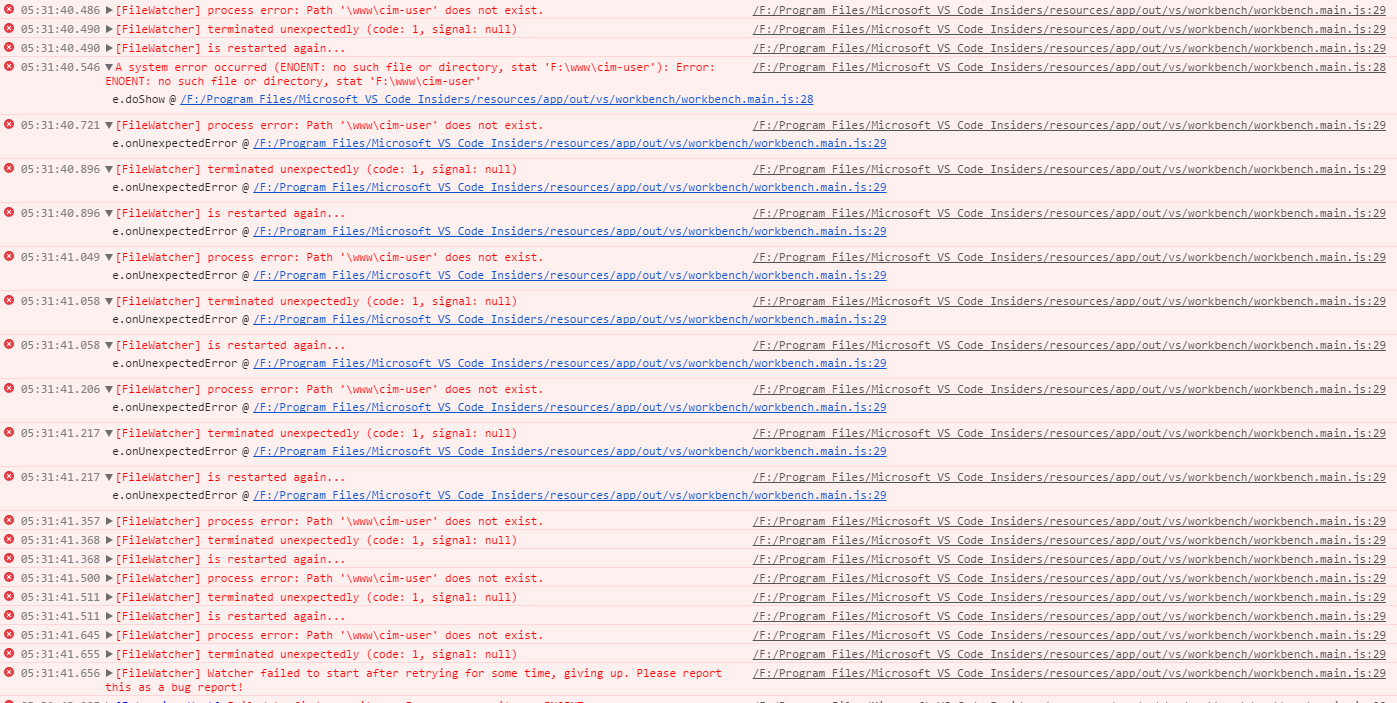
it seems to be dropping the drive letter, and then it's trying to "guess" using the cwd for the insiders
 pocesar
on 28 Aug 2017
pocesar
on 28 Aug 2017
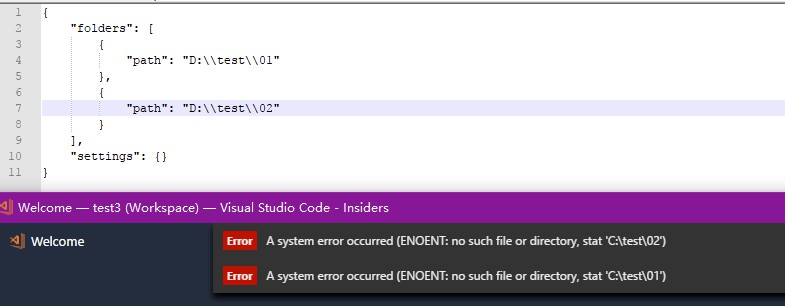
Yeah I notice that once you remove or add a workspace, the drive letter is removed. I am looking into a fix...
bpasero
on 28 Aug 2017
 kzhui125
on 28 Aug 2017
kzhui125
on 28 Aug 2017
I will rebuild todays Windows insider for this fix to land.
bpasero
on 28 Aug 2017
A new insider build is out, please everyone can you try it out and see if it works? You might have to manually fix your workspace file to add the drive letter back.
bpasero
on 28 Aug 2017
You are awesome @bpasero 👍
naviat
on 29 Aug 2017
Related issues
 shanalikhan
·
3Comments
shanalikhan
·
3Comments
 biij5698
·
3Comments
biij5698
·
3Comments
 lukehoban
·
3Comments
lukehoban
·
3Comments
 borekb
·
3Comments
borekb
·
3Comments
 sijad
·
3Comments
sijad
·
3Comments
Most helpful comment
A new insider build is out, please everyone can you try it out and see if it works? You might have to manually fix your workspace file to add the drive letter back.