The issue
I'm unable to open project folders in VS Code - attempting to open one results in seemingly nothing happening. However, going to the desired folder and running code . --verbose --disable-extensions gives:
Unable to read folders in /Users/kabir/Library/Application Support/Code/Workspaces (Error: ENOENT: no such file or directory, scandir '/Users/kabir/Library/Application Support/Code/Workspaces').
Reinstalling VS Code worked initially, but then the issue started occurring again.
Details
- VSCode Version: Code 1.15.1 (41abd21afdf7424c89319ee7cb0445cc6f376959, 2017-08-16T17:15:57.756Z)
- OS Version: Darwin x64 16.6.0
- Extensions:
Extension|Author (truncated)|Version
---|---|---
EditorConfig|Edi|0.9.4
vsc-material-theme|Equ|1.0.2
python|don|0.7.0
file-icons|fil|1.0.5
Go|luk|0.6.63
atom-keybindings|ms-|3.0.1
laravel-blade|one|1.8.1
sass-indented|rob|1.4.1
nunjucks|ron|0.2.3
laravel-5-snippets|sac|2.0.1
standard|shi|0.2.3
(2 theme extensions excluded)
Steps to Reproduce:
- Try to open a project folder on macOS
Reproduces without extensions: Yes
 kbrgl
kbrgl
All 19 comments
What's the output of ls -la /Users/kabir/Library/Application Support/Code | grep Workspaces ?
 Tyriar
on 22 Aug 2017
Tyriar
on 22 Aug 2017
@Tyriar that doesn't output anything, but I created the directory and the editor is still unable to open project folders. The earlier error Unable to read folders... doesn't appear though.
kbrgl
on 22 Aug 2017
@kbrgl is that a some remote drive (samba share) or similar?
 bpasero
on 23 Aug 2017
bpasero
on 23 Aug 2017
@bpasero no, it's all local.
kbrgl
on 23 Aug 2017
The same issue on MacOS Sierra
 NGorco
on 23 Aug 2017
NGorco
on 23 Aug 2017
Can you try to reproduce with our nightly insider builds? You can give our preview releases a try from: http://code.visualstudio.com/Download#insiders
bpasero
on 23 Aug 2017
@bpasero sure, but the issue had taken a few days to come up, so I'll let you know when it turns up on the insider build
kbrgl
on 23 Aug 2017
@bpasero welp, it turned up already. Yes, I can reproduce with the nightly builds.
kbrgl
on 23 Aug 2017
Clean install of VS Code (after removing all folders, including those in ~/Library, ~/.code, etc) still shows the issue. I think the steps to reproduce might be a little more specific:
- Do clean install of VS Code
- Start VS Code
- Open folder
- Remove from sidebar
- Try to open that
or any other folderagain
Update: this issue only presents with folders that have been removed using right click > Remove from sidebar
kbrgl
on 23 Aug 2017
@kbrgl maybe best to share a video of what you are doing and how it results in this error 👍
bpasero
on 24 Aug 2017
Having the same issue, preventing me from opening folders and doing work with vscode. It was also after I had removed a folder using right click remove from sidebar. I tried a clean install and it still doesn't work.
 CameronFraser
on 24 Aug 2017
CameronFraser
on 24 Aug 2017
/cc @sandy081 as these people seem to talk about removing a view from the explorer
bpasero
on 24 Aug 2017
@kbrgl Looks like you removed the folder view and which will be remembered. You can get back the folder by adding it back. See the following video.
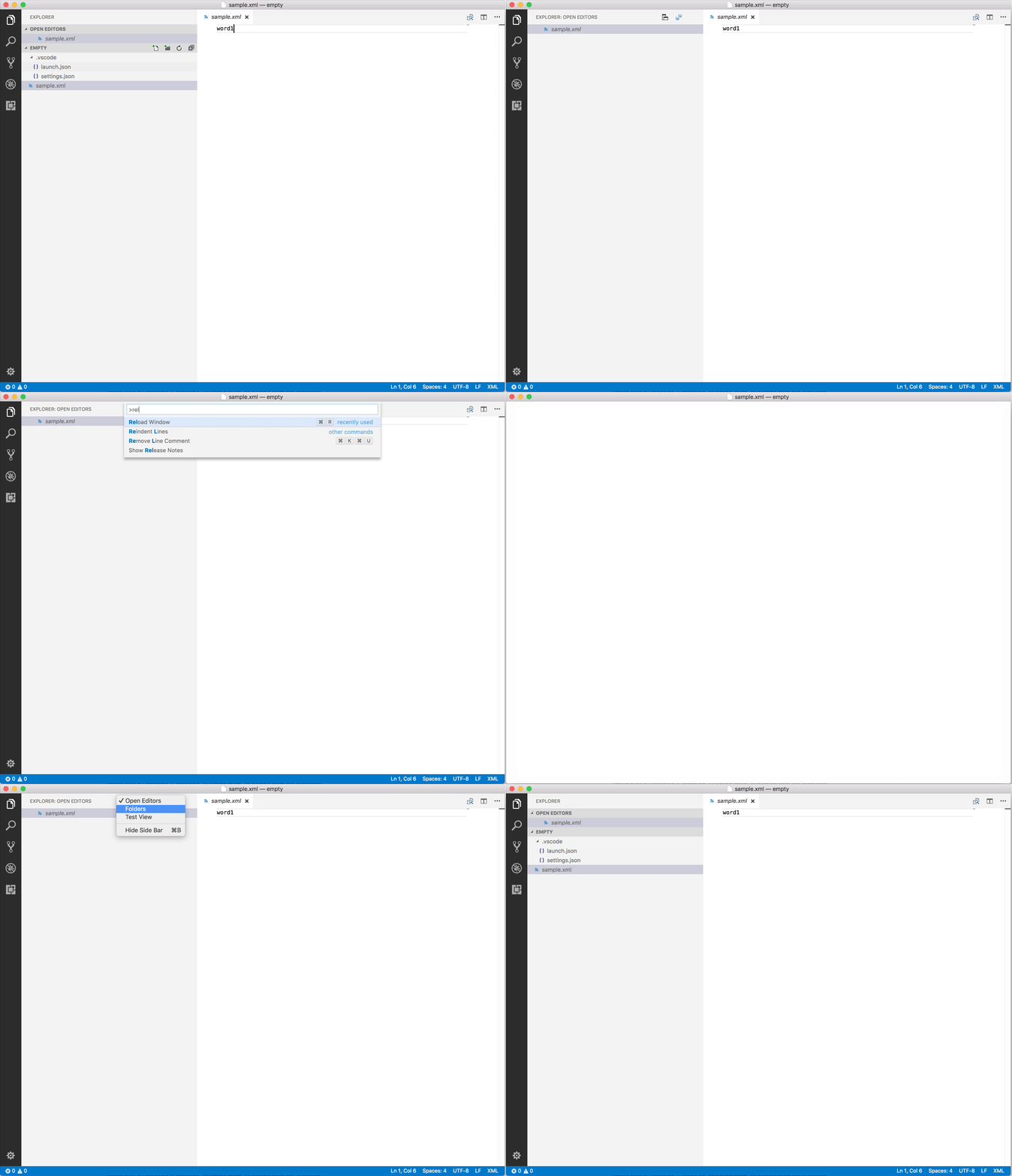
 sandy081
on 25 Aug 2017
sandy081
on 25 Aug 2017
@sandy081 I wonder if we should make it harder to get into this state, e.g. prompt the user if he really wants to remove the files explorer view.
bpasero
on 25 Aug 2017
I would also question do we need to provide an option to hide the files explorer?
sandy081
on 25 Aug 2017
Ah, okay. That worked.
I'd question whether it makes sense though, since in other editors (e.g. Atom and Sublime) removing a dir from the sidebar has the effect of closing the folder as well. It's rather unexpected that the folder should just disappear.
Perhaps this behavior should be made clear when the user tries to remove the folder for the first time, or perhaps the behavior should be removed altogether?
Thanks for helping me out though 😄
kbrgl
on 25 Aug 2017
@sandy081 yeah maybe not now that we can reorder sections around and collapsed state is persisted.
bpasero
on 25 Aug 2017
Related to #31485
sandy081
on 28 Aug 2017
I clicked the option by accident and it took me several hours of searching the internet to find https://github.com/Microsoft/vscode/issues/32962#issuecomment-324866098 and to get the folder back 😰
 honzajavorek
on 29 Aug 2017
honzajavorek
on 29 Aug 2017
Related issues
 ryan-wong
·
3Comments
ryan-wong
·
3Comments
 trstringer
·
3Comments
trstringer
·
3Comments
 DovydasNavickas
·
3Comments
DovydasNavickas
·
3Comments
 v-pavanp
·
3Comments
v-pavanp
·
3Comments
 villiv
·
3Comments
villiv
·
3Comments
Most helpful comment
@kbrgl Looks like you removed the folder view and which will be remembered. You can get back the folder by adding it back. See the following video.