Vscode: Detect autofetch credential prompt and show explanation
- VSCode Version: 1.14.2
- OS Version: macOS 10.12.6
Steps to Reproduce:
Have a VSCode window open to a git repo that SSH authentication
Expected Result:
I don't notice VSCode is open until I try to use it.
Actual Result:
I keep getting password prompts that ask for my SSH passphrase, with no context of what app spawned them, or why my password might be needed. Your Twitter account recommended disabling autofetch to workaround.
Request:
We certainly shouldn't be training users to type credentials into prompts that appear with no explanation, and security-conscious users will hopefully be skeptical of such prompts (or apps that cause them).
VSCode ought to detect when an automatic/background git operation has spawned a credential window (perhaps by measuring when git operations take too long or cancel unexpectedly) and show an explanation of:
- why VSCode tried to use the git credentials
- how to disable that behavior.
Related issues:
- #23951
- #26573
- #26441
- #11918
 appsforartists
All 14 comments
Can you show me a screenshot of that SSH passphrase ask dialog?
 joaomoreno
on 15 Aug 2017
joaomoreno
on 15 Aug 2017
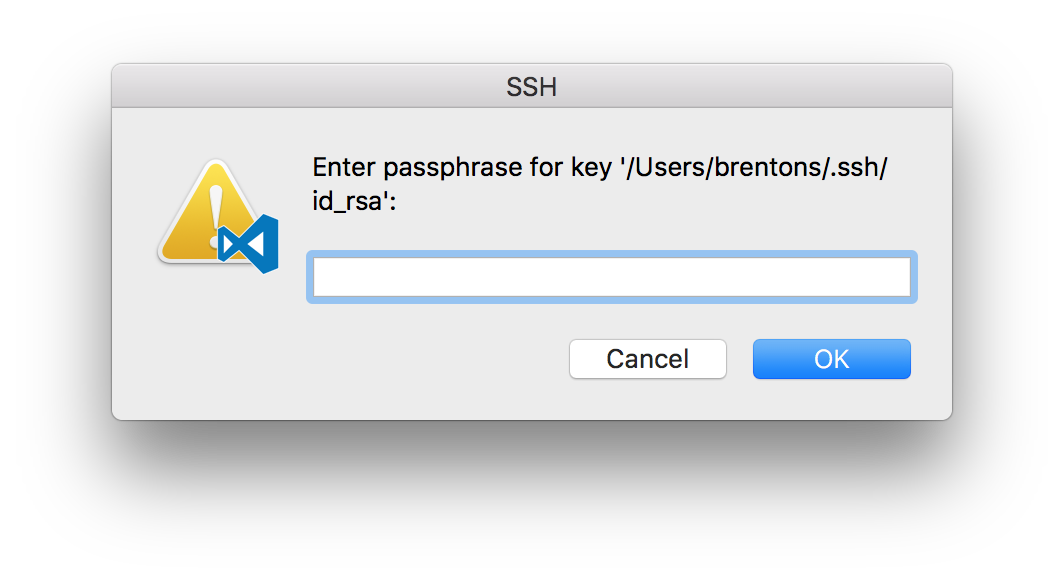
When I reported the issue, the VSCode icon was not there.
When you asked for a screenshot, I had already turned off autofetch, so I tried to trigger it using a manual Git Fetch. That triggered the "Where is Electron?" dialog, as described in #282 and #20616. As they instructed, I selected VSCode. But, that put the icon in the dialog, so I then turned on autofetch to see if I could get the prompt without the icon. But, now that I've selected VSCode, I still get its icon, even from autofetch.
When I first reported the error, there was no icon in the SSH prompt, nor was I asked to find Electron when the prompt spawned.
appsforartists
on 15 Aug 2017
This is interesting. AFAIK we don't spawn that dialog. Do you have any extension installed?
What is your configured credential helper? git config credential.helper
joaomoreno
on 15 Aug 2017
I get an empty response from git config credential.helper.
My SSH key is password protected - I believe that is why the prompt is spawned.
appsforartists
on 15 Aug 2017
Got it. I don't understand why it asked you to find Electron. It doesn't make much sense.
VSCode ought to detect when an automatic/background git operation has spawned a credential window
Code can't detect that this popup gets open at all. Code spawns git, which spawns ssh which somehow does the thing you're currently looking at. All we can do is prevent Code from spawning git and that's what the autofetch setting is doing.
joaomoreno
on 15 Aug 2017
Can you reconsider the default for autofetch? Seems like there are too many cases where it does the wrong/unexpected thing.
appsforartists
on 15 Aug 2017
I have to dispute the _too many_ qualifier and counter with a _some_ instead. The vast majority of people have git configured in a way that it will just connect without prompting for any credentials. For these people, Code will appear to work _automagically_, informing them that there are new incoming changes from the server. We don't want to throw that away.
I'm still quite surprised that you get a Where is Electron popup when SSH needs your key passphrase... This is odd.
joaomoreno
on 16 Aug 2017
Magic is not a feature that belongs in a tool. A text editor's job is to edit text. Having it open should not have side effects.
My SSH key being unexpectedly accessed is alarming. But, even for users who don't secure their keys, magic like autofetch makes everything harder to reason about. When users don't know that VSCode is fetching for them, it introduces confusion. The state of your git repo is now coupled with whether you happened to leave your editor open. Users won't understand that unless you educate them.
I understand that you are quite proud of autofetch, and it's a fine feature _so long at it's opt-in_. Promote it as a recommended setting and explain to users what it does in introductory material. But please, don't set defaults that silently introduce side effects.
appsforartists
on 16 Aug 2017
Exactly this - we are programmers, not wizards. Magic is bad in coding.
If you consider this feature to be so important to be enabled for "masses" then maybe ask when a git repo is opened for the first time, if the user wants it enabled for that repo (that would require it to be per-repo/project/directory config though).
 jkavalik
on 16 Aug 2017
jkavalik
on 16 Aug 2017
The state of your git repo is now coupled with whether you happened to leave your editor open.
Yes, the remote branches are fetched. I'd say this is a great thing.
You know, we have many people who are behind authenticated proxies. These people get annoying popup asking for credentials all the time whenever we ping anything online. Should we disable all internet communication for all users, put it behind a configuration flag, just because they have issues with it?
Let's try to approach this another way, maybe it'll be helpful. Can you try out the GitHub client, or GitKraken? What is the experience there? Do you get the same popup dialog?
joaomoreno
on 17 Aug 2017
This issue has been closed automatically because it needs more information and has not had recent activity. Please refer to our guidelines for filing issues. Thank you for your contributions.
![vscodebot[bot] picture](https://avatars2.githubusercontent.com/in/2406?v=4&s=40) vscodebot[bot]
on 24 Aug 2017
vscodebot[bot]
on 24 Aug 2017
@appsforartists Any update?
joaomoreno
on 25 Aug 2017
Nope. I think we have a fundamental disagreement about how tools should work.
I believe in the principle of least surprise and question the use of "magic" as a feature in a text editor. If VSCode is going to cause side effects, the user ought to be informed about it and opt-in to that behavior.
To be completely honest, I'm super busy at work right now and out of the office all next week. I don't know if GitHub's desktop client or GitKraken cause that dialog or try to fetch in the background - I haven't tried them. Even if they cause the prompt, and even if they don't provide context ahead of time, that doesn't justify VSCode's behavior.
appsforartists
on 25 Aug 2017
Got it. We'll keep the approach of having it enabled by default nevertheless.
I'd still be very interested in knowing what happens when you run GitKraken, for example, since I do know they have auto fetch enabled by default too. I wonder if they are able to detect the prompt somehow and do something smarter about it.
joaomoreno
on 25 Aug 2017
Related issues
 VitorLuizC
·
3Comments
VitorLuizC
·
3Comments
 mrkiley
·
3Comments
mrkiley
·
3Comments
 philipgiuliani
·
3Comments
philipgiuliani
·
3Comments
 biij5698
·
3Comments
biij5698
·
3Comments
 borekb
·
3Comments
borekb
·
3Comments
Most helpful comment
Magic is not a feature that belongs in a tool. A text editor's job is to edit text. Having it open should not have side effects.
My SSH key being unexpectedly accessed is alarming. But, even for users who don't secure their keys, magic like
autofetchmakes everything harder to reason about. When users don't know that VSCode is fetching for them, it introduces confusion. The state of your git repo is now coupled with whether you happened to leave your editor open. Users won't understand that unless you educate them.I understand that you are quite proud of
autofetch, and it's a fine feature _so long at it's opt-in_. Promote it as a recommended setting and explain to users what it does in introductory material. But please, don't set defaults that silently introduce side effects.