All 33 comments
As suggested in the linked post, please do share which of those preferences are essential for you.
And I can work on getting them implemented in the next update
 ramya-rao-a
on 14 Aug 2017
ramya-rao-a
on 14 Aug 2017
The ones I use are: css.valueSeparator, css.propertyEnd and sass.propertyEnd.
I think that enabling all preferences would be the perfect solution. But, if you are planning to implement them following the users requests, these are the ones I would appreciate the most.
 diogocorrea
on 14 Aug 2017
diogocorrea
on 14 Aug 2017
Am curious, what are your values for css.valueSeparator, css.propertyEnd and sass.propertyEnd.
ramya-rao-a
on 14 Aug 2017
@ramya-rao-a these are used in stylesheet formatters and were renamed to between and after: https://github.com/emmetio/stylesheet-formatters/blob/master/index.js#L5
 sergeche
on 14 Aug 2017
sergeche
on 14 Aug 2017
@ramya-rao-a my config file looks like this:
{
"css.valueSeparator": ":",
"css.propertyEnd": "; ",
"sass.propertyEnd": "; "
}
@sergeche Can you update the README for https://github.com/emmetio/expand-abbreviation?
It says that currently HTML element commenting is the only supported formatter.
As per your links there are stylesheet-formatters as well that can be customized. Anything else that the format option in expand options can support?
Also the use of stylesheet formatters is not as expected. I have logged https://github.com/emmetio/expand-abbreviation/issues/8 for this.
ramya-rao-a
on 15 Aug 2017
Here is the current list I am working towards:
- css.propertyEnd
- css.valueSeparator
- sass.propertyEnd
- sass.valueSeparator
- stylus.propertyEnd
- stylus.valueSeparator
- css.unitAliases
- css.intUnit
- css.floatUnit
- filter.commentAfter
- filter.commentBefore
- filter.commentTrigger
- bem.elementSeparator
- bem.modifierSeparator
ramya-rao-a
on 15 Aug 2017
@ramya-rao-a How do you want to do this? Do you plan to allow to specify a path to that config file or do you want to implement those settings as "normal" settings like emmet.includeLanguages?
 jens1o
on 15 Aug 2017
jens1o
on 15 Aug 2017
@jens1o I am thinking of bringing back the emmet.preferences and support just the above in it. The advantage is that the documentation for it already exists in https://docs.emmet.io/customization/preferences/
Internally, we will use the format option as described in https://github.com/emmetio/expand-abbreviation/issues/8
ramya-rao-a
on 15 Aug 2017
In tomorrow's Insiders, you would be able to use the emmet.preferences setting to customize the following
- css.propertyEnd
- css.valueSeparator
- sass.propertyEnd
- sass.valueSeparator
- stylus.propertyEnd
- stylus.valueSeparator
- css.unitAliases
- css.intUnit
- css.floatUnit
There hasnt been any feedback asking for the filter.* or bem.* preferences, and so they will be out of scope for this milestone.
ramya-rao-a
on 30 Aug 2017
@ramya-rao-a I assumed you were brining back filter.* since it was included in your list.
I for one use "filter.commentAfter": "\n<!-- /<%= attr('id', '#') %><%= attr('class', '.') %> -->" to add classes/ids after the closing tags.
 sjelfull
on 30 Aug 2017
sjelfull
on 30 Aug 2017
@sjelfull it’s an option of markup formatter now and should be passed as
{
...
"comment": {
"enabled": true,
"after": "\n<!-- /[#ID][.CLASS] -->"
}
}
See https://github.com/emmetio/markup-formatters/blob/master/format/html.js#L8
sergeche
on 30 Aug 2017
@sergeche Could you show the example in the context of VS Code + emmet.* options?
I'm unsure where to put it. emmet.syntaxProfiles.html?
sjelfull
on 30 Aug 2017
@sjelfull Glad to hear your feedback. I have actually added the filter.comment* preferences, but didn't have enough time in this milestone to test it, so didn't want to document the support (just yet)
Can you do me a favor and help out in testing it in the latest Insiders? You can get it from https://code.visualstudio.com/insiders
Set the filters as before i.e
"emmet.preferences": {
"filter.commentAfter": ...
"filter.commentBefore": ...
"filter.commentTrigger": ....
}
@ramya-rao-a Thanks.
I'm on 1.16.0-insider.
I got this:
"emmet.preferences": {
"filter.commentAfter": "\n<!-- /<%= attr('id', '#') %><%= attr('class', '.') %> -->",
"stylus.propertyEnd": ";",
"stylus.valueSeparator": ": "
},
"emmet.syntaxProfiles": {
"html": {
"filters": "html, c"
}
}
The stylus part seems to work, but the comment is not appended?
sjelfull
on 31 Aug 2017
@sjelfull
Ah! I was following https://docs.emmet.io/filters/#comment-tags-c when adding support for the comment filter. The filtersoption in emmet.syntaxProfiles is not being used in Emmet 2.0 as it was before. Can you try something like ul.nav|c to test the 3 filter.comment* preferences?
I have logged #33601 for adding support for the filters in emmet.syntaxProfiles
ramya-rao-a
on 31 Aug 2017
I too am using @sjelfull's setup.
Using ul.nav|c yields ul.nav|<!-- --> without the ul actually being created.
 hybridinteractive
on 1 Sep 2017
hybridinteractive
on 1 Sep 2017
@encryptdesigns Do you mean you also set c as a filter in emmet.syntaxProfiles or that you have customized the filter.commentAfter setting.
And what is your expected output for ul.nav|c ?
I get the below in the latest Insiders without customizing the filter.commentAfter setting.
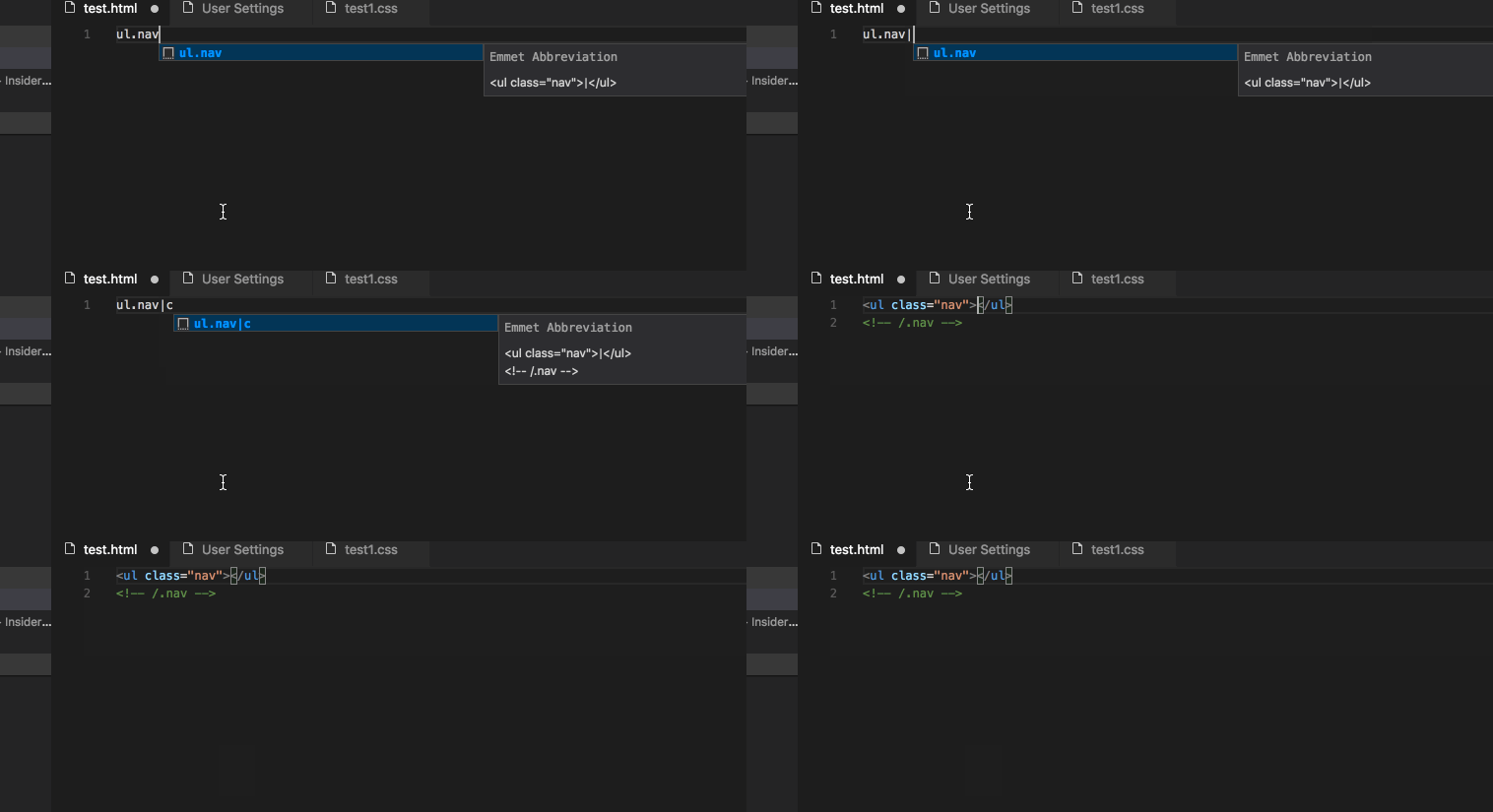
ramya-rao-a
on 1 Sep 2017
Correct, I'm currently doing this:
{
"emmet.preferences": {
"filter.commentAfter": "\n<!-- /<%= attr('id', '#') %><%= attr('class', '.') %> -->",
"stylus.propertyEnd": ";",
"stylus.valueSeparator": ": "
},
"emmet.syntaxProfiles": {
"html": {
"filters": "html, c"
}
},
"emmet.triggerExpansionOnTab": true,
"window.zoomLevel": 0,
"editor.snippetSuggestions": "top",
"workbench.statusBar.visible": true,
"editor.renderWhitespace": "all",
"git.enableSmartCommit": true,
"files.trimTrailingWhitespace": true,
"workbench.startupEditor": "newUntitledFile"
}
@encryptdesigns You must be on VS Code 1.15.1. The feature tracked in this issue will be part of VS Code 1.16 which hasnt released yet, but you can try it out in our Insiders build from https://code.visualstudio.com/insiders
Can you get the Insiders from the above link and try ul.nav both with and without the customization for filter.commentAfter under emmet.preferences and share your output and expected output?
ramya-rao-a
on 1 Sep 2017
@sergeche The after for the comment formatter in Emmet 2.0 seem to be using a different format compared to filter.commentAfter in the old Emmet. Can you share some information on how the before and after should be specified for the comment formatter in Emmet 2.0?
ramya-rao-a
on 1 Sep 2017
I've got the latest stable of VSC 1.16.0 and using the code that @encryptdesigns has above it almost works except that when adding the comment tag it includes the raw code of he emmet preference setting.

and my settings file has:
"emmet.preferences":{
"filter.commentAfter": "<!-- /<%= attr('id', '#') %><%= attr('class', '.') %> -->"
},
"emmet.syntaxProfiles": {
// Enable XHTML dialect for HTML syntax
// “html”: “xhtml”
"html" : {
"filters" :"html, c"
}
},
 CreateSean
on 13 Sep 2017
CreateSean
on 13 Sep 2017
Technically comments are working if I remove the filter.commetAfter in my settings. But the problem is that it adds the comment to the new line, which drives me nuts. I want my closing comment next tothe closing tag like this
In Sublime I had this set up exactly as above I just removed the /n to generate a new line and I was happy. Is this possible in VSC?
CreateSean
on 13 Sep 2017
Emmet 2 uses different syntax for commenting: https://github.com/emmetio/markup-formatters/blob/master/format/html.js#L20
sergeche
on 13 Sep 2017
Tested this just now:
"emmet.preferences": {
"filter.commentAfter": "\n<!-- /[#ID][.CLASS] -->",
"stylus.propertyEnd": ";",
"stylus.valueSeparator": ": "
},
📈 Works!
sjelfull
on 13 Sep 2017
Confirmed!
Although I prefer the closing tag on the same line:
"emmet.preferences": {
"filter.commentAfter": "<!-- /[#ID][.CLASS] -->",
"stylus.propertyEnd": ";",
"stylus.valueSeparator": ": "
},
The Release Notes: https://code.visualstudio.com/updates/v1_17#_emmet-preferences
and the Emmet docs: https://code.visualstudio.com/docs/editor/emmet#_emmet-configuration have been updated with notes on the new format for filter.commentAfter
ramya-rao-a
on 5 Oct 2017
Rock on!
On Oct 5, 2017 2:15 PM, "Ramya Rao" notifications@github.com wrote:
The Release Notes: https://code.visualstudio.com/updates/v1_17#_emmet-
preferences
and the Emmet docs: https://code.visualstudio.com/
docs/editor/emmet#_emmet-configuration have been updated with notes on
the new format for filter.commentAfter—
You are receiving this because you were mentioned.
Reply to this email directly, view it on GitHub
https://github.com/Microsoft/vscode/issues/32496#issuecomment-334579155,
or mute the thread
https://github.com/notifications/unsubscribe-auth/AFcmwTzxkyWZ2m6K-tZLvIa-V5iQrszwks5spTjMgaJpZM4O2p5v
.
hybridinteractive
on 5 Oct 2017
Hi peeps. Sorry Im new to the conversation (and somewhat VScode - but loving it!)
Ive tried using the new preference:
"emmet.preferences": {
"filter.commentAfter": "\n<!-- /[#ID][.CLASS] -->"
}
But still no auto complete with comments :(. Any ides what Im doing wrong? I am on version 1.17.0
Me trying it -> http://gph.is/2xVH9Pz
Thanks!
 kenjonespizza
on 6 Oct 2017
kenjonespizza
on 6 Oct 2017
@kenjwho You need to use the comment filter. Use div|c instead of just c
If you are sure you want to use the comment filter all the time, then update the settings with
  "emmet.syntaxProfiles": {
    "html": {
        "filters": "c"
    }
}
@ramya-rao-a thanks so much for the reply. Im sure Im just doing it wrong. These are the only emmet settings Im setting. And it does work just fine when I type |c before hitting tab
"emmet.syntaxProfiles": {
"html": {
"filter": "div|c"
}
},
"emmet.preferences": {
    "filter.commentAfter": "\n<!-- /[#ID][.CLASS] -->"
}
Use the below
"emmet.syntaxProfiles": {
    "html": {
        "filters": "c"
    }
}
@ramya-rao-a you are my hero. Thank you!!
kenjonespizza
on 7 Oct 2017
Related issues
 DovydasNavickas
·
3Comments
DovydasNavickas
·
3Comments
 borekb
·
3Comments
borekb
·
3Comments
 VitorLuizC
·
3Comments
VitorLuizC
·
3Comments
 trstringer
·
3Comments
trstringer
·
3Comments
 villiv
·
3Comments
villiv
·
3Comments
Most helpful comment
Use the below