Vscode: Can't search root folder names in quickopen
- Have a multiroot workspace with folders 'foo' and 'bar'
- Search 'foo' in quickopen
- No results 🐛
- Search 'f1' where 'f1/file.txt' is some file in 'foo'
- It appears ✔️
 roblourens
All 19 comments
@roblourens I am not sure how much sense it makes to show folders in quick open results? what should happen when you open a folder? can you clarify?
 bpasero
on 14 Aug 2017
bpasero
on 14 Aug 2017
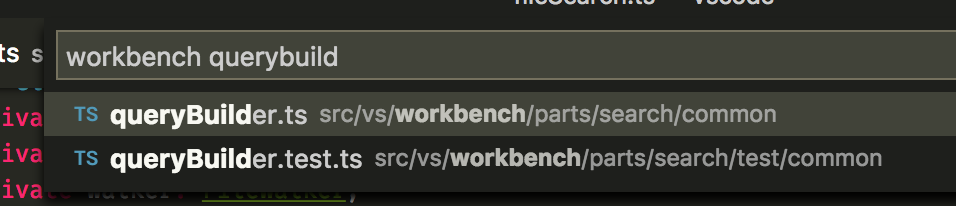
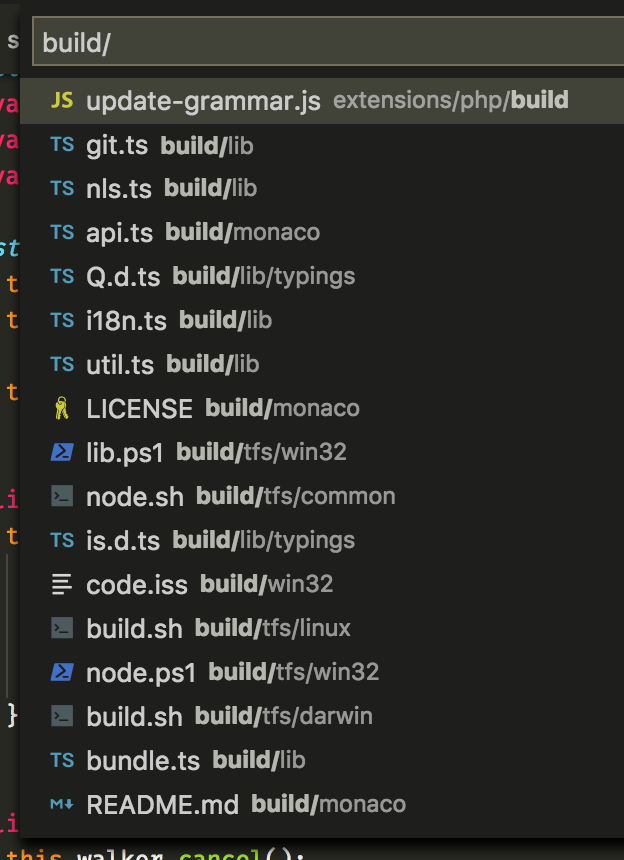
I don't mean show the folders themselves, I just want to be able to be able to filter with the root folder name.
Examples:
I can find 'querybuilder' files under some 'workbench' folder
I can see stuff under 'build/'
And it would be useful if I could search vscode-chrome-debug launch.json to get the 'launch.json' under a vscode-chrome-debug root, as opposed to some other root folder
roblourens
on 14 Aug 2017
@roblourens if you give me some pointers I can look into it because I think it would be cool to have. What I wonder is why this does not work (ticino-playground is one of my root folders):

But this does:
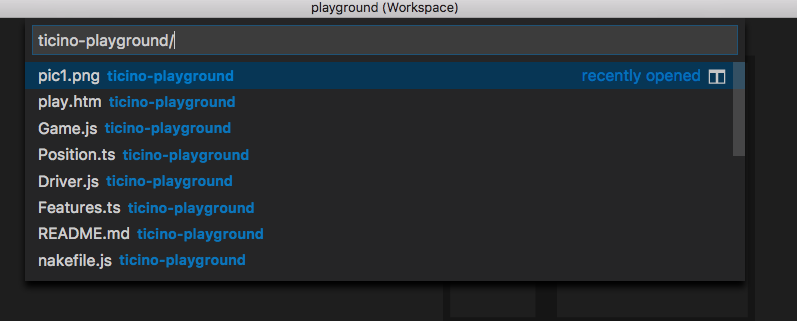
Wouldn't this be just a matter of checking if the typed folder name is the beginning of any root folder (this includes also root folders that have a different name via the name property of .code-workspace file) and then automatically treating it as if <root>/ was typed?
bpasero
on 18 Nov 2017
I think that's just because they're in Recently Opened. I think the fix will be in fileSearch.ts. isFilePatternMatch is only looking at each candidate's relative path in the root. We probably just need to add the root folder name to the "relative path" of each candidate file.
roblourens
on 20 Nov 2017
@roblourens ah yeah, you are right. To prevent spam from recently opened we only consider the path portion from those bucket when the user is intentionally searching for paths by having the path separator in the query.
bpasero
on 20 Nov 2017
@roblourens is fileSearch (FileWalker) still being used, isn't it the old implementation without RipGrep?
bpasero
on 20 Nov 2017
Yeah, that's where it spawns ripgrep (previously find or the node traversal) and checks all the results against the search pattern.
cc @chrmarti
roblourens
on 20 Nov 2017
@roblourens I guess this one is a bit tricky because it actually depends on the workspace setup for how we want to match against results:
- single root: match on the path portion relative to the folder
- multi root: match on the path portion relative to the workspace
Example:
- given a path of
/some/development/folder/myfile.txt - and a query of
folder myfile - if the user has
folderopened: we do not expect a match - if the user has a multi-root workspace configured on
folder: we do expect a match
So somewhere down where we convert the absolute path to a relative one for matching we need to know if the user is in a multi root workspace or not. And if so, prefix the root folder to that path. Can you point me where that is?
bpasero
on 20 Nov 2017
The FileMatchItemAccessor passed in here seems to be doing this: https://github.com/Microsoft/vscode/blob/master/src/vs/workbench/services/search/node/rawSearchService.ts#L258
 chrmarti
on 20 Nov 2017
chrmarti
on 20 Nov 2017
Somehow you need to check folderQueries that we have here: https://github.com/Microsoft/vscode/blob/master/src/vs/workbench/services/search/node/fileSearch.ts#L120 for .length > 1. That should be the case iff this is a multiroot workspace.
Then ripgrep is spawned and you need to add the folder name to the relative paths coming back, over here: https://github.com/Microsoft/vscode/blob/master/src/vs/workbench/services/search/node/fileSearch.ts#L206
roblourens
on 20 Nov 2017
@roblourens unfortunately the number of folders can still be 1 but you can be in a multi root workspace, even just with 1 folder. So this might need a new option for the query.
bpasero
on 21 Nov 2017
Ah that's right.
roblourens
on 21 Nov 2017
I take it back, we only show the extra root folder name if we have more than one folder in the workspace, so it looks like we could use that as a guess.
Frankly speaking fileSearch.ts is super hard for me to understand and any change in there I feel I would break something. It seems that the relativeFiles array that we produce from the RipGrep search needs the root folder for each relative file so that the matching is proper. But doing that of course results in all paths being wrong because the absolute path will have duplicate root folders in them.
I am not considering to help out anymore as I find it impossible to understand the code :).
bpasero
on 22 Nov 2017
OT: @bpasero what's the ticino-playground project about? I've just seen it in the "Release notes" gifs and felt a little bit patriotic :switzerland: :smile:
 denysvitali
on 15 Mar 2018
denysvitali
on 15 Mar 2018
@denysvitali ticino was the original codename for VS Code. Since we are working from Switzerland (Zurich) we picked names from here. That playground code is actually from a TypeScript sample ("Mankala").
bpasero
on 16 Mar 2018
@roblourens Would there be anything we could do to help make progress on this? Either design-decision-wise, or something else? Happy to be of service.
 Nasafato
on 10 Jan 2019
Nasafato
on 10 Jan 2019
As far as I can tell, this is now fixed, at least the problem as I described it in #68165. Thank you very much!
 radix
on 14 Mar 2019
radix
on 14 Mar 2019
I would very much like to see implemented the solution @bpasero described. :+1: to being able to type root folder names.
 AaronFriel
on 27 Mar 2019
AaronFriel
on 27 Mar 2019
That would be really nice. A typical example is when you have several npm packages in your workspace and you want to Ctrl + P to the package.json of one of the folders in the workspace. In Sublime Text I would type the first letters of my package then package.json. In VS Code I have to type package.json and select the right one, it's much less convenient
EDIT: Almost 3 years since this issue exists, almost 1 year without activity while this seems like an easy thing to fix. Will this ever be fixed? :/
 SBRK
on 20 Jan 2020
SBRK
on 20 Jan 2020
Related issues
 trstringer
·
3Comments
trstringer
·
3Comments
 VitorLuizC
·
3Comments
VitorLuizC
·
3Comments
 curtw
·
3Comments
curtw
·
3Comments
 DovydasNavickas
·
3Comments
DovydasNavickas
·
3Comments
 philipgiuliani
·
3Comments
philipgiuliani
·
3Comments
Most helpful comment
I don't mean show the folders themselves, I just want to be able to be able to filter with the root folder name.
Examples:
I can find 'querybuilder' files under some 'workbench' folder

I can see stuff under 'build/'

And it would be useful if I could search
vscode-chrome-debug launch.jsonto get the 'launch.json' under a vscode-chrome-debug root, as opposed to some other root folder