Vscode: Integrated Terminal is not working
- VSCode Version: Code - Insiders 1.15.0-insider (fed03b66ac8acdac93897727a1d19ee0f6898bf2, 2017-07-25T07:30:52.414Z)
- OS Version: Windows_NT x64 10.0.15063
- Extensions:
Extension|Author (truncated)|Version
---|---|---
vscode-eslint|dba|1.2.11
xml|Dot|1.9.2
gitlens|eam|4.3.2
tslint|eg2|0.17.0
beautify|Hoo|1.1.1
csharp|ms-|1.11.0
PowerShell|ms-|1.4.1
vscode-icons|rob|7.11.0
Steps to Reproduce:
- Launch VS Code
- Launch Terminal
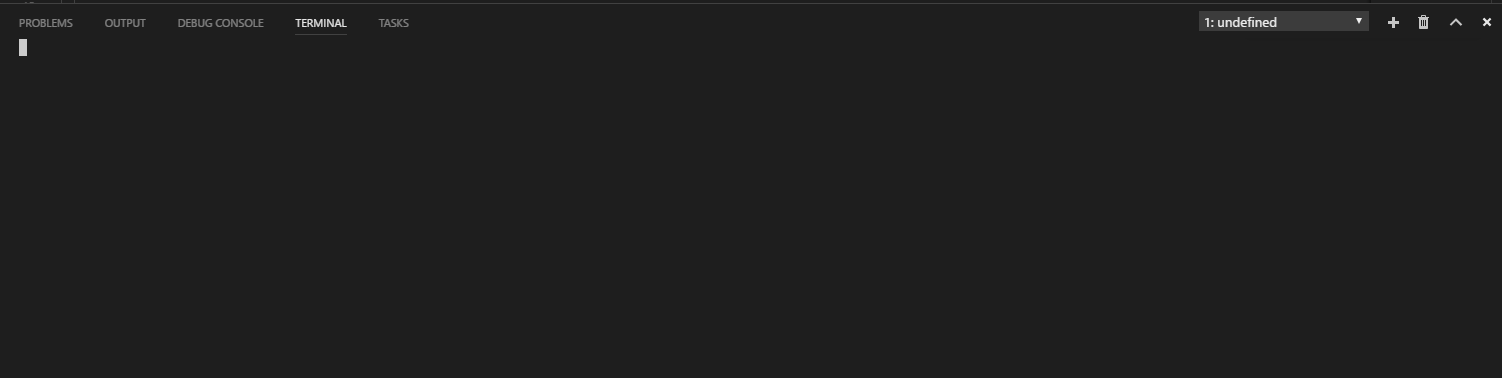
Reproduces without extensions: Yes
 bemartin
All 8 comments
I am seeing the same thing with the same 64bit insiders version, also with the undefined as the terminal name in the drop down.
To add: I have also the 64-bit version of cmd set up as my terminal in the settings, all of which worked fine before the recent update:
"terminal.integrated.shell.windows": "C:\\Windows\\sysnative\\cmd.exe"
 batjko
on 25 Jul 2017
batjko
on 25 Jul 2017
I didn't realize that the integrated shell was configured. The issue is that there is no such directory as "sysnative". Changing the setting to the correct path fixes the issue:
terminal.integrated.shell.windows": "C:\\Windows\\SysWOW64\\cmd.exe
bemartin
on 25 Jul 2017
@bemartin Yup, indeed.
I don't remember where that path was suggested. But either way, for some reason this worked for weeks though.
Not sure, but this is fixed for me, as well.
batjko
on 25 Jul 2017
You will need to use C:\\Windows\\System32\\cmd.exe in the 64-bit client.
 Tyriar
on 25 Jul 2017
Tyriar
on 25 Jul 2017
@bemartin Using terminal.integrated.shell.windows": "C:\\Windows\\SysWOW64\\cmd.exe" will not allow you to launch bash . It returns
'bash' is not recognized as an internal or external command,
operable program or batch file.
Use C:\\Windows\\System32\\cmd.exe instead, as @Tyriar said.
 fjsuarez
on 25 Jul 2017
fjsuarez
on 25 Jul 2017
@batjko C:\\Windows\\System32\\cmd.exe will run the plain old Windows console which might work for some programs/commands like how you had it set up before (depending on what software you've installed in the past) but I'm assuming you're trying to get your shell to be bash from WSL (Windows Subsystem Linux). This can be achieved by setting terminal.integrated.shell.window to "C:\Windows\System32\bash.exe"
 rozzzly
on 28 Jul 2017
rozzzly
on 28 Jul 2017
@rozzzly Thanks for that. I wasn't looking to use bash, actually. I'm quite happy with the plain old Windows console ;)
batjko
on 28 Jul 2017
you should test before releasing
 josersleal
on 26 Aug 2017
josersleal
on 26 Aug 2017
Related issues
 chrisdias
·
3Comments
chrisdias
·
3Comments
 biij5698
·
3Comments
biij5698
·
3Comments
 borekb
·
3Comments
borekb
·
3Comments
 shanalikhan
·
3Comments
shanalikhan
·
3Comments
 philipgiuliani
·
3Comments
philipgiuliani
·
3Comments
Most helpful comment
You will need to use
C:\\Windows\\System32\\cmd.exein the 64-bit client.