Vscode: Add a Linux man page for 'code' command line
Hi,
I looked in the issues and in the documentation, apparently there is no Linux/UNIX manpage for the code command which is installed on *NIX systems when install VSCode.
Could it be added? It could be minimalist, generated automatically (e.g., with pandoc) from the code --help message.
 Naereen
All 10 comments
I am using Windows 10 and out of curiosity, I decided to run the code command inside of bash. It appears to work in the same way as VIM or cat and opens files code (or a file if in the cd if a name is specified).
@Naereen Is that the same way it works in Linux?
 rocketinventor
on 24 Jul 2017
rocketinventor
on 24 Jul 2017
Hi @rocketinventor. I don't see the link between your question and the issue/question I raised here.
But to answer, it works as subl or gedit works: it starts the program with no file if just code is called, or opens one or more FILE if code FILE [FILE...] is called (same with directory/ies).
Naereen
on 24 Jul 2017
The reason I didn't pursue this was because on macOS there is already a code command and I'm not sure how conflicts would be handled. If we had a man page on Linux it should also be on macOS.
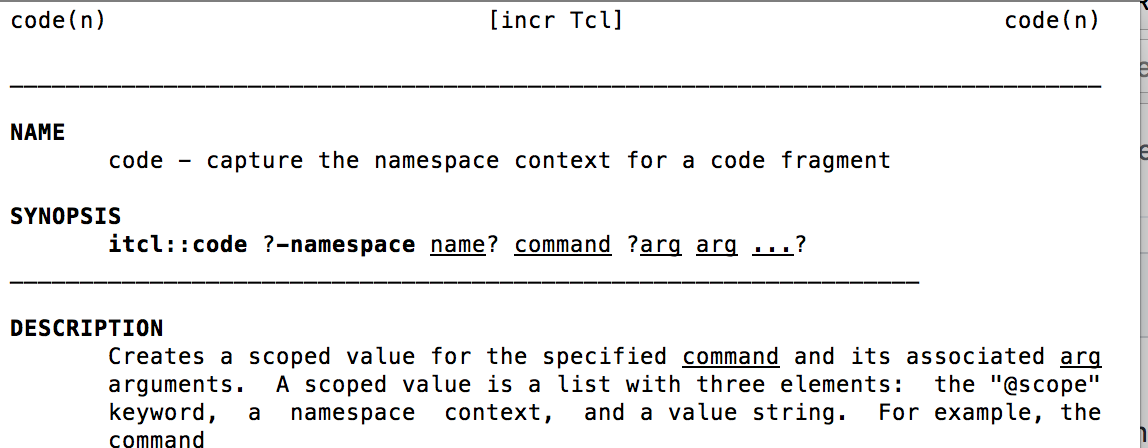
Any insights on the subject would be useful.
 Tyriar
on 24 Jul 2017
Tyriar
on 24 Jul 2017
Hum, I didn't know that. No idea how to handle this situation if there is already a code command on Mac OS.
But if the shell is able to use $PATH to know which is code, then man should be able to use $MANPATH and its order to know which manpage to open from man code... no?
Naereen
on 24 Jul 2017
The man page for code on macOS doesn't have a section. (Note that it has code(n).)
VSCode could use the code(1) man page and there should not be any conflicts. See man-pages(7) for more information about the man page sections.
 sumnerevans
on 25 Jul 2017
sumnerevans
on 25 Jul 2017
Apparently on Mac OS (and maybe other places as well?), n is a valid code page section, for Tcl/Tk functions / routines / whatever the right term is:
So it's not that the existing code manpage has no section, it's just that it's in section n. Either way, though, there will be no conflict if VS Code adds a code manpage in section 1 (which is the correct manpage section for any command the user would type at the terminal prompt).
 rmunn
on 25 Jul 2017
rmunn
on 25 Jul 2017
@Tyriar @sumnerevans @rmunn
I think this can be resolved very quickly: one could add a script in the build process that does these steps:
- take https://code.visualstudio.com/docs/editor/command-line#_additional-command-line-arguments (https://github.com/Microsoft/vscode-docs/blob/master/docs/editor/command-line.md) and copy this part of the Markdown file
- use
pandoc --to man(or --to groff I never know) to convert the markdown file to a man page - include it in the install script to deploy it to /usr/share/man or whever you want
Naereen
on 16 Oct 2017
This iteration we focus on issue grooming. This issue is being closed to keep the number of issues in our inbox on a manageable level, we are closing issues that are not going to be addressed in the foreseeable future: We look at the number of votes the issue has received and the number of duplicate issues filed. More details here. If you disagree and feel that this issue is crucial: We are happy to listen and to reconsider.
If you wonder what we are up to, please see our roadmap and issue reporting guidelines.
Thanks for your understanding and happy coding!
![vscodebot[bot] picture](https://avatars2.githubusercontent.com/in/2406?v=4&s=40) vscodebot[bot]
on 12 Sep 2018
vscodebot[bot]
on 12 Sep 2018
While this issue has languished for a while, I feel that closing it as "out of scope" may not be warranted:
- @Tyriar had considered fixing it (see https://github.com/Microsoft/vscode/issues/31317#issuecomment-317505815) but didn't do so because of a potential OS X issue, and that issue has a solution.
- The lack of a manpage is still weird on Linux: cross-platform software is generally expected to install a manpage, even if it's just a minimal one that only describes the command-line parameters (e.g.,
man google-chromedescribes possible command-line parameters to Chrome).
So because this issue means that VS Code feels like a "foreign" piece of software on Linux (when AFAICT every effort has been made to make it feel native on all three major platforms), and because the solution is rather simple, I'd request that it be considered for reopening.
rmunn
on 12 Sep 2018
@rmunn we're focusing on getting our issue count down currently. We would probably still accept a PR for this but I don't think there's that much point tracking it as it's been open for PRs for over a year, opened longer and only has 3 votes. You can read more about how we classify out of scope here: https://github.com/Microsoft/vscode/wiki/Issue-Grooming#out-of-scope-feature-requests
Tyriar
on 12 Sep 2018
Related issues
 chrisdias
·
3Comments
chrisdias
·
3Comments
 sijad
·
3Comments
sijad
·
3Comments
 shanalikhan
·
3Comments
shanalikhan
·
3Comments
 curtw
·
3Comments
curtw
·
3Comments
 vsccarl
·
3Comments
vsccarl
·
3Comments
Most helpful comment
The man page for
codeon macOS doesn't have a section. (Note that it hascode(n).)VSCode could use the
code(1)man page and there should not be any conflicts. Seeman-pages(7)for more information about the man page sections.