Vscode: Git Lens extension stopped working on latest insiders
- VSCode Version: Code - Insiders 1.15.0-insider (9a308d1128df9af90e84b2988bce4f57f885b1c3, 2017-07-19T06:40:44.535Z)
- OS Version: Windows_NT ia32 10.0.15063
- Extensions:
Extension|Author (truncated)|Version
---|---|---
Bookmarks|ale|0.15.2
project-manager|ale|0.18.1
vscode-eslint|dba|1.2.11
gitlens|eam|4.3.1
EditorConfig|Edi|0.9.4
beautify|Hoo|1.1.1
atom-keybindings|ms-|2.9.1
stylelint|shi|0.27.0
Quite popular (350K) and 5-starred extension Git Lens doesn't work with the latest insiders build anymore.
Steps to Reproduce:
- Launch VS Code with the installed Gitlens extension https://github.com/eamodio/vscode-gitlens/
- Notice that the extension doesn't work anymore: it doesn't show in the status bar the author of the current line, doesn't show blame output, doesn't provide many of its features in via the command palette.
I bisected the recent VS Code changes and here's the commit that breaks the extension: 531b6b1c219fb4b18df6a429d19ed2649c2c61ac
 vvs
vvs
All 19 comments
Duplicate of #31038
 jrieken
on 20 Jul 2017
jrieken
on 20 Jul 2017
I've built VS Code from the latest master sources and unfortunately, that fix for #31038 didn't fix this issue.
Most of the Git Lens functionality continues to be disabled and not available.
vvs
on 20 Jul 2017
Yeah, I see that two. Might not be a duplicate then
jrieken
on 20 Jul 2017
My guess is it might have to do with the Uri changes to use readonly fields. Because my GitUri class extends Uri and tries setting those private props -- see here
 eamodio
on 20 Jul 2017
eamodio
on 20 Jul 2017
Because my GitUri class extends Uri and tries setting those private props
😲 Hm, sorry for breaking you. Please don't use private properties. The refactoring was about slimming down the URI class. You might be able to easily fix this, since the (not public) ctor now allows to set those fields. Tho you are on thin ice with this, considering all the carnage #31038 caused
jrieken
on 20 Jul 2017
@eamodio Not pretty, but replacing the explicit assignments with this makes this work (test it with insiders and stable)
        const base = this as any;
        for (const key in uri) {
            if (uri.hasOwnProperty(key)) {
                base[key] = (uri as any)[key];
            }
        }
This is the patch I have, I can also create a PR if you like.
jrieken
on 20 Jul 2017
@jrieken thanks! I'm not in front of a computer atm so I can't really check it out. Do you think that method is better than calling the other ctor? Or maybe until 1.15 becomes stable. If you wouldn't mind creating a PR that would be great. I'll try to get that in tonight.
eamodio
on 20 Jul 2017
Do you think that method is better than calling the other ctor?
No, calling the ctor is better but until insiders and stable aren't equal you must have some graceful code that handles both (_scheme and scheme-getter as well as scheme etc).
jrieken
on 20 Jul 2017
Yeah. That makes sense. Thanks again!
P.S. Swiss mobile service is insane. I'm up in the mountains above Rierderalp and still have full LTE :)
eamodio
on 20 Jul 2017
There you go: https://github.com/eamodio/vscode-gitlens/pull/121. Should be OK, please give it a try tho. Especially considering that I have created this PR entirely in the web 😱
jrieken
on 20 Jul 2017
The proposed PR works for me on the insiders build. Thanks!
vvs
on 20 Jul 2017
Sorry for the newb question, can you please give instructions or a link on how to compile and install your patched branch?
 fjsuarez
on 20 Jul 2017
fjsuarez
on 20 Jul 2017
@fjsuarez I will release a new GitLens tonight with the patch
eamodio
on 20 Jul 2017
v4.3.2 is out with the patch -- thanks again @jrieken
I think this can be closed now.
eamodio
on 20 Jul 2017
Thanks everyone! Happy Coding!
jrieken
on 21 Jul 2017
Hi all, i am getting this same issue where all the features of Git Lens are not working at all as described above after i upgraded my VSCode just recently. Below are the VSCode version that i am using:
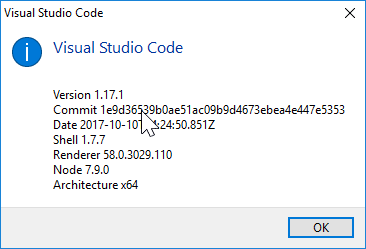
Running a GitLens function from the Command palette also causes error as shown:

Before the update it is working as usual. Also, I am using Git Lens version 5.6.5.
 takato1314
on 19 Oct 2017
takato1314
on 19 Oct 2017
@takato1314 its probably best to open this issue on the GitLens repo: https://github.com/eamodio/vscode-gitlens/issues
Although I'm am unable to reproduce any issues with the latest vscode (stable or insiders). You might want to try uninstalling GitLens completely and then re-installing it to see if that helps.
eamodio
on 19 Oct 2017
@takato1314 FWIW, the latest insiders build of VS Code works with no issue with the latest GitLens (5.6.5) for me.
vvs
on 19 Oct 2017
@eamodio and @vvs, thanks for the advice. Strangely enough completely uninstall and reinstall the extension does get everything working again.
@eamodio I didnt thought of opening an issue in the vscode-gitlens repo because initially it was working fine before the VsCode upgrade, but after reinstalling as you suggested helps.
takato1314
on 19 Oct 2017
Related issues
 villiv
·
3Comments
villiv
·
3Comments
 VitorLuizC
·
3Comments
VitorLuizC
·
3Comments
 ryan-wong
·
3Comments
ryan-wong
·
3Comments
 sijad
·
3Comments
sijad
·
3Comments
 shanalikhan
·
3Comments
shanalikhan
·
3Comments
Most helpful comment
@fjsuarez I will release a new GitLens tonight with the patch