Vscode: disturbing alert when adding another folder to a workspace
[I'm filing this issue as a long time VS Code user, not as a dev who understands what's going on...]
When trying to add a new folder to an existing workspace, I get the following alert:
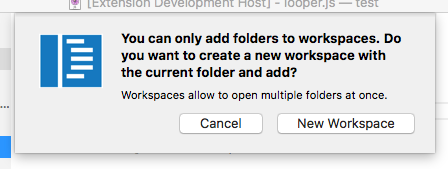
As a long time VS Code user, I am a bit surprised by the wording because in my current understanding I have already a "workspace" and I cannot really understand why the alert says that I do not have a "workspace".
Could we change the wording so that it sounds less scary, e.g. something like:
"Before we can add another folder we need to upgrade your workspace to support multiple folders..."
 weinand
All 22 comments
Agreed that above dialog is not helping in understanding the transition from Opening a folder to Opening a multi folder workspace. I have changed the wordings and behaviour today so that the existing or new user understands what is happening.
@weinand Please verify with the insiders tomorrow and let us know if it makes sense to you.
 sandy081
on 17 Jul 2017
sandy081
on 17 Jul 2017
IMO the new wording is even worse:
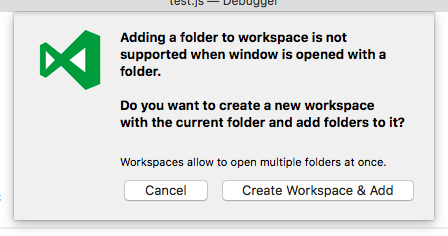
Adding "window" to the wording doesn't help.
I still believe that the wording should be more along the lines of this:
"Before we can add another folder we need to upgrade your workspace to support multiple folders..."
/cc @Microsoft/vscode other opinions ?
weinand
on 18 Jul 2017
I missed why there is a confirmation dialog at all. Why not just "upgrade" silently?
 chrmarti
on 18 Jul 2017
chrmarti
on 18 Jul 2017
We cannot upgrade without window reload due to the fact that we have to migrate some state in the background for which we are not ready yet. Hence there is a confirmation dialog.
Upgrade without reload is on the cards for future.
Currently shifting from 1-2 is heavy weight operation of creating a new workspace and opening it.
sandy081
on 18 Jul 2017
We do not upgrade yet so that I can have some nice vacation without being worried.
 bpasero
on 18 Jul 2017
bpasero
on 18 Jul 2017
Agree with @weinand. We should not use phrasing that makes you too cautious about loosing your working state, such as "not supported", or restrictive sentence as "you can do only ...". We just need to inform a user on what will happen.
@weinand proposal sounds good to me
"Before we can add another folder we need to upgrade your workspace to support multiple folders..."
 michelkaporin
on 18 Jul 2017
michelkaporin
on 18 Jul 2017
"Adding a second folder requires a one-time reload of the workbench so @bpasero can go on vacation without worries?"
chrmarti
on 18 Jul 2017
I am happy to accept suggestions on the wordings in the dialog here. What we are trying to convey to user is that any multi root operation on a current workspace (opened with a folder) needs:
Creating a multi root workspace with current folder in the background, do the operation and open it, which needs window reload.
Note: Upgrade at present, is only adding the current folder to the new workspace. We do not migrate any state (workspace settings, UI state, hot exit, extension storage).
With @weinand suggestion, the new dialogs are shown as follows
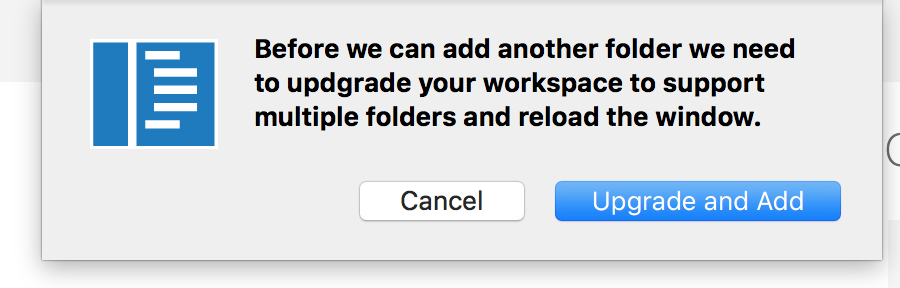
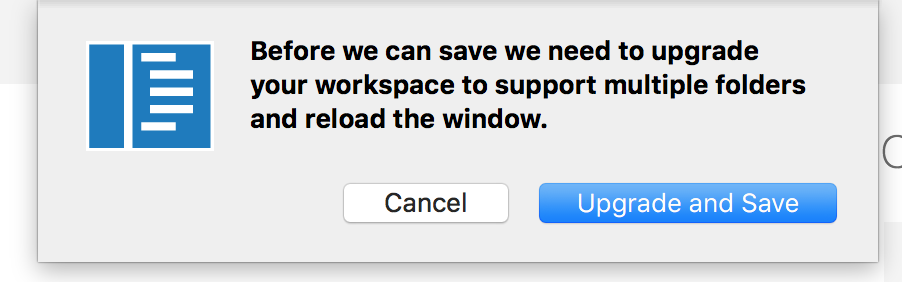
I would go with this if no objections.
sandy081
on 18 Jul 2017
I would have the focus on reloading the window, since that's more interesting to the user. Maybe if the button said "Reload and Add". As a user I'm not sure what upgrading is going to do or if it's going to be reversible.
 roblourens
on 18 Jul 2017
roblourens
on 18 Jul 2017
Btw here is my comment on the famous multi root issue why we currently require an explicit step when entering workspace mode: https://github.com/Microsoft/vscode/issues/396#issuecomment-315402932
bpasero
on 18 Jul 2017
@weinand Today's insiders have above dialogs. Please reopen if you think they are not good enough. Thanks.
sandy081
on 19 Jul 2017
I think the wording is fine now but there is still the typo "updgrade" (see your screenshot above).
How important is it to mention the "reload the window"?
There will be no data loss, right?
So on a regular "Open..." we do not show a "reload window" warning either.
weinand
on 19 Jul 2017
Thanks @weinand . Will fix the typo.
As mentioned earlier, we do not retain any state (UI, workspace settings, extensions storage and hot exit). It means after reload user will see a different workspace, opened editors dirty files are not retained. If there are workbench settings like different themes and colours in the workspace, these will not be retained too.
In Open... case, user is explicitly asking to open a new workspace. But in this case, I am not sure if we are clear enough in the dialog that upgrading is opening a brand new workspace.
sandy081
on 19 Jul 2017
Ok, I see. So leave the "reload window" in.
weinand
on 19 Jul 2017
saw this while testing #30722
weinand
on 19 Jul 2017
I react negatively to the "upgrade your workspace" portion of the message. This sounds like the tool is going to do something to my files and it scares me. Can I revert whatever is going to happen? Is this a one way street? It is very daunting :)
Have we considered providing an info message _after_ we restart the environment? We could provide a "more info" link where we can describe what is different now that you are in MRW mode.
 chrisdias
on 19 Jul 2017
chrisdias
on 19 Jul 2017
Are you also scared when VS Code offers you an "upgrade"?
Would "prepare" sound less scary than "upgrade"?
weinand
on 19 Jul 2017
something like this...

chrisdias
on 19 Jul 2017
Or, we can really simplify the message to:
"To open multiple folders, VS Code requires a reload."
As a user, what else do I need to know?
chrisdias
on 19 Jul 2017
Yes, I like that (and it is in line with https://github.com/Microsoft/vscode/issues/31014#issuecomment-316396043)
weinand
on 19 Jul 2017
Liked the suggestion from @chrisdias. It is simple and short. Will change to it. Thanks.
sandy081
on 20 Jul 2017
+1, the new flow is very cool.
@weinand @sandy081 @chrisdias my only concern now is that it is not just a window reload that we are doing compared to a normal window reload: UI state, hot-exit (dirty files) and extension state is lost after the window reload. I can look into what it would take to keep and restore these things after the reload. E.g. as a user I would not expect to be asked to save files only for a window reload (we do not ask this for a manual window reload either).
Another thing to consider is: once you added multiple folders and the window is reloaded you are in a "Untitled Workspace". I think we must educate the user what this concept is, otherwise it seems very weird that closing such a window asks you to save this workspace. I have opened https://github.com/Microsoft/vscode/issues/31182 for this purpose.
bpasero
on 21 Jul 2017
Related issues
 v-pavanp
·
3Comments
v-pavanp
·
3Comments
 borekb
·
3Comments
borekb
·
3Comments
 curtw
·
3Comments
curtw
·
3Comments
 vsccarl
·
3Comments
vsccarl
·
3Comments
 shanalikhan
·
3Comments
shanalikhan
·
3Comments
Most helpful comment
Or, we can really simplify the message to:
"To open multiple folders, VS Code requires a reload."
As a user, what else do I need to know?