Vscode: Add border options to `selectionBackground`
- VSCode Version: 1.14.1:
- OS Version: Windows 10 build 15063
Add border options to selectionBackground and findMatchBackground. They would be called like selectionBorder and findMatchBorder. You cannot find them on:
Currently the selection has no border:

Would be awesome if it has borders like Sublime Text selections:

Reproduces without extensions: Yes
Related issues:
- https://github.com/Microsoft/vscode/issues/8050 additional options for
editor.selectionHighlight
 evandrocoan
All 10 comments
+1
 ro31337
on 31 Jul 2017
ro31337
on 31 Jul 2017
Moving here as per @aeschli and @chrisdias
This looks awesome! :)
Selection Highlight and Find Match
Expose border, and background for selectionHighlight and findMatch

/*
  This puts a thin yellow border around the found items like Sublime did it
*/
.monaco-editor .findMatch,
.monaco-editor .selectionHighlight {
  border-top: 0.1px solid #f7ecb5;
  border-bottom: 0.1px solid #f7ecb5;
  background: transparent;
}
 johnpapa
on 29 Nov 2017
johnpapa
on 29 Nov 2017
I added border options for most of the text decorations (findMatch, wordHighlight...). Not for selection as this needs more work to look good.
 aeschli
on 16 Feb 2018
aeschli
on 16 Feb 2018
+1
This would make it much easier to create a high-visibility style for the active selection.
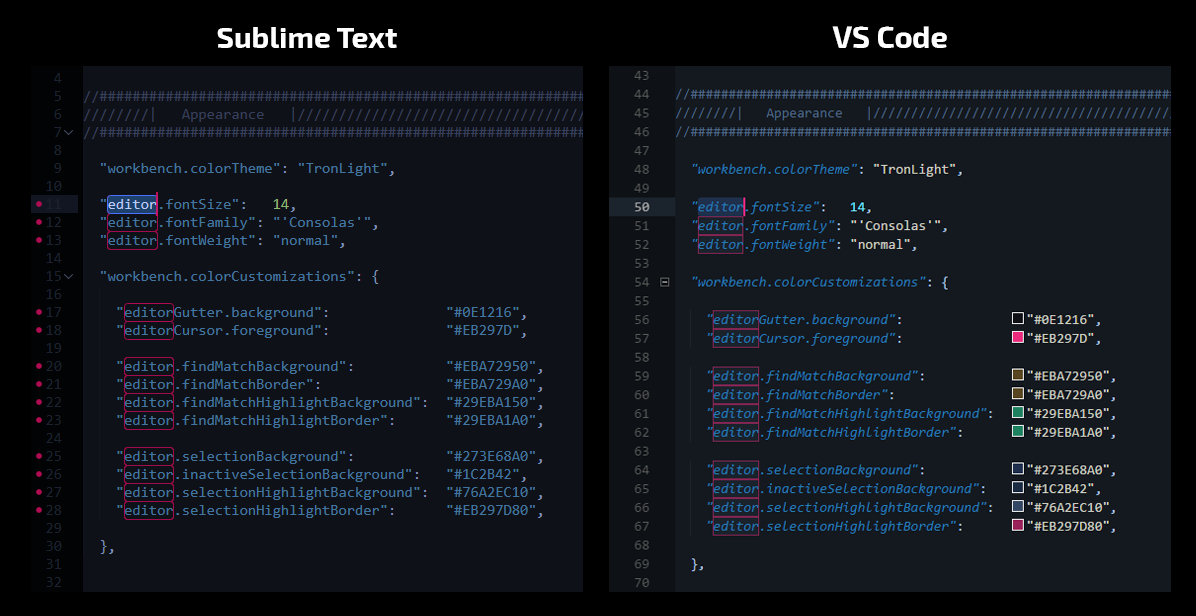
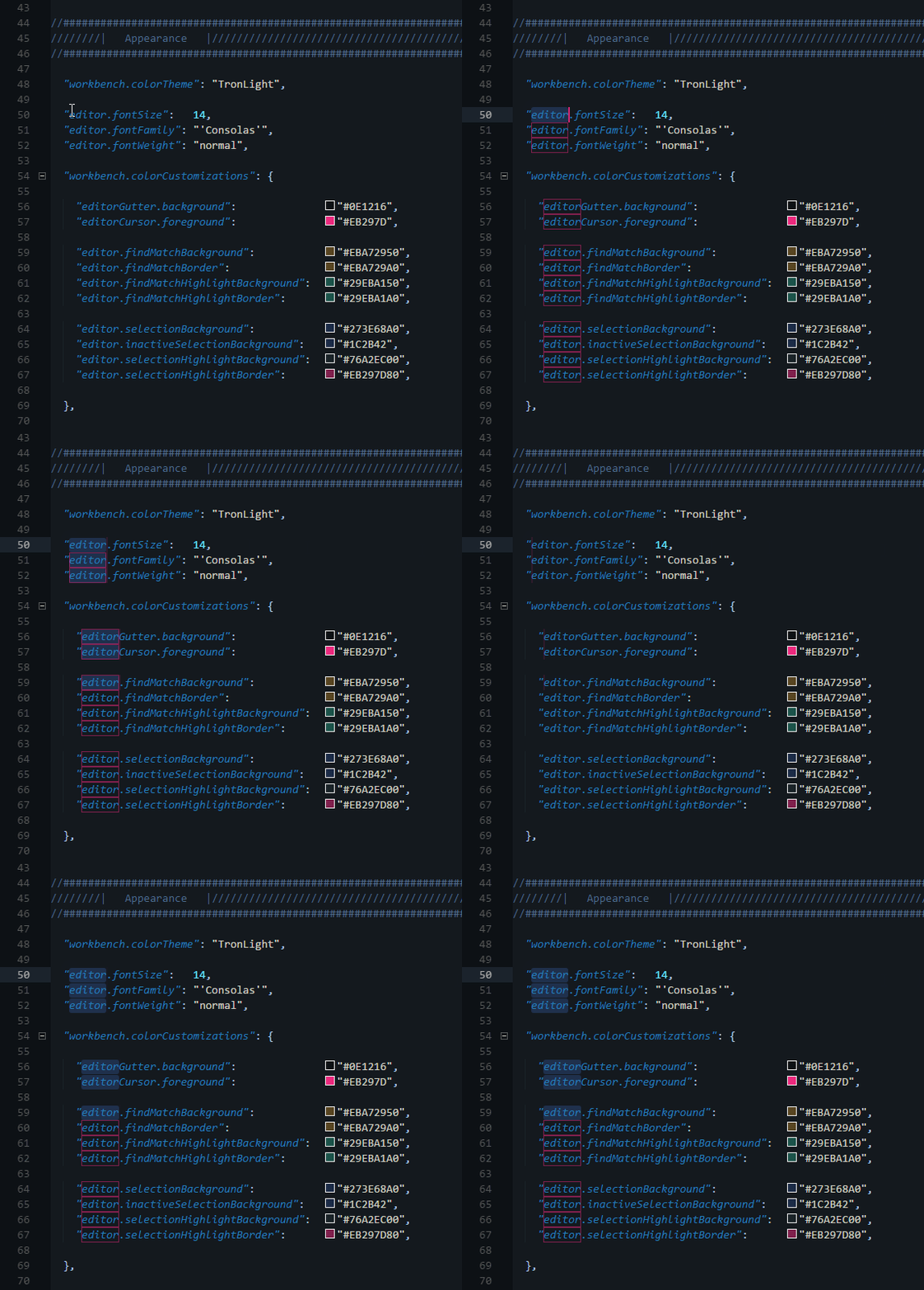
On a related note, the lack of selectionForeground for non-high-contrast themes is definitely a detriment to achieving the same effect.
Also, I just noticed that the selection & selectionHighlight properties have kind of an odd behavior in relation to addSelectionToNextFindMatch.
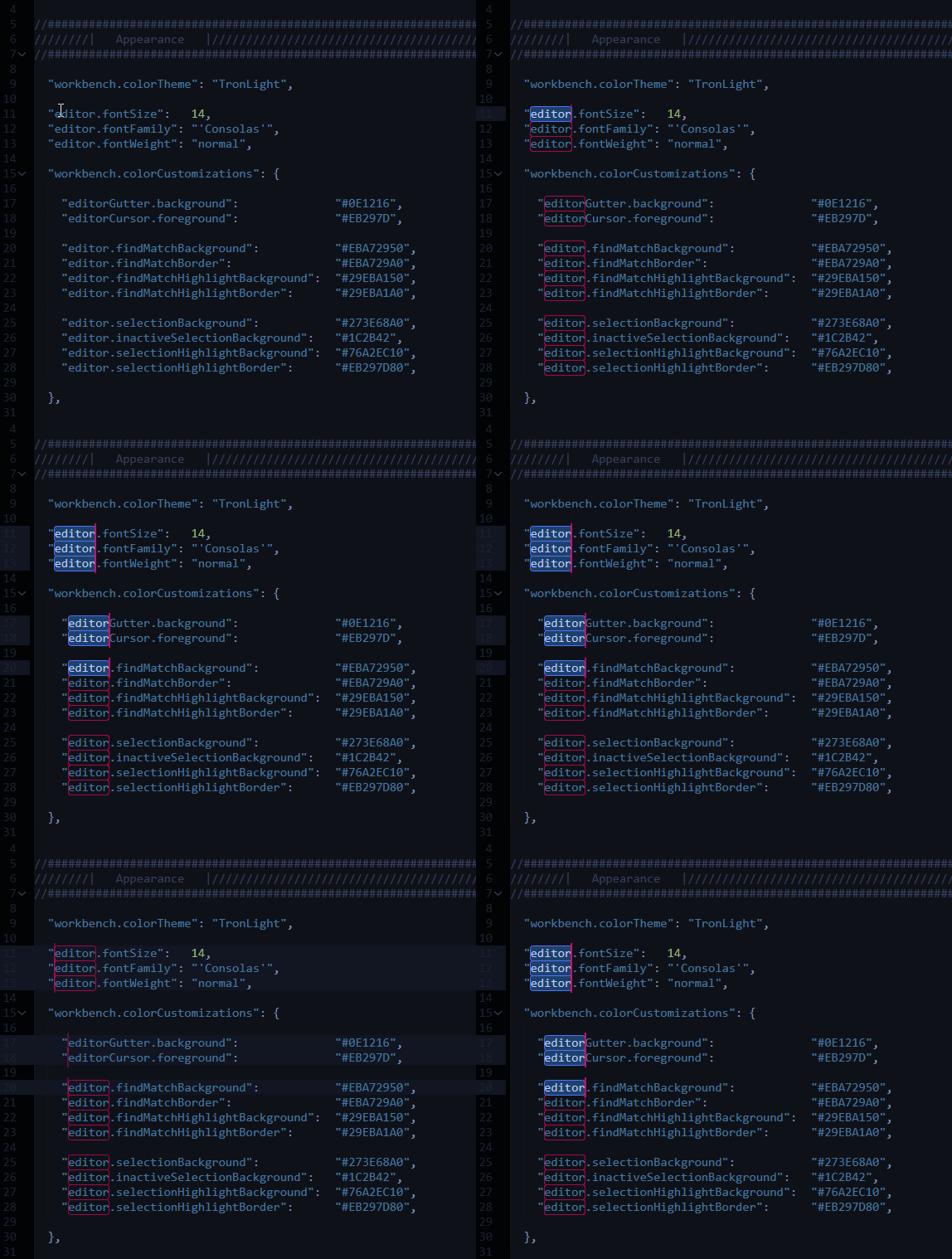
When using addSelectionToNextFindMatch, the selection & selectionHighlight properties are both applied to each additionally selected match. I would expect selection properties to activate and selectionHighlight properties to deactivate in this case. The expected behavior is exhibited in the second half of the GIF, when multiple selections are made simultaneously.
Here is the same sequence of actions in SublimeText:
 Enteleform
on 29 Jun 2018
Enteleform
on 29 Jun 2018
+1 please!
 blacktop
on 2 Feb 2019
blacktop
on 2 Feb 2019
I miss this too much
 kanlukasz
on 14 Mar 2019
kanlukasz
on 14 Mar 2019
Here"s an extra take on this old issue:
The following image illustrates the problem. Here editor.selectionhighlightborder works, but not editor.selectionBorder.
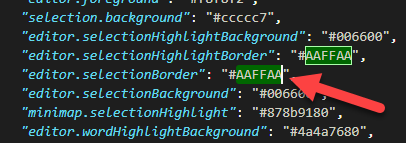
The arrow is on the currently seleted item: the AAFFAA of editor.selectionBorder. It is _not bordered_, when this is where you want to point out the current selection, which is the most important item in the whole editor: where things will happen if you hit keys on the keyboard.
The AAFFAA of editor.selectionHighlightBorder _is_ bordered. This _is_ important, but _much less_ than editor.selectionborder. It's there to say "hey, the one you've got selected isn't the only one, if you're thinking of editing this one, don't forget all the rest".
If we have to choose, I would vote for borders on editor.selectionBorder, not editor.selectionHighlightBorder .
 FrancisVila
on 18 Feb 2020
FrancisVila
on 18 Feb 2020
This would make some themes MUCH more readable.
blacktop
on 13 Mar 2020
Bump
 haakonstorm
on 10 May 2020
haakonstorm
on 10 May 2020
/duplicate of https://github.com/microsoft/vscode/issues/21898 , let's track it there.
 rebornix
on 5 Nov 2020
rebornix
on 5 Nov 2020
Related issues
 curtw
·
3Comments
curtw
·
3Comments
 ryan-wong
·
3Comments
ryan-wong
·
3Comments
 chrisdias
·
3Comments
chrisdias
·
3Comments
 philipgiuliani
·
3Comments
philipgiuliani
·
3Comments
 biij5698
·
3Comments
biij5698
·
3Comments
Most helpful comment
Here"s an extra take on this old issue:
The following image illustrates the problem. Here editor.selectionhighlightborder works, but not editor.selectionBorder.
The arrow is on the currently seleted item: the AAFFAA of editor.selectionBorder. It is _not bordered_, when this is where you want to point out the current selection, which is the most important item in the whole editor: where things will happen if you hit keys on the keyboard.
The AAFFAA of editor.selectionHighlightBorder _is_ bordered. This _is_ important, but _much less_ than editor.selectionborder. It's there to say "hey, the one you've got selected isn't the only one, if you're thinking of editing this one, don't forget all the rest".
If we have to choose, I would vote for borders on editor.selectionBorder, not editor.selectionHighlightBorder .