Vscode: After update to 1.14 word wrap doesn't work anymore
After updating vscode to 1.14, word wrap does not work anymore.
I tried toggling it with alt+Z, the menu item and the command palette command, none of these worked.
- VSCode Version: 1.14.0 (b8cd5b9556d8b70ea560d35b903422363f6c5c40)
- OS Version: MacOS Sierra 10.12.5 (16F73)
Steps to Reproduce:
mmmh upgrade to 1.14.0 from - I guess - 1.13.x. I had word wrap enabled at the time of upgrade. I used the automatic upgrade functionality of vscode.
try toggling wordwrap on and off
Reproduces without extensions: Yes
 xanathar
All 5 comments
Me too.
I get the next windows when I try to open VSCode and after update VSCode from 1.13 to 1.14.
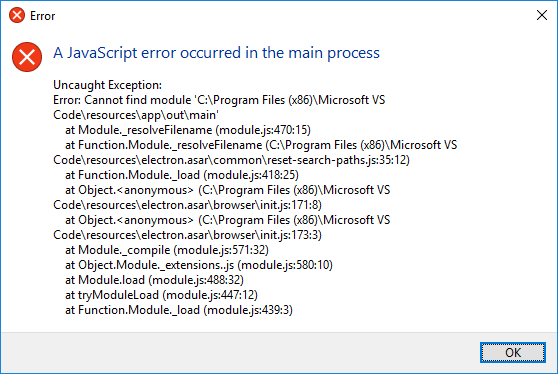
I had a problem updating VSCode (I don't know why) and I selected the abort button.
After that, I get this error and VSCode is not working now.
 J0rgeSerran0
on 13 Jul 2017
J0rgeSerran0
on 13 Jul 2017
Word wrap problem here on windows after updating to 1.14
 joaquimg
on 13 Jul 2017
joaquimg
on 13 Jul 2017
Check your settings.json, it probably has "editor.wordWrap":"true". "true" is no longer a valid value:
// Controls how lines should wrap. Can be:
// - 'off' (disable wrapping),
// - 'on' (viewport wrapping),
// - 'wordWrapColumn' (wrap at editor.wordWrapColumn) or
// - 'bounded' (wrap at minimum of viewport and editor.wordWrapColumn).
Set it to one of the above and your toggle will start to work again.
 eja-git
on 13 Jul 2017
eja-git
on 13 Jul 2017
Solved
joaquimg
on 13 Jul 2017
I confirm changing the setting fixed the issue here, too.
xanathar
on 14 Jul 2017
Related issues
 trstringer
·
3Comments
trstringer
·
3Comments
 NikosEfthias
·
3Comments
NikosEfthias
·
3Comments
 ryan-wong
·
3Comments
ryan-wong
·
3Comments
 lukehoban
·
3Comments
lukehoban
·
3Comments
 sijad
·
3Comments
sijad
·
3Comments
Most helpful comment
Check your settings.json, it probably has "editor.wordWrap":"true". "true" is no longer a valid value:
// Controls how lines should wrap. Can be:
// - 'off' (disable wrapping),
// - 'on' (viewport wrapping),
// - 'wordWrapColumn' (wrap at
editor.wordWrapColumn) or// - 'bounded' (wrap at minimum of viewport and
editor.wordWrapColumn).Set it to one of the above and your toggle will start to work again.