Vscode: Excessive logging of `vscode.workspace.rootPath`-usage causes high CPU load
- VSCode Version: 1.14.0
- OS Version: Microsoft Windows 10 Enterprise 10.0.15063
I updated my vscode this morning. My system cpu usage increased to %100. It was not like that before.
My cpu is i7 6500u.
 nadircan
All 20 comments
@nadircan Are you using the atefth.ruby-on-rails-snippets extension? It contains a (valid snippet) that makes us choke. See https://github.com/Microsoft/vscode/issues/30407 for more details. It might be that
 jrieken
on 12 Jul 2017
jrieken
on 12 Jul 2017
I just updated and VSCode is unusable, I can navigate between tabs and open/close files, but the moment I start to type, cpu usage goes up and the editor starts lagging.
- VSCode Version: Code 1.14.0 (b8cd5b9556d8b70ea560d35b903422363f6c5c40, 2017-07-10T20:36:40.018Z)
- OS Version: Linux x64 4.7.4-040704-generic
- Extensions:
Extension|Author (truncated)|Version
---|---|---
ChatScript|jua|0.0.1
vscode-eslint|dba|1.2.11
tslint|eg2|0.16.0
Angular2|joh|2.3.3
cpptools|ms-|0.12.0
debugger-for-chrome|msj|3.1.6
typescript-hero|rbb|1.1.0
vscode-icons|rob|7.10.1
inserttimestamp|zvl|1.1.3
 juanmirod
on 12 Jul 2017
juanmirod
on 12 Jul 2017
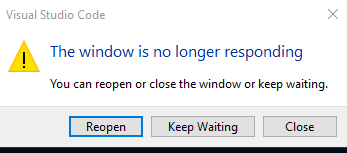
Also i get this error. @jrieken I remember, I dont use that extension. I cant access extension tab. It comes empty.
Now I can access extensions tab.
- Auto Class Tag
- Debugger for Chrome
- Go
- One Dark Pro
- Path Intellisense
- Sort JSON objects
- Sort Lines
- TypeScript Hero
- vscode icons
nadircan
on 12 Jul 2017
I have the same problem. After opening an angular 4 project, when I start typing in a typescript file processor load rises, typing is sluggish and after a while I get "The window is no longer responding". Only running extensions are the ones installed by "Angular Essentials".
 F0rt1s
on 12 Jul 2017
F0rt1s
on 12 Jul 2017
I'm having the same huge CPU usage in an Angular 4 project, resulting in freezes for ~15 seconds on a fast computer. The problem occurs whether or not the code is running in a browser. I first saw the problem within minutes of the VSCode Version: 1.14.0 release. OS=Windows 10 (both before and after the updates of 11 July).
Extensions:
- angular2-inline
- Bracket Pair Colorizer
- Debugger for Chrome
- NgBootstrap Snippets
- TSLint
- TypeScript Hero
 MickeySegal
on 12 Jul 2017
MickeySegal
on 12 Jul 2017
Ok, different folks with potential different problems. Everyone here please do the following
- F1 > Toggle Developer Tools > Select Profile tab
- Select Record JavaScript CPU Profile, select Start
- Now do whatever you did you make it hang, appear as slow, show the not responsive warning
- Stop recording, Save the profile, and attach it here.
Also try to reproduce without extensions enabled (start from the command line via code --disableExtensions) Thanks.
jrieken
on 12 Jul 2017
As reported on a different thread: Changing the typescript workspace version to 2.3.4 fixes the problem.
F0rt1s
on 12 Jul 2017
This is a kitchen sink issue. /cc @mjbvz since some folks suggest this has something to do with angular & TypeScript
jrieken
on 12 Jul 2017
I upgraded 4 hours ago. Since then I've seen slow/unresponsive intellisense and plenty of 'not responding' & 'the window has crashed' messages.
Extensions Installed:
- Angular Language Service
- Angular v4 TypeScript Snippets
- C#
- Debugger for Chrome
- TSLint
- TypeScript Hero
- Visual Studio Keymap
- vscode-icons
I've run a few profile captures, but only been able to capture a slow/non-responsive intellisense so far.
 simonneedham
on 12 Jul 2017
simonneedham
on 12 Jul 2017
I'm wondering if TypeScript Hero is the problem here... Just disabled it and so far it hasn't locked up again.
 johnnyreilly
on 12 Jul 2017
johnnyreilly
on 12 Jul 2017
The other main thread on this issue is https://github.com/Microsoft/vscode/issues/30449, discussing changing the typescript workspace version to 2.3.4.
Should one wait for a fix or do a workaround? If a fix is created now, how long would it take to be pushed out to users for a serious problem such as this one?
MickeySegal
on 12 Jul 2017
Thanks @simonneedham and @johnnyreilly. There is something fishy with us and TypeScriptHero. I'll make sure to have local repro steps to confirm my theory and update this issue
jrieken
on 12 Jul 2017
@johnnyreilly @jrieken I just switched off TypeScript Hero. Instant improvement.
simonneedham
on 12 Jul 2017
So, the following is happening here and a good example for how easy things can go south... As some of you already know, we are currently working on supporting multiple root folders in VS Code. Many things have already happened in that area and one thing we focus on is extensions. Until now, there is just the vscode.workspace.rootPath-API which isn't sufficient anymore once multiple (root) paths come into play. We will keep that API stable but also want extensions to eventually adopt the new and better API for multiple root paths. To get an understanding how the current API is used and to be able to help out extensions authors with advise, PRs, etc. we have added telemetry ala "extension 'foo' uses 'rootPath'". What we didn't account for is extensions using this a lot (like in loops) and making us choke on many, many repeated events. So, TypeScript Hero is doing that and that's totally OK. I'll make sure we send less events...
jrieken
on 12 Jul 2017
Pushed a fix to master and release/1.14 which mean Insiders is fixed in ~12 hours and stable as soon as we release 1.14.1
jrieken
on 12 Jul 2017
I'm currently working on a hot fix for typescript hero, so that the extension only accesses workspace.rootPath once and passes it down to the components via DI.
 buehler
on 12 Jul 2017
buehler
on 12 Jul 2017
@jrieken Out of curiosity, when did you guys add the reporting for rootPath?
buehler
on 12 Jul 2017
A new version of TypeScript Hero was released with a workaround to this problem. More information at buehler/typescript-hero#242
MickeySegal
on 12 Jul 2017
re https://github.com/Microsoft/vscode/issues/30486#issuecomment-314814776 Early June, so it should have been in Insiders for quite a while.
jrieken
on 13 Jul 2017
Fix looks good. Verified by code review.
 sandy081
on 13 Jul 2017
sandy081
on 13 Jul 2017
Related issues
 niagr
·
246Comments
niagr
·
246Comments
 stoffeastrom
·
380Comments
stoffeastrom
·
380Comments
 TurkeyMan
·
411Comments
TurkeyMan
·
411Comments
 Tekbr
·
191Comments
Tekbr
·
191Comments
 lw-schick
·
229Comments
lw-schick
·
229Comments
Most helpful comment
Pushed a fix to
masterandrelease/1.14which mean Insiders is fixed in ~12 hours and stable as soon as we release 1.14.1