Vscode: settings.json error: "(json-to-ast) Cannot Tokenize Symbol </> at (1:1)"
- VSCode Version: Code - Insiders 1.14.0-insider (b508e11e5a8b90c8fa19e6e3a7d8ccd57ab6e9b7, 2017-06-26T05:16:29.957Z)
- OS Version: Windows_NT ia32 10.0.15063
- Extensions:
Extension|Author (truncated)|Version
---|---|---
aurelia|Aur|0.3.4
vscode-icontheme-nomo-dark|be5|1.3.2
path-intellisense|chr|1.4.2
githistory|don|0.2.0
vscode-generate-getter-setter|DSK|0.4.2
vscode-babel-coloring|dza|0.0.4
tslint|eg2|0.15.0
vscode-great-icons|emm|2.1.8
vsc-material-theme|Equ|1.0.0
prettier-vscode|esb|0.20.0
code-runner|for|0.6.24
beautify|Hoo|1.1.1
rest-client|hum|0.14.5
easy-icons|jam|0.3.1
continuum|jam|1.2.0
sublime-babel-vscode|jos|0.2.5
vscode-icon-theme|jtl|1.5.0
Lua|key|0.0.9
vscode-simple-icons|Lau|1.3.1
cpptools|ms-|0.12.0
typescript-javascript-grammar|ms-|0.0.22
debugger-for-chrome|msj|3.1.5
color-highlight|nau|2.2.0
material-icon-theme|PKi|2.0.9
vscode-icons|rob|7.10.1
code-settings-sync|Sha|2.8.1
vscode-parinfer|sha|0.6.1
bunker|sld|0.2.5
guides|spy|0.8.3
visualclojure|sti|0.0.2
ayu|tea|0.4.0
ReactSnippets|xab|1.4.0
maple|yjt|1.1.6
markdown-pdf|yza|0.1.7
(93 theme extensions excluded)
Steps to Reproduce:
- Not sure how to reproduce this. It just started happening after I updated tonight. I've been using VS Code Insiders for a really long time but have never seen this issue.
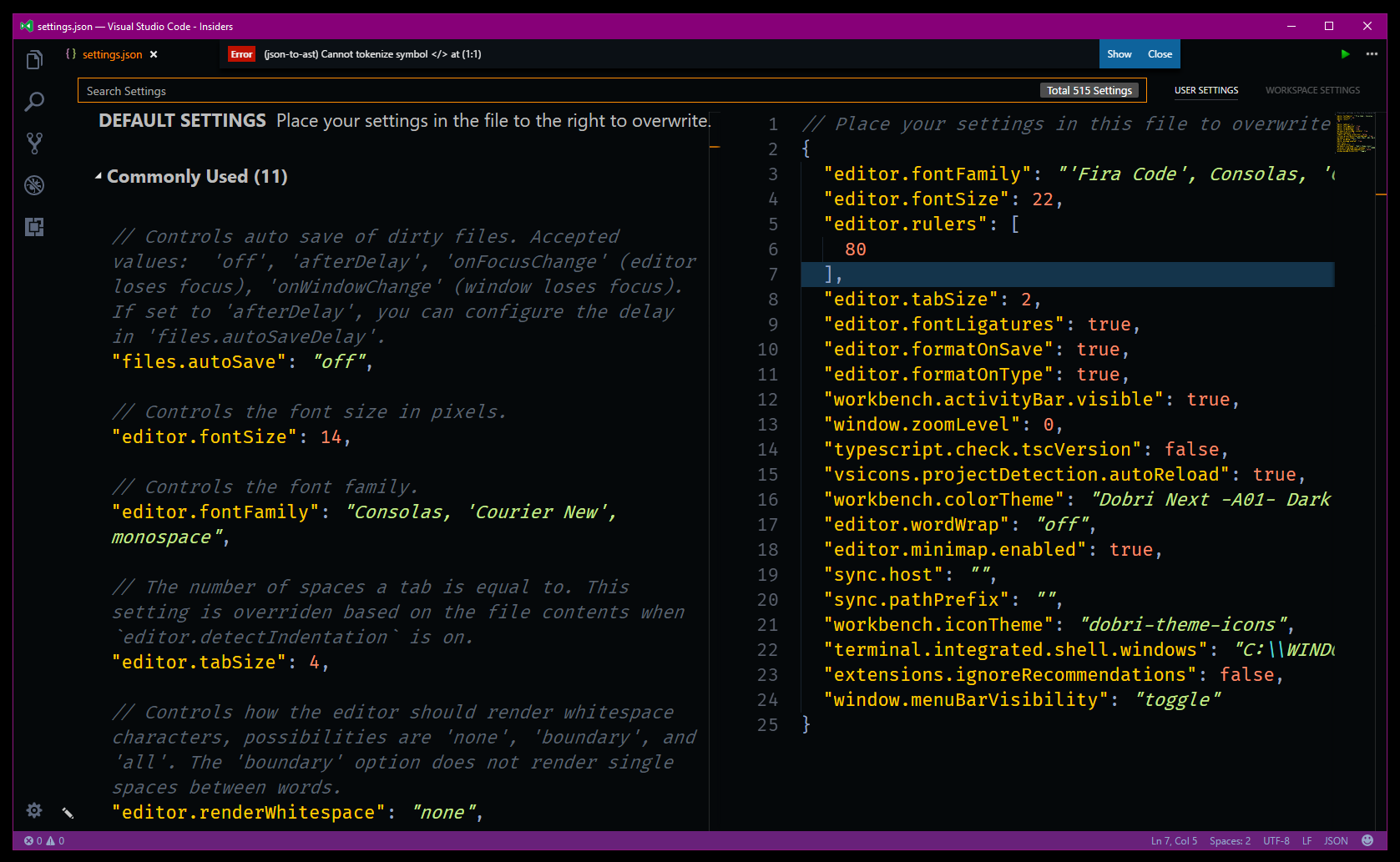
"(json-to-ast) Cannot Tokenize Symbol at (1:1)"

I get this error on my VS Code settings.json file.
 frankhale
All 8 comments
I experience this issue as well, with a very minimal custom config so far.
In my case, it appears to be caused by editor.formatOnSave. When I remove the setting or set it to false (the default), the error disappears (sometimes after saving settings a few times).
{
    "editor.wordBasedSuggestions": false,
    "javascript.nameSuggestions": false,
    "workbench.colorTheme": "Blackboard",
    "prettier.tabWidth": 4,
    "editor.fontFamily": "'Source Code Pro', Consolas, 'Courier New', monospace",
    "editor.minimap.enabled": false,
    "editor.fontSize": 14,
    "editor.formatOnSave": false
}
 PerplexDaniel
on 28 Jun 2017
PerplexDaniel
on 28 Jun 2017
Having the same problem here. @PerplexDaniel
After remove the editor.formatOnSave and restart the VSCode, the error message will disappear.
 kpman
on 28 Jun 2017
kpman
on 28 Jun 2017
This is caused by prettier, not VSCode.
 Chillee
on 28 Jun 2017
Chillee
on 28 Jun 2017
Wait, so it's caused by prettier... fine... but is there a work around? Is there an open issue with prettier? How do we deal with this. Feeling a little stranded.
I opened an issue at prettier, but then quickly realized it was the leading comment causing the error.
 geirman
on 4 Jul 2017
geirman
on 4 Jul 2017
@geirman here is the reference issue on the Prettier repo: https://github.com/esbenp/prettier-vscode/issues/149
frankhale
on 4 Jul 2017
In the case of my settings.json file it had a comment at the top. Pretty sure that is a stock comment added by VS Code and Prettier as of a week ago is now strictly parsing JSON and comments are not part of the spec. See the issue for details on the Prettier repo, issue linked above.
frankhale
on 5 Jul 2017
@frankhale thank you! I figured out it was the comment pretty quickly after posting this and updated my earlier comment to highlight my oversight. Appreciate it though!
geirman
on 5 Jul 2017
This is weird. It kind of is an issue with vsCode then if they're using invalid json, isn't it? ;-)
Wonder if there's any specific reason to not just use *.js for settings
 thedamon
on 12 Jul 2017
thedamon
on 12 Jul 2017
Related issues
 NikosEfthias
·
3Comments
NikosEfthias
·
3Comments
 philipgiuliani
·
3Comments
philipgiuliani
·
3Comments
 borekb
·
3Comments
borekb
·
3Comments
 trstringer
·
3Comments
trstringer
·
3Comments
 ryan-wong
·
3Comments
ryan-wong
·
3Comments
Most helpful comment
This is caused by prettier, not VSCode.