Vscode: Multi root: indicate unsupported settings on a folder level visually
E.g. by graying them out. I would not show a warning so that people are not accidentally removing a setting that is still valid when opening the folder alone.
 bpasero
All 11 comments
Following is how a workbench setting is indicated as unsupported in folder settings in MR workspace.
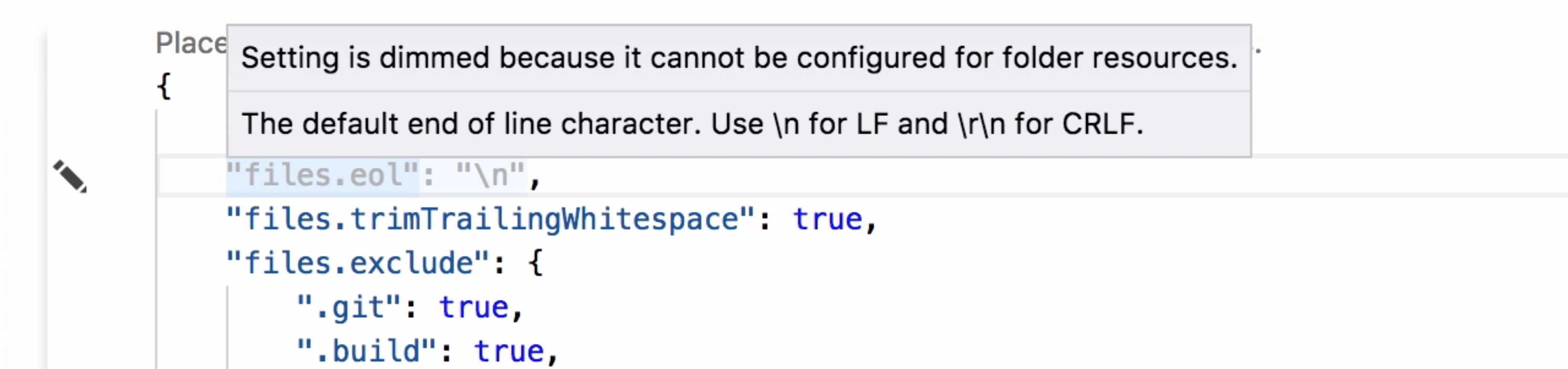
@Microsoft/vscode Please provide your suggestions to improve the wordings.
 sandy081
on 25 Jul 2017
sandy081
on 25 Jul 2017
I think the "setting is dimmed" explanation is unnecessary. Same as how we don't say "text is underlined because..." for other warnings. I like "This setting cannot be configured for folder resources".
 roblourens
on 25 Jul 2017
roblourens
on 25 Jul 2017
The message should really mention the fact that the setting can't be applied now, given the current multi-root context; but it will be applied later on another single folder context.
 joaomoreno
on 26 Jul 2017
joaomoreno
on 26 Jul 2017
How about this
This setting is not applied because it cannot be scoped for folder resources. Changing this would impact other workspaces.
sandy081
on 26 Jul 2017
Maybe:
This setting can't be currently applied because it does not support the folder resource scope. Changing it might impact other workspaces.
joaomoreno
on 26 Jul 2017
Thanks @joaomoreno.
sandy081
on 26 Jul 2017
@sandy081 Is this accessible? Using different shades of color to convey meaning generally is not.
 chrisdias
on 26 Jul 2017
chrisdias
on 26 Jul 2017
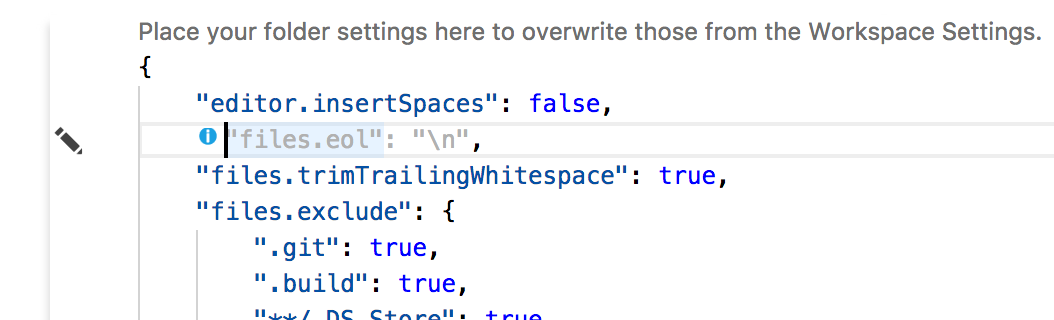
@chrisdias Good point. I am also showing an info icon in addition to colouring with grey.
sandy081
on 27 Jul 2017
can I set focus to the "i" and have the tooltip somehow read to me?
chrisdias
on 27 Jul 2017
I tried and unfortunately tooltip was not read.
I have to ask @alexandrudima to know how to get the tooltip to be read here?
sandy081
on 28 Jul 2017
Decorations are unfortunately not accessible at this time (except for e.g. squiggles or diff editors where we have special stories). We might want to go in the direction of VS where a command will present all decorations at a specific editor position.
 alexdima
on 10 Aug 2017
alexdima
on 10 Aug 2017
Related issues
 mrkiley
·
3Comments
mrkiley
·
3Comments
 v-pavanp
·
3Comments
v-pavanp
·
3Comments
 borekb
·
3Comments
borekb
·
3Comments
 curtw
·
3Comments
chrisdias
·
3Comments
curtw
·
3Comments
chrisdias
·
3Comments
Most helpful comment
I think the "setting is dimmed" explanation is unnecessary. Same as how we don't say "text is underlined because..." for other warnings. I like "This setting cannot be configured for folder resources".