Vscode: File will not be displayed because is it either binary, very large or an unsupported text encoding
- VSCode Version: Code 1.13.1 (379d2efb5539b09112c793d3d9a413017d736f89, 2017-06-14T18:21:47.485Z)
- OS Version: Windows_NT ia32 6.1.7601
- Extensions:
|Extension|Author|Version|
|---|---|---|
|language-x86-64-assembly|13xforever|2.2.11|
|rainbow-brackets|2gua|0.0.6|
|read-only-indicator|alefragnani|0.6.0|
|alignment|annsk|0.3.0|
|Doxygen|bbenoist|1.0.0|
|vscode-astyle|chiehyu|0.6.2|
|python|donjayamanne|0.6.5|
|EditorConfig|EditorConfig|0.9.3|
|matlab|Gimly81|0.5.0|
|triggertaskonsave|Gruntfuggly|0.1.2|
|status-bar-tasks|GuardRex|0.2.0|
|vscode-dimmer|hoovercj|2.1.0|
|docthis|joelday|0.4.5|
|center-editor-window|kaiwood|2.0.2|
|select-part-of-word|mlewand|1.0.1|
|cpptools|ms-vscode|0.11.4|
|indent-rainbow|oderwat|0.6.1|
|vscode-clearcase|OpenNingia|1.9.2|
|vscode-icons|robertohuertasm|7.9.0|
|theme-cyanicpastels|SamuelLampa|0.0.9|
|indenticator|SirTori|0.4.2|
|vscode-hexdump|slevesque|1.3.0|
|code-spell-checker|streetsidesoftware|1.2.0|
|comment-snippets|Tobiah|0.2.0|
|selectline-statusbar|tomoki1207|0.0.2|
|dark-plus-material|vangware|1.0.3|
|change-case|wmaurer|1.0.0|
|highlight-trailing-white-spaces|ybaumes|0.0.2|;
Steps to Reproduce:
- Open attached file in VS code get error message.
- Open file in Notepad. No problem.
I had edit the file to remove private information. When I edited it Notepad and saved it was converted to a readable format. When I edited it in SlickEdit, I could preserve the original formatting so it would load in Notepad but not in VS Code.
vs code.txt
 BillDenton
All 4 comments
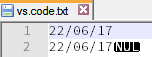
Looks like there are zero-byte-characters in that file:

In that case we think the file is binary. You need to include a UTF-16 BOM in the file if it is using that encoding.
 bpasero
on 26 Jun 2017
bpasero
on 26 Jun 2017
Given that the file successfully opens in both Notepad and SlickEdit, IMHO the binary detection is incorrect. Is there is any chance that it could be resolved?
BillDenton
on 26 Jun 2017
Given that the attached file works in Notepad, Notepad++ and SlickEdit (and probably other editors - these are only the ones I have installed), should it not work in VS Code? This is not particularly robust behaviour - IMHO an editor should be able to cope with a wide range of input files.
In Notepad++ the zeros are shown:
BillDenton
on 18 Jul 2017
This also happens on Apache error logs for some reason. I don't think the detection is correct at the moment.
 TheDutchCoder
on 20 Oct 2017
TheDutchCoder
on 20 Oct 2017
Related issues
 NikosEfthias
·
3Comments
NikosEfthias
·
3Comments
 sirius1024
·
3Comments
sirius1024
·
3Comments
 biij5698
·
3Comments
biij5698
·
3Comments
 mrkiley
·
3Comments
mrkiley
·
3Comments
 shanalikhan
·
3Comments
shanalikhan
·
3Comments
Most helpful comment
Given that the attached file works in Notepad, Notepad++ and SlickEdit (and probably other editors - these are only the ones I have installed), should it not work in VS Code? This is not particularly robust behaviour - IMHO an editor should be able to cope with a wide range of input files.

In Notepad++ the zeros are shown: