Vscode: Allow `command:` links in hover decorations
- VSCode Version: Code - Insiders 1.14.0-insider (77bf512f0eba6c7082f5b442ac5de585febcab23, 2017-06-19T08:59:44.265Z)
- OS Version: Windows_NT ia32 10.0.16215
It would be great to be able to execute commands from hover decorations. It would provide for powerful navigation options as well as open up many other uses.
For example, in GitLens I would love to have the shas eb411003 & 078960e8 be links that would open the commit details command. And the Changes be a link to open the diff with previous command.

 eamodio
All 69 comments
@mjbvz I should have dug deeper, but it looks like this changed very recently here: https://github.com/Microsoft/vscode/commit/fe8ea995bd766177574b704df1c723ad55237b8e
eamodio
on 20 Jun 2017
@eamodio Yes there's a bit of history to that change. In summary: command: uris are a security concern and they were previously enabled in many more places than they should have been, including in hovers. The concern is that commands have not been validated for safety which may allow an evildoer to craft some evil source code that could trick a user into executing a vscode command:
/**
 * Does stuff
 *
 * [Learn More](command:runShellComamnd?rm%20-rf%20%25)
 */
export function doStuff() { ... }
fe8ea99 attempted to fix this
I don't know if there is a safe way to selectively re-enable this functionality. Let me know if you have any thoughts on this
 mjbvz
on 20 Jun 2017
mjbvz
on 20 Jun 2017
Ah - I see. Could maybe the extension provide a whitelist of commands that should be allowed in a hover? Because having commands in hovers can be quite powerful, and I'd hate to completely lose that ability (even though I didn't think it worked because I was always trying to wrap a link around a code block which caused the action to never trigger).
Or maybe have an command callback on a hover that would allow an extension to see the command being attempted and take its own action? That might be nicer than a whitelist -- but it could be abused if an extension was lazy and just blindly forwarded commands.
eamodio
on 20 Jun 2017
@jrieken Any thoughts on supporting some form of interactivity in hovers? I'm inclined to keep hovers limited to static content.
If we did want to support actions in the hover, the HoverProvider may be a good place to handle these.
mjbvz
on 21 Jun 2017
I would argue that there was (and still is) interactivity in hovers -- you have just taken away a part of it (for perfectly reasonable security concerns). But I would hope that the feature that used to work (which could have the security concerns mitigated) would not be lost altogether -- just changed for security.
As for hover decorations vs hover providers -- again I would argue that this feature has already existed and will continue to exist for both external links as well as internal file links.
Also, I want to point out that not only have command links been lost, but also custom TextDocumentContentProvider links -- are those also of the same security risk?
eamodio
on 21 Jun 2017
@jrieken Any thoughts on supporting some form of interactivity in hovers? I'm inclined to keep hovers limited to static content.
Yeah, I think is critical that we are taking features aways. This has been working and advertised since at least a year. Why don't we do something similar to script execution and the preview command? There we didn't just disable script execution but prompted the user in some way. I think taking the big hammer to solve this problem won't make people happy.
 jrieken
on 21 Jun 2017
jrieken
on 21 Jun 2017
I only recall seeing command uris documented for html previews. That they worked in hovers seemed like a side effect of using the OpenerService to handle links. Was this really a feature that we officially supported?
In the markdown preview, we disabled scripts by default and then provided a setting to enable them again. Prompting works fine for the markdown preview because the markdown content comes from the user. For UX, I'm not in favor of a prompt based solution here because the content is coming from an extension which the user has already trusted. How should they know which commands to trust and which not to? A whitelist of valid commands for given hover would be better.
Unless a large number of users will be negatively impacted when some existing extensions stop working, we need to ship 1.14 with the current change that uses a whitelist of valid link schemes, or at the very least entirely disable command uris in hovers. If we ever do want to interactive functionality in hovers, we should look into a proper solution that does not use marked strings and command uris
mjbvz
on 21 Jun 2017
I didn't say prompt allow user in some way to keep/restore the old behaviour. Generally, the dislike is expressed when things are taken away. How about making it a user-setting? I don't think that whitelisting necessary works because my good and proper extension might be (ab)used by a third party to with special crafted contents. So, I'd its a generic, single trust switch which defaults to "safe"
jrieken
on 21 Jun 2017
Depending on how "safe" things need to be having something like a onDidExecuteCommand on the decorator feels somewhat natural to the api -- similar in spirit to onDidSelectItem in the QuickPicks. As I mentioned above, the main downside I see is that an extension could be lazy and just forward on commands without inspecting -- re-opening the security hole. But is that a legitimate concern? Extensions could do all sorts of "bad" things.
Where as if we are worried about that security risk, having something like hoverMessageCommands?: string[] (don't love the name) whitelist on a decorator feels like a reasonable compromise -- it is explicit, it only affect extensions that really want this behavior, and it should be fairly safe. It also doesn't feel like a big ask for an extension to provide with the hover the set of commands it expects in a given hover. The biggest downside I see is it is somewhat different than other areas of the api.
As for a single trust switch -- I'm not sure I understand what that means -- would it be per extensions? Would it be on the first executing of a specific command? Would there be a blacklist of commands that would be considered "unsafe" (blacklists are of course problematic)?
eamodio
on 21 Jun 2017
Extensions could do all sorts of "bad" things.
That is correct and there is little we can do. However, there is a scenario in which a good extension can be made do evil thing by special input, e.g. a source file which results in a special hover command. Because of that a list of approached commands won't help much and I'd opt for a global flag (user-setting) that says "I understand and I am OK with the risk"
jrieken
on 21 Jun 2017
Why wouldn't a separate callback or whitelist of commands not help? In the callback case the extension could decide to execute the command or not. And in the whitelist case, there wouldn't even be a command execution unless the extension expressed that the command should be allowed - e.g. in GitLens I would allow the gitlens.showQuickCommitDetails and gitlens.diffWithPrevious commands -- but anything else would be blocked.
And at least that way -- the extension doesn't get "tricked" into doing something it didn't expect
eamodio
on 21 Jun 2017
I'm not in favor of a user setting to disable security for the same reasons I'm not in favor of a prompt.
My proposal:
Keep all commands uris disabled in 1.14. I don't know the history of this code but my understanding is the command uris were never officially documented as being supported in hovers / MarkedStrings.
Revisit interactivity in hovers. If we decide that markdown + command uris are really how we want to support interactivity, document this and use a callback or whitelist on the hover/hoverprovider to enable these
mjbvz
on 21 Jun 2017
😞
Also, I want to point out that not only have command links been lost, but also custom TextDocumentContentProvider links -- are those also of the same security risk?
@mjbvz is the above still a risk? Or only command:?
eamodio
on 22 Jun 2017
Keep all commands uris disabled in 1.14.
We are using command: URIs and disabling them would cripple a useful feature in our extension.
 ArtemGovorov
on 22 Jun 2017
ArtemGovorov
on 22 Jun 2017
@mjbvz @jrieken is there any resolution on this? I was planning to add more interactivity into the GitLens hovers (to open quickpicks, open diffs, even revert a line to the previous), but I obviously don't want to put in that effort if the feature is going to get pulled.
eamodio
on 25 Jun 2017
We'll leave command: urls enabled in hovers for 1.14. We'll disable them in 1.15 but we'll give extension authors an API that they can use to not only specify the content of a hover but also the actions that should be shown. We'll make sure in the UI that users can clearly identify actions and their potential side effects.
 kieferrm
on 28 Jun 2017
kieferrm
on 28 Jun 2017
@mjbvz @jrieken @kieferrm Thank you! :)
eamodio
on 28 Jun 2017
@kieferrm is there any chance this commit https://github.com/Microsoft/vscode/pull/29082/commits/ca6b39b14e2dbe910c23f50752b4795a08089410
from my PR https://github.com/Microsoft/vscode/pull/29082 could get in? It allows links to be inside <code> tags
For example in GitLens I want to add the following command links:

But I'd much rather not lose the monospace code-block styling.
eamodio
on 28 Jun 2017
@ArtemGovorov Can you provide a sample with some screen shot or animated gif to illustrate how you are using command-links?
jrieken
on 11 Jul 2017
@jrieken Sure, here it is:
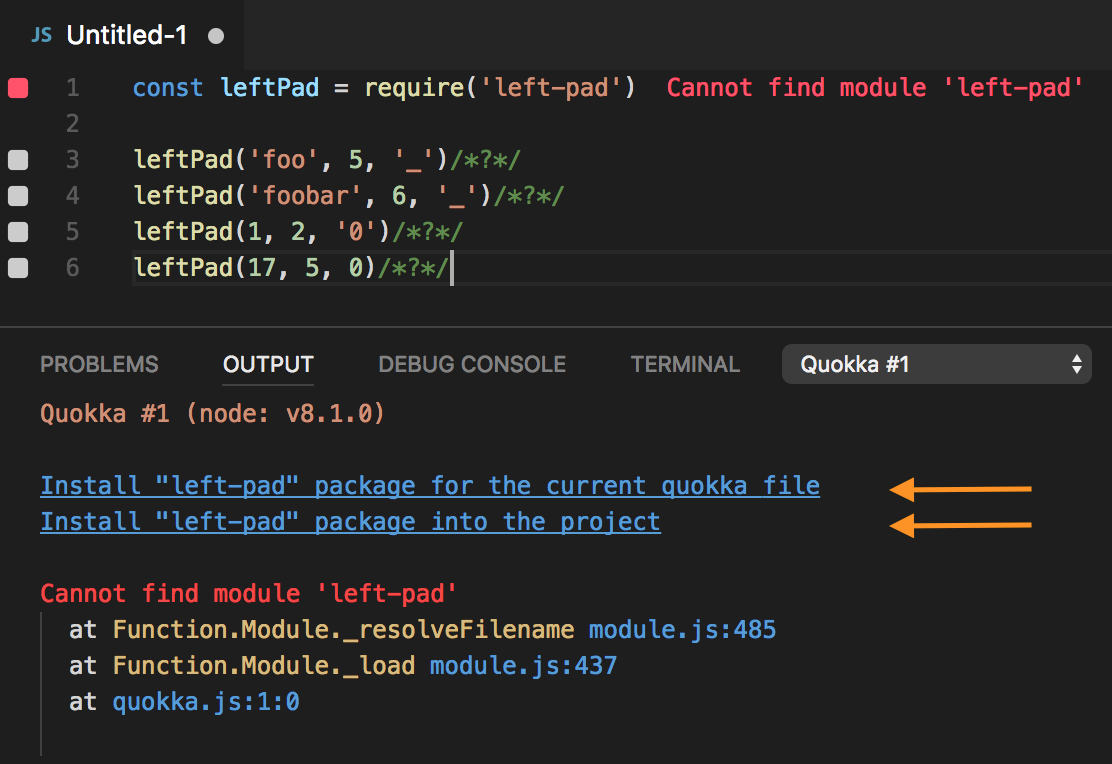
We render these command-links in our output channel, they install missing modules when clicked.
Another use case: we sometimes need to open a file from a link, but with a certain action executed before opening the file (so we can't just use a file URI).
ArtemGovorov
on 11 Jul 2017
@eamodio sorry to ask this here, but what's the font you're using?
 fbnlsr
on 11 Jul 2017
fbnlsr
on 11 Jul 2017
@fbnlsr it's fira code. Also make sure you have font ligatures enabled in vscode for the full effect.
eamodio
on 11 Jul 2017
@ArtemGovorov Are you using command-links just with the link provider API or also in hovers?
jrieken
on 17 Jul 2017
@jrieken We are using command-links with the link provider API at the moment, and would like to do it in hovers as well (for the same feature). But we have postponed the implementation for hovers because of the announced plans to change the API to provide command links in hovers.
Is there a plan to disable/change API for command-links with the link provider API as well?
ArtemGovorov
on 18 Jul 2017
Is there a plan to disable/change API for command-links with the link provider API as well?
Yeah, for me the hover and document link provider pretty similar. For both the trick will be to study how an extension creates links (that means how it derives links from an input file) and craft a file such that its looks looks unsuspicious but does something unexpected. I have two proposals
Decorate Command Links
In addition to the underline, we can render a special glyph with links that are actually commands. That should tell the user "Caution, something will be executed". Think of something similar to external links on wikipedia:  . This will not require any work from extensions authors but it adds UX elements that must be explained first and that might annoy some people.
Enable command links with specific API
Instead of a UX hint we can change the API to explicitly allow command links. So the Hover constructor and the DocumentLinkProvider-registration-api will have a new parameter alà enableCommandLinks which means command links generated by them will be run as commands. The default will be to not support command links and the idea is to make extension author aware of this risk, e.g. when deriving links from an input source they don't control. This will require adoption work from extensions authors.
@ArtemGovorov @eamodio @mjbvz What is your preferred solution?
jrieken
on 18 Jul 2017
@jrieken I like the first option (Decorate Command Links) better. Perhaps with a config option to turn it off if it annoys a user.
The second option doesn't seem to protect users much, except for fact that extension authors will maybe think twice about cleansing the input for command links properly.
BTW, http links may too be a source of a security threat. An extension (as a result of some malicious input) may generate a link that when click will pass some undesired data via GET params to a malicious URL.
ArtemGovorov
on 19 Jul 2017
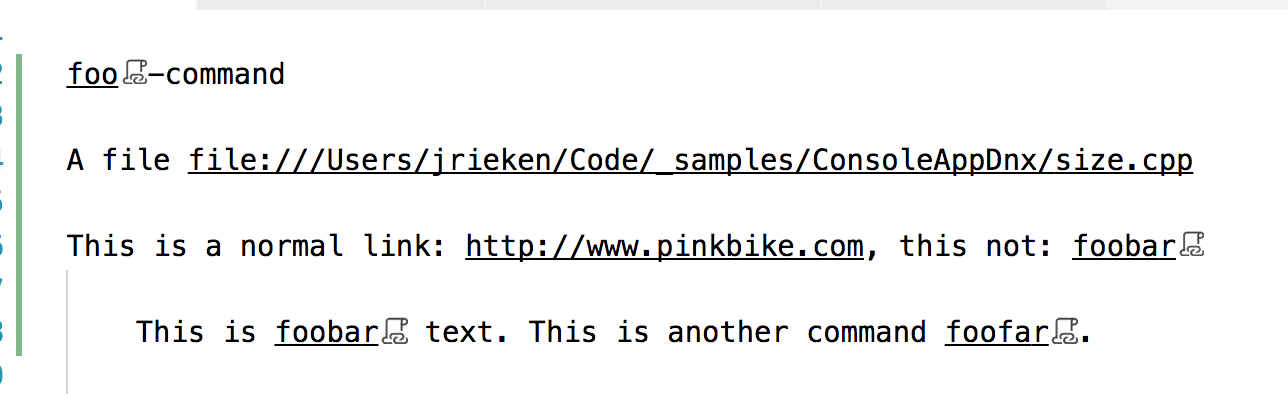
Some early code showing how inline-link-decoration could look like. For command links, an icon is appended; also the link-hover mentions that this is command (in this sample every word starting with "foo" is a command link)
Inline Command Icon
Link Hover
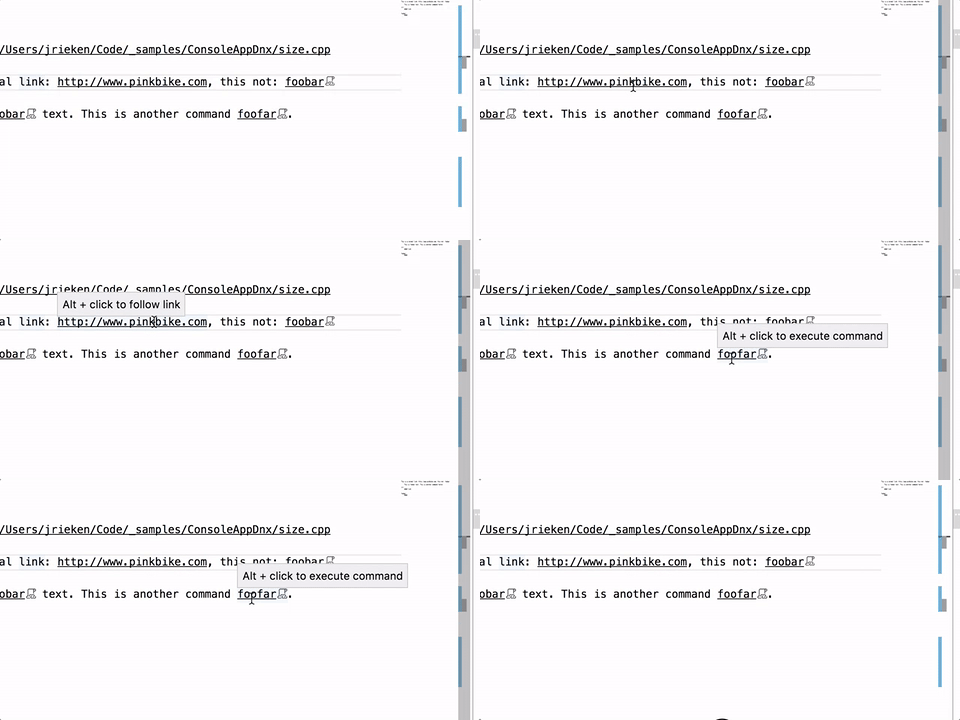
Command Hover
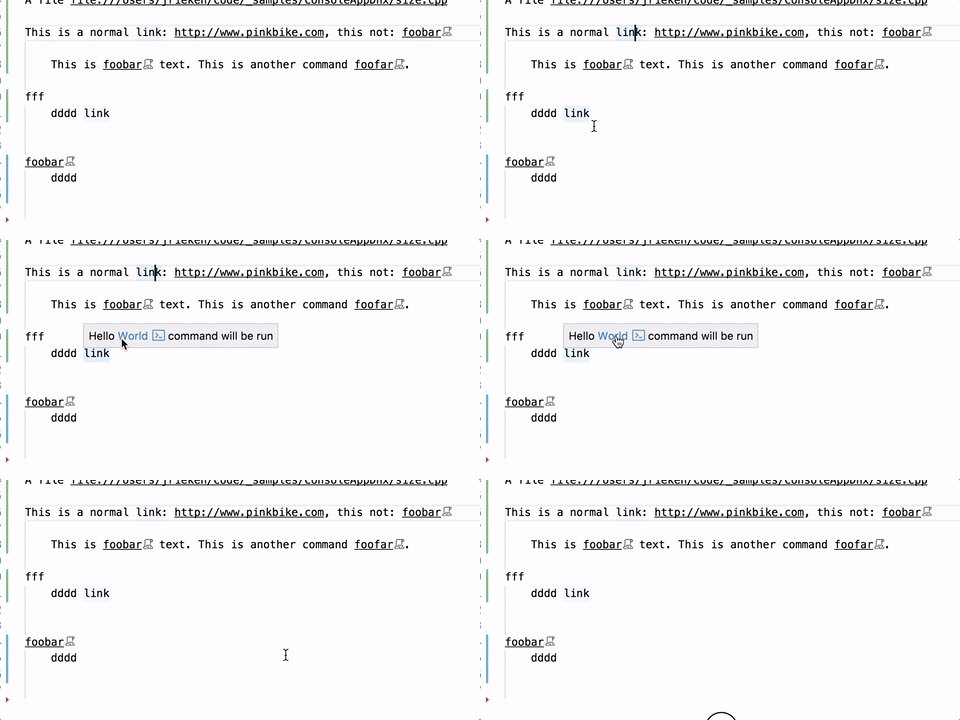
Apart from editor links also the editor hover shows what a command link is. Instead of the "VS-script-warning"-icon, it uses the terminal octicon (in that sample every word "link" has a hover with a command link):
jrieken
on 19 Jul 2017
BTW, http links may too be a source of a security threat. An extension (as a result of some malicious input) may generate a link that when click will pass some undesired data via GET params to a malicious URL.
Yeah, @mjbvz might have an idea about that
jrieken
on 19 Jul 2017
@ArtemGovorov You're talking about the potential for cross site request forgery? Or something else?
mjbvz
on 19 Jul 2017
@jrieken Looks great, thanks for sharing! BTW, what's the reason for displaying different icons inline and in hover messages (why not displaying the same terminal octicon in both cases)?
@mjbvz I meant that theoretically some malicious input may make an extension to generate a link like http://malicious-website.com?p=userPersonalData.
ArtemGovorov
on 20 Jul 2017
BTW, what's the reason for displaying different icons inline and in hover messages (why not displaying the same terminal octicon in both cases)?
I want to see what gets more likes
jrieken
on 20 Jul 2017
@jrieken I can't say I love having the decoration (mainly in the hovers as space is more constrained), but it is probably the best option. Could the decoration only show on hover or does it need to always be visible. For command links in hover decorators, it will just be the icon decoration that will appear right (not any associated text)?
I also can't say I love either of the icons as the terminal one just looks too much like it will be executed in the terminal or something, and the other one I'm unsure what it is :). what about something like ⚡️ (https://octicons.github.com/icon/zap/)? Then command links could be ⚡️ and others could be a link icon or something else.
eamodio
on 20 Jul 2017
The first icon seems too detailed for such a small decoration and reminds me of the 'external link' decoration when looking from afar.
 chrmarti
on 20 Jul 2017
chrmarti
on 20 Jul 2017
@stevencl @chryw Can you please advise? We need an icon that decorates a link to express that this link runs a command, like in this real world sample: https://github.com/Microsoft/vscode/issues/29076#issuecomment-314362332
jrieken
on 20 Jul 2017
Besides showing an icon should we maybe also educate users that a command can be executed via click and that commands are indicated with this icon? e.g. on the first time you click on such a link we show a small blue hover message (similar to the thing we show when no definition can be found) and explain what happens when you click? Or we show the lightbulb or something similar (dialog / message seems too heavy).
 bpasero
on 20 Jul 2017
bpasero
on 20 Jul 2017
@ArtemGovorov I think the extension itself would have to be malicious for that to be an issue. Otherwise, the best an attacker can do is contribute a static url through jsdocs or similar
mjbvz
on 20 Jul 2017
@jrieken @bpasero I can explore some icon ideas.
 chryw
on 21 Jul 2017
chryw
on 21 Jul 2017
@jrieken Looking at your gif above, I wonder whether we need the inline icon if we'd enrich the editor tooltip with the same information you shown in hover tooltip, i.e. so that it tells me which command will be executed when alt-clicking. Then in both cases, I'd be told what will happen and I need to explicitly confirm. At the same time, it would not impact the presentation of links.
kieferrm
on 26 Jul 2017
if we'd enrich the editor tooltip with the same information you shown in hover tooltip,
I like tho that would mean we have a hover on top of a hover. Unsure if the UX gods approve that...
jrieken
on 26 Jul 2017
@kieferrm How would the user have "to explicitly confirm"?
eamodio
on 26 Jul 2017
Perhaps styling the command links somewhat similar to a light button would make it clearer that it is a command?
 SebastianZaha
on 26 Jul 2017
SebastianZaha
on 26 Jul 2017
I don't know how lightning bolt (by itself) is used in VS Code. But in Visual Studio we use the lightning bolt icon for "Event" in intelliSense, and for "Trigger" in other common areas. So to avoid making it like an intelliSense "Event" I added 3 lines on the left so it's more like "run/execute". Will something like this make sense?
I'm also inclined to agree what @kieferrm said, that tooltip may be enough for differentiating regular link or command link. If the tooltip is style-able, maybe we can add "external link" icon and "execute" icon there, not inline with actual code. So this way it's less noisy (image you have lots of executable commands in your code, you'll see many inline icons). (rough mock below)
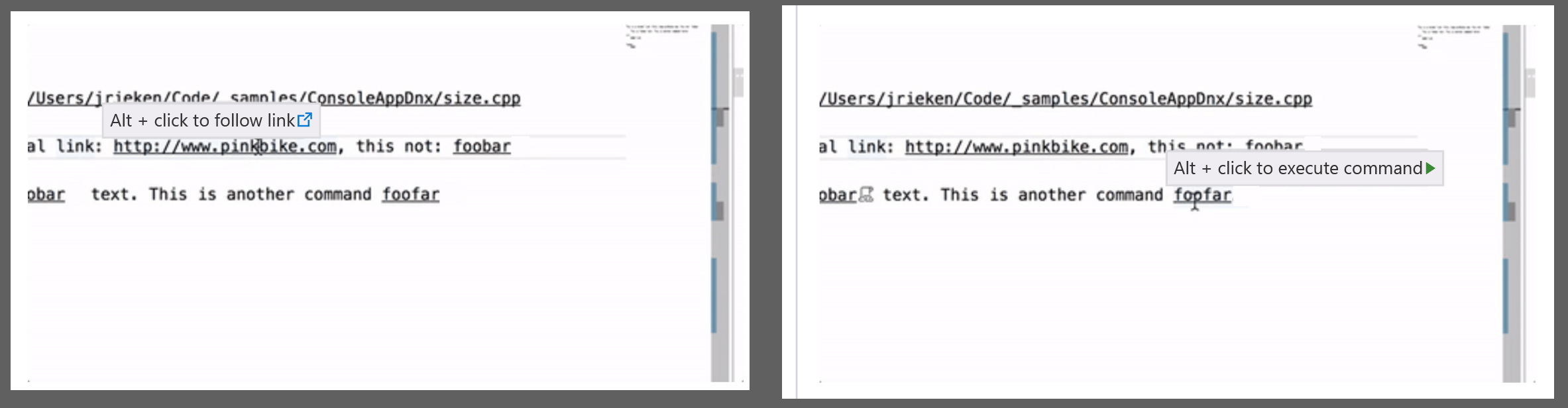
chryw
on 26 Jul 2017
@eamodio "explicit confirm": When you look at the gif @jrieken posted than you see that in the command hover case the command is only executed after the user clicked the "World" link in the tooltip. I.e. no command is run until the user takes additional action.
kieferrm
on 27 Jul 2017
@kieferrm ah - gotcha. Thanks. Although the hover on a hover (as @jrieken mentioned) would feel fairly odd imo and less usable in the scenarios I am thinking about using this feature. I'd much rather just click on a link in a hover and have the action happen, rather than hover on a link in the hover and have to click another target. My 2c anyway ;)
eamodio
on 27 Jul 2017
I'd much rather just click on a link in a hover and have the action happen, rather than hover on a link in the hover and have to click another target.
@eamodio I think you would click the link, get the tooltip, and then have a second click. No hovering, no delay. Just a confirmation that this is a potentially modifying or unsafe operation.
kieferrm
on 9 Aug 2017
@kieferrm so it would be 2 clicks on the same link in the hover?
eamodio
on 9 Aug 2017
@eamodio You have the hover open. You click the link without any modifier. This does not follow the link but instead opens the tooltip and tells you that this runs a command and that you have to click the link with the alt modifier pressed in order to run the command.
kieferrm
on 9 Aug 2017
@kieferrm Ah -- I totally missed the modifier part -- sorry! That makes total sense now -- love it!
eamodio
on 9 Aug 2017
We went with a little bit of both. So, for links inside the editor the hover with alt/cmd+click is the winner. Note that is because clicking in the editor already means 'set selection'. For (command) links inside hovers we went with the terminal icon because reactions to the hover on top of the hover was negative and because the alt+click instead of "normal" click is somewhat confusing once you know what you are doing. We need to make sure that the icon is getting properly documented this release.
jrieken
on 16 Aug 2017
@jrieken as a user who encounters the terminal icon for the first time, how do I know what it means? Do I still get a hover informing me? How do I search for the meaning of an icon in the documentation?
kieferrm
on 16 Aug 2017
Honestly the use of a terminal icon feels strange to me, given that vscode has a built-in terminal. It make me think something is going to happen in the terminal. I'd much rather see something like the lightning bolt or something that doesn't make me think terminal.
eamodio
on 16 Aug 2017
Do I still get a hover informing me?
Yes, but not on click but on hover, like hovers do.
jrieken
on 17 Aug 2017
I have re-opened and I wanna do a 180 on this. While working on a confirm message ala 'this link runs command blabla' it felt wrong doing it. The root of this is the MarkedString which allows extension writers via hovers and editor decorations to add fancy things to the UI. We should tackle it there.
Some extensions, like GitLens, know what they are doing and know that their hover will contain a command link (besides other things). Others, like TypeScript, don't know that. They actually don't even know that a doc-comment uses markdown. They just forward what they have seen in the sources and we happen to interpret that as markdown.
We should have enough expressiveness in the API to cover those two scenarios.
jrieken
on 22 Aug 2017
@jrieken that brings us close to where we started the discussion, i.e. providing API. However, the UI exploration was worthwhile as we needed to understand if there is a reasonable solution that is safe for users and does not require adoption by extension authors. An API requires adoption, but in the end a better user experience.
kieferrm
on 22 Aug 2017
So, idea is to deprecate MarkedString because it lacks expressiveness, for this issue and also for adding markdown in other places, see #11877.
The proposal is to have a MarkdownString (yeah, stupid name) that looks like this
    export class MarkdownString {
        value: string;
        trusted?: boolean;

        constructor(value?: string);
        appendText(value: string): MarkdownString;
        appendMarkdown(value: string): MarkdownString;
    }
So, basically MarkdownString is the next version of MarkedString and more or less just a wrapper around a string. The trusted flag means that value has been crafted with caution (which we obviously cannot verify). Extensions that just forward contents, like TypeScript, won't set the trusted flag which disables certain features, e.g. command links.
Pros
- Contains the source string and information about this in one place
- Allows to solve other issues we have, see #11877
- Aligned with the
SnippetStringand how we use it
Cons
- A little ugly as it is quite similar to the
MarkedString
Another proposal is to have a second enum-style type that contains information about MarkedString usages. Like so
export enum MarkedStringType {
  TrustedMarkdown,
  Markdown,
  Plaintext
}

export class Hover {

  contents: MarkedString[];
  contentsType: MarkedStringType
Pros
- Doesn't enforce us to have two
XYZStringtypes - Fits nicely onto LSP workings
- Also solves #11877
Cons
- Bogus property containment as these two pieces of information belong into one logical unit and not into their enclosing unit
jrieken
on 24 Aug 2017
Please forgive me is this is a stupid questions -- but why couldn't MarkedString have the optional trusted?: bool? Since it is currently defined as:
https://github.com/Microsoft/vscode/blob/93a3cfc36c7bfa4ff55390c87c5500d58f24ea0f/src/vs/vscode.d.ts#L1825
So if it was a string or if the trusted property wasn't explicitly set it wouldn't be trusted.
eamodio
on 25 Aug 2017
Yeah, a common pitfall ;-). The { language, value }-bit is actually "desugared" into a code block, so triple backtick, language, newline, value, triple-backtick. That is from a time in which the string portion wasn't supporting markdown but was just plaintext.
So, yes we could add another type-definition { value:string, trusted:boolean } making the MarkedString being a or-type of three. However, that doesn't the solve the problem described in #11877
jrieken
on 25 Aug 2017
I personally would go with the MarkdownString type. But for better compatibility I would define MarkedString as
export type MarkedString = string | { language: string; value: string } | MardownString;
 dbaeumer
on 25 Aug 2017
dbaeumer
on 25 Aug 2017
I personally would go with the MarkdownString type. But for better compatibility I would define MarkedString as
Unsure, it will make the the API look cleaner but I also want to add the @deprecated-tag to MarkedString. Going that way would mean types like this hover: MarkdownString[] | MarkedString[] and in places that today accept strings only documentation: string | MarkdownString. Esp the former is a little ugly...
jrieken
on 25 Aug 2017
May be it is not a good idea. For the hover example should that be: hover: MarkdownString | MarkedString[]. If we have a MarkdownString I thing properties don't need to define an array of it. Or ?
dbaeumer
on 25 Aug 2017
If we have a MarkdownString I thing properties don't need to define an array of it. Or ?
Unsure, I believe we have it because each of them is separated by a horizontal line... Tho, we could also deprecate a level up so
export interface DecorationOptions {
  /**
   * @deprecated
   */
  hoverMessage?: MarkedString | MarkedString[];

  hoverMessage?: MarkdownString | MarkdownString[]
Tho it makes it harder to describe what to do. Use hoverMessage with that other type?
jrieken
on 25 Aug 2017
Ugh, this is getting ugly constructor(contents: MarkdownString | MarkdownString[] | MarkedString | MarkedString[], range?: Range);. Tending to go with @dbaeumer's suggestion of mixing the MarkdownString into the MarkedString
jrieken
on 25 Aug 2017
Moving this to September when we turn off command-links unless explicitly enabled via isTrusted
jrieken
on 28 Aug 2017
@jrieken will the api be in August but not enforced until Sept or no api until Sept too?
eamodio
on 28 Aug 2017
Yes, the new MarkdownString will ship for August (it already is in insiders) and the default behaviour for MarkedString will change in September.
jrieken
on 28 Aug 2017
Awesome -- thank you. New GitLens features coming ;)
eamodio
on 28 Aug 2017
Closing this as the new API is out and adopting is being tracked here: #33577
jrieken
on 7 Sep 2017
Can you clarify what the change was for september, and what part of it needs to be verified for this issue?
 roblourens
on 27 Sep 2017
roblourens
on 27 Sep 2017
Not sure if @jrieken wanted something specific checked, but this works for me in GitLens now:

Those links are all command links now
eamodio
on 27 Sep 2017
Related issues
 hsdk123
·
263Comments
hsdk123
·
263Comments
 TurkeyMan
·
411Comments
TurkeyMan
·
411Comments
 ozsay
·
247Comments
ozsay
·
247Comments
 Tekbr
·
191Comments
Tekbr
·
191Comments
 Perkovec
·
191Comments
Perkovec
·
191Comments
Most helpful comment
Some early code showing how inline-link-decoration could look like. For command links, an icon is appended; also the link-hover mentions that this is command (in this sample every word starting with "foo" is a command link)
Inline Command Icon
Link Hover
Command Hover
Apart from editor links also the editor hover shows what a command link is. Instead of the "VS-script-warning"-icon, it uses the terminal octicon (in that sample every word "link" has a hover with a command link):