Vscode: On highlight/select text - cannot unhighlight/deselect text on click - need to do ESC
- VSCode Version: Code 1.13.0 (376c52b955428d205459bea6619fc161fc8faacf, 2017-06-08T16:43:13.058Z)
- OS Version: Windows_NT ia32 6.1.7601
- Extensions:
|Extension|Author|Version|
|---|---|---|
|git-easy|bibhasdn|1.9.1|
|file-icons|file-icons|1.0.3|
|auto-close-tag|formulahendry|0.4.2|
|auto-rename-tag|formulahendry|0.0.12|
|minify|HookyQR|0.3.0|
|Angular2|johnpapa|2.3.2|
|vscode-github|KnisterPeter|0.16.2|
|vs-deploy|mkloubert|9.25.0|
|prettify-json|mohsen1|0.0.3|
|debugger-for-chrome|msjsdiag|3.1.3|
|vscode-run-git-difftool|narekmal|0.0.4|
|gitblame|waderyan|1.11.2|
|bootstrap-3-snippets|wcwhitehead|0.0.9|;
Steps to Reproduce:
- Open a file
- Click Ctrl+A
- Click anywhere - highlight still stays and can't do anything else
 redapplewithleaves
All 36 comments
@redapplewithleaves Do you have any kind of codelens on your file?
I can repro this only when clicking on the line occupied by the codelens
Clicking anywhere else removes the selection.
 ramya-rao-a
on 13 Jun 2017
ramya-rao-a
on 13 Jun 2017
@ramya-rao-a I haven't used code lens. Not quite sure its on...
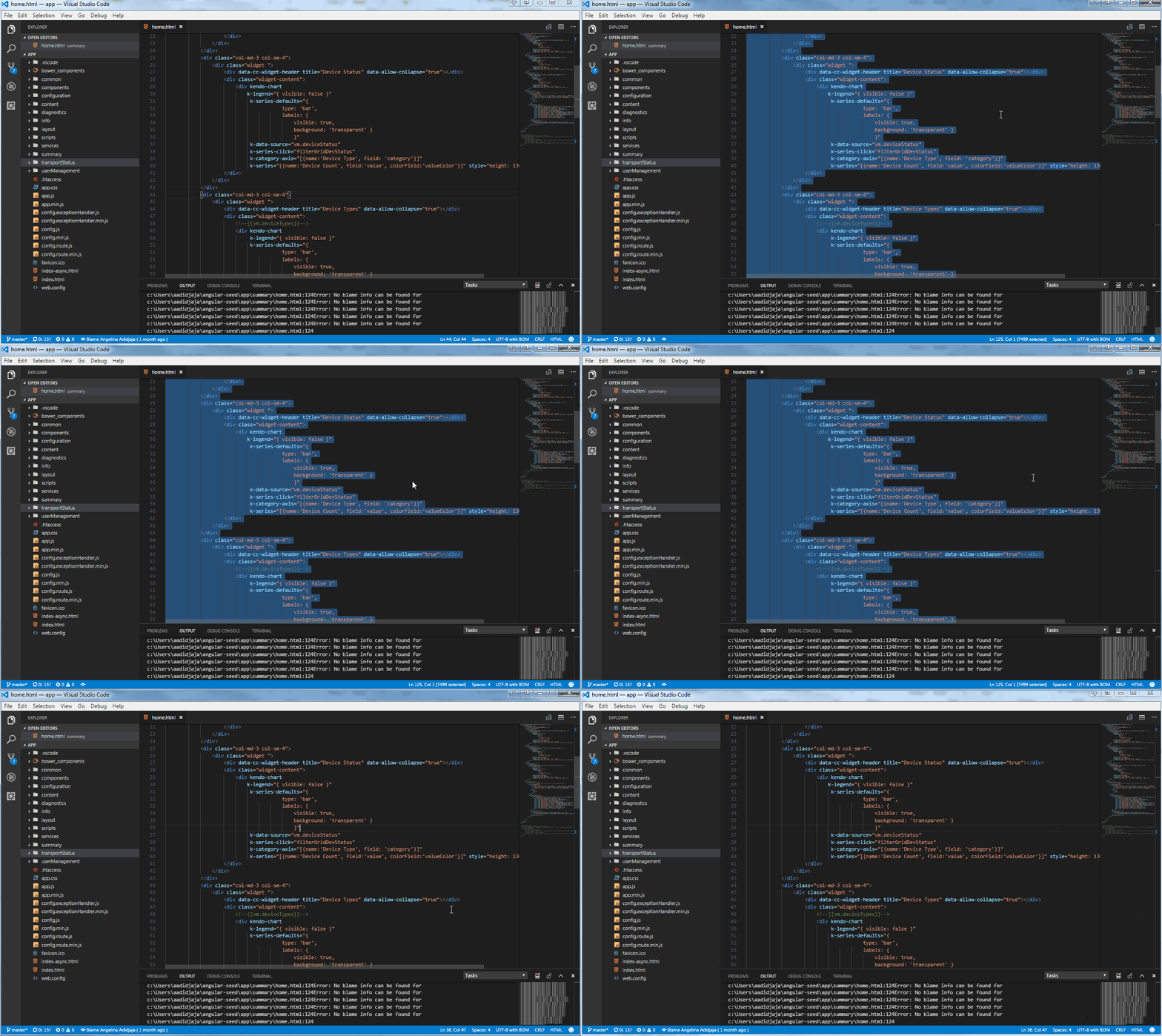
Here is a screencast -> Each time the cursor change, I'm clicking on the the mouse. It takes about 7 or 8 times to clear the select.
redapplewithleaves
on 13 Jun 2017
@redapplewithleaves Can you share your settings?
ramya-rao-a
on 14 Jun 2017
@redapplewithleaves could you please try disable drag and drop in the editor by setting editor.dragAndDrop to false and see if it happens still? Our mouse target detecting seems not smart enough.
 rebornix
on 14 Jun 2017
rebornix
on 14 Jun 2017
@rebornix editor.dragAndDrop: false did the trick.
Thank you so much!
This is my overwrite for default settings:
// Place your settings in this file to overwrite the default settings
{
"typescript.tsdk": "node_modules/typescript/lib",
"workbench.iconTheme": "file-icons",
"window.zoomLevel": -1,
"editor.dragAndDrop": false
}
redapplewithleaves
on 14 Jun 2017
This appears to be happening on Mac as well:
- VSCode Version: Code 1.13.0 (376c52b, 2017-06-08T16:34:53.678Z)
- OS Version: Darwin x64 16.6.0
 russianryebread
on 14 Jun 2017
russianryebread
on 14 Jun 2017
Same problem
- VSCode 1.13.1
- MacOS Sierra 10.12.5
editor.dragAndDrop: false fixed it for me too
 johneriksson
on 15 Jun 2017
johneriksson
on 15 Jun 2017
Same here, same solution on Linux (ubuntu 16.04)
- VSCode Version: Code 1.13.1 (379d2efb5539b09112c793d3d9a413017d736f89, 2017-06-14T18:18:03.540Z)
- OS Version: Linux x64 4.4.0-83-generic
- Extensions:
|Extension|Author|Version|
|---|---|---|
|matlab|Gimly81|0.5.0|
|latex-workshop|James-Yu|2.9.1|
|python|donjayamanne|0.6.7|
|code-spell-checker|streetsidesoftware|1.2.1|;
 joostmeulenbeld
on 5 Jul 2017
joostmeulenbeld
on 5 Jul 2017
i am having same issue on multiple OS!!!!
- Windows 10
- Windows 7
- Ubuntu 14.04
- Ubuntu 16.04 with Budgie Desktop (Ubuntu budgie-remix)
the same solution worked for me as well.
 r3wt
on 21 Aug 2017
r3wt
on 21 Aug 2017
Same issue. Same solution.
 tylerstillwater
on 5 Sep 2017
tylerstillwater
on 5 Sep 2017
Hi all, sorry for coming back to it too late, and thank you for your patience. I've tried hard to reproduce this issue but failed. I tested with latest Stable/Insider on three different platforms
1.18.1 on Ubuntu 16.04

1.19-insiders on macOS High Sierra

1.18.1 on Windows 10
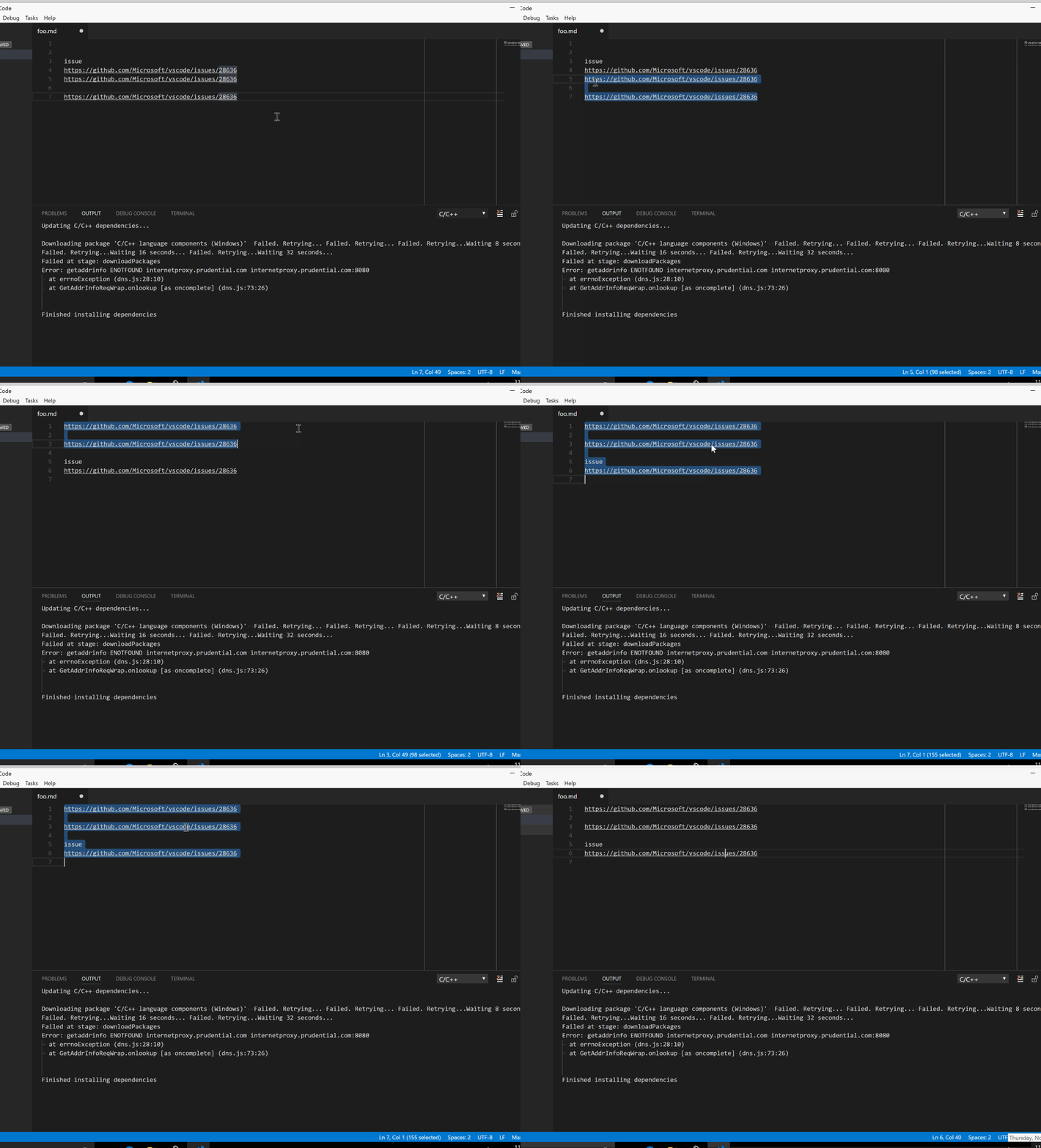
I tried to drag and drop then click, select all then click, drag and hold then click, click on selection, click on end of line (which is not on selection but on selected lines), etc but can't reproduce. I have a feeling it might be a problem with Chromium where the drag/drop/click event sequence is not guaranteed but it's just my wild guess. Can anyone help me with troubleshooting by
- Update to latest version (I suppose most of you already did)
- Some gif like @redapplewithleaves did
- Provide specific platform/version info
- Launch without extensions
- Not too complicated user setting
I may ask for too much but appreciate any help from you.
rebornix
on 27 Nov 2017
As far as I can tell, it's no longer an issue in the latest stable version: 1.18.1 (MacOS)
russianryebread
on 27 Nov 2017
in version 1.18.1 (Windows 10)

Screen 1:
- select, drag and drop, right click, then click. takes two clicks to deselect if right click occurs first.
you can see in both screen caps, when drag and drop css with a color box, the color box is left behind. very ugly.
issue is fixed in windows 10 but other undesirable behavior occur
r3wt
on 27 Nov 2017
I'm using Ubuntu 16.04.3 LTS 64-bit and VSCode 1.18.1. I've removed all my user settings and started VSCode with --disable-extensions. The bug still occurs:

First I try single clicks on selected lines. Then I click on an unselected line which deselects the text. The 2nd time I do a fast double click on a selected line which also deselects the text successfully.
I've added event listeners too but could witness anything unusual except that a normal speed double click triggers the dblclick event but doesn't trigger a deselect. To deselect I have to double click even faster. Seems like it's handled in VSCode.
 ctusch
on 27 Nov 2017
ctusch
on 27 Nov 2017
It would be useful to decrease drag sensitivity (or increase distance moved before a click is detected as a drag, however you wish to phrase it). Right now, if I click inside a selection with a 0px move, it's a click and deselects the selection. However, if I move horizontally or vertically by even 1 pixel (which it would appear my standard click on my magic mouse tends to do) it's a drag so no deselection happens.
 alexrussell
on 1 Mar 2018
alexrussell
on 1 Mar 2018
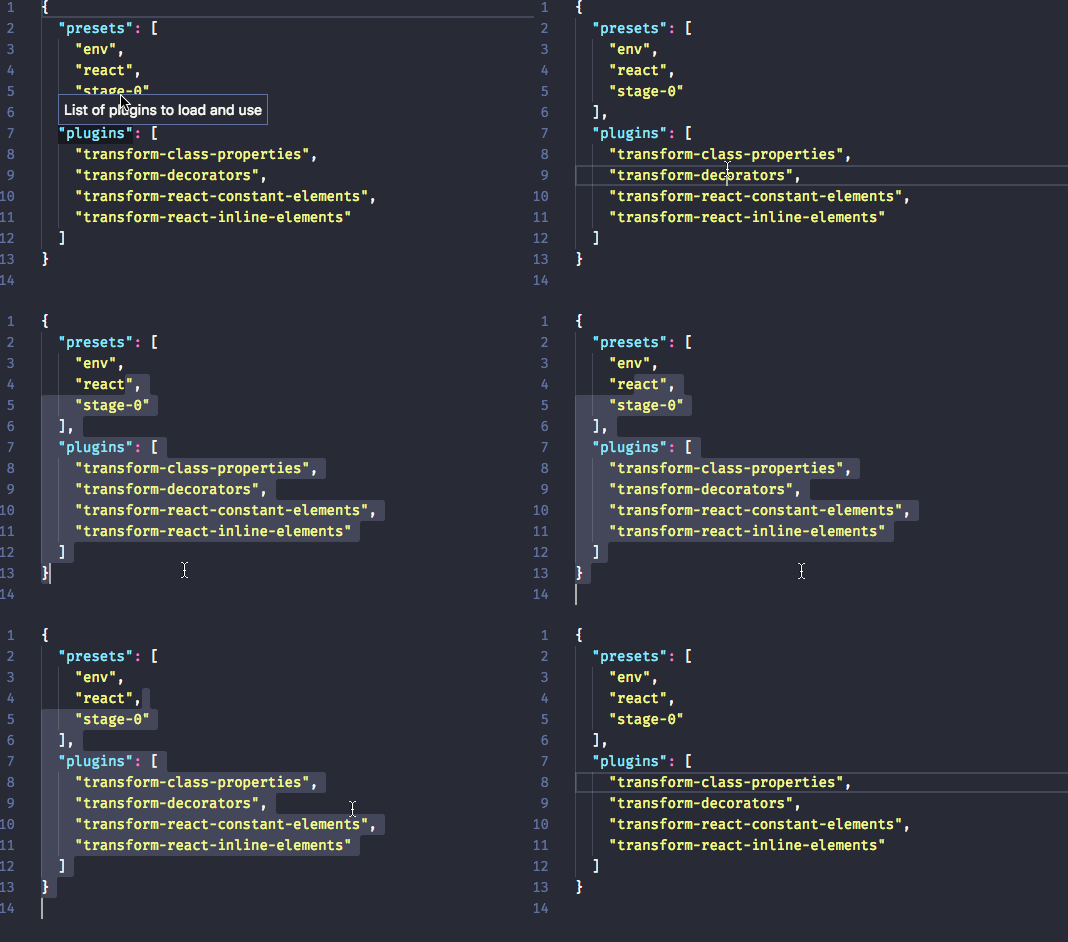
In fact I have a feeling my mouse isn't even moving by 1 pixel (though I still think changing the drag distance will be useful for people), I have a gif here of me selecting and clicking within the selection (and to the right of but 'within' the selection) and I can't see the cursor move. However, every time it doesn't deselect, the cursor turns from a text caret to a normal arrow (which is indicative of a drag, among other things admittedly), so I still think that somehow it's going into "drag mode", albeit not necessarily due to the cursor having moved.
alexrussell
on 1 Mar 2018
💯 i agree that would be useful. this is an extremely annoying problem
On Mar 1, 2018 6:16 AM, Alex Russell notifications@github.com wrote:
It would be useful to decrease drag sensitivity (or increase distance moved before a click is detected as a drag, however you wish to phrase it). Right now, if I click inside a selection with a 0px move, it's a click and deselects the selection. However, if I move horizontally or vertically by even 1 pixel (which it would appear my standard click on my magic mouse tends to do) it's a drag so no deselection happens.
—
You are receiving this because you commented.
Reply to this email directly, view it on GitHubhttps://github.com/Microsoft/vscode/issues/28636#issuecomment-369573769, or mute the threadhttps://github.com/notifications/unsubscribe-auth/AERo_VJ72Hjk30Qt4mhhIL5ggiw_l7cQks5tZ-ahgaJpZM4N4tw_.
r3wt
on 1 Mar 2018
alexrussell is correct, the issue here seems to be with the sensitivity of drag and drop activation. I just tested this and if I am very careful to not move the mouse, deselect works. If I work normally though, my mouse usually moves a tiny bit and so drag and drop is activated rather than the desired result of deselecting.
 timdmackey
on 13 Mar 2018
timdmackey
on 13 Mar 2018
bug still occuring for me on latest build as well. i thought it had been fixed, but i was mistaken. they just got a little bit better at making it not happen, but it still happens.
r3wt
on 13 Mar 2018
@timdmackey Yeah I think specifically it's the use of a magic mouse. Because the whole mouse clicks when you click, it appears to be easier to accidentally "move" it in the process (especially if you have your general mouse moving sensitivity turned up like I do).
I see similar issues with Firefox (click on a <select> element and a fair amount of the time it "selects" the value and closes straight away, because I moved 1 pixel and am now in drag-to-select-an-option mode, or right click to bring up context menu and accidentally go back in the page for the same reason). I don't use Sublime but I also see people in the office have issues with deselecting a selection (this exact issue), and it's quite possible it's the same thing - any amount of movement = drag.
But yeah, the magic mouse/drag thing is really just anecdotal. I can't say with certainty this is the culprit.
alexrussell
on 14 Mar 2018
@alexrussell I also use a Magic Mouse, so I tried using a regular logitech mouse and was able to replicate the issue with that mouse too. If I'm working really quickly I tend to move my mouse a bit sometimes when I click, which causes the drag and drop to activate.
I think the drag and drop activation just needs to have a couple pixels of movement allowance before it activates.
I ended up disabling drag and drop in my settings because I don't like using the feature anyways.
timdmackey
on 14 Mar 2018
@timdmackey yeah I guess it's not just a Magic Mouse that'll have the issue, but is certainly seems worse on a Magic Mouse than a touchpad for example. But, as I say, it's pretty anecdotal and definitely not mouse specific.
alexrussell
on 15 Mar 2018
Would appreciate this getting fixed, sacrificing drag'n'drop to fix this is not that great of a solution.
This happens even with 1 line/block being fully selected, not just when the entire file is, which makes it that much more annoying.
 robotboy655
on 28 Jun 2018
robotboy655
on 28 Jun 2018
I personally have only had this issue with a Magic Mouse so far. I'll update if it happens with my Razer mouse.
 garrettw
on 23 Jul 2018
garrettw
on 23 Jul 2018
setting "editor.dragAndDrop": false "fixed" the issue for me. I agree with what was said above about decreasing the sensitivity of editor drag and drop as a more permanent fix. It seems the mouse moving ever-so-slightly causes the drag and drop functionality to be triggered.
I was seeing this behavior on MacOS with my Magic Mouse and built in trackpad. I was not seeing this behavior with my Mighty Mouse.
 kyleloyka
on 4 Aug 2018
kyleloyka
on 4 Aug 2018
I don't think it's because of sensitivity of drag n drop.
Even when the mouse is not moving AT ALL, the text still doesn't get deselected.
For now, what I do is: (without using "editor.dragAndDrop": false)
- press Esc key to deselect
- click at lines where text not selected (except case when whole document is highlighted)
 zhuhang-jasper
on 6 Sep 2018
zhuhang-jasper
on 6 Sep 2018
Yes but are you 100% the cursor doesn't move even one pixel? Because this happens for me when using the magic mouse a lot more than the trackpad (I haven't tried a "traditional" mouse as I don't have one) I feel that it's that my cursor is moving an undetectable (by eye) amount when the click happens, which makes Code think it's a drag.
I imagine setting drag sensitivity to even 2 pixels would fix this. But I unfortunately can't prove this.
alexrussell
on 6 Sep 2018
The drag event was sent out when the mouse moves without releasing, but we didn't throttle or had any sensitivity adjustment. Sounds like that's what we should do, especially for Magic Mouse or any pointer device which is more likely to move a little bit when we click (it's hard to click without any movement at all by using fingers IMO).
One thing I'm not sure about if that would lead to any problem once we decrease the sensitivity, like if users fail to drag and drop anymore (for example, drag a single character which is probably single digit pixels.)
rebornix
on 10 Sep 2018
I wonder if waiting for just 2 or 3 pixels of movement before starting the drag action would be sufficient.
garrettw
on 10 Sep 2018
Or delaying the drag and drop event only if the mouse has been held down > 100ms?
 danieldbird
on 10 Sep 2018
danieldbird
on 10 Sep 2018
I'm glad to now I'm not crazy...
Just to add my $0.02 to the conversation, if you set the trackpad to tap-to-click and put the mouse pointer over the middle of a block of selected text and tap... it always delects... I have a Magic Mouse and it pretty much _never_ works, even if I move my hand off the mouse and just activate the click with my fingertip. I can 99% guarantee you that the mouse itself did not move. I wonder if the mechanical click in the microswitch is enough to jostle the laser enough to give a false motion signal?
 armchairdeity
on 19 Sep 2018
armchairdeity
on 19 Sep 2018
This is 100% not a solution to the issue, but as a suggestion to work out whether it's what you say, try turning the mouse upside down so the laser isn't doing its job and then click with your nail (so the swipe-scrolling mechanism has a minimal change of kicking in).
When I do that, it deselects 100% of the time, so I maintain that the magic mouse is just prone to a 1px (and apparently visually undetectable) movement during a click much of the time as we're all starting to agree.
And just going back to my earlier point, I know it's not exactly Code's place to fix the issues with certain mice, but I can't see not detecting a drag until the mouse has moved at least 2 pixels as being a thing that'd break anything.
alexrussell
on 20 Sep 2018
FWIW I'm using a Logitech 403 mouse. I can say with almost 100% certainty it is the inadvertant moving of the mouse at least 1px whilst clicking that causes this issue.
danieldbird
on 20 Sep 2018
I use an external trackpad on OS X and use Emacs navigation in the editor pane. Until the latest update the editor.dragAndDrop fix worked for me. Now the problem is back. Whenever I use keyboard navigation the cursor selects every character I navigate past. Obviously this isn't really a dragging issue since the trackpad doesn't move during keyboard navigation.
 keithcelt
on 16 Oct 2018
keithcelt
on 16 Oct 2018
I have the same problem on Windows 10. I am 100% certain I am not moving the mouse. If you turn your mouse upside down, the laser cannot track movement. If you click while the mouse is like this, you are assured that no movement is being tracked.
Setting editor.dragAndDrop to false and it resolved the issue. However, I can no longer use that feature.
 miniversal
on 12 Sep 2019
miniversal
on 12 Sep 2019
@miniversal interesting mouse "hack" I hadn't considered. FWIW on MacOS with my Magic Mouse I get this behaviour, but if I employ the "stop the mouse tracking movement" hack above a click works fine. So for me at least this is 100% definitely Magic Mouse movement related.
Interesting how it's not related to movement for you though @miniversal...
alexrussell
on 12 Sep 2019
Related issues
 VitorLuizC
·
3Comments
VitorLuizC
·
3Comments
 ryan-wong
·
3Comments
ryan-wong
·
3Comments
 lukehoban
·
3Comments
lukehoban
·
3Comments
 mrkiley
·
3Comments
mrkiley
·
3Comments
 curtw
·
3Comments
curtw
·
3Comments
Most helpful comment
@redapplewithleaves could you please try disable drag and drop in the editor by setting
editor.dragAndDroptofalseand see if it happens still? Our mouse target detecting seems not smart enough.