- VSCode Version: Code 1.13.0 (376c52b955428d205459bea6619fc161fc8faacf, 2017-06-08T16:43:13.058Z)
- OS Version: Windows_NT ia32 10.0.10586
- Extensions:
|Extension|Author|Version|
|---|---|---|
|githistory|donjayamanne|0.2.0|
|auto-close-tag|formulahendry|0.4.2|
|auto-rename-tag|formulahendry|0.0.12|
|csharp|ms-vscode|1.10.0|
|PowerShell|ms-vscode|1.3.2|
|vscode-sort-json|richie5um2|1.9.0|
|vscode-icons|robertohuertasm|7.9.0|;
Steps to Reproduce:
- In a node project, open up the terminal in Code.
- Perform an
npm install - Experience some variant of
npm ERR! Error: EPERM: operation not permitted, rename
Close code, perform the operation in powershell / cmd. Operation succeeds.
I've only just started experiencing this in the last week or so and it's not consistent. Sometimes installs succeed. But I've experienced it on 2 separate computers, both running code and wondered if that could be the common factor...
 johnnyreilly
All 80 comments
I had the same issue, for me updating to 5.0.3 (I had 5.0.0) fixed my issue.
What is your npm version?
 DickvdBrink
on 13 Jun 2017
DickvdBrink
on 13 Jun 2017
I tried the latest versions from 3/4/5 including 5.0.3. I'm pretty sure I received it consistently with all though (error message differed slightly but same general gist)
johnnyreilly
on 13 Jun 2017
same issue here after upgrade to latest 1.13.0
 yizhoucao
on 13 Jun 2017
yizhoucao
on 13 Jun 2017
@johnnyreilly could you install 1.12.2 and see if you have the same issue? https://az764295.vo.msecnd.net/stable/19222cdc84ce72202478ba1cec5cb557b71163de/VSCodeSetup-1.12.2.exe
 Tyriar
on 13 Jun 2017
Tyriar
on 13 Jun 2017
Sure - I'll give it a go tomorrow and report back
johnnyreilly
on 13 Jun 2017
Rolled back to 1.12.2 and I haven't experienced the issue again. It looks like the problem may be vs code
johnnyreilly
on 14 Jun 2017
As an aside, I also noticed that the "right click on taskbar / left click on recent folder" vs code launch functionality also works with 1.12.2 whereas it mostly doesn't in 1.13.0. Has that been raised elsewhere as well?
johnnyreilly
on 14 Jun 2017
Hi, we are a development team of 30 plus developers and this just started to happen and is killing us. Is there an ETA on a fix? Also we have had problems where the file will be corrupted and have to be manually deleted even after closing Visual Code.
The same Error: EPERM: operation not permitted, rename 'foo' -> 'foo.DELETE'
 kenoyer130
on 16 Jun 2017
kenoyer130
on 16 Jun 2017
Does the regression occur with PowerShell only?
Tyriar
on 16 Jun 2017
I use bash with VSCode (bash on Ubuntu on Windows 10), same problem. I have to close VSCode, perform npm install, and start VSCode again. If I run _npm install_ while VSCode is running, it fails for random packages. The error occurs with bash running in VSCode and with bash running independently.
 rstropek
on 16 Jun 2017
rstropek
on 16 Jun 2017
@joaomoreno I can't think of anything I did that would cause this to regress, any related changes on your end?
Tyriar
on 16 Jun 2017
No idea... 😕 If it's Bash for Windows, then that could be an issue
 joaomoreno
on 16 Jun 2017
joaomoreno
on 16 Jun 2017
@johnnyreilly what shell are you using when you see this issue?
Tyriar
on 16 Jun 2017
@Tyriar FWIW we are using either the cmd in visual code or git bash shell. When the problem occurs if we use Unlocker it has a list of like 10-15 vscode processes locking it. Note we also tend to run 2-4 Visual code instances at the same time.
kenoyer130
on 16 Jun 2017
I also tend to run the same number of Vs code instances (4 or 5 - one per npm module I'm working on). I'm using powershell in the terminal.
johnnyreilly
on 16 Jun 2017
Running into the same issue with Code 1.13.1 on Windows 10.
Do an npm install while Code is open results in an EPERM: operation not permitted, or ENOENT: no such file or directory, rename error, close code and try again results in success.
Note: using Yarn instead of NPM seems to work just fine.
Using a PowerShell console, NPM 5.0.3 and Code 1.13.1.
 mauricedb
on 20 Jun 2017
mauricedb
on 20 Jun 2017
FWIW it seems having more VS Code instances running increases the likelihood of encountering the issue. Colleagues of mine that only run with 1 VS Code instance at a time haven't been bitten by this.
johnnyreilly
on 21 Jun 2017
I was only running a single copy of VS Code when I tested this yesterday evening. It didn't fail the first time, it seems I needed to open a TypeScript file with an import of RxJS which was on one of the failing to install packages.
mauricedb
on 21 Jun 2017
In case it's relevant I should say that our codebase is TypeScript also (npm modules built with ts). So we often have a good number of TypeScript files open when installing.
johnnyreilly
on 21 Jun 2017
Running into the same issue with Code 1.13.1 on Windows 10.
When doing a npm install in a separate bash console (cygwin) and having vscode open on same project most of the time I'm getting EPERM errors. After closing vscode npm install works without any problem.
Tracking down the reason took me several days with many different experiments (node, npm versions, ...).
For me the issues ev. came with code 1.13, about 2 weeks ago.
Is there any way to install a previous version of vscode manually?
 WalterLeinert
on 21 Jun 2017
WalterLeinert
on 21 Jun 2017
@rprichard could [email protected] have affected the permissions of the pty by chance? https://github.com/rprichard/winpty/releases/tag/0.4.3 There have been an increased number reports of EPERM errors since shipping it.
Tyriar
on 21 Jun 2017
@Tyriar
- Where did you find the winpty 0.4.3 issues? There are no EPERM issues in the repo.
- For me the "npm install" issues are related to file system concurrency problems. So I see no relation to winpty.
I will do further tests with other shells.
WalterLeinert
on 21 Jun 2017
@WalterLeinert well I was assuming it was related to permissions and since winpty is the thing that actually launches the shell process, it could be related to that.
Do people experiencing this issue have A/V software installed by chance? https://github.com/Medium/phantomjs/issues/19#issuecomment-14366435
Tyriar
on 21 Jun 2017
@Tyriar I have Windows Defender enabled on my Windows 10 machine. I did try and turn Defender completely off but was still experiencing the same issue. No other AV software running.
mauricedb
on 21 Jun 2017
I'm using avast and deactivating it had no effect.
WalterLeinert
on 21 Jun 2017
@Tyriar I tested multiple rebuilds of my framework with vscode https://az764295.vo.msecnd.net/stable/19222cdc84ce72202478ba1cec5cb557b71163de/VSCodeSetup-1.12.2.exe (2 vscode instances opened, 1 babun shell for build): no issues with vscode 1.12.2.
After upgrade to vscode 1.13.1 the tests fail again. For me some code or some dependencies in vscode after 1.12.2 cause the problems.
Regards.
Walter
WalterLeinert
on 22 Jun 2017
I'm not sure how winpty would cause EPERM errors.
It sounds like the problem can happen outside of VSCode, as long as one (or several?) instances of VSCode are running. Does the VSCode integrated terminal even need to be open to cause the issue?
Anyway... VSCode uses winpty.dll, which uses winpty-agent.exe. The public API of winpty.dll hasn't changed in a long time, so it should be easy to try combining a new VSCode with an old winpty. (e.g. Overwrite winpty.dll and winpty-agent.exe with the files from https://github.com/rprichard/winpty/releases/download/0.4.2/winpty-0.4.2-msvc2015.zip, subdir ia32/bin)
 rprichard
on 22 Jun 2017
rprichard
on 22 Jun 2017
When I was experiencing the issues with my last test I was using an external terminal, ConEmu, with a PowerShell window. I didn't have the internal VS Code terminal window open at any time at all. I have also had the same problems using a Console2 PowerShell window on a different machine.
mauricedb
on 22 Jun 2017
@mjbvz are we doing additional things with npm in 1.13? We're seeing EPERM errors when touching files due to some other process locking them.
Tyriar
on 22 Jun 2017
@rprichard The files from the given zip-archive do not work:
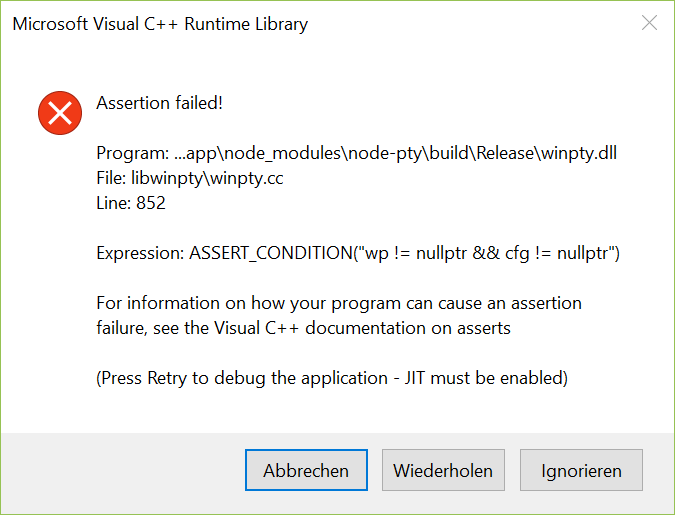
{ Release }  » size saved/win*
   text    data     bss     dec     hex filename
 161141    5632       0  166773   28b75 saved/winpty.dll
 210579    5632       0  216211   34c93 saved/winpty-agent.exe
{ Release }  »
{ Release }  » size win*
   text    data     bss     dec     hex filename
 500366    5632       0  505998   7b88e winpty.dll
 570692    6409       0  577101   8ce4d winpty-agent.exe
{ Release }  »

{ Release }  » file win*
winpty.dll:       PE32 executable (DLL) (console) Intel 80386, for MS Windows
winpty-agent.exe: PE32 executable (console) Intel 80386, for MS Windows
{ Release }  » file saved/win*
saved/winpty.dll:       PE32 executable (DLL) (GUI) Intel 80386, for MS Windows
saved/winpty-agent.exe: PE32 executable (console) Intel 80386, for MS Windows
{ Release }  »
Are these the right files from ia32/bin?
WalterLeinert
on 22 Jun 2017
@Tyriar Not really, besides the task.json 2.0 stuff which looks up tsc from node_modules/.bin. That path should not be enabled in 1.13 unless users specifically enable tasks 2.0
 mjbvz
on 23 Jun 2017
mjbvz
on 23 Jun 2017
NOTE: AFAIK, my comment here is a digression from the reported npm issue...
@WalterLeinert Yes, those are the right files. It doesn't assert fail for me, though. I tested with 1.13 and 1.13.1. Maybe it's a permissions issue? (e.g. Cygwin does something with ACLs to encode Unix mode bits, and Cygwin unzip will make an EXE non-executable by default. I used non-Cygwin 7z.exe to open the ZIP file.)
When I used Cygwin to replace the two files, if I left both winpty.dll and winpty-agent.exe non-executable (the default), then when I tried to open the VSCode integrated terminal, it flashed open and immediately closed. If I then made only winpty.dll executable, I saw the same assertion failure that @WalterLeinert reported. If both files were executable, then everything worked.
Aside: the control flow with Nan::ThrowError in node-pty is suspicious looking [src]. I'd guess that Nan::ThrowError returns to its caller, right? There are a few places that assume it does, but others places that don't. Assuming it does, then if winpty_open fails (e.g. because it can't spawn winpty-agent.exe, because the ACL on it doesn't allow execution), then rather than report an error in the JavaScript environment, we're instead going to hit the ASSERT(wp != nullptr && cfg != nullptr); assertion in winpty_spawn.
rprichard
on 23 Jun 2017
@rprichard yesterday I extracted the files by 7-zip (explorer extension) and copied them with windows explorer. Just 5 minutes ago I copied the files from babun bash (admin mode) and vscode is working. I will have a look at npm install issues and give feedback.
WalterLeinert
on 23 Jun 2017
@rprichard I'm getting install errors again; only for some of my libraries, like I got before. Typically I get an error when installing rxjs, sometimes also for lodash. Eventually because rxjs is one of the larges packages which takes more time to install.
Regards,
Walter
WalterLeinert
on 23 Jun 2017
This is the main place I've seen this issue pop up:
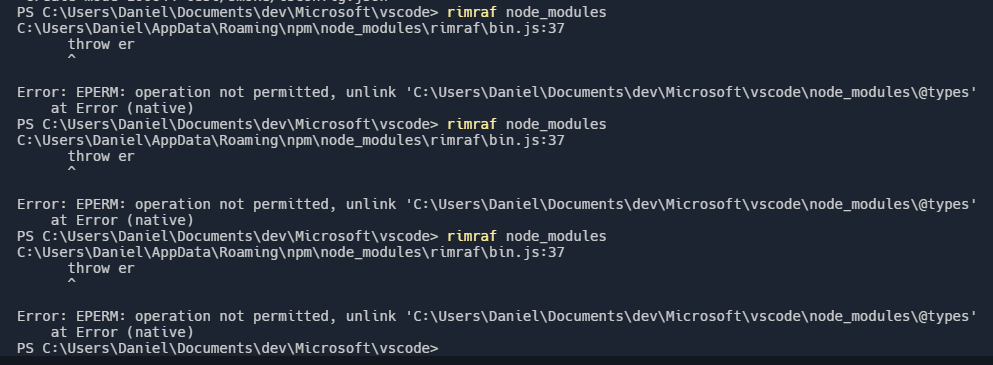
Tyriar
on 23 Jun 2017
As I wrote most of the time I'm getting the error when rxjs is installed:
...
npm ERR! Windows_NT 10.0.15063
npm ERR! argv "C:\\Program Files\\nodejs\\node.exe" "C:\\Program Files\\nodejs\\node_modules\\npm\\bin\\npm-cli.js" "install"
npm ERR! node v7.10.0
npm ERR! npm  v4.2.0
npm ERR! path C:\Entwicklung\...\master\fluxgate\libraries\core\node_modules\.staging\rxjs-20bf71b2
npm ERR! code EPERM
npm ERR! errno -4048
npm ERR! syscall rename

npm ERR! Error
npm ERR!     at destStatted (C:\Program Files\nodejs\node_modules\npm\lib\install\action\finalize.js:29:7)
npm ERR!     at C:\Program Files\nodejs\node_modules\npm\node_modules\graceful-fs\polyfills.js:284:29
npm ERR!     at FSReqWrap.oncomplete (fs.js:114:15)
npm ERR!
npm ERR! Error: EPERM: operation not permitted, rename 'C:\Entwicklung\...\master\fluxgate\libraries\core\node_modules\.staging\rxjs-20bf71b2' -> 'C:\Entwicklung\...\master\fluxgate\libraries\core\node_modules\rxjs'
npm ERR!  { Error
npm ERR!     at destStatted (C:\Program Files\nodejs\node_modules\npm\lib\install\action\finalize.js:29:7)
npm ERR!     at C:\Program Files\nodejs\node_modules\npm\node_modules\graceful-fs\polyfills.js:284:29
npm ERR!     at FSReqWrap.oncomplete (fs.js:114:15)
npm ERR!
npm ERR! Error: EPERM: operation not permitted, rename 'C:\Entwicklung\...\master\fluxgate\libraries\core\node_modules\.staging\rxjs-20bf71b2' -> 'C:\Entwicklung\...\master\fluxgate\libraries\core\node_modules\rxjs' parent: '@fluxgate/core' }
npm ERR!
npm ERR! Please try running this command again as root/Administrator.

npm ERR! Please include the following file with any support request:
npm ERR!     C:\Users\Walter\AppData\Roaming\npm-cache\_logs\2017-06-22T13_39_00_364Z-debug.log
...
I'm seeing the same error as @WalterLeinert
I cloned MSAL-Angular-Sample and when I run npm install I get that error.
npm ERR! Error: EPERM: operation not permitted, rename 'C:\Users\mdepouw\Documents\GitHub\msa
l-angular-sample\node_modules\.staging\rxjs-cc014eb4' -> 'C:\Users\mdepouw\Documents\GitHub\m
sal-angular-sample\node_modules\rxjs'
VS Code -> Help -> About
Version 1.13.1
Commit 379d2efb5539b09112c793d3d9a413017d736f89
Date 2017-06-14T18:21:47.485Z
Shell 1.6.6
Renderer 56.0.2924.87
Node 7.4.0
 spottedmahn
on 1 Jul 2017
spottedmahn
on 1 Jul 2017
Ive been having issues with vscode fighting npm and locking node_modules folder, since Im not able to delete that folder if vscode is open.
window 64,
node 8.1.2
npm 5.0.3
vscode v 1.13.1
Update:
winver: (I had a major update a few weeks ago)

I use the terminal inside studio a lot too
Update
exstensions used:
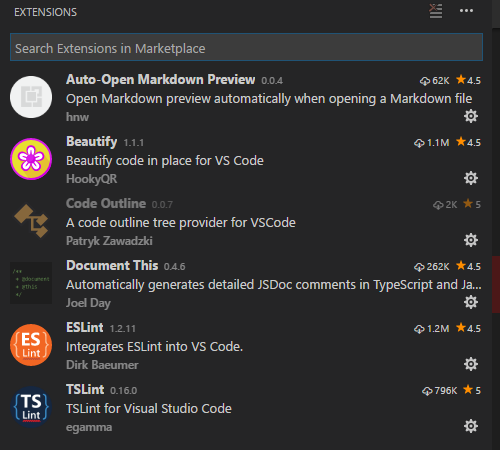
 vegarringdal
on 2 Jul 2017
vegarringdal
on 2 Jul 2017
Hi, I switched back to vscode 1.12.2 several days ago by using the link above. No problems with the old version. I'm waiting for some fix.
Regards, Walter
WalterLeinert
on 2 Jul 2017
For all data about os, extenions etc, see 2 post above
Using handle
Error

Ran handle with path of my project:
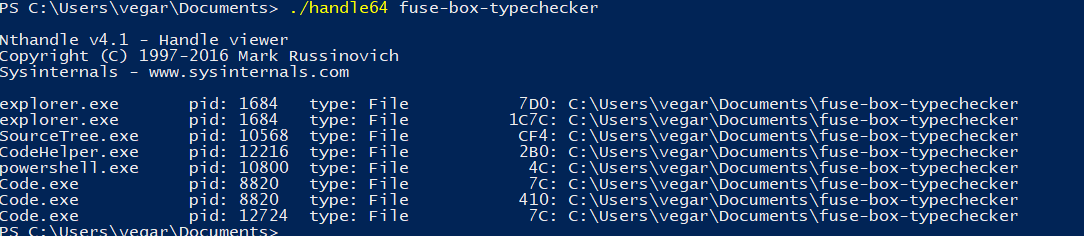
Then I tried to just run in in external powershell... still same error
Then I closed the internal terminal in vscode and ran in in external powershell, still same error
Then I closed the vscode studio, and ran in in external powershell, and it worked
Here is the handle on that path when studio is closed

Update:
Notice sometimes I cant delete node_modules folder
Opened a lof of my code files, noticed that types is open:
But not sure if this have anything to do with the other issue I had above, havent managed to reproduce it atm..

Really weird this
vegarringdal
on 3 Jul 2017
Add me to the list of affected users:
npm install fails in PowerShell when Visual Studio Code is running for the same directory:
Exception: npm ERR! path C:\...\node_modules\typescript
npm ERR! code ENOENT
npm ERR! errno -4058
npm ERR! syscall rename
npm ERR! enoent ENOENT: no such file or directory, rename 'C:\...\node_modules\typescript' -> 'C:\...\node_modules\.typescript.DELETE'
npm ERR! enoent This is related to npm not being able to find a file.
npm ERR! enoent
or similar.
- VSCode Version: 1.13.1
- OS Version: Windows 10
("integrated-terminal" tag should probably be removed, as this also happens with bash and PowerShell)
 janpio
on 5 Jul 2017
janpio
on 5 Jul 2017
@Microsoft/vscode does anyone do something new with npm in 1.13? Files are being locked on Windows, particularly when using npm.
Tyriar
on 5 Jul 2017
I am not sure this only started with 1.13.1 by the way - it is very possible I had these problems before and just "fixed" it by running the npm command again until it worked.
janpio
on 5 Jul 2017
Could this be typescript and @ types ?
 bpasero
on 5 Jul 2017
bpasero
on 5 Jul 2017
@bpasero ATA was added several versions ago and 1.12 works. @mjbvz couldn't think of anything on the TypeScript side but that was a suspicion of mine earlier too.
@janpio the first we heard of the issue was in 1.13 and reverting seems to make people happy. Based on the amount of reports as well I'd say this is a 1.13 regression.
Tyriar
on 5 Jul 2017
Having the same issue with the latest version of vscode. Reverting to the older version until it's fixed.
 kylelamse
on 5 Jul 2017
kylelamse
on 5 Jul 2017
After looking at the file handles and their owner processes, I've believe the root cause of this issue is that the TypeScript server is holding onto files in node_modules\.staging. I suspect this bug was revealed in 1.13 by a change I made in VSCode: https://github.com/Microsoft/vscode/commit/0d5c9f418b2c68dd87bffb8c481ebbb0022e9a41
The error flow is something like:
- User runs
npm install - While the install is going on, the Typescript server starts watching a bunch of files in
node_modules/.staging - TypeScript server sends a diagnostic event to VSCode. The
triggerFilein the diagnostic event is a file innode_modules/.staging - VSCode proceeds to open the
triggerFile(0d5c9f418b2c68dd87bffb8c481ebbb0022e9a41) - TypeScript now has opened the
triggerFilefrom.stagingas well. I believe this last part is what is causing issues
I've opened https://github.com/Microsoft/TypeScript/issues/16955 to track the typescript part of this issue. I'm investigating a workaround on the vscode side as well
mjbvz
on 5 Jul 2017
b8cd5b9 takes in the vscode workaround in for 1.14. Fix should also be in the latest insiders build
mjbvz
on 7 Jul 2017
Thanks!
johnnyreilly
on 7 Jul 2017
Just to chime in on possible reasons: killing the Sophos on-demand scanning process in task manager solved the problem for me (while having VS Code 1.13.1 open; Win 8.1).
 heinrich-ulbricht
on 7 Jul 2017
heinrich-ulbricht
on 7 Jul 2017
@heinrich-ulbricht is there a way to completely disable that process?
kylelamse
on 7 Jul 2017
@kylelamse Unfortunately not (group policies or somewhat). It spawns again right after killing it. In fact I had to repeat killing it until npm install finished. But it made the difference. Before this installation was not possible at all.
heinrich-ulbricht
on 7 Jul 2017
I spent my half day on this :( and reverted back to 1.12.2. Any estimation on 1.4 release?
 pankajparkar
on 7 Jul 2017
pankajparkar
on 7 Jul 2017
Hi I would like to volunteer for beta testing of 1.4 to test is there still is issues...
I love vscode, if me going through hell for others then Ill do it to get something awesome back in 1.14 😂
vegarringdal
on 7 Jul 2017
We're targeting early next week for 1.14. The current VSCode insiders builds match what we plan to ship with 1.14. You can test the fix using this: https://code.visualstudio.com/insiders Please let us know if you run into any issues
mjbvz
on 7 Jul 2017
@heinrich-ulbricht I also tried to get rid of the vscode issue by deactivating avast antivirus, but this had no effect. The only way for me was switching back to vs 1.12.2 as I wrote above.
Eventually deactivating antivirus on your machine leads to different timing of something similar which leads to a slightly changed behaviour at runtime and no lock contention.
Regards, Walter
WalterLeinert
on 8 Jul 2017
@mjbvz fyi,
Been using the VSCode insiders build last 3 days, and no issues like before 👍
vegarringdal
on 11 Jul 2017
Snap!
johnnyreilly
on 11 Jul 2017
VSCode update 1.14 seems to have resolved this
 dmastag
on 12 Jul 2017
dmastag
on 12 Jul 2017
Same issue with 1.14 here. Turning off antivirus software is not an option due to enterprise restrictions. Although I get "Error: EPERM: operation not permitted, scandir" it is very close to the issue above.
 jonsalvas
on 4 Aug 2017
jonsalvas
on 4 Aug 2017
This appears to still be a problem for me in VSCode 1.14.2.
- Tried installing ava "npm install ava --save dev" in Integrated Terminal (Powershell), but failed:
2229 verbose unlock done using C:\Users\Einar\AppData\Roaming\npm-cache\_locks\staging-74d71e8b8f4dd1a0.lock for D:\Projects\cranford\node_modules\.staging 2230 verbose stack Error: EPERM: operation not permitted, scandir 'D:\Projects\cranford\node_modules\fsevents\node_modules\getpass\node_modules' 2231 verbose cwd D:\Projects\cranford 2232 verbose Windows_NT 6.1.7601 2233 verbose argv "C:\\Program Files\\nodejs\\node.exe" "C:\\Program Files\\nodejs\\node_modules\\npm\\bin\\npm-cli.js" "install" "--save-dev" "ava" 2234 verbose node v8.2.0 2235 verbose npm v5.3.0 2236 error path D:\Projects\cranford\node_modules\fsevents\node_modules\getpass\node_modules 2237 error code EPERM 2238 error errno -4048 2239 error syscall scandir 2240 error Error: EPERM: operation not permitted, scandir 'D:\Projects\cranford\node_modules\fsevents\node_modules\getpass\node_modules' 2240 error { Error: EPERM: operation not permitted, scandir 'D:\Projects\cranford\node_modules\fsevents\node_modules\getpass\node_modules' 2240 error stack: 'Error: EPERM: operation not permitted, scandir \'D:\\Projects\\cranford\\node_modules\\fsevents\\node_modules\\getpass\\node_modules\'', 2240 error errno: -4048, 2240 error code: 'EPERM', 2240 error syscall: 'scandir', 2240 error path: 'D:\\Projects\\cranford\\node_modules\\fsevents\\node_modules\\getpass\\node_modules' } 2241 error Please try running this command again as root/Administrator. 2242 verbose exit [ -4048, true ]
Opened up Powershell as administrator in a second terminal (outside VSCode) but got the same error.
Finally, closed VSCode and tried again in the separate Powershell window - and this time it worked!
 einarpersson
on 10 Aug 2017
einarpersson
on 10 Aug 2017
Same here, "Error: EPERM: operation not permitted, scandir" for any npm install that's non-trivial (whether run from the integrated terminal or outside, no difference). Closing VSCode always solves this.
VSCode 1.14.2.
 rubenprins
on 10 Aug 2017
rubenprins
on 10 Aug 2017
I don't think it's any directory. It's a specific module that I get this on myself: \node_modules\fsevents. It's ALWAYS fsevents. And it's always the scandir operation.
I'm using Windows, and so is @einarpersson. And on Windows, fsevents is optional. So I bet it's related to that. Something about the module being optional is tripping up VSCode. Maybe on optional modules the dir is created and torn down super fast.
 filipesilva
on 10 Aug 2017
filipesilva
on 10 Aug 2017
Yep @filipesilva, now that you mention it, I also have noticed that it fsevents seems to be mentioned in the error message every time.
einarpersson
on 10 Aug 2017
@mjbvz does optional modules causing problems ring any bells perhaps?
filipesilva
on 10 Aug 2017
ok FYI: Still got the same issue with 1.15 and indeed it is always referring to \node_modules\fsevents\node_modules\getpass\node_modules. Strange thing is, it is occuring randomly, sometimes the first time, sometimes after 3 times executing an npm install. It is really annoying because I have to close the terminal every 10 mins.
jonsalvas
on 11 Aug 2017
I'm also having this problem, usually with the fsevents package. I am also running anti virus that I cannot disable. I'm running 1.15.1
 ccarse
on 21 Aug 2017
ccarse
on 21 Aug 2017
@mjbvz Should we open new issues for people who are still experiencing this issue? Or should this issue be reopened?
ccarse
on 21 Aug 2017
There's an issue on npm for the same thing: https://github.com/npm/npm/issues/17671
Perhaps the new problem is not related to VSCode directly.
filipesilva
on 21 Aug 2017
You know I think you're right. Usually closing code fixes this issue but it's still happening for me now even when code's not running. Thanks!
ccarse
on 22 Aug 2017
Had the same issue indeed without VSCode, but I did have Visual Studio 2017 open which was running a TSServer. Still might not be related though, but I don't think it is VSCode it's fault.
DickvdBrink
on 22 Aug 2017
For me this is still an issue. I am able to install just fine after closing VSCode so it does seem to be an issue with VSCode and not npm.
 twastvedt
on 23 Aug 2017
twastvedt
on 23 Aug 2017
Downgrading to npm version 5.0.4 seems to have solved the problem for me
(npm install -g [email protected])
@filipesilva: Yes, it seems to be a more general problem of npm not being happy with many processes working on the same files. https://github.com/npm/npm/issues/17671 That would explain why the problem arises when you're working in the same folder in vscode, perhaps?
einarpersson
on 25 Aug 2017
To be perfectly honest I don't think it's related to VSCode at all. I think that it's the combo of:
- people reporting the problem use VSCode on npm projects.
- the second install always works, regardless of having VSCode open or not.
filipesilva
on 25 Aug 2017
Well, even if the root cause isn't VSCode there still seems to be a correlation. I can at least on my part say that I've had a lot of problems installing npm packages while in the VSCode terminal but not as much as when I've closed VSCode. And the second install does not always work for me. But it's not a 1-1 causation and reading from the other thread I would agree that the problem seems to has it root somewhere else.
In any case, downgrading npm seems to work 100% for now for me at least. How about you?
einarpersson
on 25 Aug 2017
I didn't try downgrading because I had a bunch of problems with older 5.x versions... I tried upgrading to 5.4 and ran into https://github.com/npm/npm/issues/18287.
There's a report of using --no-optional to fix these issues as well in #17671 (see my comment https://github.com/npm/npm/issues/17671#issuecomment-324889920 and the commit right above it).
filipesilva
on 25 Aug 2017
What I find strange about all those new comments saying that it may not be an issue with VSCode but with npm itself, is that I downgraded and sticked with VSCode 1.12.2 (as suggested here) since this issue appeared and never experienced it again...
 electrotype
on 25 Aug 2017
electrotype
on 25 Aug 2017
@filipesilva The problem does not always go away if you install a second time. This works only some of the times. In fact: if this problem happens, I can only rarely resolve the error by running npm install again.
Closing VSCode does always solve the problem, however (for me, at least), and I've only once seen the problem without VSCode running.
So to me, current VSCode versions at the very least cause the bug to surface, while older versions of VSCode do not, regardless of where in the source code or in which program the bug actually resides.
rubenprins
on 25 Aug 2017
My bad, my recollection was that I always reinstalled a second time and it seemed to be fine.
filipesilva
on 25 Aug 2017
I'm having the same issue here. Win 10 and VS Code 1.15.1 64-bit. Tried running as Administrator same issues.
Running Terminal in VSCode
npm ERR! Windows_NT 10.0.15063
npm ERR! argv "C:\Program Files\nodejs\node.exe" "C:\Program Files\nodejs\node_modules\npm\bin\npm-cli.js" "install" "gulp"
npm ERR! node v6.10.3
npm ERR! npm v3.10.10
npm ERR! file C:\Users\ShaunPitt\package.json
npm ERR! code EJSONPARSE
npm ERR! Failed to parse json
npm ERR! No data, empty input at 1:1
npm ERR!
npm ERR! ^
npm ERR! File: C:\Users\xxxxxxxx\package.json
npm ERR! Failed to parse package.json data.
npm ERR! package.json must be actual JSON, not just JavaScript.
npm ERR!
npm ERR! This is not a bug in npm.
npm ERR! Tell the package author to fix their package.json file. JSON.parse
npm ERR! Please include the following file with any support request:
npm ERR! C:\Users\xxxxx\some-foldernpm-debug.log
And running PowerShell while VSCode still open:
PS C:\WINDOWS\system32> npm install gulp
npm WARN deprecated [email protected]: Please update to minimatch 3.0.2 or higher to avoid a RegExp DoS issue
npm WARN deprecated [email protected]: Please update to minimatch 3.0.2 or higher to avoid a RegExp DoS issue
npm WARN deprecated [email protected]: graceful-fs v3.0.0 and before will fail on node releases >= v7.0. Please update to graceful-fs@^4.0.0 as soon
as possible. Use 'npm ls graceful-fs' to find it in the tree.
C:\WINDOWS\system32
`-- [email protected]
npm WARN enoent ENOENT: no such file or directory, open 'C:\WINDOWS\system32\package.json'
npm WARN system32 No description
npm WARN system32 No repository field.
npm WARN system32 No README data
npm WARN system32 No license field.
This is really a struggle. I think i will go back to 1.12 as it seems the best right now.
Shaun
 shaunpitt
on 29 Aug 2017
shaunpitt
on 29 Aug 2017
Related issues
 sirius1024
·
3Comments
sirius1024
·
3Comments
 mrkiley
·
3Comments
mrkiley
·
3Comments
 trstringer
·
3Comments
trstringer
·
3Comments
 NikosEfthias
·
3Comments
NikosEfthias
·
3Comments
 villiv
·
3Comments
villiv
·
3Comments
Most helpful comment
b8cd5b9 takes in the vscode workaround in for 1.14. Fix should also be in the latest insiders build