Vscode: Save as: incorrect file extension for unsupported file types
- VSCode Version: 1.13.0
- OS Version: Win 10
Steps to Reproduce:
- Open a not support file type but still a text file (e.g.
a.xyz) - Save as a
b.xyzby enter b in the save file field. (File type show as Plain Text) - If the destination does not have a .txt file, it will save as
b.xyz. But if the destination have a .txt file, it will save asb.txt
 joshuaavalon
All 7 comments
- VSCode Version: 1.17.1
- OS Version: Mac OS Sierra
it happened on VSCode for Mac too
 qoyyim
on 18 Oct 2017
qoyyim
on 18 Oct 2017
I meet same question when I tried to save *.in.
How can I fix it?
 namasikanam
on 25 Aug 2018
namasikanam
on 25 Aug 2018
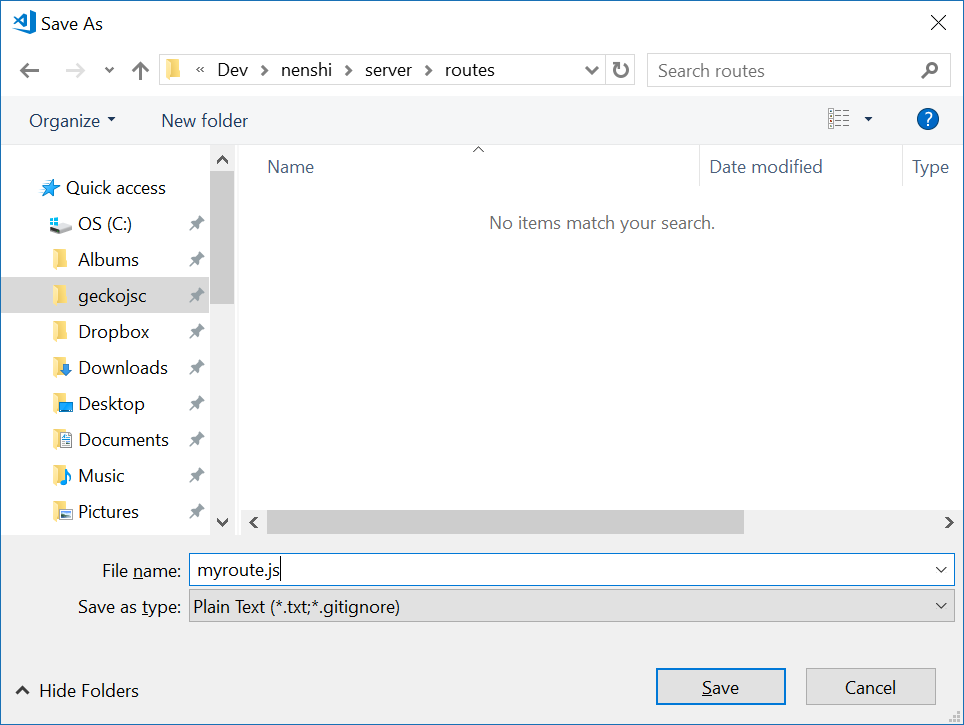
On a related note, I get kinda lost when saving a new empty file because I can't see which other code files are in the directory, unless I manually change the type to 'All files (*.*)'
 exelotl
on 3 Oct 2018
exelotl
on 3 Oct 2018
I have same issue, and I think my issue with ti would be solved if the default was "all files" instead of plain text. Is it possible to change this setting as a user?
In my case it is a .r file I want to save, and even with extensions for R installed, the default is save as plain text (.txt)
 mstenemo
on 30 Nov 2018
mstenemo
on 30 Nov 2018
I cannot believe this is still an issue after two years. Just took a moment to figure out why all my .py files were .py.txt.
 zulrang
on 17 Jul 2019
zulrang
on 17 Jul 2019
Apparently this is disabled _by design_ inside Electron, to safeguard it from adding *.* to the file name, as can be seen in shell/browser/ui/file_dialog_win#L206.
// By default, *.* will be added to the file name if file type is "*.*". In
// Electron, we disable it to make a better experience.
// ...
for (size_t i = 0; i < filterspec.size(); ++i) {
    if (std::wstring(filterspec[i].pszSpec) != L"*.*") {
        // SetFileTypeIndex is regarded as one-based index.
        dialog->SetFileTypeIndex(i + 1);
        dialog->SetDefaultExtension(filterspec[i].pszSpec);
        break;
    }
}
There has to be a way though, because many other programs can do it. I'll try and test if this issue actually happens later, but I'll have to build my own Electron as well I think.
 rmobis
on 28 Jul 2019
rmobis
on 28 Jul 2019
This issue seems to originate from an upstream component and is not something VSCode can fix by making a change to the code. As such, I will go ahead and close it. If you can identify the component that is causing the issue, please report it upstream:
- for UI, OS integration: https://github.com/electron/electron
- for Rendering: https://bugs.chromium.org/p/chromium/issues/list
- for file IO: https://github.com/nodejs/node
Thanks for understanding.
 bpasero
on 9 Oct 2019
bpasero
on 9 Oct 2019
Related issues
 villiv
·
3Comments
villiv
·
3Comments
 sirius1024
·
3Comments
sirius1024
·
3Comments
 mrkiley
·
3Comments
mrkiley
·
3Comments
 VitorLuizC
·
3Comments
VitorLuizC
·
3Comments
 vsccarl
·
3Comments
vsccarl
·
3Comments
Most helpful comment
I have same issue, and I think my issue with ti would be solved if the default was "all files" instead of plain text. Is it possible to change this setting as a user?
In my case it is a .r file I want to save, and even with extensions for R installed, the default is save as plain text (.txt)