Vscode: VSCode Icons look gross when launching it from Terminal
- VSCode Version: Code 1.13.0 (376c52b955428d205459bea6619fc161fc8faacf, 2017-06-08T16:34:53.678Z)
- OS Version: Darwin x64 16.1.0 (macOS Sierra 10.12.1)
- Extensions:
|Extension|Author|Version|
|---|---|---|
|beautify|HookyQR|1.1.1|
|lorem-ipsum|Tyriar|1.0.0|
|csharp|ms-vscode|1.10.0|
|live-server-preview|negokaz|0.0.4|
|java|redhat|0.5.0|
|sass-indented|robinbentley|1.4.1|;
Steps to Reproduce:
- In Terminal, type the command
code path/to/folder



 cansi
cansi
👍11
All 7 comments
same here
 Leoxdnardo
on 10 Jun 2017
Leoxdnardo
on 10 Jun 2017
👍4
same goes for macOS Sierra 10.12.5
when opening folder with: code . from the terminal
 ghost
on 10 Jun 2017
ghost
on 10 Jun 2017
👍5
after Update i get the same issue. No Commandlineoption help´s.
 lanzenotter
on 10 Jun 2017
lanzenotter
on 10 Jun 2017
👍2
I don't have the issue. I used "code /PATH/" and it started without any issues. (Hackintosh) Sierra 10.12.4, VS Code Version 1.13.0
 Ghosty141
on 11 Jun 2017
Ghosty141
on 11 Jun 2017
😆 What the hell caused this. My eyes hurt!
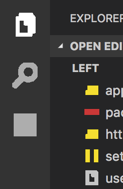
 krokofant
on 11 Jun 2017
krokofant
on 11 Jun 2017
Duplicate of #28345
 burknator
on 12 Jun 2017
burknator
on 12 Jun 2017
Thanks @burknator, Closing as duplicate of #28345
cc @bpasero
 ramya-rao-a
on 12 Jun 2017
ramya-rao-a
on 12 Jun 2017
Was this page helpful?
0 / 5 - 0 ratings
Related issues
 NikosEfthias
·
3Comments
NikosEfthias
·
3Comments
 omidgolparvar
·
3Comments
omidgolparvar
·
3Comments
 trstringer
·
3Comments
trstringer
·
3Comments
 DovydasNavickas
·
3Comments
DovydasNavickas
·
3Comments
 v-pavanp
·
3Comments
v-pavanp
·
3Comments
Most helpful comment
same goes for macOS Sierra 10.12.5
when opening folder with: code . from the terminal