vscode 1.13.0 - integrated terminal, issue with view
- VSCode Version: 1.13.0
- OS Version: macOS Sierra 10.12.5
Steps to Reproduce:
- Updated vscode

 kubens
All 13 comments
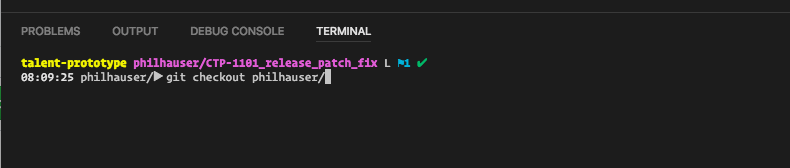
I have a similar issue where tab completion is prepending the line with the completed word.
 zweck
on 9 Jun 2017
zweck
on 9 Jun 2017
I had similar issue when updates to vscode 1.13.0. I'm seeing repeating project url in the terminal.

 vikrantnegi
on 9 Jun 2017
vikrantnegi
on 9 Jun 2017
Same problem here it seems that as soon as you add / the issue happens.

Update:
I also tried to disable all extensions and the bug still happens.
 jfrancoist
on 9 Jun 2017
jfrancoist
on 9 Jun 2017
My problem with Ubuntu 16.04 is that when I press tab the cursor will go to the beginning of the line, overwriting the terminal prompt. Pretty ugly.

 ivcosla
on 9 Jun 2017
ivcosla
on 9 Jun 2017
Have some issue

 dimensi
on 9 Jun 2017
dimensi
on 9 Jun 2017
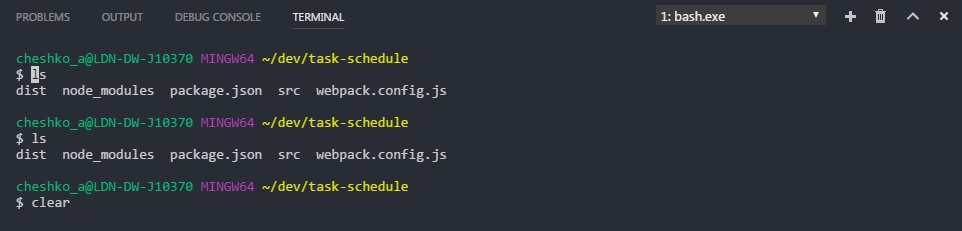
I am not sure if this is related, but after updating to 1.13.0 my integrated terminal (tried a number of external shells: bash from cygwin, babun, git-bash) clear command stopped clearing, just moves the cursor to the top of the view.
VSCode Version: 1.13.0
OS Version: Windows 7 Enterprise SP1
Integrated Terminal: "C:\Program Files\Git\bin\bash.exe" (git-bash)
 andreihq
on 9 Jun 2017
andreihq
on 9 Jun 2017
Also having some issues with terminal, showing double.
VSCode Version: 1.13.0
OS: Mac OS X 10.12.5

 mriel
on 9 Jun 2017
mriel
on 9 Jun 2017
I have narrowed down that the issue is probably triggered with a link and special Unicode symbols, such as the Powerline one.
 ishitatsuyuki
on 11 Jun 2017
ishitatsuyuki
on 11 Jun 2017
same issue
 zhiyuxia
on 11 Jun 2017
zhiyuxia
on 11 Jun 2017
same issue too
- VSCode Version: 1.13.0
- OS Version: Windows 10 Pro (1703)
- Device : Surface Pro 4
 nkokla
on 11 Jun 2017
nkokla
on 11 Jun 2017
same here
 kruchy8
on 11 Jun 2017
kruchy8
on 11 Jun 2017
same issue in version 1.13.0
 caronyan
on 12 Jun 2017
caronyan
on 12 Jun 2017
 Tyriar
on 12 Jun 2017
Tyriar
on 12 Jun 2017
Related issues
 ryan-wong
·
3Comments
ryan-wong
·
3Comments
 trstringer
·
3Comments
trstringer
·
3Comments
 curtw
·
3Comments
curtw
·
3Comments
 sijad
·
3Comments
sijad
·
3Comments
 lukehoban
·
3Comments
lukehoban
·
3Comments
Most helpful comment
Have some issue
