Vscode: Bad text colors in terminal in Solarized Dark theme (regression)
- VSCode Version: Code 1.13.0 (376c52b955428d205459bea6619fc161fc8faacf, 2017-06-08T16:43:13.058Z)
- OS Version: Windows_NT ia32 6.1.7601
- Extensions:
|Extension|Author|Version|
|---|---|---|
|path-intellisense|christian-kohler|1.4.2|
|gitignore|codezombiech|0.5.0|
|bracket-pair-colorizer|CoenraadS|0.10.4|
|githistory|donjayamanne|0.2.0|
|python|donjayamanne|0.6.4|
|Ionide-fsharp|Ionide|2.26.1|
|hoogle-vscode|jcanero|0.0.4|
|tabsanity|jedmao|0.0.9|
|language-haskell|justusadam|2.2.0|
|docomment|k--kato|0.0.15|
|vscode-rust|kalitaalexey|0.3.14|
|Go|lukehoban|0.6.61|
|csharp|ms-vscode|1.10.0|
|PowerShell|ms-vscode|1.2.1|
|material-icon-theme|PKief|2.0.8|
|java|redhat|0.5.0|
|haskero|Vans|1.3.1|
|gitblame|waderyan|1.11.2|
|change-case|wmaurer|1.0.0|;
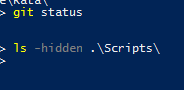
The colors in the integrated terminal with the Solarized Dark theme changed in the update to 1.13, and they're now difficult to read.
In native terminal (Powershell):
In VS Code terminal:
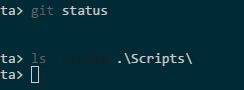
The other themes still have the yellow and grey scheme that Powershell uses, which is also what the Solarized Dark theme used to use before 1.13. The Solarized Light theme also has different colors than the native terminal and the other themes, but those at least are readable.
 elirnm
All 19 comments
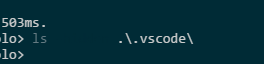
I agree all the colors seem to be the same color now, pretty difficult to differentiate an executable from a folder with the 'ls' command for example:

 Tankypon
on 9 Jun 2017
Tankypon
on 9 Jun 2017
I believe the colors match up to the official solarized terminal colors on the spec http://ethanschoonover.com/solarized
Could you check if any of the colors mismatch the spec and if so, which ones?
 Tyriar
on 9 Jun 2017
Tyriar
on 9 Jun 2017
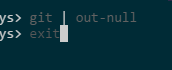
I am having the same issue, but only for some text.
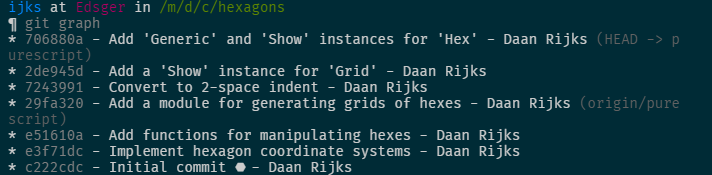
The prompt seems alright, but Gits output isn't. I think it might have to do with ANSI escapes for 'bold' text - I've had problems with those in the past on Linux.
This is running Fish shell through WSL, by the way. Also on version 1.13.0.
 ijks
on 9 Jun 2017
ijks
on 9 Jun 2017
@Tyriar The color of the option switch -hidden is #1c1c1c, which is supposed to be a background color. Look at the picture I posted above, there's an almost unreadable word between ls and Scripts.
But furthermore, why are the general color values changed from other themes and native terminals? Yellow is an allowed highlight color in Solarized, even in terminals, so shouldn't that yellow be used when the terminal requests a yellow color rather than translating the yellow to gray for some reason?
And I just noticed, the green color is also translated to a gray. So this seems like a bigger issue than just bad selection for yellow, like stuff isn't being represented the way it's supposed to.
Native:
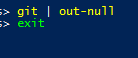
VS Code:
Note that in the native terminal those are drastically different colors, but in VS Code Solarized they're slightly different shades of gray.
elirnm
on 9 Jun 2017
Maybe they should be the colors to the left, not the ones under XTERM in the table https://github.com/altercation/vim-colors-solarized/blob/528a59f26d12278698bb946f8fb82a63711eec21/colors/solarized.vim#L243, I'll look into this for the recovery build.
Tyriar
on 9 Jun 2017
Sorry, I hit the wrong button.
elirnm
on 9 Jun 2017
I also noticed a regression with Solarized Dark in the terminal, with the colors of text on non-default background colors (such as in a Powerline-style prompt). Notably, only the default background color seems to have a white text color available, while other background colors just have a dull grey where white should be. Bold or not doesn't make a difference. Screenshots of a simple ZSH script to output every FG color with every BG color included:
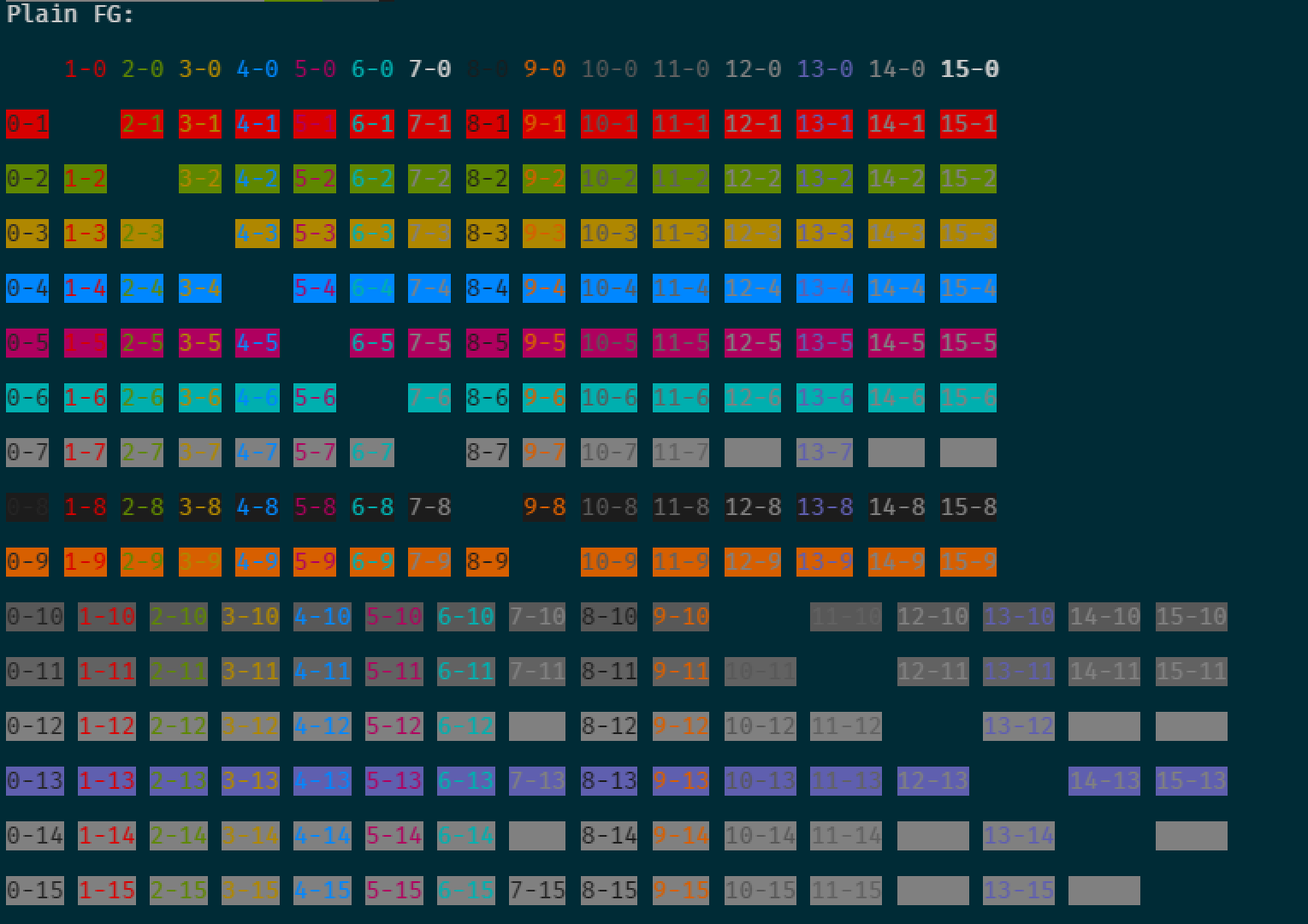

Note that the 15-X outputs for every X apart from 0 aren't showing white text.
 singerb
on 13 Jun 2017
singerb
on 13 Jun 2017
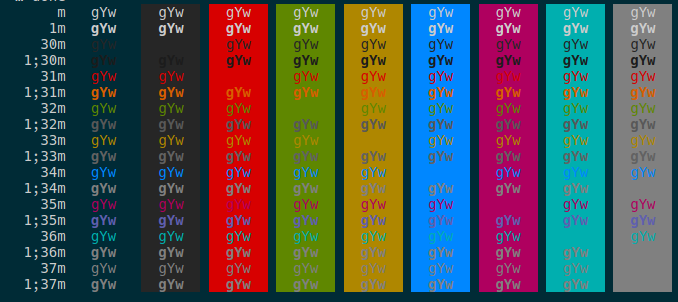
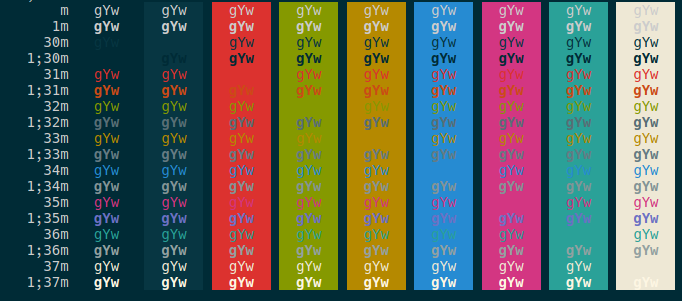
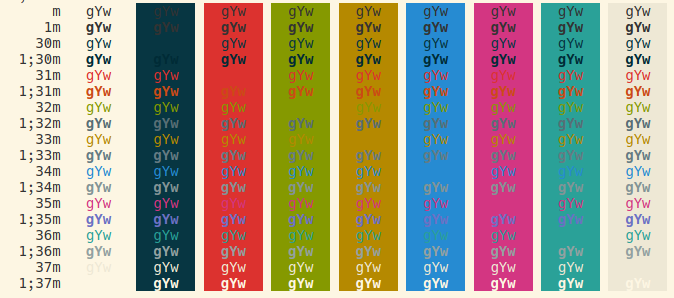
Switched to using the proper colors in the official themes.
Old:
New:
Tyriar
on 13 Jun 2017
Pushed to master and release/1.13.
Tyriar
on 13 Jun 2017
Verified in 1.13.1
 aeschli
on 14 Jun 2017
aeschli
on 14 Jun 2017
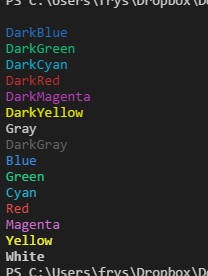
@Tyriar I still have this issue in 1.13.1.
Dark+:
Solarized Dark:
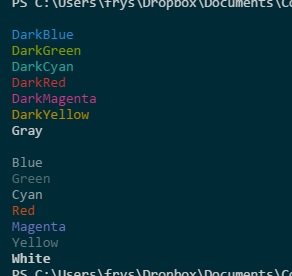
Notice that DarkGray is completely unreadable and Blue, Green, Cyan, and Yellow are just shades of gray and not easily distinguishable from each other.
In actual use:
Dark+:
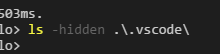
Solarized Dark:
elirnm
on 15 Jun 2017
Solarized Dark:
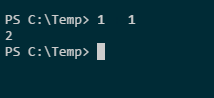
The text should say 1 + 1
Version 1.13.1
Commit 379d2efb5539b09112c793d3d9a413017d736f89
Date 2017-06-14T18:21:47.485Z
Shell 1.6.6
Renderer 56.0.2924.87
Node 7.4.0
 m-ghaoui
on 15 Jun 2017
m-ghaoui
on 15 Jun 2017
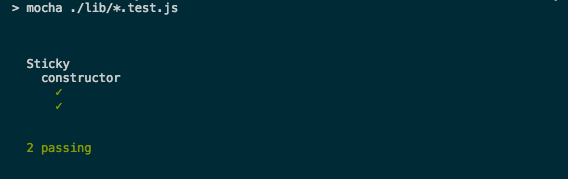
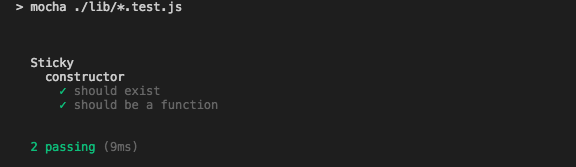
I am having similar issues when i run mocha test cases in the in-built terminal.
How it looks like in Solarized Dark at the moment:
Solarized Dark, with the text highlighted:
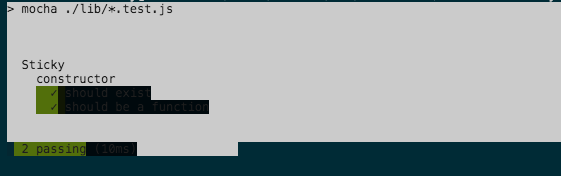
With default dark theme:
 ashishkushwaha
on 15 Jun 2017
ashishkushwaha
on 15 Jun 2017
Notice that DarkGray is completely unreadable
Can somebody find an official solarized terminal theme that uses colors other than these? These colors are based on the specification sources from http://ethanschoonover.com/solarized
SOLARIZED HEX     16/8 TERMCOL  XTERM/HEX   L*A*B      RGB         HSB
--------- ------- ---- -------  ----------- ---------- ----------- -----------
base03    #002b36  8/4 brblack  234 #1c1c1c 15 -12 -12   0  43  54 193 100  21
base02    #073642  0/4 black    235 #262626 20 -12 -12   7  54  66 192  90  26
base01    #586e75 10/7 brgreen  240 #585858 45 -07 -07  88 110 117 194  25  46
base00    #657b83 11/7 bryellow 241 #626262 50 -07 -07 101 123 131 195  23  51
base0     #839496 12/6 brblue   244 #808080 60 -06 -03 131 148 150 186  13  59
base1     #93a1a1 14/4 brcyan   245 #8a8a8a 65 -05 -02 147 161 161 180   9  63
base2     #eee8d5  7/7 white    254 #e4e4e4 92 -00  10 238 232 213  44  11  93
base3     #fdf6e3 15/7 brwhite  230 #ffffd7 97  00  10 253 246 227  44  10  99
yellow    #b58900  3/3 yellow   136 #af8700 60  10  65 181 137   0  45 100  71
orange    #cb4b16  9/3 brred    166 #d75f00 50  50  55 203  75  22  18  89  80
red       #dc322f  1/1 red      160 #d70000 50  65  45 220  50  47   1  79  86
magenta   #d33682  5/5 magenta  125 #af005f 50  65 -05 211  54 130 331  74  83
violet    #6c71c4 13/5 brmagenta 61 #5f5faf 50  15 -45 108 113 196 237  45  77
blue      #268bd2  4/4 blue      33 #0087ff 55 -10 -45  38 139 210 205  82  82
cyan      #2aa198  6/6 cyan      37 #00afaf 60 -35 -05  42 161 152 175  74  63
green     #859900  2/2 green     64 #5f8700 60 -20  65 133 153   0  68 100  60
The first change was using the TERMCOL column, the latest is using the SOLARIZED column which is also what the official xfce4 terminal color scheme uses https://github.com/altercation/solarized/blob/master/xfce4-terminal/dark/terminalrc
Blue, Green, Cyan, and Yellow are just shades of gray and not easily distinguishable from each other.
I believe this is intentional as it's trying to stick with the solarized palette http://ethanschoonover.com/solarized
Tyriar
on 15 Jun 2017
I use hyper terminal with zsh and solarized dark theme. This seems to work fine - https://github.com/ghosh/hyper-solarized-dark/blob/master/index.js
ashishkushwaha
on 15 Jun 2017
@ashishkushwaha looks like they had the same issues here https://github.com/ghosh/hyper-solarized-dark/issues/11
Tyriar
on 15 Jun 2017
@Tyriar - wow yes. I definitely noticed that the value for lightBlack was set to #586e75 in the theme in hyper, but never went through their issue list.
So, are you considering changing to this exact value since Atom version of the theme also uses it (as pointed out in that thread). BTW, it is the exact same value as lightGreen.
ashishkushwaha
on 15 Jun 2017
Well it seems to be a flaw with the spec, probably the best thing to do is to copy the color people expect from a similar theme.
Tyriar
on 16 Jun 2017
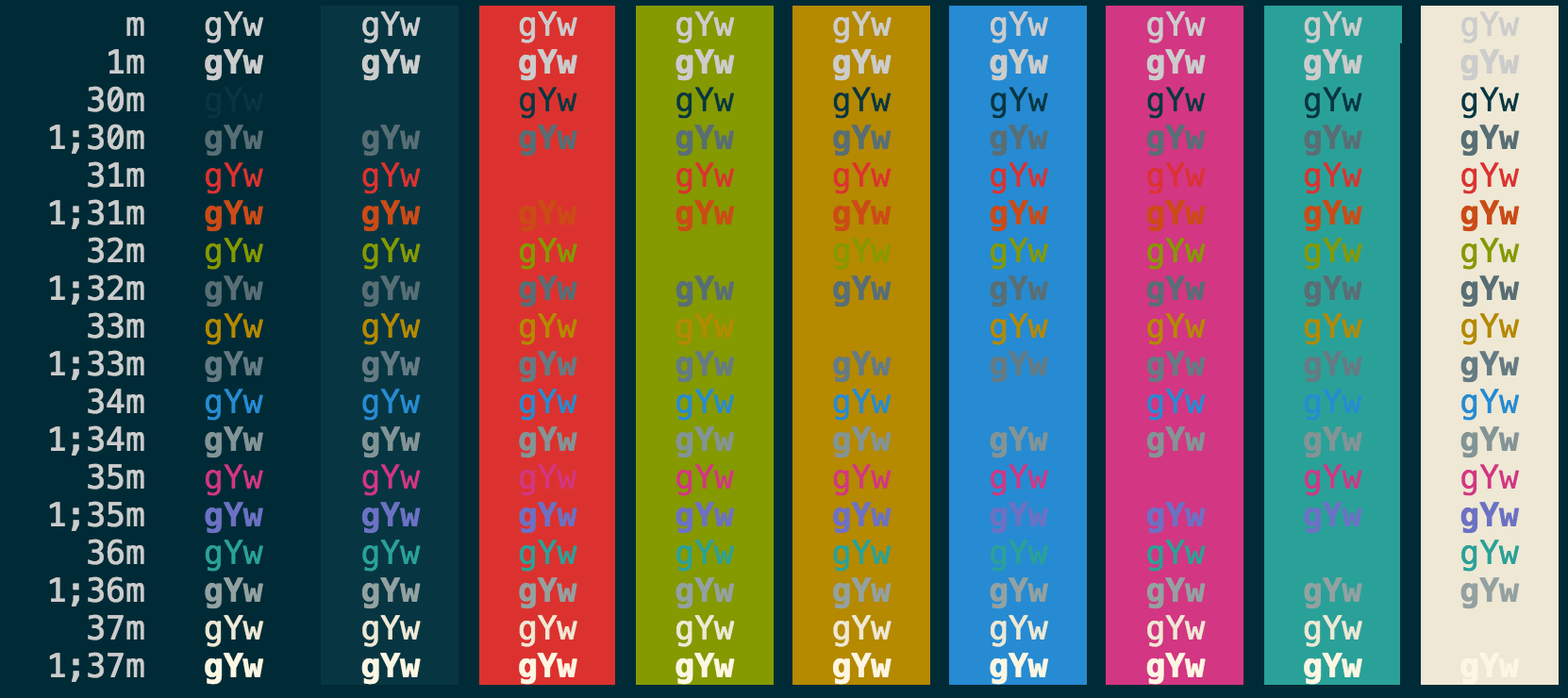
I pushed the change for bright black, could someone test it out next week and see if everything looks better now? Remember that many of the colors do come out as greys in order to stick to the palette.
Tyriar
on 17 Jun 2017
Related issues
 omidgolparvar
·
3Comments
omidgolparvar
·
3Comments
 trstringer
·
3Comments
trstringer
·
3Comments
 mrkiley
·
3Comments
mrkiley
·
3Comments
 villiv
·
3Comments
villiv
·
3Comments
 ryan-wong
·
3Comments
ryan-wong
·
3Comments
Most helpful comment
I am having similar issues when i run mocha test cases in the in-built terminal.
How it looks like in Solarized Dark at the moment:
Solarized Dark, with the text highlighted:
With default dark theme: