Vscode: [html] Allow navigating to CSS class definitions
Other editors like webstorm, allow the user to click on the CSS class name the same way VSCode allows command + clicking functions / class names to take the user to its definition.
Is this planned? I searched the issues list and didn't find anything like this...
 ShashankaNataraj
All 15 comments
Please make this (+ html) happen. this is the only thing keeping me from moving to vscode from webstorm.
 anjildhamala
on 19 Oct 2017
anjildhamala
on 19 Oct 2017
@Zignd @andersea @ecmel This would be a good addition to the IntelliSense for CSS class names, HTML Class Suggestions or HTML CSS Support extensions. They are have an index of all class names and could also offer 'go to declaration'
 aeschli
on 19 Oct 2017
aeschli
on 19 Oct 2017
It would be cool.
One issue that pops into my head right now is, what should we do if the same class name is included multiple times in separate files? I have seen some projects with duplicate versions of bootstrap css files, for example. Which one should we jump to?
HTML Class Suggestions uses file hashing to prevent the same definition being parsed multiple times. It only cares about finding a set of unique class names to present to the user. Right now none of these extensions (as far as I know) store any information about what the source file contains which css classes, because this information is not needed for the extension to do its work.
 andersea
on 19 Oct 2017
andersea
on 19 Oct 2017
@andersea You could show a list of all the files where the css class is included and the user would select one. (from webstorm)
anjildhamala
on 19 Oct 2017
@andersea The definition provider can return a single or mutiple locations (type Definition = Location | Location[];). VSCode will show a selection widget.
aeschli
on 19 Oct 2017
The definition provider can return a single or mutiple locations (type Definition = Location | Location[];). VSCode will show a selection widget.
Interesting, I guess that for my extension I will simply store the location in which the class definitions were found in a key-value structure in which the key would be the class name and the value a list of locations. Thanks for the tip @aeschli!
 zignd
on 19 Oct 2017
zignd
on 19 Oct 2017
-- Sorry for the English, I used Google Translator --
Hello, just a question about this issue. //ping @ShashankaNataraj @aeschli
Would it be for the same to work similar to this gif?

Note: I've never used WebStorm, but @aeschli has put it as a duplicate. But I'm in doubt if it really is a duplicate.
Issue #10727 was asked for something of how it works in CSS Brackets and an extension for it to AngularJS.
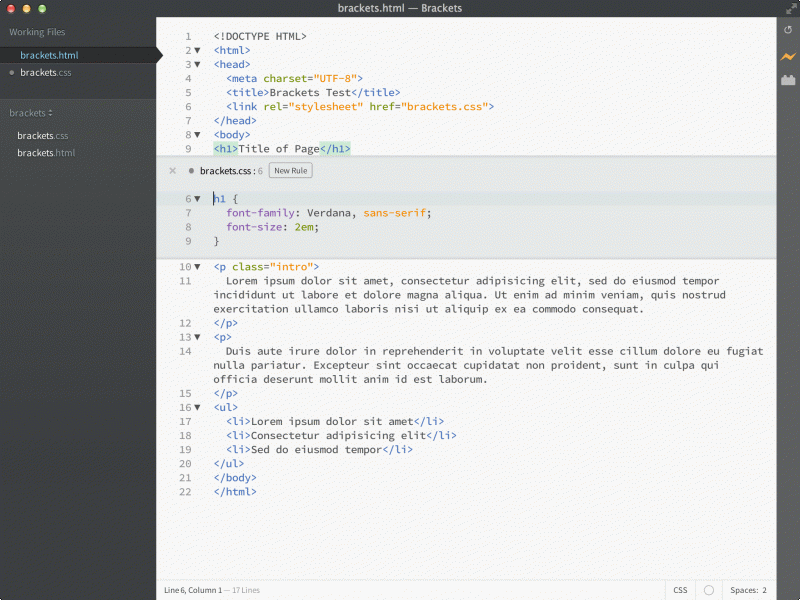
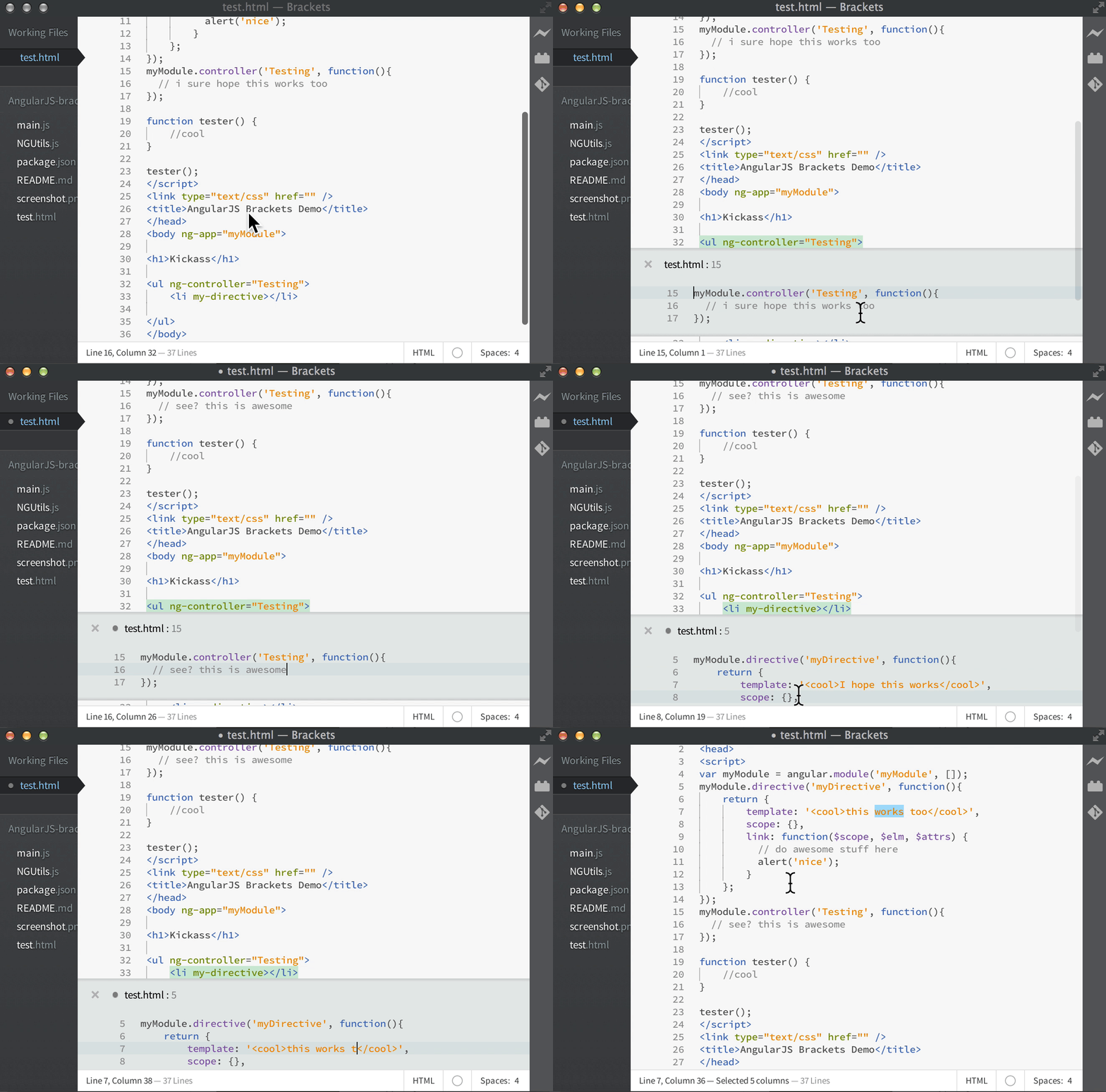
Would this be that way or as the first gif above?
 Tekbr
on 15 Dec 2017
Tekbr
on 15 Dec 2017
- Ctrl + click is the same as goto declaration so yes that would work
- We don't plan to have exactly the same UI like Brackets, so this won't happen. But once we have 'goto declaration' we also get 'Peek Definition' which is similar to the brackets UI and should give you the same possibilities.
aeschli
on 15 Dec 2017
-- Sorry for the English, I used Google Translator --
@aeschli The idea is to edit the CSS / AngularJS within HTML. Will we have that possibility?
(I've seen how Peek Definition works, works like in Brackets, but the idea of using CSS / AngularJS with the tag/controller)
Tekbr
on 15 Dec 2017
@Tekbr
- css in HTML: yes,
- AngularJS in HTML: no: that would have to be provided by an Angular extension
aeschli
on 15 Dec 2017
I only just learnt about this issue. For posterity, I've built an extension called CSS Peek over a year ago that does precisely this. It can be found on the marketplace
 pranaygp
on 15 Jun 2018
pranaygp
on 15 Jun 2018
Regarding the last release v1.27, I think this issue can be closed.
 thedaviddias
on 7 Sep 2018
thedaviddias
on 7 Sep 2018
Regarding the last release v1.27, I think this issue can be closed.
what happen in v1.27 ?
 craigcosmo
on 6 Aug 2019
craigcosmo
on 6 Aug 2019
FWIW, this feature has been requested in Eclipse Wild Web Developer, which uses the HTML Language Server from VSCode.
 mickaelistria
on 25 Sep 2019
mickaelistria
on 25 Sep 2019
covered by #47331
aeschli
on 9 Oct 2019
Related issues
 trstringer
·
3Comments
trstringer
·
3Comments
 borekb
·
3Comments
borekb
·
3Comments
 omidgolparvar
·
3Comments
omidgolparvar
·
3Comments
 biij5698
·
3Comments
biij5698
·
3Comments
 villiv
·
3Comments
villiv
·
3Comments
Most helpful comment
Please make this (+ html) happen. this is the only thing keeping me from moving to vscode from webstorm.